This is the multi-page printable view of this section. Click here to print.
Blog
Eclipse Dataspace Components 1.0.0-RC1 Released
We are excited to announce the release of Eclipse Dataspace Components 1.0.0-RC1 — the first release candidate on the road to a stable 1.0. This release represents a significant step forward in terms of architectural clarity, protocol alignment, and overall code quality across all the repositories.
What’s New Since 0.18.0
Architectural Consolidation
One of the main themes of this release is simplification. A large number of structural changes have been made to create a leaner, more cohesive codebase:
- The control-plane now can be used with multiple participants.
- The
v5management API version is now stable together withv4. - Management API v3 has been fully removed, completing the migration path that was announced in earlier versions.
- The data-plane framework has been removed from the EDC project in its entirety: adopters are now responsible for providing their own data plane implementation. The DataPlane SDKs offer ready-made building blocks to make this straightforward.
- The control-plane now tracks DPS (Data Plane Signaling) 1.0-RC4, maintaining alignment with the latest version of the specification.
These changes collectively reduce the footprint of the project and make it significantly easier to understand and extend.
Dataspace Profile Management
A dedicated Dataspace Profile management vertical has been added to the Connector. This covers the full lifecycle of dataspace profile configuration:
- A new management API and storage layer for DataspaceProfile objects, including trusted issuer registration.
- Trusted issuers can now be validated at runtime against the registered profile, and also configured declaratively via settings.
- Profile-based policy definition validation ensures that policies are compliant with the active dataspace profile before being persisted.
IdentityHub
IdentityHub has received several important improvements in this release:
- DCP conformance gaps in the issuance and presentation flows have been closed, improving interoperability with other DCP implementations.
- DID capabilityInvocation is now properly set on DID documents generated by IdentityHub, aligning with the W3C DID specification.
- The API surface has been updated to v1.
- Dynamic scope mapping has been introduced, allowing scopes to be resolved at runtime rather than statically configured.
What This Means for Adopters
The 1.0.0-RC1 release is not yet production-stable — it is a release candidate intended for early adopters, integration testing, and community feedback. Breaking changes may still occur before the final 1.0.0 release.
That said, the scope of breaking changes between RC1 and the final release is expected to be minimal. If you are currently running 0.18.0 or earlier, the main migration work involves:
- Adapting to the consolidated SPI and lib module names.
- Migrating off Management API v3 (now fully removed).
- Updating any references to the old data-plane modules.
- Removing usage of the deprecated EDR classes.
Next Steps
We encourage the community to test 1.0.0-RC1 against their integration scenarios and report any issues on the respective GitHub repositories. Feedback gathered during the RC phase will directly shape the final 1.0.0 release.
You can find the release artifacts on Maven Central under the org.eclipse.edc group. Discussions and issue reports are welcome on the EDC GitHub organisation.
Data Plane migration
- Module changes
- Seamless upgrade
- Temporary measure, not a target state
Over the last few months, we have invested significant effort adapting the control-plane implementation to the Data Plane Signaling specification. We are about to drop the legacy protocol together with the whole EDC-DataPlane implementation. In this guide, we cover the steps needed for teams running EDC-based control-planes that want to upgrade.
What is changing: the control-plane no longer manages DataAddress directly; that responsibility moves to the
data-plane, which now speaks the DPS protocol. The EDC-DataPlane modules that previously handled this will be removed
from the EDC platform.
Module changes
Control-plane
From the control-plane modules’ point of view, the switch is as easy as:
- exclude
transfer-data-plane-signalingmodule - include
data-plane-signalingmodule
Please note that these two modules are not meant to run together, and defining them in the same runtime could lead to unexpected behavior.
Data-plane
The current EDC-DataPlane implementation will be removed soon. DPS support will not be added to it before removal, so downstream projects that still rely on it must fork the codebase and own the implementation going forward.
Data-plane implementations that already speak DPS are expected to emerge, such as
siglet.
Seamless upgrade
The recommended approach for offering assets on the new protocol without disrupting active negotiations and transfers is a parallel-running strategy: the legacy data-plane and the new DPS data-plane run simultaneously during the transition period. The steps below assume your current data-plane is an EDC Data-Plane; they must be carried out in order.
Step 1 — Add DPS support to your data-plane
Your current data-plane implementation must support the Data Plane Signaling protocol alongside the legacy one, because once the control-plane is switched to DPS, it can no longer serve the legacy protocol. As noted above, the EDC-DataPlane will eventually be removed from the EDC platform.
Required implementation steps:
- Inherit the EDC-DataPlane code in your downstream project by copying the contents of the
[core|extensions|spi]/data-planefolders into your project. - Implement a shim layer with DPS-compliant endpoints that maps incoming DPS messages to the existing
DataFlowmechanics of the EDC-DataPlane. In particular,DataAddressproperties must be read fromdataplaneMetadata.propertiesin DPS requests. - Implement
TransferProcessApiClientto support the DPS callback spec (the interface is defined in the DPS specification). - Optional: if the data-plane is deployed independently from the control-plane, different
DataFlows may carry different signaling versions at the same time. To avoid this complexity, we recommend keeping control-plane and data-plane deployments in sync during the migration.
Step 2 — Migrate existing assets on the control-plane
The DPS protocol introduces a substantial change: DataAddress is no longer managed by the control-plane but by the
data-plane. This means existing Assets must be updated before the control-plane is switched to the new DPS version.
Required data migrations:
- Copy the
dataAddressproperties into thedataplaneMetadata.propertiesobject structure. - Set the transfer type the
Assetis meant to be offered on in thedataplaneMetadata.profilesarray. This information can be derived by querying existingTransferProcessrecords and collecting theirtransferTypevalues.
Script 1: copy dataAddress properties into dataplaneMetadata.properties
This script copies Asset.dataAddress.properties into dataplaneMetadata.properties only if dataplaneMetadata does not
exist, so if you run this script twice it won’t do anything; for this reason it can be considered idempotent.
Please note that this script is just an example, please adapt based on your needs, don’t blindly run it on your production database!
BEGIN;

UPDATE edc_asset
SET dataplane_metadata =
      jsonb_build_object(
              'labels',     '[]'::jsonb,
              'properties', COALESCE(data_address::jsonb, '{}'::jsonb),
              'profiles',   '[]'::jsonb
      )
WHERE dataplane_metadata IS NULL
  AND data_address IS NOT NULL
  AND data_address::jsonb <> '{}'::jsonb;

COMMIT;
Script 2: set dataplaneMetadata.profiles from TransferProcess transferType
This script is meant to run AFTER script 1. It obtains the current transferTypes of TransferProcesses related
to an Asset, joins them into an array, and sets them on dataplaneMetadata.profiles.
Please note that also this script is just an example, please adapt based on your needs, don’t blindly run it on your production database!
BEGIN;

WITH
transfer_types_per_asset AS (
  SELECT   asset_id, jsonb_agg(DISTINCT transfer_type ORDER BY transfer_type) AS types
  FROM     edc_transfer_process
  WHERE    transfer_type IS NOT NULL AND transfer_type <> ''
  GROUP BY asset_id
),
merged_profiles AS (
  SELECT
    a.asset_id,
    COALESCE(
            (
              SELECT jsonb_agg(DISTINCT val ORDER BY val)
              FROM (
                     SELECT jsonb_array_elements_text(
                                    COALESCE(a.dataplane_metadata::jsonb -> 'profiles', '[]'::jsonb)
                            ) AS val
                     UNION
                     SELECT jsonb_array_elements_text(t.types)
                   ) combined
            ),
            '[]'::jsonb
    ) AS new_profiles
 FROM edc_asset a JOIN transfer_types_per_asset t ON t.asset_id = a.asset_id
)
UPDATE edc_asset
SET dataplane_metadata = jsonb_set(
      dataplane_metadata::jsonb,
      '{profiles}',
      mp.new_profiles,
      true  -- create the key if it doesn't exist
) FROM merged_profiles mp WHERE edc_asset.asset_id = mp.asset_id;

COMMIT;
Step 3 — Register both data-planes on the control-plane
The control-plane must have both data-planes registered and selectable. Selection is based on the transferType/profile
each data-plane declares it supports.
Legacy assets and data-planes will advertise the legacy transfer types such as HttpData-PULL and HttpData-PUSH,
while the new DPS data-plane will advertise DPS profiles
(follow DPS issue for the final
profile definitions).
Step 4 — Deploy and phase out legacy assets
Once the prerequisites above are in place, deploy all three components together:
- EDC control-plane with DPS support (using the
data-plane-signalingmodule) - Legacy EDC data-plane extended with DPS support (inheriting the EDC-DataPlane code: this will not be provided by the EDC team)
- New DPS-native data-plane (such as
siglet)
The legacy data-plane registers itself with the legacy profiles (HttpData-PUSH, HttpData-PULL, etc.); the new DPS
data-plane registers itself with the new DPS profiles
(follow DPS issue).
Active negotiations and transfers will continue to run on the legacy data-plane uninterrupted. New assets can be
created with dataplaneMetadata.profiles pointing to the DPS data-plane. Existing legacy assets can be duplicated
and updated to the new profiles at your own pace.
Legacy and DPS assets can coexist for as long as needed, allowing teams to plan a gradual phase-out of the legacy ones. The migration is complete when all active transfers have finished and all assets have been moved to DPS profiles.
Temporary measure, not a target state
Copying the EDC-DataPlane code and building a DPS shim layer on top of it is a migration aid only. It exists to give teams a bridge while transitioning away from the legacy data-plane, not as a long-term architecture. Maintaining a fork of the removed EDC-DataPlane code carries ongoing cost: you own all future fixes, security patches, and compatibility work with no upstream support.
The recommended long-term approach is to adopt a data-plane built on the
Data Plane SDKs and the DPS protocol natively — for example
siglet. These implementations are
designed around the DPS specification from the ground up and are the supported path forward.
Plan to retire the shim-based data-plane as soon as the migration window closes.
The Path to Version 1 for the Eclipse Dataspace Components
The Eclipse Dataspace Components (EDC) project has evolved significantly since its initial release. What started as an experimental reference implementation for dataspace connectors has grown into a mature, modular framework used in a variety of production-grade data sharing environments.
Over the past few years, the project has continuously expanded its capabilities, aligned with emerging dataspace specifications, and improved its operational maturity. With these developments in place, the project is now approaching an important milestone: Version 1.0.
This blog post outlines what “Version 1” means for EDC, which milestones are currently in progress, and how these efforts shape the next phase of the project.
Why Version 1?
Reaching version 1 is not about introducing a completely new generation of features. Instead, it marks the completion of the foundational capabilities required for interoperable dataspaces, along with stable support for the core specifications (e.g. DSP, DCP) that underpin them.
The main goals of the Version 1 milestone are:
- Finalizing support for key dataspace protocols
- Consolidating architectural components developed across the ecosystem
- Aligning the APIs and operational maturity of the project
- Providing a clear baseline for adopters building dataspace infrastructures
In other words, Version 1 represents the point where the essential building blocks of EDC are considered complete and cohesive.
Important Disclaimer
Although the release will carry a 1.0 version tag, it will not be a Long-Term Support (LTS) release.
EDC Version 1 will follow the same release and deprecation strategy that applies to all other versions of the project. APIs and components may still evolve, and deprecated functionality will continue to follow the existing removal policy.
The Version 1 tag should therefore be understood primarily as a milestone for functional completeness and ecosystem alignment, rather than a guarantee of extended maintenance.
Milestones on the Road to Version 1
Several key initiatives are currently underway to finalize the core architecture of EDC before the Version 1 release.
Data Plane Signaling Integration
One important step is the integration of the Data Plane Signaling specification into the EDC data plane architecture.
The Data Plane Signaling specification defines how control planes communicate with data planes during data transfers. Integrating this specification enables:
- Standardized communication between control and data planes
- Improved interoperability between dataspace participants
- Better alignment with evolving dataspace standards
This work builds on the concepts described in our previous article about data plane signaling and brings the specification directly into the core implementation.
EDC-V as the Default Capability Set
Another major step toward Version 1 is the consolidation of capabilities introduced in EDC-V.
The EDC-V initiative introduced improved abstractions and architectural refinements for control planes adn their runtimes. These capabilities are now being merged with the legacy EDC repository and will become the default capability set.
The goal is to unify the project around a single, modernized architecture, simplifying both adoption and maintenance.
For users, this means:
- A consistent runtime architecture
- Reduced fragmentation between experimental and legacy components
- A clear path forward for building connectors
New Management API Versions
Another milestone involves updating the management APIs.
EDC currently exposes several APIs for connector configuration and operational control. As part of the Version 1 preparation, the project will transition to new management API versions, specifically:
- Management API v4
- Management API v5
The introduction of these versions improves:
- API consistency
- Long-term maintainability
- Alignment with the evolving EDC domain model
During the transition period, both versions will be supported to allow users to migrate gradually.
EDC Maturity Assessment
Finally, the project is undergoing a formal maturity assessment within the Eclipse Foundation ecosystem.
The Eclipse Foundation requires projects to demonstrate governance, development processes, and ecosystem stability before they can claim higher maturity levels.
Completing the EDC maturity assessment ensures that:
- Project governance and contribution processes are well established
- Documentation and development workflows meet Eclipse standards
- The project is ready for broader industry adoption
This step is an important signal that the project is moving beyond early-stage development into a fully established open-source infrastructure project.
What Happens After Version 1?
Version 1 should be seen as a foundation for future evolution, not the end of the roadmap. The EDC community will continue its iterative development approach, delivering improvements in regular releases.
You want to discuss new features or even contribute your ideas? Use the discussion page of the EDC project and check our guidelines in CONTRIBUTION.md.
Next Steps
Reaching Version 1 marks an important milestone for the Eclipse Dataspace Components project and its growing ecosystem.
Over the coming months, the community will continue working toward the milestones outlined above. As these pieces come together, we will get closer to officially tagging EDC Version 1.0.
Management API upcoming versions
The current, stable Management API of EDC Connector version 3 has served well during the last 2 years, but changes in the underlying protocols and the solidification of the EDC-V concept demand new versions.
Rationale
There will be 2 new Management API version releases.
Version 4
Version 4, which is already in its beta phase (as you can check in the OpenAPI documentation, so you can test it out and provide feedback), has been introduced to better align with the DSP 2025-1 spec.
In that spec we can read:
All protocol messages are normatively defined by a json-schema. This specification also uses JSON-LD 1.1 and provides a JSON-LD context to serialize data structures and Message types as it facilitates extensibility. The JSON-LD context is designed to produce Message serializations using compaction that validate against the JSON Schema for the given Message type. This allows implementations to choose whether to process messages as plain JSON or as JSON-LD and maintain interoperability between those approaches.
This means that, despite the adoption of JSON-LD as done in the earliest versions of DSP, the specification describes the payloads with json schema documents, with the goal to have more tidy and simple messages and to avoid falling into the JSON-LD complexity.
JSON-LD is still there under the hood; in fact the way these messages can be expanded is described by the proper @context, so the semantic approach will be maintained.
EDC is going to follow the same approach: all the JSON payloads in the Management API will be described and validated
by json schema documents.
For example, here’s the TransferRequest type one: schema.
EDC already provides a common JSON-LD context that can be used, e.g.
{
  "@context": "https://w3id.org/edc/connector/management/v2",
  "@type": "TransferRequest",
  "@id": "<uuid>",
  ...
}
The advantages of this approach are that those who need to use additional contexts to provide further semantics can do so, and also provide additional validation by just registering the related json schema file. Plus, client implementation will be much easier.
Version 5
Version 5 of the Management API will be pretty much the same as version 4 schema-wise, the only major change
will be in the path of the API: since the Virtual Connector will introduce the possibility to support multiple participants in the same runtime, the endpoint will need to contain the participantContextId, so an endpoint like /v4/assets/request could (just speculation, the format hasn’t been decided yet) become /v5/<participantContextId>/assets/request
Approach
The current plan is to promote v4 to stable with EDC release v0.17.0 and deprecate v3 at the same moment. Then v3 will be removed sometime after 3 months from the deprecation as stated in the “deprecation rules”.
At the moment there is no plan for v5 release.
Data Plane Signaling
Data Plane Signaling is a specification for interoperable communication between Dataspace Protocol Control Planes and Data Planes (github project).
We decided to fully adopt this specification and to deprecate the current approach. This will involve deprecating the current implementation of the communication layer between the Control Plane and Data Plane in addition to the EDC Data Plane Framework.
Rationale
The Data Plane Signaling specification addresses key architectural ambiguities by clearly delineating the roles of the Control Plane (orchestration and protocol-level authentication) and the Data Plane (actual data transfer and flow-specific authentication). This separation resolves design confusion, establishes symmetry between push and pull patterns, and, most importantly, creates a standard interface. This allows any application to become a compliant Data Plane, fostering innovation and moving the industry toward a future where data sharing is a seamless, integrated layer within sovereign applications, rather than a connector-centric task.
Approach
The implementation of the Data Plane Signaling protocol in the EDC Control Plane is already progressing (issue), we expect to have a fully compliant version as soon as a stable version of the Data Plane Signaling specification is released.
At that point, we will deprecate the EDC Data Plane Framework in its entirety, and after 2 releases, it will be eligible for removal from the codebase. If you are an EDC adopter, we recommend to start prototyping your Data Plane(s) following the current specification. The dataplane-signaling team is already providing SDKs library in different languages (Go, Rust, Java, .NET) to help with this transition.
Let’s see from the technical point of view what are the advantages brought by this approach.
How It Works Now
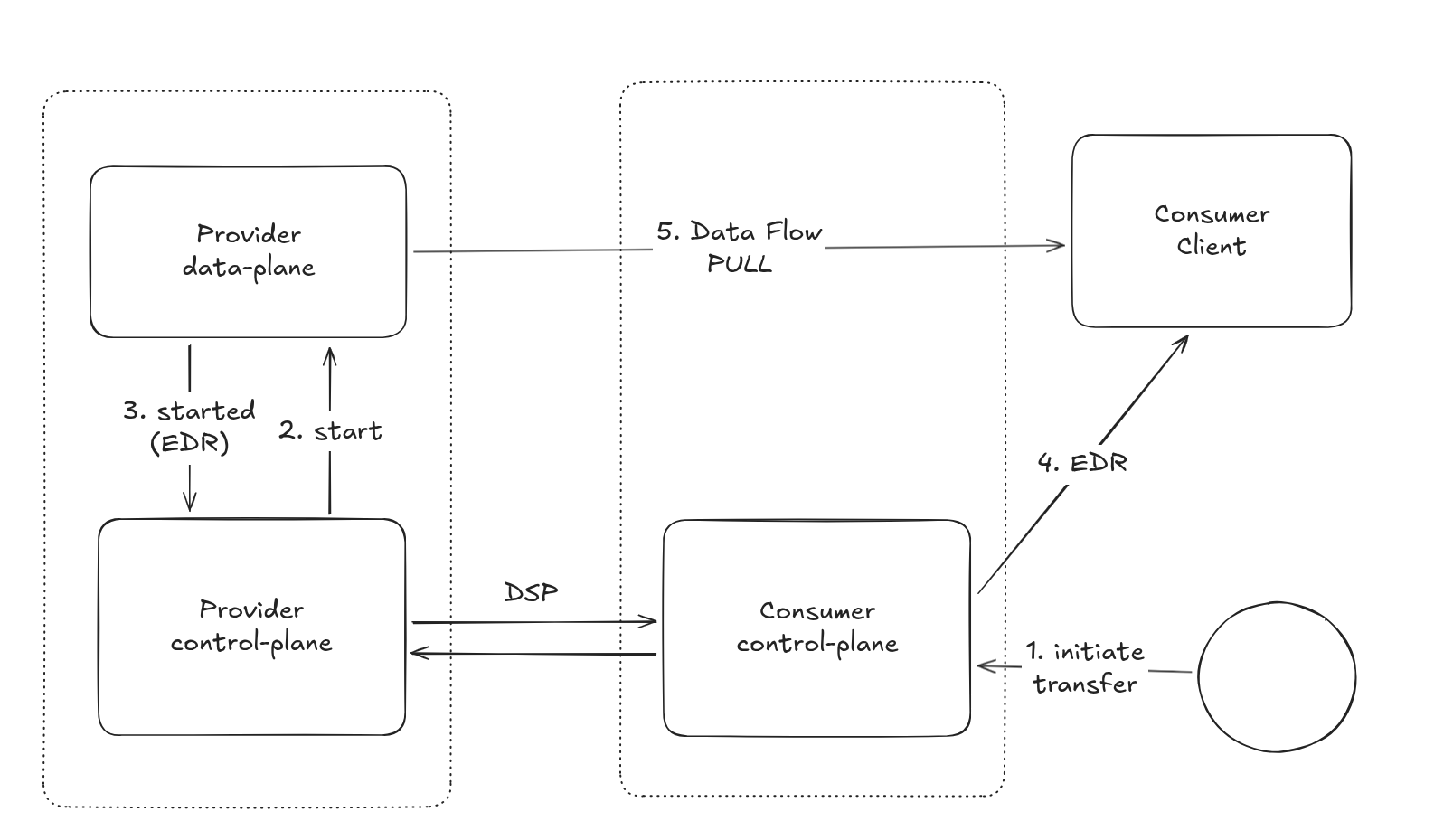
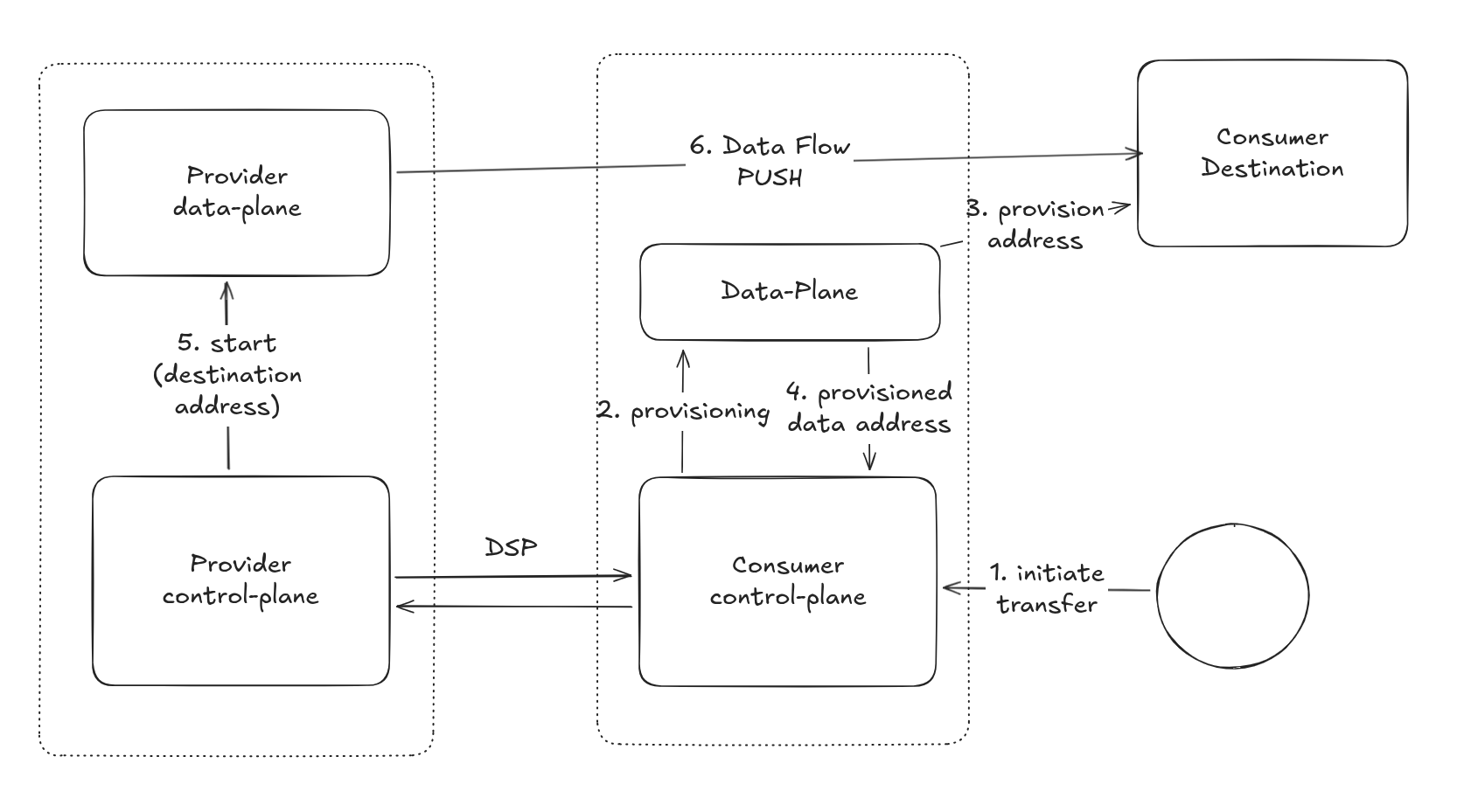
These diagrams are showing the current state-of-the-art; some details have been intentionally left out to focus on the scope of Control Plane and Data Plane interaction.
Two issues become apparent just by looking at the diagrams:
- Vertical grouping: The Data Plane is often considered part of the connector component together with the control plane. While this may not necessarily be an issue, it creates confusion for those building dataspace applications regarding the correct boundaries and leads to poor design.
- Lack of symmetry: The pull and push cases are handled quite differently on the consumer side, and the role of the consumer’s Data Plane/client is not as clear as it should be.
How It Will Work with Data Plane Signaling
Just a glance at the diagrams shows that a strong focus has been placed on separating the dataspace layer from the
“use case/application” layer.
This is not to say they were not separated before, but this specification formalizes it: the Control Plane and Data
Plane are two distinct architectural components serving different purposes.
While the Control Plane is responsible for wire protocol (DSP) communication and dataspace authentication, the Data
Plane handles the actual transfer and receipt of data, managing authentication for the chosen data flow protocol.
With this specification, any application meant to share data in a dataspace can implement the Data Plane Signaling specification and to become a Data Plane. This is the intended path forward: no more direct user-facing interaction with the connector, but rather an application layer that relies on the dataspace to provide sovereign data sharing.

Another interesting concept is that the data address is not managed by the Control Plane anymore: its creation and use happens completely in the Data Plane, while the control-plane just takes care to pass it to the counter-part through DSP.
