Documentation
Welcome to the EDC, a framework for building globally-scalable data sharing services.
Many organizations face the challenge of securely sharing data with their partners or other trusted third parties. In
the past, this has been the realm of proprietary EDI solutions. EDC is an alternative to these systems built on the
concept of dataspaces. EDC is a set of components that enable developers to create
dataspaces using the following building blocks:
- Identity service for managing and verifying organizational credentials
using DIDs
and W3C Verifiable Credentials or OAuth2 tokens.
- Catalog service for publishing and securing assets that can be shared with other organizations.
- Control plane services for the automated creation and processing of data usage agreements that grant access to
data.
- Data plane integration and monitoring services for initiating and managing data transfers through data planes that
implement the Data Plane Signaling protocol, using
off-the-shelf protocols such as
HTTP, Kafka, cloud object storage, or virtually any other technology.
EDC is designed to serve a range of use cases, including large AI data sets, API access, supply-chain data processing,
and research data sharing.
EDC components are standards-based and implement
the Dataspace Protocol Specification
and Decentralized Claims Protocol Specification.
What EDC is not
EDC is not a data processing platform, integration framework, or messaging bus. EDC is also not a prepackaged system or
application. Rather, it is a toolbox for building customized distributions. As a generic toolbox, EDC:
- Does not ship an installable distribution; those are provided by downstream projects that customize EDC to their
needs.
- Does not contain use case-specific features; those are added through EDC’s modularity and extension system.
- Does not provide infrastructure for storing, processing, or moving data; EDC integrates with third-party data planes
to provide these services.
What Next?
If you are new to EDC, start with the Adopters Manual. If you are an experienced EDC developer and
want to take a deep-dive into the codebase, see the Contributors Manual.
1 - Adopters Manual
The Samples
The quickest way to get started building with EDC is to work through
the samples. The samples cover everything from basic scenarios involving
sharing files to advanced streaming and large data use cases.
The MVD
The EDC Minimal Viable Dataspace (MVD) sets up and runs a
complete demonstration dataspace between two organizations. The MVD includes automated setup of a complete dataspace
environment in a few minutes.
Overview: Key Components
EDC is architected as modules called extensions that can be combined and customized to create components
that perform specific tasks. These components (the “C” in EDC) are not what is commonly referred to as "
microservices." Rather, EDC components may be deployed as separate services or collocated in a runtime process. This
section provides a quick overview of the key EDC components.
The Connector
The Connector is a pair of components that control data sharing and execute data transfer. These components are the
Control Plane and Data Plane, respectively. The Control Plane is an EDC runtime, the Data Planes are separate
applications that it directs through the Data Plane Signaling protocol, so that both can be individually managed and
scaled.

The Control Plane
The Control Plane is responsible for creating contract agreements that grant access to data, managing data transfers,
and monitoring usage policy compliance. For example, a data consumer’s control Plan initiates a contract negotiation
with a data provider’s connector. The negotiation is an asynchronous process that results in a contract agreement if
approved. The consumer connector then uses the contract agreement to initiate a data transfer with the provider
connector. A data transfer can be a one-shot (finite) transfer, such as a discrete set of data, or an ongoing (
non-finite) data stream. The provider control plane can pause, resume, or terminate transfers in response to certain
conditions. For example, if a contract agreement expires.
The Data Plane
The Data Plane is responsible for executing data transfers, which are managed by the Control Plane. A Data Plane sends
data using specialized technology such as a messaging system or data integration platform. EDC doesn’t include a Data
Plane: any application that implements
the Data Plane Signaling (DPS) protocol can be one,
for example one built with the Data Plane SDKs. See
the Data Plane section for details.
Federated Catalog
The Federated Catalog (FC) is responsible for crawling and caching data catalogs from other participants. The FC builds
a local cache that can be queried or processed without resorting to complex distributed queries across multiple
participants.
Identity Hub
The Identity Hub securely stores and manages W3C Verifiable Credentials, including the presentation of VCs and the
issuance and re-issuance process.
The Big Picture: The Dataspace Context
EDC components are deployed to create a dataspace ecosystem. It is important to understand that there is no such thing
as “dataspace software.” At its most basic level, a dataspace is simply a context between two participants:

The Federated Catalog fetches data catalogs from other participants. A Connector negotiates a contract agreement
for data access between two participants and manages data transfers using a data plane technology. The Identity Hub
presents verifiable credentials that a participant connector uses to determine whether it trusts and should grant data
access to a counterparty.
The above EDC components can be deployed in a single runtime process (e.g., K8S ReplicaSet) or a distributed topology (
multiple ReplicaSets or clusters). The connector components can be further decomposed. For example, multiple control
plane components can be deployed within an organization in a federated manner where departments or subdivisions manage
specific instances termed Management Domains.
Customizing the EDC
EDC was designed with the philosophy that one size does not fit all. Before deploying an EDC-powered data sharing
ecosystem, you’ll need to build customizations and bundle them into one or more distributions. Specifically:
- Policies - Create a set of policies for data access and usage control. Constraints are evaluated by policy
functions, written in Java, or by CEL expressions managed through the
Management API.
- Verifiable Credentials - Define a set of W3C Verifiable Credentials for your use cases that your policy functions
can process. For example, a credential that identifies a particular partner type.
- Data transfer types - Define a set of data transfer technologies or types that must be supported, e.g. HTTP,
S3-based transfers or Kafka, and the data planes that implement them, existing ones or
built with the Data Plane SDKs.
- Backend connectivity - You may need to integrate EDC components with back-office systems. This is done by writing
custom extensions.
Third parties and other open source projects distribute EDC extensions that can be included in a distribution. These
will typically be hosted on Maven Central.
1.1 - Dataspaces
A brief introduction to what a dataspace is and how it relates to EDC.
The concept of a dataspace is the starting point for learning about the EDC. A dataspace is a context between one or more participants that share data. A participant is typically an organization, but it could be any entity, such as a service or machine.
Dataspace Protocol (DSP): The Lingua Franca for Data Sharing
The messages exchanged in a dataspace are defined by the Dataspace Protocol Specification (DSP). EDC implements and builds on these asynchronous messaging patterns, so it will help to become acquainted with the specification. DSP defines how to retrieve data catalogs, conduct negotiations to create contract agreements that grant access to data, and send data over various lower-level wire protocols. While DSP focuses on the messaging layer for controlling data access, it does not specify how “trust” is established between participants. By trust, we mean on what basis a provider makes the decision to grant access to data, for example, by requiring the presentation of verifiable credentials issued by a third-party. This is specified by the Decentralized Claims Protocol (DCP), which layers on DSP. We won’t cover the two specifications here, other than to highlight a few key points that are essential to understanding how EDC works.
After reading this document, we recommend consulting the DSP and DCP specifications for further information.
The Question of Identity
One of the most important things to understand is how identities work in a dataspace and EDC. A participant has a single identity, which is a URI. EDC supports multiple identity systems, including OAuth2 and the Decentralized Claims Protocol (DCP). If DCP is used, the identity will be a Web DID.
An EDC component, such as a control plane, acts as a participant agent; in other words, it is a system that runs on behalf of a participant. Therefore, each participant served by a component uses a single identity: a single participant runtime has one identity, and a multi-participant runtime hosts several participant contexts, each with its own identity. This concept is important and nuanced. Let’s consider several scenarios.
Simple Scenarios
Single Deployment
An organization deploys a single-instance control plane. This is the simplest possible setup, although it is not very reliable or scalable. In this scenario, the connector has exactly one identity. Now take the case where an organization decides on a more robust deployment with multiple control plane instances hosted as a Kubernetes ReplicaSet. The control plane instances still share the same identity.
Distributed Deployment
EDC supports the concept of management domains, which are realms of control. If different departments want to manage EDC components independently, the organization can define management domains where those components are deployed. Each management domain can be hosted on distinct Kubernetes clusters and potentially run in different cloud environments. Externally, the organization’s EDC infrastructure appears as a unified whole, with a single top-level catalog containing multiple sub-catalogs and data sharing endpoints.
In this scenario, departments deploy their own control plane clusters. Again, each instance is configured with the same identity across all management domains.
Multiple Operating Units
In some dataspaces, a single legal entity may have multiple subdivisions operating independently. For example, a multinational may have autonomous operating units in different geographic regions with different data access rights. In this case, each operating unit is a dataspace participant with a distinct identity. EDC components deployed by each operating unit will be configured with different identities. From a dataspace perspective, each operating unit is a distinct entity.
Common Misconceptions
Data transfers are only about sending static files
Data can be in a variety of forms. While the EDC can share static files, it also supports open-ended transfers such as streaming and API access. For example, many EDC use cases involve providing automated access to event streams or API endpoints, including pausing or terminating access based on continual evaluation of data use policies.
Dataspace software has to be installed
There is no such thing as dataspace “software” or a dataspace “application.” A dataspace is a decentralized context. Participants deploy the EDC and communicate with other participant systems using DSP and DCP.
EDC adds a lot of overhead
EDC is designed as a lightweight, non-resource-intensive engine. EDC adds no overhead to data transmission since specialized wire protocols handle the latter. For example, EDC can be used to grant access to an API endpoint or data stream. Once access is obtained, the consumer can invoke the API directly or subscribe to a stream without requiring the request to be proxied through EDC components.
Cross-dataspace communication vs. interoperability
There is no such thing as cross-dataspace communication. All data sharing takes place within a dataspace. However, that does not mean there is no such thing as dataspace interoperability. Let’s unpack this.
Consider two dataspaces, DS-1 and DS-2. It’s possible for a participant P-A, a member of DS-1, to share data with P-B, a member of DS-2, under one of the following conditions:
- P-A is also a member of DS-2, or
- P-B is also a member of DS-1
P-A shares data with P-B in the context of DS-1 or DS-2. Data does not flow between DS-1 and DS-2. It’s possible for one EDC instance to operate within multiple dataspaces as long as its identity remains the same (if not, different EDC deployments will be needed).
Interoperability is different. Two dataspaces are interoperable if:
- They have compatible identity systems. For example, if both dataspaces use DCP and Web DIDs, or a form of OAuth2 with federation between the Identity Providers.
- They have a common set of verifiable credentials (or claims) and credential issuers.
- They have an agreed set of data sharing policies.
If these conditions are met, it is possible for a single connector deployment to participate in two dataspaces.
1.2 - Modules, Runtimes, and Components
An overview of the EDC modularity system.
EDC is built on a module system that contributes features as extensions to a runtime. Runtimes are assembled to create a
component such as a control plane, a data plane, or an identity hub. A component may be composed of a single runtime
or a set of clustered runtimes:

The EDC module system provides a great deal of flexibility as it allows you to easily add customizations and target
diverse deployment topologies from small-footprint single-instance components to highly reliable, multi-cluster setups.
The documentation and samples cover in detail how EDC extensions are implemented and configured. At this point, it’s
important to remember that extensions are combined into one or more runtimes, which are then assembled into components.
A Note on Identifiers
The EDC uses identifiers based on this architecture. There are three identifier types: participant IDs, component IDs,
and runtime IDs. A participant ID corresponds to the organization’s identifier in a dataspace. This will vary by dataspace
but is often a Web DID. All runtimes of all components operated by an organization - regardless of where they are deployed
- use the same participant ID.
A component ID is associated with a particular component, for example, a control plane or data plane deployment. If an
organization deploys two data planes across separate clusters, they will be configured with two distinct component IDs.
All runtimes within a component deployment will share the same component ID. Component IDs are permanent and survive runtime
restarts.
A runtime ID is unique to each runtime instance. Runtime IDs are ephemeral and do not survive restarts. EDC uses runtime IDs to acquire cluster locks and for tracing, among other things.
1.3 - Control Plane
Explains how data, policies, access control, and transfers are managed.
The control plane is responsible for assembling catalogs, creating contract agreements that grant access to data, managing data transfers, and monitoring usage policy compliance. Control plane operations are performed by interacting with the Management API. Consumer and provider control planes communicate using the Dataspace Protocol (DSP). This section provides an overview of how the control plane works and its key concepts.
The main control plane operations are depicted below:
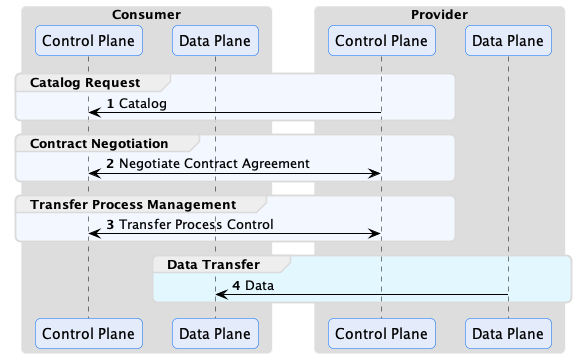
The consumer control plane requests catalogs containing data offers, which are then used to negotiate contract agreements. A contract agreement is an artifact that acts as a token granting access to a data set. It encodes a set of usage policies (as ODRL) and is bound to the consumer via its Participant ID. Every control plane must be configured with a Participant ID, which is the unique identifier of the dataspace participant operating it. The exact type of identifier is dataspace-specific but will often be a Web DID if the Decentralized Claims Protocol (DCP) is used as the identity system.
After obtaining a contract agreement, the consumer can initiate a data transfer. A data transfer controls the flow of data, but it does not send it. That task is performed by the consumer and provider data planes using a separate wire protocol. Data planes are typically specialized technology, such as a messaging system or data integration platform, deployed separately from the control plane. A control plane may use multiple data planes and communicate with them via a RESTful interface called the Data Plane Signaling API.
EDC is designed to handle all general forms of data. It’s important to note that a data transfer does not need to be file-based. It can be a stream, such as a market feed or an API that a client queries. Moreover, a data transfer does not need to be completed. It can exist indefinitely and be paused and resumed by the control plane at intervals. Now, let’s jump into the specifics of how the control plane works, starting briefly with the Management API and proceeding to catalogs.
Management API
The Management API is a RESTful interface for client applications to interact with the control plane. All client
operations described in this section use the Management API. We won’t cover the API in detail here since there is an
OpenAPI definition. The API is secured with an API key (v4, single participant runtimes) or with OAuth2 tokens and
scopes (v5, multi-participant runtimes), see Management API, but it is important to note
that it should never be exposed over the Internet or other non-trusted networks. A runtime can host several
participants, see Participant Contexts.
The openapi documentation is available following this link:
https://eclipse-edc.github.io/Connector/openapi/management-api/
Catalogs, Datasets, and Offers
A data provider uses its control plane to publish a data catalog that other dataspace participants access. Catalog requests are made using DSP (HTTP POST). The control plane will return a response containing a DCAT Catalog The following is an example response with some sections omitted for brevity:
{
  "@context": {...},
  "dspace:participantId": "did:web:example.com",
  "@id": "567bf428-81d0-442b-bdc8-437ed46592c9",
  "@type": "dcat:Catalog",
  "dcat:dataset": [
    {
      "@id": "asset-1",
      "@type": "dcat:Dataset",
      "description": "...",
      "odrl:hasPolicy": {...},
      "dcat:distribution": [{...}]
    }
  ]
}
Catalogs contain Datasets, which represent data the provider wishes to make available to the requesting client. A Dataset has two important properties: odrl:hasPolicy, which is an ODRL usage policy, and one or more dcat:distribution entries that describe how to obtain the data. The catalog is serialized as JSON-LD. It is highly recommended that you become familiar with JSON-LD, and in particular, the JSON-LD Playground, since EDC makes heavy use of it.
Why does EDC use JSON-LD instead of plain JSON? There are two reasons. First, DSP is based on DCAT and ODRL, which rely on JSON-LD. As you will see, many EDC entities can be extended with custom attributes added by end-users. EDC needed a way to avoid property name clashes. JSON-LD provides the closest thing to a namespace feature for plain JSON.
Catalogs are not static documents. When a data consumer requests a catalog from a provider, the provider’s control plane dynamically generates a response based on the consumer’s identity and credentials. For example, a provider may offer specific datasets to a consumer or category of consumer (for example, if it is a tier-1 or tier-2 partner).
You will learn more about restricting access to datasets in the next section, but one way to do so is through the offer associated with a dataset. The following odrl:hasPolicy contains an Offer that specifies a dataset can only be used by an accredited manufacturer:
"odrl:hasPolicy": {
	"@id": "...",
	"@type": "odrl:Offer",
	"odrl:obligation": {
	  "odrl:action": {
		"@id": "use"
	  },
	  "odrl:constraint": {
		"odrl:leftOperand": {
		  "@id": "ManufacturerAccredidation"
		},
		"odrl:operator": {
		  "@id": "odrl:eq"
		},
		"odrl:rightOperand": "active"
	  }
	}
},
An offer defines usage policy. Usage policies are the requirements and permissions - or, more precisely, the duties, rights, and obligations - a provider imposes on a consumer to grant access to data. In the example above, the provider requires the consumer to be an accredited manufacturer. In practice, policies translate down into checks and verifications at runtime. When a consumer issues a catalog request, it will supply its identity (e.g., a Web DID) and potentially a set of Verifiable Presentations (VP). The provider control plane could check for a valid VP, or perform a back-office system lookup based on the client identity. Assuming the check passes, the dataset will be included in the catalog response.
A dataset will also be associated with one or more dcat:distributions:
"dcat:distribution": [
	{
		"@type": "dcat:Distribution",
		"dct:format": {
			"@id": "HttpData-PULL"
		},
		"dcat:accessService": {
		"@id": "a6c7f3a3-8340-41a7-8154-95c6b5585532",
		"@type": "dcat:DataService",
		"dcat:endpointDescription": "dspace:connector",
		"dcat:endpointUrl": "http://localhost:8192/api/dsp",
		"dct:terms": "dspace:connector",
		"dct:endpointUrl": "http://localhost:8192/api/dsp"
		}
	},
	{
		"@type": "dcat:Distribution",
		"dct:format": {
			"@id": "S3-PUSH"
		},
		"dcat:accessService": {
		"@id": "a6c7f3a3-8340-41a7-8154-95c6b5585532",
		"@type": "dcat:DataService",
		"dcat:endpointDescription": "dspace:connector",
		"dcat:endpointUrl": "http://localhost:8192/api/dsp",
		"dct:terms": "dspace:connector",
		"dct:endpointUrl": "http://localhost:8192/api/dsp"
		}
	}
]
A distribution describes the wire protocol a dataset is available over. In the above example, the dataset is available using HTTP Pull and S3 Push protocols (specified by the dct:format property). You will learn more about the differences between these protocols later. A distribution will be associated with a dcat:accessService, which is the endpoint where a contract granting access can be negotiated.
If you would like to understand the structure of DSP messages in more depth, we recommend looking at the JSON schemas and examples provided by the Dataspace Protocol Specification (DSP).
EDC Entities
So far, we have examined catalogs, datasets, and offers from the perspective of DSP messages. We will now shift focus to the primary EDC entities used to create them. EDC entities do not have a one-to-one correspondence with DSP concepts, and the reason for this will become apparent as we proceed.
Assets
An Asset is the primary building block for data sharing. An asset represents any data that can be shared. An asset is not limited to a single file or group of files. An asset could be a continual stream of data or an API endpoint. An asset does not even have to be physical data. It could be a set of computations performed at a later date. Assets are data descriptors loaded into EDC via its Management API (more on that later). Notice the emphasis on “descriptors”: assets are not the actual data to be shared but describe the data. The following excerpt shows an asset:
{
  "@context": [
    "https://w3id.org/edc/connector/management/v2"
  ],
  "@id": "899d1ad0-532a-47e8-2245-1aa3b2a4eac6",
  "properties": {
    "somePublicProp": "a very interesting value"
  },
  "privateProperties": {
    "secretKey": "..."
  },
  "dataplaneMetadata": {
    "profiles": [ "HttpData-PULL" ],
    "properties": {
      "baseUrl": "http://localhost:8080/test"
    }
  }
}
When a client requests a catalog, the control plane processes its asset entries to create datasets in a DSP catalog. An asset must have a globally unique ID. We strongly recommend using the JDK UUID implementation. Entries under the properties attribute will be used to populate dataset properties. The properties attribute is open-ended and can be used to add custom fields to datasets. Note that several well-known
properties are included in the edc namespace: id, description, version, name, contenttype (more on this in the next section on asset expansion).
In contrast, the privateProperties attribute contains properties that are not visible to clients (i.e., they will not be serialized in DSP messages). They can be used to internally tag and categorize assets. As you will see, tags are useful to select groups of assets in a query.
Why is the term Asset used and not Dataset? This is mostly for historical reasons since the EDC was originally designed before the writing of the DSP specification. However, it was decided to keep the two distinct since it provides a level of decoupling between the DSP and internal layers of EDC.
Remember that assets are just descriptors - they do not contain actual data. How does EDC know where the actual data is stored? It doesn’t need to: the properties of the dataplaneMetadata object act as a pointer to where the actual data resides, and are passed to the data plane that transfers the asset. Their content is open-ended and defined by the data plane: it could be an HTTP address, an S3 bucket, a messaging topic, or some other form of storage. The profiles list the transfer types the asset is offered with (all those of the registered data planes, if empty), and the optional labels restrict which data planes may transfer it. It’s important not to include secrets in the dataplaneMetadata since it is persisted. Instead, use a secure store for secrets and include a reference to it. The dataAddress of an asset is deprecated since 0.18.0.
Understanding Expanded Assets
The @context property on an asset indicates that it is a JSON-LD type. JSON-LD (more precisely, JSON-LD terms) is used by EDC to enable namespaces for custom properties. The following excerpt shows an asset with a custom property, dataFeed:
{
  "@context": [
    "https://w3id.org/edc/connector/management/v2",
    {
      "market-systems": "http://w3id.org/market-systems/v0.0.1/ns/"
    }
  ],
  "@id": "...",
  "properties": {
    "dataFeed": {
		"feedName": "Market Data",
		"feedType": "PRICING",
		"feedFrequency": "DAILY"
    }
  }
}
Notice a reference to the market-systems context has been added to @context in the above example. This context defines the terms dataFeed, feedName, feedType, and feedFrequency. When the asset is added to the control plane via the EDC’s Management API, it is expanded according to the JSON expansion algorithm This is essentially a process of inlining the full term URIs into the JSON structure. The resulting JSON will look like this:
{
"@id": "...",
"https://w3id.org/edc/v0.0.1/ns/properties": [
  {
	"http://w3id.org/market-systems/v0.0.1/ns/dataFeed": [
	  {
		"http://w3id.org/market-systems/v0.0.1/ns/feedName": [
		  {
			"@value": "Market Data"
		  }
		],
		"http://w3id.org/market-systems/v0.0.1/ns/feedType": [
		  {
			"@value": "PRICING"
		  }
		],
		"http://w3id.org/market-systems/v0.0.1/ns/feedFrequency": [
		  {
			"@value": "DAILY"
		  }
		]
	  }
	]
  }
]
}
Be careful when defining custom properties. If you forget to include a custom context and use simple property names (i.e., names that are not prefixed or a URI), they will be expanded using the EDC default context, https://w3id.org/edc/v0.0.1/ns/.
EDC persists the asset in expanded form. As will be shown later, queries for assets must reference property names in their expanded form.
Policies and Policy Definitions
Policies are a generic way of defining a set of duties, rights, or obligations. EDC and DSP express policies with ODRL. EDC uses policies for the following:
- As a dataset offer in a catalog to define the requirements to access data
- As a contract agreement that grants access to data
- To enable access control
Policies are loaded into EDC via the Management API using a policy definition, which contains an ODRL policy type:
{
  "@context": [
    "https://w3id.org/edc/connector/management/v2"
  ],
  "@type": "PolicyDefinition",
  "policy": {
    "@context": "http://www.w3.org/ns/odrl.jsonld",
    "@id": "8c2ff88a-74bf-41dd-9b35-9587a3b95adf",
    "duty": [
      {
        "target": "http://example.com/asset:12345",
        "action": "use",
        "constraint": {
          "leftOperand": "headquarter_location",
          "operator": "eq",
          "rightOperand": "EU"
        }
      }
    ]
  }
}
A policy definition allows the policy to be referenced by its @id when specifying the usage requirements for a set of assets or access control. Decoupling policies in this way allows for a great deal of flexibility. For example, specialists can create a set of corporate policies that are reused across an organization.
The Management API accepts a constraint’s rightOperand only as a literal value: a plain string, a value object carrying a @value, or an array of these. A node reference such as {"@id": "https://example.com/memberships/gold"} is rejected with a 400 Bad Request. When the value is an identifier, pass it as a plain string: "rightOperand": "https://example.com/memberships/gold".
Contract Definitions
Contract definitions link assets and policies by declaring which policies apply to a set of assets. Contract definitions contain two types of policy:
- Contract policy
- Access policy
Contract policy determines what requirements a data consumer must fulfill and what rights it has for an asset. Contract policy corresponds directly to a dataset offer. In the previous example, a contract policy is used to require a consumer to be an accredited manufacturer. Access policy determines whether a data consumer can access an asset. For example, if a data consumer is a valid partner. The difference between contract and access policy is visibility: contract policy is communicated to a consumer via a dataset offer in a catalog, while access policy remains “hidden” and is only evaluated by the data provider’s runtime.
Now, let’s examine a contract definition:
{
  "@context": [
    "https://w3id.org/edc/connector/management/v2"
  ],
  "@type": "ContractDefinition",
  "@id": "test-id",
  "accessPolicyId": "access-policy-1234",
  "contractPolicyId": "contract-policy-5678",
  "assetsSelector": [
    {
      "@type": "Criterion",
      "operandLeft": "id",
      "operator": "in",
      "operandRight": ["id1", "id2", "id3"]
    },
    {
      "@type": "Criterion",
      "operandLeft": "productCategory",
      "operator": "=",
      "operandRight": "gold"
    },
  ]
}
The accessPolicyId and contractPolicyId properties refer to policy definitions. The assetsSelector property is a query (similar to a SQL SELECT statement) that returns a set of assets the contract definition applies to. This allows users to associate policies with specific assets or types of assets.
Since assetsSelectors are late-bound and evaluated at runtime, contract definitions can be created before assets exist. This is a particularly important feature since it allows data security to be put in place prior to loading a set of assets. It also enables existing policies to be applied to new assets.
Catalog Generation
We’re now in a position to understand how catalog generation in EDC works. When a data consumer requests a catalog from a provider, the latter will return a catalog result with datasets that the former can access. Catalogs are specific to the consumer and dynamically generated at runtime based on client credentials.
When a data consumer makes a catalog request via DSP, it will send an access token that provides access to the consumer’s verifiable credentials in the form of a verifiable presentation (VP). We won’t go into the mechanics of how the provider obtains a VP - that is covered by DCP and the EDC IdentityHub. When the provider receives the request, it generates a catalog containing datasets using the following steps:

The control plane first retrieves contract definitions and evaluates their access and contract policies against the consumer’s set of claims. These claims are populated from the consumer’s verifiable credentials and any additional data provided by custom EDC extensions. A custom EDC extension could look up claims such as partner tier in a back-office system. Next, the assetsSelector queries from each passing contract definition is then evaluated to return a list of assets. These assets are iterated, and a dataset is created by combining the asset with the contract policy specified by the contract definition. The datasets are then collected into a catalog and returned by the client. Note that a single asset may result in multiple datasets if more than one contract definition selects it.
Careful consideration needs to be taken when designing contract definitions, particularly the level of granularity at which they operate. When a catalog request is made, The access and contract policies of all contract definitions are evaluated, and the passing ones are selected. The asset selector queries are then run from the resulting set. To optimize catalog generation, contract definitions should select groups of assets rather than correspond in a 1:1 relationship with an asset. In other words, limit contract definitions to a reasonable number and use them as a mechanism to filter groups of assets. Adding custom asset properties that serve as selection labels is an easy way to do this.
Contract Negotiations
Once a consumer has received a catalog, it can request access to a dataset by sending a DSP contract negotiation request using the Management API. The contract negotiation takes the dataset offer as a parameter. When the request is received, the provider will respond with an acknowledgment. Contract negotiations are asynchronous, which means they are not completed immediately but sometime in the future. A contract negotiation progresses through a series of states defined by the DSP specification (which we will not cover). Both the consumer and provider can transition the negotiation. When a transition is attempted, the initiating control plane sends a DSP message to the counterparty.
If a negotiation is successfully completed (termed finalized), a DSP contract agreement message is sent to the consumer. The message contains a contract agreement that can be used to access data by opening a transfer process:
{
  "@context":  [
   "https://w3id.org/dspace/2024/1/context.json"
  ],
  "@type": "ContractAgreementMessage",
  "providerPid": "urn:uuid:a343fcbf-99fc-4ce8-8e9b-148c97605aab",
  "consumerPid": "urn:uuid:32541fe6-c580-409e-85a8-8a9a32fbe833",
  "agreement": {
    "@id": "urn:uuid:e8dc8655-44c2-46ef-b701-4cffdc2faa44",
    "@type": "Agreement",
    "target": "urn:uuid:3dd1add4-4d2d-569e-d634-8394a8836d23",
    "timestamp": "2023-01-01T01:00:00Z",
    "permission": [{
      "action": "odrl:use" ,
      "constraint": [{
        "leftOperand": "dateTime",
        "operand": "lteq",
        "rightOperand": "2023-12-31T06:00Z"
      }]
    }]
  },
  "callbackAddress": "https://example.com/callback"
}
A provider can also hold contract negotiations for manual approval before the agreement is sent, for example for
requests from unknown counterparties. Which negotiations need approval is decided by the contract policy, see
Contract Negotiation Approval.
EDC implements DSP message exchanges using a reliable quality of service. That is, all message operations and state machine transitions are performed reliably in a transaction context. EDC will only commit a state machine transition if a message is successfully acknowledged by the counterparty. If a send operation fails, the associated transition will be rolled back, and the message will be resent. As with all reliable messaging systems, EDC operations are idempotent.
Retiring Contract Agreements
A provider can retire a contract agreement it no longer wants to honour, e.g. when the business relationship ends,
with POST /v4/contractagreements/{id}/retire (or POST /v5/participants/{participantContextId}/contractagreements/{id}/retire)
and a reason. A retired agreement can’t be used to start new transfer processes, and the
policy monitor terminates the running ones. Retirement can be undone with …/unretire, and emits the
events contract.agreement.retired and contract.agreement.unretired. See the
contributors manual for details.
Working with Asynchronous Messaging and Events
DSP and EDC are based on asynchronous messaging, and it is important to understand that and design your systems appropriately. One anti-pattern is to try to “simplify” EDC by creating a synchronous API that wraps the underlying messaging and blocks clients until a contract negotiation is complete. Put simply, don’t do that, as it will result in complex, inefficient, and incorrect code that will break EDC’s reliability guarantees. The correct way to interact with EDC and the control plane is expressed in the following sequence diagram:
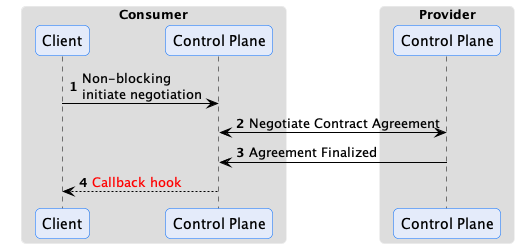
EDC has an eventing system that code can plug into and receive events when something happens via a callback hook. For example, a contract negotiation is finalized. The EventRouter is used by extension code to subscribe to events. Two dispatch modes are supported: asynchronous notification or synchronous transactional notification. The latter mode can be used to reliably deliver the event to an external destination such as a message queue, database, or remote endpoint. Integrations will often take advantage of this feature by dispatching contract negotiation finalized events to another system that initiates a data transfer.
Reliable Messaging
EDC implements reliable messaging for all interactions, so it is important to understand how this quality of service works. First, all messages have a unique ID and are idempotent. If a particular message is not acknowledged, it will be resent. Therefore, it is expected the receiving endpoint will perform de-duplication (which all EDC components do). Second, reliable messaging works across restarts. For example, if a runtime crashes before it can send a response, the response will be sent either by another instance (if running in a cluster) or by the runtime when it comes back online. Reliability is achieved by recording the state of all interactions using state machines to a transactional store such as Postgres. State transitions are initiated in the context of a transaction by sending a message to the counterparty, which is only committed after an acknowledgment is received.
How the counter-party answers a message decides what happens next:
2xx: the message is acknowledged, and the state machine moves on.
4xx: the message is rejected for good, and the negotiation or transfer process is terminated. As required by the
Dataspace Protocol, a connector answers 400 to a message that is not valid in the current state of the process, and
404 when the process does not exist or the client is not authorized (catalog requests get 401).
5xx, or no answer (timeout, unreachable counter-party): the message is sent again with a growing delay
(edc.negotiation.send.retry.*, edc.transfer.send.retry.*, see Tuning), until
the retry limit is reached. A connector answers 503 when it can’t process a message now but may later:
- the negotiation or transfer process is being modified, e.g. by an earlier copy of the same message;
- the message arrived before the connector finished its own preceding step, e.g. a
TransferStartMessage that
arrives while the consumer hasn’t received the acknowledgement of its transfer request yet, or a contract agreement
that arrives while the consumer is still sending its acceptance; - the token of the counter-party couldn’t be verified for a reason that has nothing to do with the token: the
counter-party’s credential service, its DID document or a status list of its credentials could not be reached, or
the connector couldn’t create its own token for the presentation request (e.g. the vault or the STS was not
available).
A copy that arrives after the first one was processed is accepted when the process already is in the state the
message leads to, e.g. a repeated agreement or finalization, and is otherwise rejected. A repeated initial contract
request (one without providerPid, e.g. sent again because its acknowledgement was lost) gets the negotiation the
first request created, as a repeated transfer request gets the existing transfer process.
Transfer Processes
After a Contract Negotiation has been finalized, a consumer can request data associated with an asset by initiating a Transfer Process via the Management API.
A finite transfer process completes after the data, such as a file, has been transferred. Other types of data transfers, such as a data stream or access to an API endpoint, may be ongoing. These types of transfer processes are termed non-finite because there is no specified completion point. They continue until they are explicitly terminated or canceled.

Pay careful attention to how data is modeled. In particular, model your assets in a way that minimizes the number of Contract Negotiations and Transfer Processes that need to be created. For large data sets such as machine-learning data, this is relatively straightforward: an asset can represent individual data set. Consumers will typically need to transfer the data once or infrequently, so the number of Contract Negotiations and Transfer Processes will remain small, typically one Contract Negotiation and a few transfers.
Now, let’s take as an example a supplier that wishes to expose parts data to their partners. Do not model each part as a separate asset, as that would require at least one contract negotiation and transfer process per part. If there are millions of parts, the number of contract negotiations and transfer processes will quickly grow out of control. Instead, having a single asset represents aggregate data, such as all parts, or a significant subset, such as a part type. Only one Contract Negotiation will be needed, and if the Transfer Process is non-finite and kept open, consumers can make multiple parts data requests (over the course of hours, days, months, etc.) without incurring additional overhead.
Flow Types
We’ll explain how to open a Transfer Process in the next section. First, it is important to understand the two modes for sending data from a provider to a consumer that EDC supports.
Consumer Pull
It requires the consumer to initiate the data flow operation. A common example of this is when a consumer makes an HTTP request to an endpoint and receives a response or pulls a message off a queue:
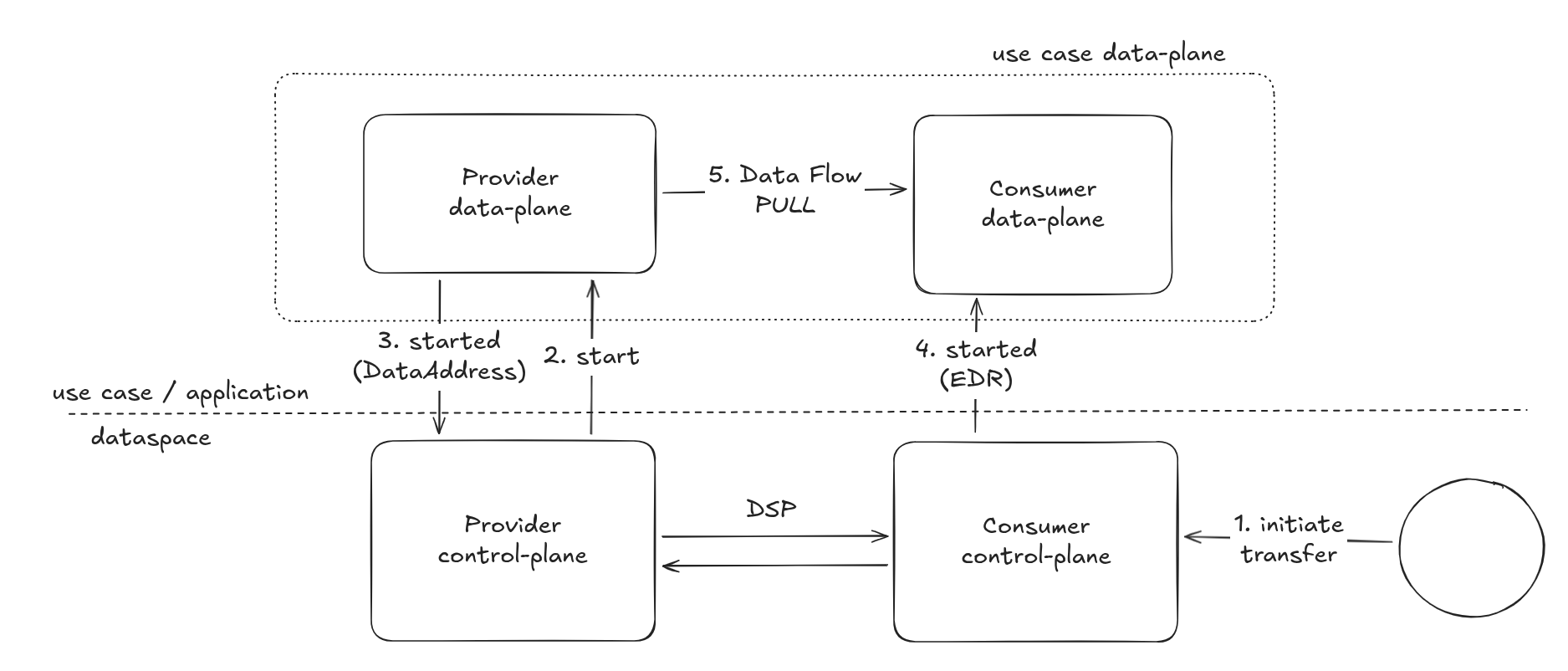
The provider data plane creates a data address that contains all the coordinates to reach the endpoint where the data can be fetched, and the credentials if needed. The provider control plane sends it to the consumer, whose control plane hands it to the consumer data plane. In the basic case, it is an HTTP endpoint, but it could be a message broker, an object storage and so on.
Provider Push
It requires the provider to actively push data to the consumer.
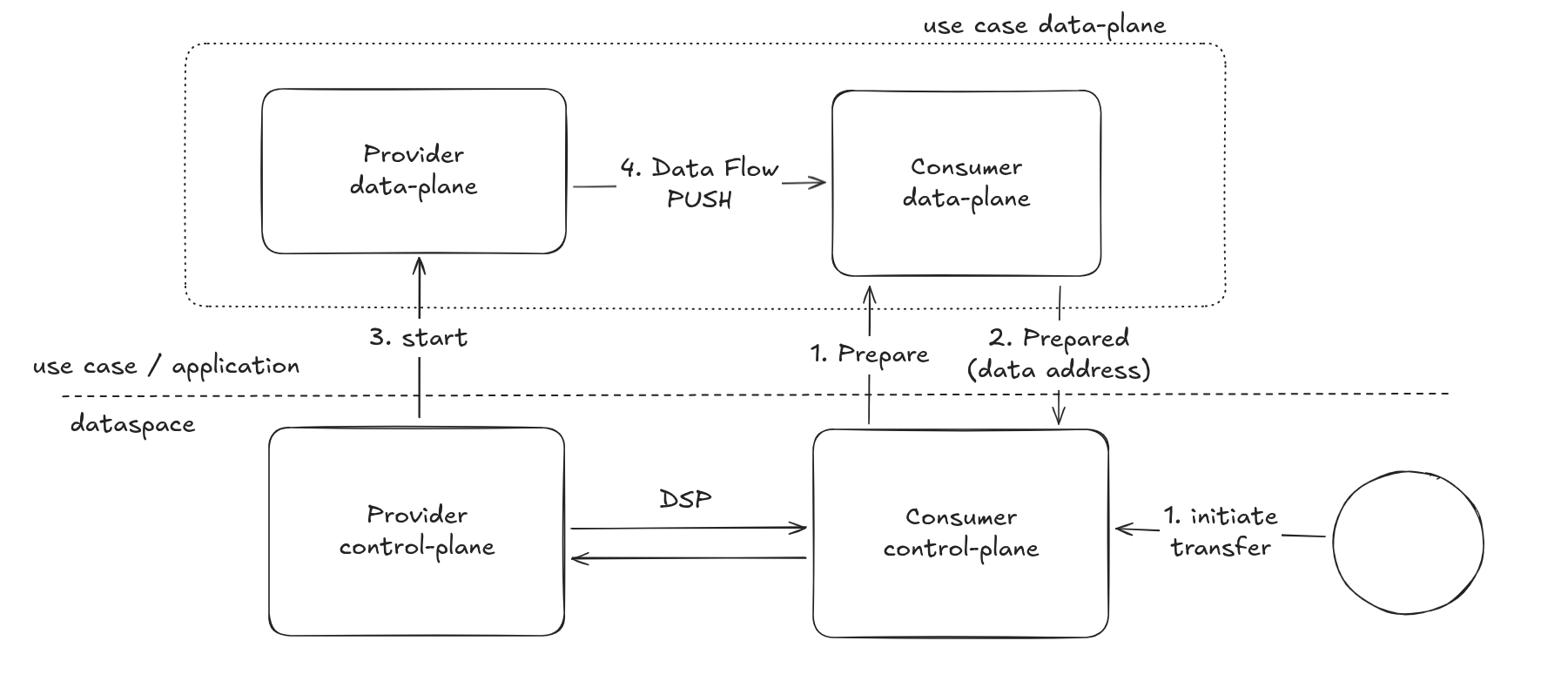
Note that, on the consumer side, the data plane role is to prepare the destination endpoint.
An example of provider push is when a consumer wishes to receive a dataset at an object storage endpoint that it controls.
The consumer data plane returns the destination, with an access token if needed, as data address when the transfer process is initiated, and the consumer control plane sends it to the provider. The provider data plane uses it to push the data once it is ready.
Transfer Process States
Now that we have covered how transfer processes work at a high level, let’s look at the specifics. A transfer process is a shared state machine between the consumer and provider control planes. A transfer process will transition between states in response to a message received from the counterparty or as the result of a Management API operation. For example, a consumer will create a transfer process request via its Management API and send a request message to the provider. If the provider acknowledges the request with an OK, the transfer process state machine will be set to the REQUESTED state on both the consumer and provider. When the provider control plane is ready, it will send a message to the consumer, and the state machine will be transitioned to STARTED on both control planes.
The following are the most important transfer process states:
- REQUESTED - The consumer has requested a data transfer from the provider.
- STARTED - The consumer has received a start message from the provider. The data is available and can be pulled by the consumer or will be pushed by the provider.
- SUSPENDED - The consumer or provider has received a suspend message from the counterparty. All in-process data send operations will be paused.
- RESUMED - The consumer or provider has received a resume message from the counterparty. All in-process data send operations will be restarted.
- COMPLETED - The data transfer has been completed.
- TERMINATED - The consumer or provider has received a termination message from the counterparty. All in-process data send operations will be stopped.
There are a number of internal states that the consumer or provider can transition into without notifying the other party. The two most important are:
- PREPARATION_REQUESTED - When a data transfer request is made through the Management API on the consumer, the consumer control plane first asks its data plane to prepare the transfer. If the data plane needs time for the setup, e.g. to create a destination for a push transfer, the transfer process waits in this state until the data plane reports that it is prepared. The consumer control plane then dispatches the request to the provider and transitions to the REQUESTED state.
- STARTUP_REQUESTED - The provider control plane asks its data plane to start the transfer after receiving a request. If the data plane needs time, e.g. to pre-process the data, the transfer process waits in this state until the data plane reports that it is started. On the consumer, the transfer process passes through this state while the control plane hands the provider’s data address to its data plane.
Any resources a transfer needs, and their clean-up, are handled by the data planes. As with the contract negotiation state machine, custom code can react to transition events using the EventRouter.
Policy Monitor
It may be desirable to conduct ongoing policy checks for non-finite transfer processes. Streaming data is a typical example where such checks may be needed. If a stream is active for a long duration (such as manufacturing data feed), the provider may want to check if the consumer is still a partner in good standing or has maintained an industry certification. The EDC PolicyMonitor can be embedded in the control plane or run in a standalone runtime to periodically check consumer credentials.
1.3.1 - Participant Contexts
Run one control plane for many dataspace participants, manage their lifecycle and configure each of them.
Overview
A participant context represents one dataspace participant hosted by a control plane: its identity in the
dataspace, its configuration, and every resource it owns (assets, policies, contract definitions, negotiations,
agreements, transfer processes, data planes, partners). One control plane runtime can host many participant contexts,
each isolated from the others, which lets an operator run a shared, multi-tenant connector instead of one connector per
participant.
A participant context has:
- an
@id, the participant context id, which appears in the Management API paths and in the Dataspace Protocol (DSP)
endpoints of the participant; - an
identity, the id of the participant in the dataspace, e.g. its DID, as other participants see it; - a
state: CREATED, ACTIVATED or DEACTIVATED; - free-form
properties; - a configuration, a set of key/value entries that configure the participant’s
services, e.g. its identity provider or its vault.
Single and multi-participant runtimes
EDC can be assembled in two modes, which can’t be combined in one runtime:
| Single participant (“classic”) | Multi-participant (“virtual”) |
|---|
| BOM | controlplane-base-bom | controlplane-virtual-base-bom (task-based state machines) or controlplane-virtual-poll-base-bom (poll-based), plus controlplane-virtual-feature-sql-bom, -dcp-bom, -nats-bom |
| Participant contexts | one, defined by the runtime configuration | any number, managed through the Management API |
| Configuration of the participant | the runtime configuration | the participant context configuration, stored in the database |
| Management API | v4, authenticated with an API key | v5, authenticated with OAuth2 tokens and scopes |
| DSP endpoints | one set per runtime | one set per participant context and dataspace profile |
In a single participant runtime, the participant context is created from the settings edc.participant.id (the
identity) and edc.participant.context.id (the id, defaults to the identity), and the runtime configuration doubles as
its participant context configuration. The runtime refuses to start if the multi-participant Management API
authorization is also present.
Managing participant contexts
In a multi-participant runtime, participant contexts are managed through the v5 Management API, with a token that has
the management-api:admin scope:
| Operation | Endpoint |
|---|
| Create | POST /v5/participants |
| List | GET /v5/participants?offset=0&limit=50 |
| Read, update, delete | GET, PUT, DELETE /v5/participants/{participantContextId} |
| Activate, deactivate | POST /v5/participants/{participantContextId}/activate, …/deactivate |
{
  "@context": [ "https://w3id.org/edc/connector/management/v2" ],
  "@type": "ParticipantContext",
  "@id": "acme",
  "identity": "did:web:acme.example.com",
  "properties": {
    "displayName": "ACME Corp."
  }
}
Lifecycle
A participant context is CREATED when it is created, and can be moved to ACTIVATED and DEACTIVATED and back. Only
DEACTIVATED changes the behaviour of the runtime:
- the participant’s DSP endpoints answer
404, as if the participant didn’t exist; - its tokens are rejected by the Management API, unless they have the admin scope.
Deactivating a participant context doesn’t terminate its running contract negotiations and transfer processes: they
continue, but the counter-parties can’t reach the participant until it is activated again.
Resources of a participant context
Every resource belongs to one participant context and is identified by the participant context id and its own id: two
participant contexts can each have an asset with the id asset-1, and the SQL stores use composite primary keys. The
v5 Management API scopes all resource paths by participant context, e.g.
/v5/participants/{participantContextId}/assets, and a token without the admin scope can only access the resources of
the participant context in its sub claim (see Management API).
Dataspace Protocol endpoints
In a multi-participant runtime, the DSP endpoints of a participant context are served under its id and the
dataspace profile used for the exchange, on the protocol API context:
/{participantContextId}/{profileId}/catalog, …/negotiations, …/transfers;/{participantContextId}/.well-known/dspace-version for the version metadata.
The dataspace profiles a participant context may use are set in its configuration (edc.dataspace.profiles), or all
profiles of the runtime with edc.dataspace.enable.profiles.all=true.
Participant context configuration
Services read their participant-specific settings from the participant context configuration, e.g. which identity
provider (STS) issues the participant’s tokens, or which vault partition stores its secrets. A configuration has
entries, stored in clear text, and privateEntries, for secrets.
Setting the configuration
The configuration API requires the management-api:admin scope:
| Operation | Endpoint |
|---|
| Replace the configuration | PUT /v5/participants/{participantContextId}/config |
| Change some entries | PATCH /v5/participants/{participantContextId}/config |
| Read the configuration | GET /v5/participants/{participantContextId}/config |
| Check the configuration | GET /v5/participants/{participantContextId}/config/validation |
{
  "@context": [ "https://w3id.org/edc/connector/management/v2" ],
  "@type": "ParticipantContextConfig",
  "entries": {
    "edc.participant.id": "did:web:acme.example.com",
    "edc.iam.sts.type": "oauth",
    "edc.iam.sts.oauth.token.url": "https://sts.example.com/token",
    "edc.iam.sts.oauth.client.id": "acme",
    "edc.iam.sts.oauth.client.secret.alias": "acme-sts-secret"
  },
  "privateEntries": {
    "edc.vault.hashicorp.config": "{ ... }"
  }
}
PATCH merges the request into the stored configuration
(JSON merge patch): the entries it contains are added or replaced, an entry
set to null is removed, the others are left as they are. Several parties can therefore complete a configuration with
separate patches, e.g. a provisioning agent that sets the identity and another that sets the vault.
Private entries
privateEntries hold secrets. They are encrypted before they are stored, with the algorithm set in
edc.participants.config.encryption.algorithm. EDC ships the aes algorithm (module aes-encryption, part of the
virtual BOM), whose key is read from the vault under the alias edc.encryption.aes.key.alias. Without an algorithm,
private entries are stored as they are, so set one in production.
Validation
Extensions register the configuration keys they read, with their format, whether they are required, and whether they
are secret. The configuration is checked against these registrations:
PUT rejects a configuration with an invalid value, a missing required key, or a secret key in entries instead of
privateEntries (400);PATCH checks the values it contains, but not missing keys, since a configuration may be completed by several
patches;GET …/config/validation reports whether the stored configuration is complete, with the list of violations.
Keys that no extension registered are accepted, unless edc.participants.config.validation.strict=true.
Configuration keys
The keys registered by the extensions shipped with EDC:
| Key | Description |
|---|
edc.participant.id | the id of the participant, used as its DID |
edc.participant.did | the DID of the participant, required if edc.participant.id is not set |
edc.dataspace.profiles | comma-separated list of the dataspace profiles of the participant |
edc.iam.sts.type | the STS issuing the participant’s self-issued tokens: oauth (a remote STS, e.g. IdentityHub’s) or signature (signed by the control plane’s signature service, e.g. Vault Transit, so that the key never leaves it); defaults to edc.iam.sts.default.type (oauth) |
edc.iam.sts.oauth.token.url, edc.iam.sts.oauth.client.id, edc.iam.sts.oauth.client.secret.alias | token endpoint, client id and vault alias of the client secret, required for the oauth STS |
edc.iam.sts.signature.keyname, edc.iam.sts.signature.kid | name of the signing key in the signature service and key id set on the tokens, required for the signature STS (token validity: edc.iam.sts.signature.token.expiration, 600 s) |
edc.vault.hashicorp.config | secret: JSON settings of the participant’s HashiCorp Vault partition |
edc.callbacks | JSON array of the callbacks notified of the participant’s events |
1.3.2 - Management API
Versions of the Management API, how clients authenticate, and the scopes that authorize them.
Overview
The Management API is the RESTful interface through which applications drive the control plane: they create assets,
policies and contract definitions, request catalogs, negotiate contracts and start transfers. It is served on its own
API context (web.http.management.port, default 8181, and web.http.management.path, default /api/management).
Like the other internal APIs, it must not be exposed to the internet.
Request and response bodies are JSON-LD, with the context https://w3id.org/edc/connector/management/v2.
Versions
| Version | Status | Runtime | Paths |
|---|
| v3 | removed in 1.0 | | |
| v4 | stable | single participant | /v4/assets, /v4/policydefinitions, /v4/contractnegotiations, … |
| v5 | stable | multi-participant | /v5/participants/{participantContextId}/assets, … |
The v4 API serves the single participant of a “classic” runtime. The v5 API serves the participant contexts of a
multi-participant runtime (see Participant Contexts): every resource path starts
with the participant context, and v5 adds the endpoints of the features that only multi-participant runtimes have:
- participant contexts and their configuration:
/v5/participants, /v5/participants/{participantContextId}/config; - dataspace profiles, DCP scopes, cached documents and schema validators:
/v5/dataspaceprofiles, /v5/participants/{participantContextId}/profiles, /v5/dcpscopes, /v5/cacheddocuments,
/v5/schemavalidators; - CEL expressions:
/v5/celexpressions; - partners and partner groups:
/v5/participants/{participantContextId}/partners,
…/partnergroups; - discovery of the dataspace profiles usable with a counter-party (from its DID document and DSP version metadata):
/v5/participants/{participantContextId}/discover.
/v4/secrets exists only in v4.
The versions a runtime serves are listed by GET /v1/version on the default API context (web.http.path), with their
version number, path and maturity.
Authentication
API key (v4)
A single participant runtime authenticates Management API calls with an API key, sent in the X-Api-Key header:
web.http.management.auth.type=tokenbased
web.http.management.auth.key.alias=management-api-key
web.http.management.auth.key.alias names the vault secret that holds the key; web.http.management.auth.key sets it
in the configuration instead, which is only acceptable for tests. With web.http.management.auth.type=delegated, the
calls are authenticated with tokens of a third-party identity provider instead, validated against the keys at
web.http.management.auth.dac.key.url (and the audience web.http.management.auth.audience, if set).
OAuth2 tokens (v5)
A multi-participant runtime authenticates Management API calls with OAuth2 bearer tokens (JWTs) issued by an
authorization server, e.g. Keycloak, and validates them against the server’s keys:
| Setting | Description |
|---|
edc.iam.oauth2.jwks.url | URL of the JWKS of the authorization server (required) |
edc.iam.oauth2.issuer | expected iss claim |
edc.iam.oauth2.jwks.cache.validity | how long the JWKS is cached, in ms (default 5 minutes) |
The token’s exp and nbf claims are checked, and two claims identify the caller:
sub: the participant context the caller acts for. It must be an existing participant context that is not
DEACTIVATED, unless the token has the admin scope;scope: the space-separated scopes granted to the caller.
A request without a valid token is answered with 401.
Authorization with scopes
Scopes have the form management-api[:resource]:action, where action is read, write or admin:
- a stronger action includes the weaker ones:
admin includes write, write includes read. A token with
management-api:assets:write may call the endpoints that require management-api:assets:read; - without a resource, a scope applies to all resources:
management-api:read (the same as management-api:*:read)
allows every read endpoint.
Scopes of the endpoints
| Scope | Endpoints |
|---|
management-api:assets:read, :write | assets |
management-api:policies:read, :write | policy definitions |
management-api:contractdefinitions:read, :write | contract definitions |
management-api:catalog:read | catalog and dataset requests |
management-api:catalogs:read | the Federated Catalog cache |
management-api:negotiations:read, :write | contract negotiations, including approval |
management-api:agreements:read, :write | contract agreements, including retirement |
management-api:transfers:read, :write | transfer processes |
management-api:dataplanes:read, :write | data planes and their registration |
management-api:partners:read, :write | partners and partner groups |
management-api:profiles:read | the dataspace profiles of a participant context |
management-api:discovery:read | dataspace profile discovery |
management-api:admin | participant contexts and their configuration, dataspace profiles, DCP scopes, CEL expressions, cached documents, schema validators |
An endpoint that doesn’t declare a scope can’t be called at all: the runtime logs a warning at startup and denies every
request to it. This protects custom extensions that forget to declare one.
Admin scope and resource ownership
A token without management-api:admin only reaches the resources of its own participant context: the participant
context in the path must be the one in the sub claim, and the resource must belong to it. Otherwise the request is
rejected, or answered with 404 if the resource doesn’t exist for that participant context.
management-api:admin lifts this restriction: an admin token acts on any participant context, and its sub doesn’t
need to be a participant context, e.g. for the service account of a provisioning system. Grant it only to such
operator tools.
Request validation
The Management API validates request bodies against JSON Schemas, and rejects invalid requests with 400. The schemas
of a dataspace can be extended with schemas of its own, e.g. to require specific policy constraints, see
Validating profile policies with JSON Schema.
1.3.3 - Policy Engine
EDC includes a policy engine for evaluating policy expressions. It’s important to understand its design center, which
takes a code-first approach. Unlike other policy engines that use a declarative language, the EDC policy engine executes
code that is contributed as extensions called policy functions. If you are familiar with compiler design and visitors,
you will quickly understand how the policy engine works. Internally, policy expressed as ODRL is deserialized into a
POJO-based object tree (similar to an AST) and walked by the policy engine.
Let’s take one of the previous policy examples:
{
  "@context": [
    "https://w3id.org/edc/connector/management/v2"
  ],
  "@type": "PolicyDefinition",
  "policy": {
    "@context": "http://www.w3.org/ns/odrl.jsonld",
    "@id": "8c2ff88a-74bf-41dd-9b35-9587a3b95adf",
    "duty": [
      {
        "target": "http://example.com/asset:12345",
        "action": "use",
        "constraint": {
          "leftOperand": "headquarter_location",
          "operator": "eq",
          "rightOperand": "EU"
        }
      }
    ]
  }
}
When the policy constraint is reached during evaluation, the policy engine will dispatch to a function registered under
the key header_location. Policy functions implement the AtomicConstraintRuleFunction interface:
@FunctionalInterface
public interface AtomicConstraintRuleFunction<R extends Rule, C extends PolicyContext> {

    /**
     * Performs the evaluation.
     *
     * @param operator the operation
     * @param rightValue the right-side expression for the constraint
     * @param rule the rule associated with the constraint
     * @param context the policy context
     */
    boolean evaluate(Operator operator, Object rightValue, R rule, C context);

}
A function that evaluates the previous policy will look like the following snippet:
public class TestPolicy implements AtomicConstraintRuleFunction<Duty, ParticipantAgentPolicyContext> {

    public static final String HEADQUARTERS = "headquarters";

    @Override
    public boolean evaluate(Operator operator, Object rightValue, Duty rule, ParticipantAgentPolicyContext context) {
        if (!(rightValue instanceof String headquarterLocation)) {
            context.reportProblem("Right-value expected to be String but was " + rightValue.getClass());
            return false;
        }

        var participantAgent = context.participantAgent();

        var claim = participantAgent.getClaims().get(HEADQUARTERS);
        if (claim == null) {
            return false;
        }
        // ... evaluate claim and if the headquarters are in the EU, return true
        return true;
    }
}
Note that PolicyContext has its own hierarchy, that’s tightly bound to the policy scope.
CEL Policy Expressions
The code-first approach described above is the primary way to evaluate policies, but it requires writing and
deploying a Java extension for each new constraint. As an experimental alternative, EDC can evaluate policy
constraints declaratively using Common Expression Language (CEL)
expressions that are managed as data through the Management API — no code required. This is especially handy for
credential-based rules, which ship with a set of ready-made helper functions.
See CEL Policy Expressions for the details.
Contract Negotiation Approval
The policy engine can also decide whether a provider contract negotiation needs to be approved manually before it
reaches an agreement. The contract policy is evaluated in the dedicated approval.contract.negotiation scope, and
negotiations that do not pass it are held until they are approved or rejected through the Management API.
See Contract Negotiation Approval for the details.
Policy Scopes and Bindings
In EDC, policy rules are bound to a specific context termed a scope. EDC defines numerous scopes, such as one for
contract negotiations and provisioning of resources. To understand how scopes work, consider the following case,
“to access data, a consumer must be a business partner in good standing”:
{
  "constraint": {
    "leftOperand": "BusinessPartner",
    "operator": "eq",
    "rightOperand": "active"
  }
}
In the above scenario, the provider EDC’s policy engine should verify a partner credential when a request is made to
initiate a contract negotiation. The business partner rule must be bound to the contract negotiation scope since
policy rules are only evaluated for each scope they are bound to. However, validating a business partner credential
may not be needed when a transfer process is requested if it has already been checked during the contract negotiation.
To avoid an unnecessary check, do not bind the business partner rule to the transfer process scope. This will result
in the rule being filtered and ignored during policy evaluation for that scope.
The relationship between scopes, rules, and functions is shown in the following diagram:

Rules are bound to scopes, and unbound rules are filtered when the policy engine evaluates a particular scope. Scopes
are bound to contexts, and functions are bound to rules for a particular scope/context. This means that separate
functions can be associated with the same rule in different scopes. Furthermore, both scopes and contexts are hierarchical
and denoted with a DOT notation. A rule bound to a parent context will be evaluated in child scopes.
Be careful when implementing policy functions, particularly those bound to the catalog scope (catalog),
which may involve evaluating a large set of policies in the course of a synchronous request. Policy functions should be
efficient and avoid unnecessary remote communication. When a policy function makes a database call or invokes a
back-office system (e.g., for a security check), consider introducing a caching layer to improve performance if testing
indicates the function may be a bottleneck. This is less of a concern for policy scopes associated with asynchronous
requests where latency is generally not an issue.
In Force Policy
The InForce is an interoperable policy for specifying in force periods for contract agreements. An in force period can
be defined as a duration or a fixed date.
All dates must be expressed as UTC.
Duration
A duration is a period of time starting from an offset. EDC defines a simple expression language for specifying the
offset and duration in time units:
<offset> + <numeric value>ms|s|m|h|d
The following values are supported for <offset>:
| Value | Description |
|---|
| contractAgreement | The start of the contract agreement defined as the timestamp when the provider enters the AGREED state expressed in UTC epoch seconds |
The following values are supported for the time unit:
| Value | Description |
|---|
| ms | milliseconds |
| s | seconds |
| m | minutes |
| h | hours |
| d | days |
A duration is defined in a ContractDefinition using the following policy and left-hand
operands inForceDate:
{
  "@context": [
      "https://w3id.org/edc/connector/management/v2"
  ],
  "@type": "Offer",
  "@id": "a343fcbf-99fc-4ce8-8e9b-148c97605aab",
  "permission": [
    {
      "action": "use",
      "constraint": {
        "and": [
          {
            "leftOperand": "inForceDate",
            "operator": "gt",
            "rightOperand": "contractAgreement"
          },
          {
            "leftOperand": "inForceDate",
            "operator": "lt",
            "rightOperand": "contractAgreement + 100d"
          }
        ]
      }
    }
  ]
}
Fixed Date
Fixed dates may also be specified as follows using inForceDate operands:
{
  "@context": [
    "https://w3id.org/edc/connector/management/v2"
  ],
  "@type": "Offer",
  "@id": "a343fcbf-99fc-4ce8-8e9b-148c97605aab",
  "permission": [
    {
      "action": "use",
      "constraint": {
        "and": [
          {
            "leftOperand": "inForceDate",
            "operator": "gt",
            "rightOperand": "2023-01-01T00:00:01Z"
          {
            "leftOperand": "inForceDate",
            "operator": "lt",
            "rightOperand": "2024-01-01T00:00:01Z"
          }
        ]
      }
    }
  ]
}
Although xsd:datatime supports specifying timezones, UTC should be used. It is an error to use an xsd:datetime
without specifying the timezone.
No Period
If no period is specified the contract agreement is interpreted as having an indefinite in force period and will remain
valid until its other constraints evaluate to false.
Not Before and Until
Not Before and Until semantics can be defined by specifying a single inForceDate
fixed date constraint and an
appropriate operand. For example, the following policy
defines a contact is not in force before January 1, 2023:
{
 "@context": [
   "https://w3id.org/edc/connector/management/v2"
 ],
 "@type": "Offer",
 "@id": "a343fcbf-99fc-4ce8-8e9b-148c97605aab",
 "permission": [
   {
     "action": "use",
     "constraint": {
       "leftOperand": "edc:inForceDate",
       "operator": "gt",
       "rightOperand": {
         "@value": "2023-01-01T00:00:01Z",
         "@type": "xsd:datetime"
       }
     }
   }
 ]
}
Examples
1.3.3.1 - CEL Policy Expressions
Enforce policy constraints declaratively with Common Expression Language, without writing Java.
Overview
The EDC policy engine takes a code-first approach: policy constraints are evaluated by Java functions
contributed as extensions. CEL (Common Expression Language) offers a
declarative alternative. Instead of writing, compiling, and deploying a Java function, you register a CEL
expression as a piece of data and bind it to a policy’s left operand. The policy engine evaluates it through a
single dynamic constraint function, so no code needs to be shipped to add or change a rule.
This is particularly useful for credential-based access rules — “the counterparty must hold a valid membership
credential issued by X” — which would otherwise each require a dedicated policy function.
CEL support is experimental and they are bundled in the edc virtual bundles (BOMs). See the
decision record
for the rationale, and the contributor documentation
for the developer-facing details and how to add your own functions.
How CEL expressions are bound
A CEL expression is stored as a CelExpression with, among other fields, a left operand and a CEL
expression string. The link to a policy is the left operand: an ODRL AtomicConstraint’s leftOperand
must be identical to the leftOperand of a registered CelExpression. When the policy engine reaches a
constraint whose left operand matches a stored expression, it evaluates that expression instead of dispatching
to a code-based function.
Left operands are conventionally IRIs, for example
https://w3id.org/example/credentials/MembershipCredential. The value is opaque to the engine — it is only
used as a lookup key — but using a stable, namespaced IRI avoids collisions.
Scopes
Policy rules are only evaluated in the scopes they are bound to. A
CelExpression declares a set of scopes, and the engine binds the expression to exactly those policy phases:
| Scope value | Policy phase |
|---|
catalog | catalog request |
contract.negotiation | contract negotiation |
approval.contract.negotiation | contract negotiation approval |
transfer.process | transfer process |
policy.monitor | policy monitor (ongoing checks) |
If scopes is left empty it defaults to *. (match all scopes). Restrict the scopes to the phases where the
check is actually needed — for example, verifying a membership credential during negotiation but not again
during provisioning — to avoid redundant evaluation.
Binding by action
In addition to the left operand, an expression may declare a set of actions. An expression is also bound
when the evaluated action matches one of its actions entries. This lets a single expression apply across
constraints that share an action rather than a single left operand.
Restricting by operator
When several expressions share a left operand, they are combined with a logical AND: all of them must evaluate to
true for the constraint to be satisfied. By default, every expression is evaluated regardless of the constraint’s
operator. An expression may declare a set of supportedOperators to restrict the operators it is evaluated with:
- If
supportedOperators is empty (the default), the expression is evaluated for any operator. - Otherwise, the expression is evaluated only when the constraint’s operator is in the set; for other operators it is
skipped.
- If none of the expressions registered for a left operand supports the constraint’s operator, the constraint
evaluates to
false (fail closed).
Operators are given as the operator names EQ, NEQ, GT, GEQ, LT, LEQ, IS_PART_OF, HAS_PART, IS_A,
IS_ALL_OF, IS_ANY_OF, and IS_NONE_OF. The deprecated IN is treated as IS_PART_OF.
This lets you register different logic per operator for the same left operand, for example an equality check for
EQ and a membership check for IS_PART_OF:
[
  {
    "@type": "CelExpression",
    "leftOperand": "https://w3id.org/example/region",
    "expression": "ctx.agent.attributes.region == this.rightOperand",
    "description": "The counterparty must be in the given region",
    "supportedOperators": ["EQ"]
  },
  {
    "@type": "CelExpression",
    "leftOperand": "https://w3id.org/example/region",
    "expression": "ctx.agent.attributes.region in this.rightOperand",
    "description": "The counterparty must be in one of the given regions",
    "supportedOperators": ["IS_PART_OF"]
  }
]
Policy definitions are validated against supportedOperators too: creating or updating a policy definition fails
if a constraint uses an operator that none of the expressions for its left operand supports.
An expression that must always apply to a left operand, such as a mandatory membership check, should keep
supportedOperators empty. A restricted expression is skipped silently for other operators.
Managing expressions with the Management API
CEL expressions are managed through the cel-api-v5 extension under the /v5beta/celexpressions path of the
Management API. All operations require the management-api:admin authorization scope.
| Operation | Request |
|---|
| Create | POST /v5beta/celexpressions |
| Query | POST /v5beta/celexpressions/request |
| Get by id | GET /v5beta/celexpressions/{id} |
| Update | PUT /v5beta/celexpressions/{id} |
| Delete | DELETE /v5beta/celexpressions/{id} |
| Test | POST /v5beta/celexpressions/test |
The field-by-field schemas are in the
OpenAPI reference; the essentials are below.
Creating an expression
The request body is a JSON-LD CelExpression. Required fields are @context, @type, leftOperand,
expression, and description; @id (a UUID is generated if omitted), scopes, actions, and
supportedOperators are optional.
{
  "@context": [
    "https://w3id.org/edc/connector/management/v2"
  ],
  "@type": "CelExpression",
  "leftOperand": "https://w3id.org/example/credentials/MembershipCredential",
  "expression": "ctx.agent.claims.vc.valid().withType('MembershipCredential').hasClaim('status', 'active')",
  "description": "Requires a valid MembershipCredential whose subject status is active",
  "scopes": [
    "catalog",
    "contract.negotiation",
    "transfer.process"
  ]
}
Create returns an IdResponse (the @id and createdAt); GET and query return the full object. A sample
body is available at celexpression.membership.json.
Testing an expression
Before binding an expression to a live policy, you can dry-run it with POST /v5beta/celexpressions/test. The
request carries the expression, the constraint triple (leftOperand, operator, rightOperand), and a
params map that stands in for the evaluation context. The response contains a boolean evaluationResult (or
an error if the expression failed to compile or evaluate):
{
  "@context": [
    "https://w3id.org/edc/connector/management/v2"
  ],
  "@type": "CelExpressionTestRequest",
  "leftOperand": "https://w3id.org/example/credentials/MembershipCredential",
  "expression": "ctx.agent.id == 'did:web:consumer'",
  "operator": "EQ",
  "rightOperand": "active",
  "params": {
    "agent": {
      "id": "did:web:consumer"
    }
  }
}
The evaluation context
Expressions are evaluated against a set of bound variables. What is available depends on the scope:
| Variable | Shape | Available in |
|---|
ctx.agent | { id, attributes, claims } — the counterparty; claims.vc is the credential list | catalog, contract.negotiation, approval.contract.negotiation, transfer.process, policy.monitor |
ctx.agreement | { id, assetId, providerId, consumerId, agreementId, contractSigningDate } | transfer.process, policy.monitor |
ctx.asset | { id, participantContextId, properties, privateProperties } — the negotiated asset | approval.contract.negotiation |
ctx.contractDefinition | { id, participantContextId, accessPolicyId, contractPolicyId, privateProperties, assetsSelector } | approval.contract.negotiation |
this | { leftOperand, operator, odrlOperator, rightOperand } — the ODRL constraint being evaluated | all scopes |
now | the current timestamp | all scopes |
this.rightOperand is the value declared on the policy constraint, so an expression can compare against it
rather than hard-coding a value.
The constraint operator is available in two forms. this.operator holds the operator name (EQ, IS_PART_OF, …).
this.odrlOperator holds the ODRL term without the namespace (eq, isPartOf, …), matching what policy authors
write, and reports both IN and IS_PART_OF as isPartOf. A single expression can branch on it:
this.odrlOperator == 'eq' ? ctx.agent.attributes.region == this.rightOperand
                          : ctx.agent.attributes.region in this.rightOperand
Alternatively, split the logic into separate expressions with supportedOperators.
In the policy.monitor and approval.contract.negotiation scopes there is no incoming request, so ctx.agent is
rebuilt from the claims stored when they were received: on the contract agreement for the policy monitor (with the
consumer as identity), and on the contract negotiation for the approval. The claims, credentials included, are not
verified again at evaluation time.
In CEL, reading a map key that is absent aborts evaluation with an error — it does not return false. Guard
raw map access with the has() macro, or prefer the Verifiable Credential helper functions below, which are
written to return “no match” instead of erroring on missing data.
Verifiable Credential helper functions
When using Decentralized Claims (DCP), the counterparty’s verified credentials are
exposed to expressions as ctx.agent.claims.vc. The decentralized-claims-cel extension registers a set of
helper functions that make credential checks concise and safe. All of them are null- and shape-safe: a
missing key, an absent credential, or a wrongly-typed value yields “no match” rather than an evaluation error.
Without the helpers, a credential check is a nested filter/exists expression:
ctx.agent.claims.vc.filter(c, c.type.exists(t, t == 'MembershipCredential'))
                   .exists(c, c.credentialSubject.exists(cs, cs.memberOf == 'Catena-X'))
With the helpers, the same check reads:
ctx.agent.claims.vc.withType('MembershipCredential').hasClaim('memberOf', 'Catena-X')
The credential shape
Each entry in ctx.agent.claims.vc is a map with these keys:
| Key | Type | Notes |
|---|
id | string | |
type | list of strings | |
@context | list of strings | |
issuer | map | { id, ...additionalProperties } |
issuanceDate | string (ISO-8601) | |
expirationDate | string (ISO-8601) | present only if the credential declares one |
credentialSubject | list of maps | each is the subject’s claims, with its id merged in |
Available functions
The functions below take the credential list (ctx.agent.claims.vc) as their receiver:
| Function | Result | Meaning |
|---|
withType(t) | list | credentials whose type contains t |
withContext(c) | list | credentials whose @context contains c |
withIssuer(id) | list | credentials issued by id |
valid() | list | credentials already issued and not expired |
hasCredential(t) | bool | whether any credential has type t |
hasClaim(name) | bool | whether any subject has a claim name |
hasClaim(name, value) | bool | whether any subject’s claim name equals value |
claim(name) | dyn | the first value of subject claim name, or null |
claims(name) | list | all values of subject claim name |
withType, withIssuer, withContext, and valid return a filtered list, so they chain:
ctx.agent.claims.vc.valid().withType('MembershipCredential').hasClaim('status', 'active').
A matching set of single-credential overloads (hasType, hasContext, hasClaim, claim, valid) take a
single credential as receiver, so they compose with the standard CEL macros:
ctx.agent.claims.vc.exists(c, c.hasType('MembershipCredential') && c.valid())
claim/hasClaim names may be dotted paths to reach nested subject claims (degree.type). The whole name
is tried as a literal key first, so credential claim keys that are themselves IRIs (and contain dots) remain
addressable.
valid() mirrors the credential validity rule applied by the verification pipeline (a credential is valid once
issued and until it expires). In the standard DCP flow credentials have already been validated before reaching
the policy engine, so valid() is a defence-in-depth check.
End-to-end example
Enforcing “the counterparty must present a valid, active membership credential” takes two objects that share a
left operand.
First, register the CEL expression (celexpression.membership.json):
{
  "@context": [
    "https://w3id.org/edc/connector/management/v2"
  ],
  "@type": "CelExpression",
  "leftOperand": "https://w3id.org/example/credentials/MembershipCredential",
  "expression": "ctx.agent.claims.vc.valid().withType('MembershipCredential').hasClaim('status', 'active')",
  "description": "Requires a valid MembershipCredential whose subject status is active",
  "scopes": [
    "catalog",
    "contract.negotiation",
    "transfer.process"
  ]
}
Then reference the same left operand from a policy constraint
(policy.cel.membership.json):
{
  "@context": [
    "https://w3id.org/edc/connector/management/v2"
  ],
  "@type": "PolicyDefinition",
  "policy": {
    "@type": "Set",
    "permission": [
      {
        "action": "use",
        "constraint": {
          "leftOperand": "https://w3id.org/example/credentials/MembershipCredential",
          "operator": "eq",
          "rightOperand": "active"
        }
      }
    ]
  }
}
When this policy is evaluated in any of the declared scopes, the engine finds the CEL expression by its left
operand and evaluates it against the counterparty’s credentials. Because the expression’s scopes include
catalog, contract.negotiation, and transfer.process, the same rule is enforced when the catalog is
requested, when a contract is negotiated, and when a transfer starts.
Configuration
CEL adds a single configuration setting, and only when the SQL store is used:
| Setting | Default | Description |
|---|
edc.sql.store.cel.datasource | default | The datasource used by the SQL expression store |
Partners
In multi-participant runtimes, ctx.partners gives expressions access to the partners and partner groups of the
participant context, e.g. ctx.partners.byIdentity(ctx.agent.id).inGroup('gold'), see
Partners and Partner Groups.
Extending with custom functions
The Verifiable Credential helpers are themselves custom functions registered by the decentralized-claims-cel
extension — you can add your own the same way. This is a developer task; see the
contributor documentation
for how to implement and register a CelFunction.
1.3.3.2 - Partners and Partner Groups
Record the counter-parties a participant knows and group them, then use them in policies.
Overview
Policies often depend on who the counter-party is to the provider: a customer of a given tier, a partner with a
contract number, a member of an allow-list. Partners and partner groups record this knowledge per participant
context, so that policies can use it without custom code:
- a
PartnerGroup has an id, a name, a description and free-form properties, e.g. gold-customers; - a
Partner has an id, the identity of the counter-party (its id in the dataspace, e.g. its DID, as the dataspace
profile extracts it from the verified token), a name, free-form properties, e.g. a customer number, and the
groupIds of the groups it belongs to.
Partners and groups belong to one participant context. Within it, a partner’s identity is unique, a partner can only
reference existing groups, and a group can’t be deleted while partners reference it (409).
Partners are available in the multi-participant runtime (module partner-cel, in controlplane-virtual-base-bom),
stored in SQL with controlplane-virtual-feature-sql-bom (edc.sql.store.partner.datasource).
Managing partners and groups
The v5 Management API manages them, with the scopes management-api:partners:read and management-api:partners:write:
| Resource | Endpoints |
|---|
| Partner groups | POST /v5/participants/{participantContextId}/partnergroups, GET, PUT, DELETE …/partnergroups/{id}, POST …/partnergroups/request (query) |
| Partners | POST /v5/participants/{participantContextId}/partners, GET, PUT, DELETE …/partners/{id}, POST …/partners/request (query) |
{
  "@context": [ "https://w3id.org/edc/connector/management/v2" ],
  "@type": "PartnerGroup",
  "@id": "gold",
  "name": "Gold customers"
}
{
  "@context": [ "https://w3id.org/edc/connector/management/v2" ],
  "@type": "Partner",
  "@id": "partner-0001",
  "identity": "did:web:customer.example.com",
  "name": "Customer Inc.",
  "properties": {
    "businessId": "BID-0001"
  },
  "groupIds": [ "gold" ]
}
Partners can be queried by their properties (properties.businessId = BID-0001) and by group
(groupIds contains gold).
Using partners in CEL expressions
CEL expressions evaluated in the catalog, contract.negotiation,
approval.contract.negotiation, transfer.process and policy.monitor scopes get a ctx.partners handle, which
looks up the partners of the participant context the policy is evaluated for:
| Expression | Result |
|---|
ctx.partners.byIdentity(s) | the partner with the identity s |
ctx.partners.byId(s) | the partner with the id s |
ctx.partners.query({'businessId': 'X'}) | the partners whose properties match all the given values (at most 1000) |
p.inGroup(s) | whether the partner p belongs to the group s |
p.groups | the group ids of the partner p |
p.found | whether the partner exists |
A lookup never fails: an unknown partner has found == false and no groups. An expression that grants access to the
members of a group is therefore simply:
ctx.partners.byIdentity(ctx.agent.id).inGroup('gold')
Because the expression is evaluated again in the policy.monitor scope, removing a partner from the group also
terminates its running transfers that depend on it. The contract negotiation approval
uses the same handle to decide which negotiations need a manual approval.
Using partners in Java policy functions
Custom policy functions inject the PartnerService and look up partners with findById, findByIdentity or search,
with the participant context id of the policy context (ParticipantContextPolicyContext).
1.3.3.3 - Contract Negotiation Approval
Hold provider contract negotiations for manual approval, driven by the contract policy.
Overview
By default, a provider accepts every contract request whose offer passes policy evaluation, and the contract
negotiation moves straight on to the agreement. Many dataspaces need a human (or an external system) to approve
some negotiations first, for example requests from counterparties that are not known business partners.
With contract negotiation approval, a provider negotiation in the REQUESTED state can be held before the
agreement is sent. Whether a negotiation needs approval is decided by the policy engine: the
contract policy is evaluated in a dedicated scope, and a negotiation that does not pass it waits until it is
approved or rejected through the Management API.
Approval works with both control plane flavours: the classic runtime (state machine) and the virtual runtime
(task executor). See the
decision record
for the rationale.
Activation
Approval needs no configuration: it is always active, in every runtime and for every participant context. Only
negotiations whose contract policy contains approval constraints can be held, so offers without
them are approved automatically, as before.
The asset and the contract definition used by the approval rules are looked up only when a rule reads them, so
negotiations of offers without approval constraints cause no additional lookup.
Writing approval rules
The approval scope
When a provider negotiation is in REQUESTED, the contract policy stored on the negotiation (the policy of the
last contract offer) is evaluated in the approval.contract.negotiation
scope:
- the evaluation succeeds: the negotiation is approved automatically and proceeds to the agreement;
- the evaluation fails: the negotiation is held for manual approval.
Only constraints explicitly bound to approval.contract.negotiation are evaluated, with a CEL expression whose
scopes contain it or with a Java function bound to it. The scope deliberately does not start with
contract.negotiation, so it does not inherit the rules bound to the contract negotiation scope: those were already
checked when the request was received. All other constraints are filtered out, so a contract policy without approval
constraints always passes, and existing offers are not affected.
Approval constraints are part of the contract policy, so the consumer always sees them in the catalog and in the
contract agreement, like any other constraint of that policy. What the constraint reveals is up to the provider: it can
declare the approval openly, or be an opaque reference to a rule whose criteria stay on the provider side.
What approval rules can use
Approval rules are evaluated by the provider, against the following data:
| Data | CEL | Java (ApprovalContractNegotiationPolicyContext) |
|---|
| The constraint being evaluated (left operand, operator, right operand) | this | the function arguments |
| The counterparty’s identity and the claims of its last contract request | ctx.agent | participantAgent() |
| The participant context, for the partner functions | ctx.partners | participantContextId() |
The negotiated asset: { id, participantContextId, properties, privateProperties } | ctx.asset | asset() (AssetPolicyContext) |
The contract definition that offered it: { id, participantContextId, accessPolicyId, contractPolicyId, privateProperties, assetsSelector } | ctx.contractDefinition | contractDefinition() (ContractDefinitionPolicyContext) |
A few things to keep in mind:
- there is no incoming request when the rule is evaluated. The counterparty’s claims are the ones captured, and
verified, when the provider received its last contract request: they are stored on the negotiation and refreshed on
every request of the counterparty;
- private properties of the asset and of the contract definition are available, as the rules are evaluated by the
provider only. The data address of the asset is not exposed;
- when the asset or the contract definition does not exist anymore, it is not available: rules reading it fail, and
the negotiation is held;
- property keys are expanded IRIs, so they are accessed with the map syntax, e.g.
ctx.asset.properties['https://w3id.org/edc/v0.0.1/ns/manualApproval']. Reading an absent key aborts the
evaluation, so check it with in first.
Public rules: declaring manual approval in the offer
The simplest way to require manual approval is to declare it in the offer itself. The contract policy carries a
constraint whose meaning is explicit, and a single CEL expression evaluates its right operand. The consumer reads in
the catalog that negotiating this offer needs a manual approval by the provider, and can plan for it.
Register the expression once (celexpression.manualapproval.json):
{
  "@context": [
    "https://w3id.org/edc/connector/management/v2"
  ],
  "@type": "CelExpression",
  "leftOperand": "https://w3id.org/example/approval/manualApproval",
  "expression": "this.rightOperand != 'required'",
  "description": "Holds the negotiations of the offers that declare a required manual approval",
  "scopes": [
    "approval.contract.negotiation"
  ]
}
and declare the approval in the contract policies that need it
(policy.manualapproval.json):
{
  "@context": [
    "https://w3id.org/edc/connector/management/v2"
  ],
  "@type": "PolicyDefinition",
  "policy": {
    "@type": "Set",
    "permission": [
      {
        "action": "use",
        "constraint": {
          "leftOperand": "https://w3id.org/example/approval/manualApproval",
          "operator": "eq",
          "rightOperand": "required"
        }
      }
    ]
  }
}
The decision depends only on what the offer declares: negotiations of offers with manualApproval eq required are
held, while offers that declare another value (or no manualApproval constraint at all) are approved automatically.
Rules based on the counterparty
Rules can also decide based on who is negotiating, keeping the criteria private: the constraint in the contract policy
only references the rule. The following expression (celexpression.approval.json) only
lets negotiations from an allow list of counterparties through without approval:
{
  "@context": [
    "https://w3id.org/edc/connector/management/v2"
  ],
  "@type": "CelExpression",
  "leftOperand": "https://w3id.org/example/approval/TrustedCounterParty",
  "expression": "ctx.agent.id in ['did:web:partner-a.example.com', 'did:web:partner-b.example.com']",
  "description": "Negotiations from counterparties outside the allow list need manual approval",
  "scopes": [
    "approval.contract.negotiation"
  ]
}
The contract policy then references the same left operand (policy.approval.json):
{
  "@context": [
    "https://w3id.org/edc/connector/management/v2"
  ],
  "@type": "PolicyDefinition",
  "policy": {
    "@type": "Set",
    "permission": [
      {
        "action": "use",
        "constraint": {
          "leftOperand": "https://w3id.org/example/approval/TrustedCounterParty",
          "operator": "eq",
          "rightOperand": "true"
        }
      }
    ]
  }
}
A request from did:web:partner-a.example.com is agreed automatically, any other counterparty is held.
If partners and partner groups are available in the runtime, the same rule can be expressed
without hard-coding identities:
ctx.partners.byIdentity(ctx.agent.id).inGroup('trusted')
Rules can also rely on the counterparty’s credentials, through the claims stored on the negotiation and the
Verifiable Credential helper functions. With Decentralized
Claims (DCP), the following expression approves automatically the negotiations of counterparties holding a valid,
active MembershipCredential, and holds all the others:
ctx.agent.claims.vc.valid().withType('MembershipCredential').hasClaim('status', 'active')
Rules based on the asset or the contract definition
Rules can depend on what is negotiated: the asset, for a check on a single asset, or the contract definition that
offered it, for a rule shared by all its assets. The following expression holds the negotiations of the assets with a
manualApproval property:
!('https://w3id.org/edc/v0.0.1/ns/manualApproval' in ctx.asset.properties)
and this one holds all the negotiations of the contract definitions with a manualApproval private property:
!('https://w3id.org/edc/v0.0.1/ns/manualApproval' in ctx.contractDefinition.privateProperties)
The data can be combined with the counterparty, e.g. to require approval for the assets with a manualApproval
property, unless the counterparty is a trusted partner:
!('https://w3id.org/edc/v0.0.1/ns/manualApproval' in ctx.asset.properties)
    || ctx.partners.byIdentity(ctx.agent.id).inGroup('trusted')
Rules as Java policy functions
Approval rules can also be implemented as regular policy functions. Bind the left operand to the approval scope, and
register the function for ApprovalContractNegotiationPolicyContext to access the asset and the contract definition:
public class ApprovalExtension implements ServiceExtension {

    private static final String TRUSTED_KEY = "https://w3id.org/example/approval/TrustedCounterParty";

    @Inject
    private PolicyEngine policyEngine;

    @Override
    public void initialize(ServiceExtensionContext context) {
        policyEngine.bindScope(TRUSTED_KEY, ApprovalContractNegotiationPolicyContext.APPROVAL_SCOPE);
        policyEngine.registerFunction(ApprovalContractNegotiationPolicyContext.class, Permission.class, TRUSTED_KEY,
                (operator, rightValue, permission, ctx) -> isTrusted(ctx.participantAgent().getIdentity(), ctx.asset()));
    }
}
Functions registered for ContractNegotiationPolicyContext are used for the approval scope too, as the approval
context extends it. They can check ctx instanceof AssetPolicyContext or ctx instanceof ContractDefinitionPolicyContext
to access the asset and the contract definition.
Held negotiations
A held negotiation stays in the REQUESTED state with pending set to true, which is now part of the contract
negotiation returned by the Management API:
{
  "@type": "ContractNegotiation",
  "@id": "a5a8b9f2-6a2c-4a39-9d55-0b6d1cdbbd0e",
  "type": "PROVIDER",
  "state": "REQUESTED",
  "pending": true,
  "counterPartyId": "did:web:unknown.example.com"
}
A contract.negotiation.held event is published when a negotiation is held. Held negotiations can be listed with
the contract negotiation query endpoint, using the filter pending = true.
Approving and rejecting
A held negotiation is approved or rejected with the following endpoints:
| Management API | Endpoint |
|---|
| v5 | POST /v5/participants/{participantContextId}/contractnegotiations/{id}/approve |
| v5 | POST /v5/participants/{participantContextId}/contractnegotiations/{id}/reject |
| v4 | POST /v4/contractnegotiations/{id}/approve |
| v4 | POST /v4/contractnegotiations/{id}/reject |
Approve has no request body. Reject requires the following body:
{
  "@context": [
    "https://w3id.org/edc/connector/management/v2"
  ],
  "@type": "RejectNegotiation"
}
Both operations only apply to a provider negotiation in the REQUESTED state that is pending: any other
negotiation results in a 409 Conflict. On the v5 API they require the management-api:negotiations:write scope.
- Approve moves the negotiation to
AGREEING, and the agreement is sent to the consumer. A
contract.negotiation.approved event is published. - Reject moves the negotiation to
TERMINATING, and a termination message is sent to the consumer. A
contract.negotiation.rejected event is published.
The termination reason is sent to the counterparty, so a rejection always uses the fixed reason
Negotiation manually rejected, to avoid disclosing any provider-internal information.
Getting notified
The contract.negotiation.held, contract.negotiation.approved and contract.negotiation.rejected events can be
delivered to an external system, such as an approval UI, with callbacks. Provider negotiations are created from
protocol messages, so they have no per-request callback addresses: use
participant callbacks or
static callbacks instead. For example, the following
participant callback (a participant context configuration entry in the virtual runtime, a runtime setting in the
classic runtime) receives the held negotiations:
edc.callbacks=[{"uri": "https://approvals.example.com/hook", "events": ["contract.negotiation.held"], "transactional": false}]
The callback receives the event with the id of the provider negotiation (payload.contractNegotiationId), which
is the id to use with the approve and reject endpoints.
Custom pending guards
Approval is built on the contract negotiation pending guards. Extensions can hold negotiations with their own
logic by registering a ContractNegotiationPendingGuard in the ContractNegotiationPendingGuardRegistry. All the
registered guards are evaluated, and a negotiation is held when any of them matches. Providing a single
ContractNegotiationPendingGuard as a service still works but is deprecated in favour of the registry.
Note that the approve and reject endpoints only apply to provider negotiations held in REQUESTED: negotiations
held by custom guards in other states need to be resumed by the extension itself.
Limitations
- Only provider negotiations in the
REQUESTED state can be approved; consumer-side approval, approval in other
states and transfer process approval are not supported. - The claims used for approval are the ones of the latest contract request received by the provider: they are not
verified again when the negotiation is approved.
1.3.4 - Dataspace Profiles
Register custom dataspace profiles, attach them to participant contexts, and wire their DCP scopes and JSON-LD contexts through the Management API.
Overview
A dataspace profile describes everything a connector needs to talk to one dataspace. It bundles:
- the wire protocol — the Dataspace Protocol (DSP) version, binding, and JSON-LD namespace used on the
wire;
- the JSON-LD contexts contributed by the dataspace’s policy vocabulary, loaded for compaction and
expansion under the profile;
- the trusted issuers whose Verifiable Credentials are accepted under the profile;
- and, alongside the profile, the DCP scopes the connector requests to obtain those credentials.
In virtual mode a single EDC runtime can serve several profiles at once, so one connector can participate in
multiple dataspaces side by side without leaking one dataspace’s protocol, contexts, or credential requests
into another. Each registered profile is served for a participant only once that participant is
associated with it.
Multi-profile virtual mode is experimental. It builds on the profile-context concept and requires the EDC
virtual bundles (BOMs). See the decision records for
dataspace profile context
and the
multi-profile virtual connector
for the rationale.
Throughout this chapter a fictional dataspace named Aurora is used for the examples, with a profile named
aurora-2025. Replace the names, namespaces, and credential types with the ones your dataspace governance
defines.
Anatomy of a profile
A profile is a DataspaceProfile object with the following fields:
| Field | Required | Description |
|---|
name | yes | The profile id. Appears as a URL segment on the DSP endpoints and as the protocol string in DSP handshakes. |
protocol.version | yes | The DSP protocol version handled by the profile (e.g. 2025-1). |
protocol.binding | yes | The protocol binding, e.g. HTTPS. |
protocol.namespace | yes | The default JSON-LD namespace for the DSP version. |
protocol.path | no | The URL path segment for the profile. Defaults to /{name} when omitted. |
jsonLdContextsUrl | no | The JSON-LD contexts loaded for compaction/expansion under the profile. |
trustedIssuers | no | The issuers accepted under the profile, each { "@id": <did>, "supportedTypes": [<credential type>...] }. |
Registering a profile
A profile can be created at runtime through the Management API, or seeded from configuration at boot. Both
paths write to the same profile store, so a profile seeded from configuration can later be updated through the
API and vice versa.
With the Management API
Profiles are managed under the /v5beta/dataspaceprofiles path of the
Management API.
| Operation | Request | Authorization scope |
|---|
| Create | POST /v5beta/dataspaceprofiles | management-api:profiles:write |
| Update | PUT /v5beta/dataspaceprofiles | management-api:profiles:write |
| Query | POST /v5beta/dataspaceprofiles/request | management-api:profiles:read |
| Get | GET /v5beta/dataspaceprofiles/{name} | management-api:profiles:read |
| Delete | DELETE /v5beta/dataspaceprofiles/{name} | management-api:profiles:write |
The request body is a JSON-LD DataspaceProfile (dataspaceprofile.aurora.json):
{
  "@context": [
    "https://w3id.org/edc/connector/management/v2"
  ],
  "@type": "DataspaceProfile",
  "name": "aurora-2025",
  "protocol": {
    "version": "2025-1",
    "binding": "HTTPS",
    "namespace": "https://w3id.org/dspace/2025/1/"
  },
  "jsonLdContextsUrl": [
    "https://w3id.org/dspace/2025/1/context.jsonld",
    "https://w3id.org/edc/dspace/v0.0.1",
    "https://w3id.org/aurora/2025/policy/context.jsonld",
    "https://w3id.org/aurora/2025/policy/odrl.jsonld"
  ],
  "trustedIssuers": [
    {
      "@id": "did:web:issuer.aurora.example",
      "supportedTypes": [
        "MembershipCredential",
        "DataProcessorCredential"
      ]
    }
  ]
}
POST creates the profile and returns it; it responds with 409 Conflict if a profile with the same name
already exists. PUT updates an existing profile only — the profile name is taken from the body, and a
PUT against a name that does not exist returns 404 Not Found (it is not an upsert). If you seed profiles
idempotently from an external job, create with POST and, on 409, follow up with PUT to reconcile the
desired state (for example to change trustedIssuers).
Once the profile is registered, the DSP endpoints served by the virtual controllers become reachable under the
profile’s path, per participant:
POST /{participantContextId}/aurora-2025/catalog/request
POST /{participantContextId}/aurora-2025/negotiations/...
POST /{participantContextId}/aurora-2025/transfers/...
With configuration
The same profile can be declared at boot through the DataspaceProfileConfigurationExtension. Each profile is
declared under edc.dataspace.profiles.<alias>.*; the <alias> is a local config grouping key, not the
profile id itself (the id is the name value).
edc.dataspace.profiles.aurora.name=aurora-2025
edc.dataspace.profiles.aurora.protocol.version=2025-1
edc.dataspace.profiles.aurora.protocol.binding=HTTPS
edc.dataspace.profiles.aurora.protocol.namespace=https://w3id.org/dspace/2025/1/
edc.dataspace.profiles.aurora.jsonld.context.urls=https://w3id.org/dspace/2025/1/context.jsonld,https://w3id.org/edc/dspace/v0.0.1,https://w3id.org/aurora/2025/policy/context.jsonld,https://w3id.org/aurora/2025/policy/odrl.jsonld
# Trusted issuers (repeat the block per issuer alias)
edc.dataspace.profiles.aurora.trustedissuers.aurora-issuer.id=did:web:issuer.aurora.example
edc.dataspace.profiles.aurora.trustedissuers.aurora-issuer.supportedtypes=MembershipCredential,DataProcessorCredential
Configured profiles are upserted into the profile store at boot, so a later Management API PUT or a
subsequent config change updates the same profile.
Associating a profile with a participant context
A profile registered at the runtime level is only served for a participant once that participant is associated
with it. Association is per-participant and is managed under
/v5beta/participants/{participantContextId}/profiles.
| Operation | Request | Authorization scope |
|---|
| Associate | PUT /v5beta/participants/{participantContextId}/profiles | management-api:admin |
| List | GET /v5beta/participants/{participantContextId}/profiles | management-api:profiles:read |
The associate request carries an AssociateDataspaceProfile with the profile ids to attach
(associateprofile.aurora.json):
{
  "@context": [
    "https://w3id.org/edc/connector/management/v2"
  ],
  "@type": "AssociateDataspaceProfile",
  "profiles": [
    "aurora-2025"
  ]
}
The call replaces the participant’s associated profile list with the one supplied, so send the full set of
ids the participant should serve. Every id is validated against the registered profiles — an unknown id is
rejected with 400 Bad Request — and a successful call returns 204 No Content.
GET on the same path returns the currently associated profiles as full DataspaceProfile objects:
[
  {
    "@context": [
      "https://w3id.org/edc/connector/management/v2"
    ],
    "@type": "DataspaceProfile",
    "name": "aurora-2025",
    "protocol": {
      "version": "2025-1",
      "path": "/aurora-2025",
      "binding": "HTTPS",
      "namespace": "https://w3id.org/dspace/2025/1/"
    },
    "jsonLdContextsUrl": [
      "https://w3id.org/dspace/2025/1/context.jsonld",
      "https://w3id.org/edc/dspace/v0.0.1",
      "https://w3id.org/aurora/2025/policy/context.jsonld",
      "https://w3id.org/aurora/2025/policy/odrl.jsonld"
    ]
  }
]
Enabling all profiles
Test and sample runtimes can skip the association step entirely by setting the runtime-wide flag:
edc.dataspace.enable.profiles.all=true
When enabled, every participant sees every registered profile and the per-participant association is ignored.
Production deployments should not enable this — it defeats the isolation between dataspaces.
Configuring DCP scopes
When the connector performs the Decentralized Claims Protocol (DCP) handshake, it asks the counterparty’s
wallet for a set of credentials expressed as scopes. Scopes are declared per profile, so the connector only
requests the credentials a given dataspace needs.
Two categories exist:
DEFAULT — requested on every DCP handshake under the profile.POLICY — requested only when a constraint whose left operand matches the scope’s prefix mapping appears in
the policy being evaluated.
The counterparty’s wallet resolves a scope to the credentials it presents. When participants hold credentials of
several dataspaces, the scopes of a profile have to select only that dataspace’s credentials, e.g. by qualifying the
credential type with the dataspace’s JSON-LD context. See
Serving several dataspaces for how Identity Hub resolves
scopes.
With the Management API
Scopes are managed under /v5beta/dcpscopes (POST to create, PUT /{id} to update, DELETE /{id} to
remove, POST /request to query). All operations require the management-api:admin scope.
An always-on membership scope (dcpscope.membership.json):
{
  "@context": [
    "https://w3id.org/edc/connector/management/v2"
  ],
  "@type": "DcpScope",
  "@id": "membership-scope",
  "value": "org.eclipse.dspace.dcp.vc.type:MembershipCredential:read",
  "type": "DEFAULT",
  "profile": "aurora-2025"
}
The DcpScope fields are:
| Field | Required | Description |
|---|
@id | no | Identifier for the scope entry. |
value | yes | The scope string sent on the DCP handshake, e.g. org.eclipse.dspace.dcp.vc.type:MembershipCredential:read. |
profile | no (default *) | The profile this scope belongs to. Keep it set so scopes are not requested against other dataspaces. |
type | no (default DEFAULT) | DEFAULT or POLICY. |
prefixMapping | when type=POLICY | Maps a policy left-operand prefix to the scope; required for POLICY scopes and must be absent for DEFAULT scopes. |
With configuration
The same scopes can be seeded from configuration under edc.iam.dcp.scopes.<alias>.*:
edc.iam.dcp.scopes.membership.id=membership-scope
edc.iam.dcp.scopes.membership.type=DEFAULT
edc.iam.dcp.scopes.membership.value=org.eclipse.dspace.dcp.vc.type:MembershipCredential:read
edc.iam.dcp.scopes.membership.profile=aurora-2025

edc.iam.dcp.scopes.processor.id=processor-scope
edc.iam.dcp.scopes.processor.type=DEFAULT
edc.iam.dcp.scopes.processor.value=org.eclipse.dspace.dcp.vc.type:DataProcessorCredential:read
edc.iam.dcp.scopes.processor.profile=aurora-2025
For a POLICY scope, add edc.iam.dcp.scopes.<alias>.prefix.mapping with the left-operand prefix that
triggers the request.
Caching JSON-LD contexts
The jsonLdContextsUrl declared on the profile point at the dataspace’s policy vocabulary. EDC does not
fetch external JSON-LD contexts at runtime by default, so the JSON-LD processor must be able to resolve those
URLs locally. There are two ways to make them available.
With the Management API
The document cache API stores a document against a URL so the processor resolves it locally instead of
reaching out to the network. Documents are managed under /v5beta/cacheddocuments (POST to create,
GET/PUT/DELETE /{id} to read, update, and remove, and POST /{id}/refresh to force a re-fetch). All
operations require the management-api:admin scope.
Cache a context by URL — EDC fetches and stores it (cacheddocument.context.json):
{
  "@context": [
    "https://w3id.org/edc/connector/management/v2"
  ],
  "@type": "CachedDocument",
  "url": "https://w3id.org/aurora/2025/policy/context.jsonld",
  "documentType": "JSON_LD"
}
The CachedDocument fields are:
| Field | Required | Description |
|---|
url | yes | The document URL, as referenced from the profile or policy. |
content | no | The document inlined as raw JSON. Supply it to cache an air-gapped document without any network fetch. |
documentType | no (default JSON_LD) | JSON_LD or JSON_SCHEMA. |
pullStrategy | no | NEVER, IF_NOT_PRESENT, or ALWAYS. Defaults to NEVER when content is supplied, otherwise IF_NOT_PRESENT. |
To cache a document without any network access, provide its body inline via content:
{
  "@context": [
    "https://w3id.org/edc/connector/management/v2"
  ],
  "@type": "CachedDocument",
  "url": "https://w3id.org/aurora/2025/policy/odrl.jsonld",
  "documentType": "JSON_LD",
  "content": {
    "@context": {
      "@version": 1.1,
      "@protected": true,
      "aurora": "https://w3id.org/aurora/2025/policy/"
    }
  }
}
With mounted files
Alternatively, contexts can be cached at boot from files mounted into the runtime, under
edc.jsonld.document.<alias>.*:
edc.jsonld.document.aurora-policy.url=https://w3id.org/aurora/2025/policy/context.jsonld
edc.jsonld.document.aurora-policy.path=/app/jsonld/aurora-policy-context.jsonld
edc.jsonld.document.aurora-odrl.url=https://w3id.org/aurora/2025/policy/odrl.jsonld
edc.jsonld.document.aurora-odrl.path=/app/jsonld/aurora-odrl.jsonld
where /app/jsonld is a directory containing the context files. The runtime resolves the URLs from the mounted
files and does not fetch them at runtime.
Validating profile policies with JSON Schema
Optionally, policies submitted for a profile can be validated against a JSON Schema at the Management API
boundary, so malformed policies are rejected on ingest. Validators are declared through the
management-api-schema-validator extension under edc.mgmt.api.schema.<alias>.* and can be scoped to a
profile: the validator activates only when the submitted input’s policy.profile matches one of the configured
profiles.
# Group declaration: register the validators under the 'v4' version prefix
edc.mgmt.api.schema.aurora.version=v4
# Redirect the upstream schema prefix to a locally bundled copy so it is not fetched at runtime
edc.mgmt.api.schema.aurora.mapping.from=https://w3id.org/aurora/2025/policy/schema
edc.mgmt.api.schema.aurora.mapping.to=classpath:/aurora/schema
# Validate PolicyDefinition inputs, but only when policy.profile == aurora-2025
edc.mgmt.api.schema.aurora.validator.policy.type=PolicyDefinition
edc.mgmt.api.schema.aurora.validator.policy.schema=https://w3id.org/aurora/2025/policy/schema/policy-schema.json#/definitions/PolicyDefinition
edc.mgmt.api.schema.aurora.validator.policy.profiles=aurora-2025
Because the validator is bound to aurora-2025, a submitted PolicyDefinition is validated only when its
policy object carries profile: aurora-2025. Bundle the schema files with the connector (or mount them and
map mapping.to to the mount path) so validation never depends on an upstream URL being reachable.
Putting it together
To bring a participant online in the Aurora dataspace:
- Register the profile —
POST /v5beta/dataspaceprofiles with
dataspaceprofile.aurora.json. - Cache its JSON-LD contexts —
POST /v5beta/cacheddocuments for
https://w3id.org/aurora/2025/policy/context.jsonld and .../odrl.jsonld
(see cacheddocument.context.json), so the profile’s contexts resolve
locally. - Declare the DCP scopes —
POST /v5beta/dcpscopes for the credentials Aurora requires
(see dcpscope.membership.json), each with profile: aurora-2025. - Associate the profile with the participant —
PUT /v5beta/participants/{participantContextId}/profiles
with associateprofile.aurora.json.
The participant now serves the Aurora DSP endpoints — for example the catalog can be requested at
POST /{participantContextId}/aurora-2025/catalog/request — requesting the Aurora credentials on the DCP
handshake and resolving the Aurora policy contexts from the cache.
1.3.5 - Task-based State Machines
Drive contract negotiations and transfer processes with tasks dispatched through NATS JetStream instead of polling the database.
Overview
The control plane advances contract negotiations and transfer processes with state machines. EDC has two
implementations:
- the poll-based state machines periodically query the database for the entities to process (see
Programming Primitives);
- the task-based state machines react to every state change with a task, dispatched through
NATS JetStream to the replicas of the control plane. There is no polling:
a step is processed as soon as the previous one is done, and the load is spread over the replicas by NATS.
The task-based state machines are the default of the multi-participant control plane.
How it works
- When a negotiation or a transfer process reaches a state that requires an action, e.g. sending a contract request,
the control plane stores a task in the task store and, in the same transaction, publishes it to NATS, on the subject
<prefix>.<consumer|provider>.<task name>, e.g. negotiations.consumer.negotiation.request.prepare. - A subscriber of a control plane replica receives the task from a durable JetStream consumer shared by all replicas,
loads the entity and performs the action, e.g. the DSP request, which may create the next task.
- The task is acknowledged and removed once it is done. A retryable failure, e.g. an unreachable counter-party, is
delivered again after a growing delay (
edc.negotiation.send.retry.*, edc.transfer.send.retry.*), a fatal one
terminates the negotiation or transfer process.
Because the task is published before the transaction commits, a subscriber may receive it before the task is visible in
the store: it is then delivered again, up to max-retries times. A task whose entity changed in the meantime is
skipped.
Assembling the runtime
| BOM | Content |
|---|
controlplane-virtual-base-bom | the task-based state machines and the in-memory task store |
controlplane-virtual-feature-nats-bom | the NATS publishers and subscribers of the negotiation and transfer tasks, and NKey authentication |
controlplane-virtual-feature-sql-bom | the SQL task store (task-store-sql, edc.sql.store.tasks.datasource) |
All three are needed in production: without the NATS BOM, tasks are stored but never executed, and negotiations and
transfer processes don’t progress; the in-memory task store doesn’t work with several replicas. The
controlplane-virtual-poll-base-bom uses the poll-based state machines instead, and needs no NATS.
Setting up NATS
The control plane needs a NATS server with JetStream enabled. The publishers and subscribers of contract negotiations
(cn) and transfer processes (tp) are configured separately, and can use the same server:
edc.nats.cn.publisher.url=nats://nats:4222
edc.nats.cn.subscriber.url=nats://nats:4222
edc.nats.tp.publisher.url=nats://nats:4222
edc.nats.tp.subscriber.url=nats://nats:4222
Streams and consumers
The tasks are stored in one JetStream stream per kind, read through one durable consumer per kind shared by all the
replicas:
| Contract negotiations | Transfer processes |
|---|
| Stream | cn-stream | tp-stream |
| Subjects | negotiations.> | transfers.> |
| Durable consumer | cn-subscriber | tp-subscriber |
With edc.nats.cn.subscriber.autocreate=true and edc.nats.tp.subscriber.autocreate=true (or the specific
…stream.autocreate and …consumer.autocreate), the subscribers create missing streams and consumers at startup.
These are meant for testing: memory storage, and the defaults of the server for everything else. Streams in memory are
lost when NATS restarts, together with their consumers and the tasks they hold, and they are created again only when
the runtime restarts. Until then, publishing a task fails (503 No Responders Available For Request), and so do the
API requests and protocol messages that create one.
Streams and consumers are provisioned infrastructure, like a database schema: in production, create them beforehand,
e.g. with the NATS CLI or the NATS operator, with:
- file storage, so that tasks survive a restart of NATS, and replicas in a NATS cluster;
- a work queue or limits retention: an acknowledged task is not needed anymore;
- a pull consumer with explicit acknowledgement, filtered on the stream’s subjects, whose name is the
subscriber.name; MaxAckPending sized for the tasks that can be in progress or waiting for a retry delay at the same time,
across all replicas, and ack wait of at least a few seconds (the subscribers mark the messages they hold as in
progress every third of the ack wait). See Tuning.
The subjects of the publishers (subject-prefix) must match the subjects of the streams and consumers.
Authentication
With the module nats-auth-nkey (in the NATS BOM), all NATS connections of the runtime authenticate with the NKey whose
seed is in the file edc.nats.auth.nkey.seed.path. Without the setting, the connections are not authenticated.
Configuration reference
The settings exist for contract negotiations (edc.nats.cn.*) and transfer processes (edc.nats.tp.*); defaults are
given for cn / tp.
| Setting | Default | Description |
|---|
edc.nats.{cn,tp}.publisher.url | nats://localhost:4222 | NATS server of the publisher |
edc.nats.{cn,tp}.publisher.subject-prefix | negotiations / transfers | prefix of the task subjects |
edc.nats.{cn,tp}.subscriber.url | nats://localhost:4222 | NATS server of the subscriber |
edc.nats.{cn,tp}.subscriber.stream | cn-stream / tp-stream | stream of the tasks |
edc.nats.{cn,tp}.subscriber.subject | negotiations.> / transfers.> | subjects of the stream and filter of the consumer |
edc.nats.{cn,tp}.subscriber.name | cn-subscriber / tp-subscriber | durable consumer |
edc.nats.{cn,tp}.subscriber.autocreate | false | creates the stream and the consumer if missing |
edc.nats.{cn,tp}.subscriber.stream.autocreate, …consumer.autocreate | false | creates only the stream, or only the consumer |
edc.nats.{cn,tp}.subscriber.workers | 1 | tasks processed concurrently by a replica |
edc.nats.{cn,tp}.subscriber.prefetch | 10 | tasks fetched in advance by a replica |
edc.nats.{cn,tp}.subscriber.batch-size | 100 | maximum tasks per fetch |
edc.nats.{cn,tp}.subscriber.max-wait | 100 | maximum wait of a fetch, in ms |
edc.nats.{cn,tp}.subscriber.max-retries | 3 | deliveries of a task that is not visible in the store yet |
edc.nats.auth.nkey.seed.path | | file holding the NKey seed |
edc.sql.store.tasks.datasource | default | datasource of the SQL task store |
How to size workers, prefetch and the database pool is described in Tuning.
Monitoring
Each subscriber contributes a liveness check, which fails when it stopped consuming or its connection is closed for
good (see Health checks). It does not check that the stream and the
consumer exist: a missing one shows up as failures to publish tasks, in the logs and in the API responses, and can be
checked with nats stream info tp-stream. The tasks pending in NATS can be inspected with the NATS tools, e.g.
nats consumer info tp-stream tp-subscriber. Each task is processed within the trace context of its
negotiation or transfer process, so all its steps belong to the trace in which it was created.
1.3.6 - State Machines Known Limitations
Accepted limitations of the poll-based and task-based state machines of the control plane, their impact and how to mitigate them.
The control plane drives transfer processes, contract negotiations and policy monitor entries through one of two state
machines:
- the poll-based state machine, which periodically leases a batch of entities per state from the store;
- the task-based state machine, which processes a task published to NATS for every state change.
Both were reviewed for robustness and for running several replicas against the same database (#6105 and #6116).
The issues found were either fixed or, when their impact is low or a fix is not worth its cost, accepted. This page
lists the accepted ones: what happens, when, the impact, and how to mitigate it where possible. See also the
stateful entity versioning decision record, which describes how leases and versions protect the entities, and the
Tuning page for the settings mentioned here.
Common to both state machines
- Synchronized clocks. Lease expiry and retry delays compare timestamps written by one replica with the clock of
another. Replicas are expected to keep their clocks synchronized (e.g. with NTP).
- Duplicate protocol messages. A step can run twice: on the poll-based state machine, when the lease of an entity
expires while it is still processed; on the task-based one, when a task is delivered again after a failure. The
counter-party can then receive the same message twice, with a different message id. Counter-parties are expected
to handle duplicate messages.
- No timeout for waiting states. A transfer process or a contract negotiation waiting for a message of the
counter-party (e.g. REQUESTED, AGREED) waits indefinitely.
- Agreement rebuilt on every attempt. Until the contract agreement is saved, the provider builds a new one (new
id, new signing date) at every attempt to send it. If an attempt reaches the consumer but is seen as failed, the
consumer receives a second agreement: it replaces the first one while in AGREED (the
agreed event fires twice),
or rejects it if it has moved on, which terminates the negotiation. - Retirement reverted before finalization. Retiring an agreement does not change the version of its negotiation,
and saving a negotiation writes the retirement fields of its agreement. A retirement done while the negotiation is
between AGREED and FINALIZED can be reverted by a concurrent save of an older copy. Once the negotiation is
FINALIZED, nothing saves it anymore.
- Saving a deleted entity re-inserts it. The store upsert inserts a missing row whatever the entity version is.
This is not reachable today: negotiations are deleted only in TERMINATED without agreement, which nothing saves
anymore, and transfer processes are never deleted. Splitting
save into a create and an update would remove it. - State changed before a step that can fail.
processProviderInitial transitions the transfer process before
storing the data address of the data plane; a retryable failure of that store would make the retry transition fail.
It is not reachable with VaultDataAddressStore, whose failures are fatal. - Lost response of a data plane signal. When the response to a
prepare or start signal is lost (e.g. it times
out) after the data plane created the data flow, the signal is sent again, by the HTTP client or by the state
machine. As defined by Data Plane Signaling, the data plane rejects it for the existing data flow, and the transfer
process fails while its data flow exists. Each attempt also selects the data plane again: with several data planes
matching the transfer, a retry may go to another one. Mitigation: have slow data planes answer asynchronously, and
keep edc.http.client.timeout.read above the time a data plane takes to answer.
Poll-based state machine
- Processing longer than the lease. When the processing of an entity lasts longer than its lease, including the
HTTP timeouts and retries of a protocol message, the entity is processed again, by another replica or by the same
one. Size the
lease-duration settings accordingly (see
Tuning). - Synchronous failures are not retries. An entity whose processing throws before anything is saved (e.g. an
unavailable vault, inconsistent data) does not increase its state count: it is not subject to the retry limit or
to the retry delay, and it is processed again at every iteration, with a severe log each time. This costs load and
logs, not correctness.
- Retry delays block the batch. Entities waiting for their retry delay are leased first, ordered by state
timestamp, and fill the batch: ready entities in the same state are not processed until the delays end (up to a few
minutes with the defaults), and every waiting entity costs a lease and its release at every iteration. It shows when
at least
batch-size entities in one state are waiting, e.g. during the outage of a counter-party, which then delays
the processing of the others. A fix would persist the due time on the entity and filter on it. - Scalability.
- Idle polling: an idle replica runs one query per processor (state) at every iteration, with no idle backoff.
- Leasing a batch: it takes one UPDATE per entity.
- No backpressure: nothing limits the number of dispatches in flight.
Task-based state machine (NATS)
How the task-based state machines work and how to set them up is described in
Task-based State Machines; their tuning in
Tuning.
- Lost tasks. A task is published before its transaction commits. A replica that does not see it yet retries with
a growing delay and drops the message after
edc.nats.*.subscriber.max-retries deliveries, so a commit slower than
that window loses the message. A task whose handling keeps failing is terminated after the retry limit, with a
severe log. In both cases, and if messages are lost on the NATS side (e.g. a purged stream), the task stays in the
task store, but nothing publishes it again. - Transaction scope. The handling of a task runs in a database transaction that holds a connection while the
remote call is made. The save that follows the call runs on the HTTP client thread, in its own transaction,
together with the creation of the next task. The two are not atomic, which is safe: a leftover task finds the entity
in another state and is skipped.
- Lease collisions. A task whose save collides with the lease held by an incoming protocol message or an API
command is retried with the usual delay: on redelivery, the entity has either moved on, and the task is skipped, or
the remote call is made again. These retries do not count toward the retry limit. Such leases are held only for the
duration of the message or command, so collisions are rare and short.
- Head-of-line blocking. A replica handles the tasks of an entity type with a pool of workers (one by default),
and a worker is blocked for the duration of the remote call of a task: once all the workers wait for slow
counter-parties, the tasks behind them wait too on that replica. Tasks are not scoped by participant, so a
participant context with many slow tasks can take all the workers. Raise the number of workers (see
Tuning).
- Stale tasks. A task carries only the entity id and its state. A task waiting for a retry delay while its entity
leaves the state and enters it again is processed for the new visit, which has its own task: at worst, a remote
call is made twice. The entity version cannot tell them apart, since every save changes it, including the one of a
failed attempt.
1.4 - Data Plane
Describes how the EDC control plane works with data planes, which transfer the data between parties using protocols such as HTTP, Kafka or cloud object storage.
A data plane is responsible for transmitting data using a wire protocol at the direction of the control plane. Data planes
can vary greatly, from a simple serverless function to a data streaming platform or an API that clients access. One
control plane may manage multiple data planes that specialize in the type of data sent or the wire protocol requested by
the data consumer. This section provides an overview of how data planes work and the role they play in a dataspace.
Separation of Concerns
A data plane is a separate component from the control plane, deployed and scaled on its own, e.g. as a separate set of
instances in a Kubernetes cluster. The two talk to each other through the
Data Plane Signaling (DPS) protocol: at runtime, a data
plane registers with a control plane, which in turn directs the data plane through DPS.
EDC doesn’t include a data plane. Any application that implements DPS can be one:
- an existing data plane that speaks DPS, such as
siglet; - a data plane of your own, built with one of the Data Plane SDKs
(Java,
Go,
Rust), or directly on the specification.
In either case, understanding the data plane registration process and the signaling flow are the first steps.
Data Plane Registration
In the EDC model, control planes and data planes are dynamically associated. At startup, a data plane registers itself
with the control plane through the Management API (PUT /v4/dataplanes, or
PUT /v5/participants/{participantContextId}/dataplanes for a participant context). Registration is idempotent and
persistent, and made available to all clustered control plane runtimes via persistent storage. A data plane that shuts
down for good deregisters itself (DELETE). The control plane doesn’t check whether a registered data plane is
available: making data planes available, e.g. by running several replicas behind a load balancer, is the job of the
infrastructure.
The registration includes the data plane’s:
- endpoint, at which the control plane sends it signals;
- supported transfer types, i.e. the DPS profiles it implements, for example
HttpData-PULL; - labels, which assets can require of the data plane that transfers them;
- authorization profile, see Securing the Signaling API.
The control plane uses this metadata for two purposes. First, it is used to determine which transfer types are available
for an asset when generating a catalog: those of the registered data planes or, if the asset lists profiles in its
dataplaneMetadata, those of the data planes that support one of them. Second, it is used to select a data plane when
a transfer process is requested: one that supports the transfer type and has all the labels the asset requires.
Data Plane Signaling
A control plane communicates with a data plane through the RESTful interfaces defined by DPS: the control plane sends
signals to the data plane, and the data plane notifies the control plane of the progress of a transfer. Any data plane
that implements DPS and registers with the control plane can be used.
The Data Plane Signaling flow is shown below:
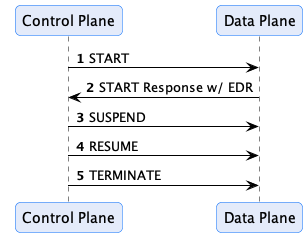
When a transfer process is requested, the consumer control plane selects a data plane and sends it a prepare message.
The provider control plane, once it accepts the request, selects a data plane and sends it a start message. A data plane
answers with the data address of the transfer when there is one: for a pull transfer, the provider data plane returns
the endpoint (and the credentials, if needed) at which the consumer gets the data; for a push transfer, the consumer data
plane returns the destination the provider pushes the data to. The control planes don’t create or interpret data
addresses, they pass them to the counter-party through the Dataspace Protocol, and the consumer control plane hands the
provider’s data address to its data plane with a started message.
A data plane can also answer asynchronously, and report the outcome later through the control plane’s Signaling API
(prepared, started). The control plane may send additional signals, such as SUSPEND and RESUME, or TERMINATE, in
response to events. For example, the control plane policy monitor could send a TERMINATE message if a policy violation
is encountered.
A signal that can’t be delivered (timeout, connection error), or that the data plane answers with a 5xx, is sent again
by the transfer process state machine, with the delays and the limit of edc.transfer.send.retry.*. A signal the data
plane rejects with a 4xx fails the transfer process. A data plane that needs long to prepare or start a data flow should
answer asynchronously: when the response to prepare or start is lost, e.g. because it takes longer than
edc.http.client.timeout.read (30 s), the signal is sent again, and the data plane rejects it for the data flow it
already created (see State Machines Known Limitations).
Securing the Signaling API
The data plane notifies the control plane of the progress of a transfer (prepared, started, completed, errored) by
calling the Signaling API of the control plane, which is served on its own port and path (web.http.signaling.port,
default 8182, and web.http.signaling.path, default /api/signaling). How these calls are authenticated depends
on the authorization profile a data plane provides when it registers:
- With an authorization profile (e.g.
oauth2_client_credentials or oauth2_token_exchange), the control plane
authenticates every call and checks that it comes from the data plane that handles the transfer. - Without an authorization profile, the calls are not authenticated: any client that can reach the Signaling API
and knows the id of a transfer process can change its state. This fits a deployment in which the control plane and
its data planes run in the same trusted network. The control plane logs a warning when such a data plane registers.
Expose the Signaling API only on the internal network. Register the data planes with an authorization profile when the
Signaling API can be reached from outside that network, or when the data planes of several participant contexts share
it, as in a multi-tenant deployment.
1.5 - Identity Hub
Identity Hub (IH) manages organization identity resources such as credentials for a dataspace participant. It is designed
for machine-to-machine interactions and does not manage personal verifiable credentials. Identity Hub implements the
Decentralized Claims Protocol (DCP) and is
based on key decentralized identity standards, including W3C DIDs, the
W3C did:web Method, and the W3C Verifiable Credentials Data Model
v1.1 and v2.0 specifications, so we
recommend familiarizing yourself with those technologies first.
One question that frequently comes up is whether Identity Hub supports OpenID for Verifiable Credentials (OID4VC). The short answer is No. That’s because OID4VC mandates human (end-user) interactions, while Identity Hub is designed for machine-to-machine interactions where humans are not in the loop. Identity Hub is built on many of the same decentralized identity standards as OID4VC but implements DCP, a protocol specifically designed for non-human flows.
Identity Hub securely stores and manages W3C Verifiable Credentials, including handling presentation and issuance. But Identity Hub is more than an enterprise “wallet” since it handles key material and DID documents. Identity Hub manages the following identity resources:
- Verifiable Credentials. Requesting, receiving, renewing and managing issued credentials and generating Verifiable Presentations (VPs).
- Key Pairs. Generating, rotating, and revoking signing keys.
- DID Documents. Generating and publishing DID documents.
It also embeds a Secure Token Service (STS) that issues the self-issued tokens of its participants.
The EDC MVD Project provides a full test dataspace setup with Identity Hub. It’s an excellent tool to experiment with Identity Hub and decentralized identity technologies.
As we will see, Identity Hub can be deployed to diverse topologies, from embedded in a small footprint edge connector to an organization-wide clustered system. Before getting into these details, let’s review the role of Identity Hub.
Identities and Credentials in a Dataspace: The Role of Identity Hub
Note this section assumes a solid understanding of security protocols, DIDs, verifiable credentials, and modern cryptography concepts.
Identity Hub is built on the Decentralized Claims Protocol (DCP). This protocol overlays the Dataspace Protocol (DSP) by adding security and trust based on a decentralized identity model. To see how a decentralized identity system works, we will contrast it with a centralized approach.
Protocols such as traditional OAuth2 grants adopt a centralized model where a single identity provider or set of federated providers issue tokens on behalf of a party. Data consumers request a token from an identity provider, which, in turn, generates and signs one along with a set of claims. The data consumer passes the signed token to the data provider, which verifies the token using public key material from the identity provider:

The centralized model is problematic for many dataspaces:
- It is prone to network outages. If the identity provider goes down, the entire dataspace is rendered inoperable. Using federated providers only partially mitigates this risk while increasing complexity since large sections of a dataspace will still be subject to outage.
- It does not preserve privacy. Since an identity provider issues and verifies tokens, it is privy to communications between data consumers and providers. While the provider may not know the content of the communications, it is aware of who is communicating with whom.
- Participants are not in control of their identity and credentials. The identity provider creates identity tokens and manages credentials, not the actual dataspace participants.
Identity Hub and the Decentralized Claims Protocol are designed to address these limitations by introducing a model where there is no single point of failure, privacy is maintained, and dataspace participants control their identities and credentials. This approach is termed decentralized identity and builds on foundational standards from the W3C and Decentralized Identity Foundation.
The Presentation Flow
To understand the role of Identity Hub in a dataspace that uses a decentralized identity system, let’s start with a basic example. A consumer wants to access data from a provider that requires proof the consumer is certified by a third-party auditor. The certification proof is a W3C Verifiable Credential issued by the auditor. For now, we’ll assume the consumer’s Identity Hub already manages the VC (issuance will be described later).
When the consumer’s control plane makes a contract negotiation request to the provider, it must include a declaration of which participant it is associated with (the participant ID) and a way for the provider to access the required certification VC. From the provider’s perspective, it needs a mechanism to verify the consumer control plane is operating on behalf of the participant and that the VC is valid. Once this is done, the provider can trust the consumer control plane and grant it access to the data by issuing a contract agreement.
Instead of obtaining a token from a third-party identity provider, DCP mandates self-issued tokens. Self-issued tokens are generated and signed by the requesting party, which in the current example is the data consumer. As we will see, these self-issued tokens identify the data consumer and include a way for the provider to resolve the consumer’s credentials. This solves the issues of centralized identity systems highlighted above. By removing the central identity provider, DCP mitigates the risk of a network outage. Privacy is preserved since all communication is between the data consumer and the data provider. Finally, dataspace members remain in control of their identities and credentials.
Let’s look at how this works in practice. Identity and claims are transmitted as part of the transport header in DSP messages. The HTTP bindings for DSP do this using an Authorization token. DCP further specifies the header contents to be a self-signed JWT. The JWT sub claim contains the sender’s Web DID, and the JWT is signed with a public key contained in the associated DID document (as a verification method). The data provider verifies the sending control plane’s identity by resolving the DID document and checking the signed JWT against the public key.
This step only proves that the requesting control plane is operating on behalf of a participant. However, the control plane cannot yet be trusted since it must present the VC issued by the third-party auditor. DCP also specifies the JWT contains an access token in the token claim. The data provider uses the access token to query the data consumer’s Identity Hub for a Verifiable Presentation with one or more required credentials. It obtains the endpoint of the consumer’s Identity Hub from a service entry of type CredentialService in the resolved DID document. At that point, the provider connector can query the Identity Hub using the access token to obtain a Verifiable Presentation containing the required VC:
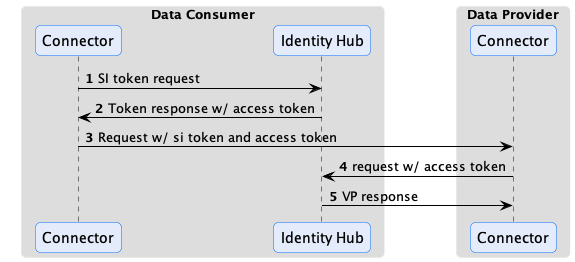
Once the VP is obtained, the provider can verify the VC to establish trust with the consumer control plane.
Why not just include the VP in the token or another HTTP header and avoid the call to Identity Hub? There’s a practical reason: VPs often exceed the header size limit imposed by HTTP infrastructure such as proxies. DSP and DCP could have devised the concept of a message envelope (remember WS-* and SOAP?) but chose not to because it ties credentials to outbound client requests. To see why this is limiting, consider the scenario where a consumer requests access to an ongoing data stream. The provider control plane may set up a policy monitor to periodically check the consumer’s credentials while the stream is active. In the DCP model, the policy monitor can query the consumer’s Identity Hub using the mechanism we described without the flow being initiated by the consumer.
Verifiable Presentation Generation
When the data provider issues a presentation request, the consumer Identity Hub generates a Verifiable Presentation based on the query received in the request. DCP defines two ways to specify a query: using a list of string-based scopes or a DIF Presentation Exchange presentation definition. Identity Hub supports scopes only: a query with a presentation definition is answered with 501 Not Implemented.
By default, a scope selects credentials by type or by id:
org.eclipse.dspace.dcp.vc.type:<Type>:read (or :*, :all) selects the credentials of type <Type>. A type of the form
<context>#<Type> also requires the credential’s @context to contain <context>;org.eclipse.dspace.dcp.vc.id:<credentialId> selects the credential with that id.
{
  "@context": [
    "https://w3id.org/dspace-dcp/v1.0/dcp.jsonld"
  ],
  "@type": "PresentationQueryMessage",
  "scope": ["org.eclipse.dspace.dcp.vc.type:AuditCertificationCredential:read"]
}
Identity Hub will process this as a request for the AuditCertificationCredential type. If the access token submitted along with the request permits the AuditCertificationCredential, Identity Hub will generate a Verifiable Presentation containing the AuditCertificationCredential. The generated VP will contain multiple credentials if more than one scope is present. Revoked, expired (including superseded) and erroneous credentials are never presented.
The mapping from scopes to credentials can be customized:
Discriminator mappings replace an alias used in scopes by the actual credential type, e.g. so that a scope with
Membership selects MembershipCredential: in the configuration (edc.identityhub.discriminator.<name>.alias,
edc.identityhub.discriminator.<name>.value), valid for every participant, or per participant with
POST /v1/participants/{participantContextId}/credentials/discriminator.
Scope mappings map scopes matching a regular expression to a query criterion, with the capture groups ($1,
${1}) of the expression. Scopes that no mapping matches are handled by the default format:
edc.identityhub.scope.membership.pattern=org\\.eclipse\\.custom\\.vc\\.type:(.+):(read|\\*|all)
edc.identityhub.scope.membership.leftoperand=verifiableCredential.credential.type
edc.identityhub.scope.membership.operator=contains
edc.identityhub.scope.membership.rightoperand=$1
An extension can replace the mapping entirely with its own ScopeToCriterionTransformer.
Serving several dataspaces
An Identity Hub that holds the credentials of a participant in several dataspaces must present only the credentials of
the dataspace a verifier asks in. Dataspaces often use the same credential types: if the Aurora and the Borealis
dataspaces both issue a MembershipCredential, the scope org.eclipse.dspace.dcp.vc.type:MembershipCredential:read
selects both. The scopes a verifier requests are defined by its dataspace (in EDC, the
DCP scopes of a dataspace profile), so each
dataspace has to request scopes that tell its credentials apart, in one of these ways:
Qualify the type with a JSON-LD context. If the credentials of each dataspace have a context of their own, a
scope of the form org.eclipse.dspace.dcp.vc.type:https://w3id.org/aurora/credentials/v1#MembershipCredential:read
selects only the credentials that have both the type and the context. No configuration of the Identity Hub is needed.
Use an alias for the qualified type. The dataspace requests a short scope like
org.eclipse.dspace.dcp.vc.type:AuroraMembership:read, and the Identity Hub resolves the alias with a discriminator
mapping to https://w3id.org/aurora/credentials/v1#MembershipCredential:
edc.identityhub.discriminator.aurora.alias=AuroraMembership
edc.identityhub.discriminator.aurora.value=https://w3id.org/aurora/credentials/v1#MembershipCredential
A participant’s own alias, set through the Identity API, takes precedence over a configured one. It is kept in
memory only, so it has to be set again after a restart.
Select the credentials by issuer. If the credentials of the dataspaces only differ by their issuer, the dataspace
requests a discriminator of its own, e.g. org.eclipse.dspace.dcp.vc.type:aurora.MembershipCredential:read, and
scope mappings select the type and the issuer. All the mappings that match a scope apply together, so two mappings
with the same pattern select the credentials that have the type and were issued by the dataspace’s issuer:
edc.identityhub.scope.aurora-type.pattern=org\\.eclipse\\.dspace\\.dcp\\.vc\\.type:aurora\\.(.+):read
edc.identityhub.scope.aurora-type.leftoperand=verifiableCredential.credential.type
edc.identityhub.scope.aurora-type.operator=contains
edc.identityhub.scope.aurora-type.rightoperand=$1
edc.identityhub.scope.aurora-issuer.pattern=org\\.eclipse\\.dspace\\.dcp\\.vc\\.type:aurora\\.(.+):read
edc.identityhub.scope.aurora-issuer.leftoperand=issuerId
edc.identityhub.scope.aurora-issuer.operator==
edc.identityhub.scope.aurora-issuer.rightoperand=did:web:issuer.aurora.example
The pattern must match only the dataspace’s own discriminators, as a matched scope is no longer resolved by the
default format. A dataspace can also use a scope alias of its own, e.g. org.aurora.vc.type:MembershipCredential:read,
with the same mappings on that alias.
Only the first way works with any wallet that resolves scopes by credential type and context. The discriminators of the
other two are resolved by the configuration of the Identity Hub: a wallet of another implementation would look for a
credential of type AuroraMembership, for instance.
How scopes are resolved:
- In the default format, a scope of the
org.eclipse.dspace.dcp.vc.type alias ends with the operation read (or *,
all), as in all the examples above. A scope without it, such as org.eclipse.dspace.dcp.vc.type:MembershipCredential,
is not resolved unless a scope mapping matches it. - The criteria of one scope apply together, and the credentials of several scopes are presented together.
- A scope that a scope mapping matches is resolved by the mappings only, not by the default format. Scope mappings apply
to all the participant contexts of an Identity Hub.
- The scopes of the verifier’s access token are resolved the same way: a credential is presented only if the token’s
scopes select it as well.
contains checks an element of a list, such as verifiableCredential.credential.type or
verifiableCredential.credential.@context. For single values like issuerId, use = or in.
The presentation format follows the format of the credentials:
| Credential format | Presentation |
|---|
VC1_0_JWT | a JWT presentation |
VC1_0_LD | a Linked-Data proof presentation (JsonWebSignature2020) |
VC2_0_JOSE | a JWT presentation (vp+jwt) wrapped in an EnvelopedVerifiablePresentation, or the plain presentation JWT with edc.iam.presentation.vcdm20.plain.enabled=true |
Presentations are valid for edc.iam.presentation.validity seconds (default 60). JWT-based formats are recommended:
in testing, they performed an order of magnitude better than Linked-Data proofs.
Linked-Data proof presentations are only accepted by connectors that include the decentralized-claims-ldp extension,
which is not part of the DCP BOMs (see Using Bills-of-Material).
Issuance Flow
W3C Verifiable Credentials enable a holder to present claims directly to another party without the involvement or knowledge of the credential issuer. This is essential to preserve privacy and mitigate against network outages in a dataspace. DCP defines the way Identity Hub obtains credentials from an issuer, such as the EDC IssuerService. In DCP, issuance is an asynchronous process. The Identity Hub sends a request to the issuer endpoint, including a self-signed identity token. Similar to the presentation flow described above, the identity token contains an access token the issuer can use to send the VC to the requester’s Identity Hub. This is done asynchronously. The VC could be issued immediately or after an approval process:
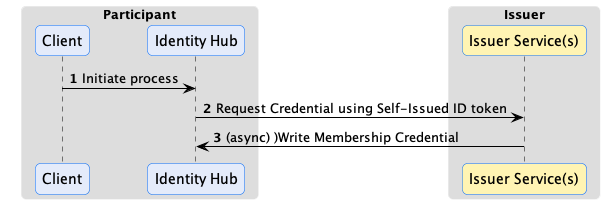
Issuance can use the same claims verification as the presentation flow. For example, the auditor issuer in the previous example may require the presentation of a dataspace membership credential issued by another organization. In this case, the issuer would use the access token sent in the outbound request to query for the required credential from the Identity Hub before issuing its VC.
Requesting credentials
A participant requests credentials through the Identity API:
POST /v1/participants/{participantContextId}/credentials/request
{
  "issuerDid": "did:web:issuer.example.com",
  "credentials": [
    { "id": "membership-credential-def", "type": "MembershipCredential", "format": "VC1_0_JWT" }
  ]
}
id is the id of the credential object in the issuer’s metadata, and format the format the issuer offers it in. The
answer is 201 Created, with the request’s status URL in the Location header,
/v1/participants/{participantContextId}/credentials/request/{holderPid}: GET on it returns the status of the
request. Identity Hub assigns the holderPid itself.
A credential request goes through the states CREATED, REQUESTING (sending the request to the issuer, retried on
failures), REQUESTED (accepted by the issuer, waiting for the delivery), and ends in ISSUED or ERROR. While a
request is REQUESTED, Identity Hub polls the issuer’s request status API, with an interval that grows from
edc.iam.credential.request.status.poll.interval (30 s) to edc.iam.credential.request.status.poll.max.interval
(15 min), so that it learns about rejections. It gives up on a request after
edc.iam.credential.request.untracked.timeout (6 h) if the issuer never acknowledged it with an issuance process id, or
after edc.iam.credential.request.tracked.timeout (24 h) otherwise.
Receiving credentials
The issuer delivers the credentials to the holder’s Storage API. Identity Hub only stores a delivered credential if it
matches an open request of the participant to that issuer, its proof verifies against a key of the issuer’s DID, it is not
expired, its type and format were requested, and its subject is the holder’s DID. Credentials in a format whose proof
can’t be verified, e.g. with an embedded Linked-Data proof, are stored with a warning, or rejected with
edc.iam.credential.delivery.reject.unverified=true.
A delivered credential supersedes the earlier credentials of the same issuer, credential object and format, which are
then set to EXPIRED and no longer presented.
Credential offers
An issuer can tell a holder that a credential is ready, e.g. after it rotated its keys, with a credential offer. Identity
Hub stores the offer and requests the offered credentials automatically if the issuer is trusted: listed in
edc.iam.credential.offer.trusted.issuers (comma-separated DIDs), or one the participant already holds credentials from.
Offers of other issuers stay RECEIVED for manual handling. If the setting is not set, offers of every issuer trigger a
request, and a warning is logged: set it in production.
Renewal
A watchdog checks the stored credentials periodically (edc.iam.credential.status.check.period, default 60 s, 0
disables it): it updates their status from their status list (revoked, suspended, expired, not yet valid), and requests
a new credential from the same issuer for the credentials that expire within edc.iam.credential.renewal.graceperiod
(default 7 days). The new credential supersedes the old one when it is delivered; failed renewals are retried with a
growing delay, up to 6 hours.
Using the Identity Hub
Identity Hub is built using the EDC modularity and extensibility system. It relies on core EDC features, including
cryptographic primitives, Json-Ld processing, and DID resolution. This architecture affords a great deal of deployment flexibility. Let’s break down the different supported deployment scenarios.

Organizational Component
Many organizations prefer to manage identity resources centrally, as strict security and control can be enforced over these sensitive resources. Identity Hub can be deployed as a centrally managed component in an organization that other EDC components use. In this scenario, Identity Hub will manage all identity resources for an organization for all dataspaces it participates in. For example, If an organization is a member of two dataspaces, DS1 and DS2, that issue membership credentials, both credentials will be managed by the central deployment. Connectors deployed for DS1 and DS2 will use their respective membership credentials from the central Identity Hub. See Serving several dataspaces for how each dataspace gets only its own credentials.
Per Dataspace Component
Some organizations may prefer to manage their identity resources at the dataspace level. For example, a multinational may participate in multiple regional dataspaces. Each dataspace may be geographically restricted, requiring all data and resources to be regionally fenced. In this case, an Identity Hub can be deployed for each regional dataspace, allowing for separate management and isolation.
Embedded
Identity Hub is designed to scale down for edge-style deployments where footprint and latency are primary concerns. In these scenarios, Identity Hub can be deployed embedded in the same runtime process as other connector components, providing a simple, fast, and efficient deployment unit.
Distributions
Identity Hub is assembled from the BOMs identityhub-bom (Identity API secured with API keys) or identityhub-oauth2-bom
(Identity API secured with OAuth2 tokens), both with the embedded STS, plus identityhub-feature-sql-bom for PostgreSQL
persistence.
Identity Hub APIs and Resources
Identity Hub serves its APIs on separate API contexts:
| API | Context | Default port and path | Purpose |
|---|
| Identity API | identity | 15151, /api/identity | management of participant contexts, keys, DIDs and credentials |
| Credentials API | credentials | 13131, /api/credentials | DCP: presentation queries, credential storage, credential offers |
| STS API | sts | 9292, /api/sts | token endpoint of the embedded STS |
| DID | did | 10100, / | serves the published did:web documents |
The DCP API implements the wire protocol defined by the Decentralized Claims Protocol Specification:
POST /v1/participants/{participantContextId}/presentations/query, …/credentials (storage) and …/offers. It is
called by other participants and issuers and must be reachable by them; its request bodies are limited to
web.http.credentials.maxbodysize (5 MiB). End-users generally do not interact with it.
The Identity API is the primary way operators and third-party applications interact with the Identity Hub. Since the API provides access to highly sensitive resources, it’s essential to secure it. Above all, the API should never be exposed over a public network such as the Internet.
Authentication and authorization
The Identity API (version v1, e.g. /api/identity/v1/participants) authenticates its callers in one of two ways:
- API keys (
identityhub-bom): the caller sends the API key of a participant context in the X-Api-Key header. A
participant context’s API key is generated when it is created, stored in the vault (alias apiKeyAlias, default
<participantContextId>-apikey) and returned once in the response; POST /v1/participants/{participantContextId}/token
generates a new one. - OAuth2 tokens (
identityhub-oauth2-bom): the caller sends a bearer token of an authorization server, validated
against edc.iam.oauth2.jwks.url, and against edc.iam.oauth2.issuer and edc.iam.oauth2.audience if set (a
warning is logged otherwise).
Access is granted by scopes, stored with the participant context (API keys) or carried by the token (OAuth2):
| Scope | Grants |
|---|
identity-api:participants:read, :write | the participant context itself, its API key and STS secret |
identity-api:keypairs:read, :write | key pairs |
identity-api:dids:read, :write | DID documents |
identity-api:credentials:read, :write | credentials, credential requests, discriminator mappings |
identity-api:read, identity-api:write | all of the above |
identity-api:admin | all of the above for every participant context, plus creating participant contexts, activating and deactivating them, setting their scopes, and the cross-participant listings |
write includes read, and admin includes both. Without the admin scope, a caller only reaches the resources of its
own participant context. A participant context with identity-api:admin acts as the operator’s super-user. Participant
contexts get identity-api:read and identity-api:write (and the IssuerService equivalents) when they are created
without scopes; PUT /v1/participants/{participantContextId}/scopes changes them.
The Participant Context
The Identity API includes CRUD operations for managing participant contexts. This API requires elevated administrative privileges.
A participant context is a unit of control for resources in Identity Hub. A participant context is tied to a dataspace participant identity. Most of the time, an organization will have a single identity and use the same Web DID in multiple dataspaces. Its Identity Hub, therefore, will be configured with exactly one participant context to manage identity and credential resources.
If an organization uses different identities in multiple dataspaces, its Identity Hub will contain one participant context per identity. All resources are contained and accessed through a participant context. The participant context acts as both a scope and security boundary. Access control for public client API endpoints is scoped to a specific participant context. For example, the JWT access token sent to data providers described above is associated with a specific context and may not be used to access resources in another context. Furthermore, the lifecycle of participant resources is bound to their containing context; if a participant context is removed, the operation will cascade to all contained resources.
A participant context is created with POST /v1/participants and a participant manifest:
{
  "participantContextId": "acme",
  "did": "did:web:acme.example.com",
  "active": true,
  "keys": [
    {
      "keyId": "did:web:acme.example.com#key-1",
      "privateKeyAlias": "acme-key-1",
      "keyGeneratorParams": { "algorithm": "EdDSA", "curve": "Ed25519" },
      "usage": ["sign_credentials", "sign_presentation", "sign_token"]
    }
  ],
  "serviceEndpoints": [
    { "id": "credential-service", "type": "CredentialService", "serviceEndpoint": "https://ih.acme.example.com/api/credentials/v1/participants/acme" }
  ]
}
Optional fields: scopes (see above), apiKeyAlias, provisionApiKey and provisionStsAccount (both true by
default; set them to false when the API key or the STS account are managed elsewhere), and additionalProperties,
which are stored as private configuration entries of the participant context. The response returns the generated
apiKey, and the clientId and clientSecret of the participant’s STS account.
A participant context can be in one of three states:
CREATED - The participant context is initialized but not operational. Resources may be added and updated, but they are not publicly accessible.ACTIVATED - The participant context is operational, and resources are publicly accessible.DEACTIVATED - The participant context is not operational. Its DID document is unpublished, its API key is rejected,
and its DCP endpoints and STS tokens are refused. Resources may be added and updated by an admin.
The participant context can transition from CREATED to ACTIVATED and between the ACTIVATED and DEACTIVATED states.
It’s useful to note that Identity Hub relies on the core EDC eventing system to enable custom extensions. Services may register to receive participant context events, for example, when a context is created or deleted, to implement custom workflows.
DID Documents
When a participant context is created, it is associated with a DID. After a participant context is activated, a corresponding DID document will be generated and published. Currently, Identity Hub only supports Web DIDs, so publishing the document will make it available at the URL specified by the DID. Identity Hub can support other DID methods through custom extensions.
In addition, custom publishers can be created by implementing the DidDocumentPublisher interface and adding it via an extension to the Identity Hub runtime. For example, a publisher could deploy Web DID documents to a web server. Identity Hub includes an extension for locally publishing Web DID documents, served on the did API context at /<path>, /<path>/did.json and /<path>/.well-known/did.json. Note that this extension is not designed to handle high-volume requests, as DID documents are served directly from storage and are not cached. For these scenarios, publishing to a web server is recommended.
The verification method of each active key pair is listed under the verification relationships of its usage:
assertionMethod for keys that sign credentials, authentication for keys that sign presentations, and
capabilityInvocation for keys that sign tokens.
Key Pair Resources
Key pair resources are used to sign and verify credentials, presentations, and other resources managed by Identity Hub. The public and private keys associated with a key pair resource can be generated by Identity Hub or provided when the resource is created. Identity Hub persists all private keys in a secure store and supports using Hashicorp Vault as the store.
A key pair has a usage: sign_credentials, sign_presentation and/or sign_token (all three by default). Generated
keys use keyGeneratorParams: EdDSA with Ed25519 (the default), EC with secp256r1, secp384r1 or secp521r1,
or RSA with 2048, 3072 or 4096 bits. Key pairs are managed with PUT /v1/participants/{participantContextId}/keypairs
and POST …/keypairs/{keyPairId}/activate, …/rotate and …/revoke.
A Key pair resource can be in one of the following states:
CREATEDACTIVATEDROTATEDREVOKED
Let’s walk through these lifecycle states.
Key Activation
When a key pair is created, it is not yet used to sign resources. When a key pair is activated, Identity Hub makes the public key material available as a verification method in the participant context’s DID document so that other parties can verify resources such as verifiable presentations signed by the private key. This is done by publishing an updated DID document for the participant context during the activation step.
Key Rotation
For security reasons, key pair resources should be periodically rotated and replaced by new ones. Identity Hub supports a staged rotation process to avoid service disruptions and ensure that existing signed resources can still be validated for a specified period.
For example, let’s assume private key A is used to sign Credential CA and public key A’ is used to verify CA. If the key pair A-A’ is immediately revoked, CA can no longer be validated, which may cause a service disruption. Key rotation can be used to avoid this. When the key pair A-A’ is rotated, a new key pair, B-B’, is created and used to sign resources. The private key A is immediately destroyed. A’, however, will remain as a verification method in the DID document associated with the participant context. CA validation will continue to work. When CA and all other resources signed by A expires, A’ can safely be removed from the DID document.
It’s important to perform key rotation periodically to enhance overall system security. This implies that signed resources should have a validity period less than the rotation period of the key used to sign them and should also be reissued on a frequent basis.
Key Revocation
If a private key is compromised, it must be immediately revoked. Revocation involves removing the verification method entry in the DID document and publishing the updated version. This will invalidate all resources signed with the revoked key pair.
Using Vault’s Transit Engine for signing
Instead of loading private key material into application memory IdentityHub can delegate sensitive signing operations to Vault’s Transit engine. In this setup, Identity Hub generates key pairs in Vault and never has access to the private key material. When a signing operation is required, Identity Hub sends the data to be signed along with the key reference to Vault, which performs the signing and returns the signature. This approach enhances security by eliminating the risk of private key exposure in application memory.
The module identity-hub-keypairs-transit is not part of the BOMs: add it, with the HashiCorp Vault extension, to use
it. Keys can’t be imported in this mode, only generated in Vault. Find details on how to configure Identity Hub to use Vault’s Transit engine in the Vault Transit documentation.
Verifiable Credentials
Identity Hub stores the credentials it receives through the issuance flow. Credentials can also be
added, updated and removed through the Identity API (/v1/participants/{participantContextId}/credentials), e.g. to
import credentials obtained by other means.
A stored credential has a status: ISSUED, REVOKED, SUSPENDED, EXPIRED, NOT_YET_VALID or ERROR (its status
couldn’t be checked), and REQUESTED while it is being renewed. Credentials that are REVOKED, EXPIRED or in
ERROR are not presented.
Secure Token Service
Identity Hub embeds a Secure Token Service (STS) that issues the self-issued tokens a participant’s connector attaches to
its DSP requests, signed with the participant’s token signing key. Each participant context has an STS account (client
id: the participant’s DID; secret: generated at creation and stored in the vault), which the connector uses with the
OAuth2 client credentials grant:
POST /api/sts/token
Content-Type: application/x-www-form-urlencoded

grant_type=client_credentials&client_id=did:web:acme.example.com&client_secret=...&audience=did:web:provider.example.com&bearer_access_scope=org.eclipse.dspace.dcp.vc.type:MembershipCredential:read
The tokens are valid for edc.iam.sts.token.expiration minutes (default 5). The STS API listens on web.http.sts.port
and web.http.sts.path, and on the interface web.http.sts.host if set. POST /v1/participants/{participantContextId}/sts/secret
replaces the client secret and returns the new one. On the connector side, the participant is configured with the STS
type oauth and the token URL, client id and secret alias of its account (see
Participant Contexts).
Security settings
| Setting | Default | Description |
|---|
edc.iam.accesstoken.jti.validation | false | Rejects reused self-issued and access tokens (jti replay check); expired entries are deleted every edc.sql.store.jti.cleanup.period seconds (60) |
edc.iam.accesstoken.publickey.fallback.enabled | false | Also verifies access tokens with keys that are not key pairs of the participant, from the vault or edc.iam.publickeys. Not scoped to the participant: leave it off unless needed for migration |
edc.iam.issuer.endpoint.restrict | false | Calls to issuer endpoints (from their DID documents) must use HTTPS and public addresses, and don’t follow redirects. Hosts listed in edc.iam.issuer.endpoint.allowed.hosts are exempted |
web.http.credentials.maxbodysize | 5 MiB | Maximum body size of the DCP API requests (413 above) |
Resource Operations
Identity Hub implements transactional guarantees when resource operations are performed through the Identity API. The purpose of transactional behavior is to ensure the Identity Hub maintains a consistent state. This section catalogs those operations and guarantees.
Participant Context Operations
Create
When a participant context is created, the following sequence is performed:
- A transaction is opened.
- The participant context and its configuration are stored.
- An API key is generated to access the context via the Identity API (unless
provisionApiKey is false). - An STS account and its client secret are created (unless
provisionStsAccount is false). - A DID document is created with the service endpoints of the manifest, and the key pairs are created and added to it.
- The DID document is published if the participant context is set to active when created.
- The transaction commits on success, or a rollback is performed, which also removes the secrets stored in the vault.
Delete
When a participant context is deleted, the following sequence is performed:
- A transaction is opened.
- The participant context is deactivated, and its DID document is unpublished.
- The DID document resource is removed from storage, and the key pairs are revoked and removed.
- The STS account and its secret, the participant’s credentials, credential requests, offers and discriminator mappings are removed.
- The participant context is removed from storage.
- The transaction commits on success, or a rollback is performed.
- The API key and the private keys associated with the context are removed after the transaction is committed since Vaults are not transactional resources.
If destroying private keys fails, manual intervention will be required to clean them up. Note that the IH will be in a consistent state.
Activate
A participant context cannot be activated without a default key pair.
When a participant context is activated, the following sequence is performed:
- A transaction is opened.
- The context is updated in storage.
- The DID document is published.
- The transaction commits on success, or a rollback is performed.
Deactivate
When a participant context is deactivated, the following sequence is performed:
- A transaction is opened.
- The context is updated in storage.
- The DID document is unpublished.
- The transaction commits on success, or a rollback is performed.
There is a force option that will commit the transaction if the DID document unpublish operation is not successful.
Key Pair Operations
Activate
This operation can only be performed when the participant context is in the CREATED or ACTIVATED state.
When a key pair is activated, the following sequence is performed:
- A transaction is opened.
- The new key pair is added to storage.
- If the DID document resource is in the
PUBLISHED state, the DID document is published with all verification methods for public keys in the ACTIVATED state. - The transaction commits on success, or a rollback is performed.
If the transaction commit fails, the DID document must be manually repaired. This can be done by republishing the DID document.
Rotate
When a key pair is rotated and a new one is added, the following sequence is performed:
- A transaction is opened.
- The new key pair is added to storage.
- If the DID document resource is in the
PUBLISHED state, the DID document is published with a verification method for the new public key. - The transaction commits on success, or a rollback is performed.
- The old private key is destroyed (note, not the old public key) after the transaction is committed since Vaults are not transactional resources.
Revoke
When a key pair is revoked, the following sequence is performed:
- A transaction is opened.
- The key pair state is updated.
- If the DID document resource is in the
PUBLISHED state, the DID document is published with the verification method of the revoked public key removed. - The transaction commits on success, or a rollback is performed.
1.6 - Issuer Service
Details how the EDC IssuerService issues, delivers and revokes Verifiable Credentials with the Decentralized Claims Protocol.
The IssuerService (IS) is a component of the Eclipse Dataspace Components (EDC) that is responsible for issuing
verifiable credentials to entities within a data ecosystem using the Decentralized Claims Protocol
(DCP).
Furthermore, the IssuerService shares a lot of its properties with the Identity Hub (it is
built from the same repository, manages participant contexts, key pairs and DID documents the same way, and embeds the
same STS), so all the introductory comments there hold true here as well.
Prospective holders of Verifiable Credentials can request credentials from the IssuerService by making a
CredentialRequest via its Issuance API, and the IssuerService will asynchronously process the request and send the
Verifiable Credential to the holder’s Storage API.
Basic Concepts
Holders operate a DCP-compliant Storage API and can receive Verifiable Credentials. In practice, holders host a DID
document that contains a CredentialService endpoint entry, so that the IssuerService can resolve the holder’s Storage
API endpoint:
{
  "@context": "https://www.w3.org/ns/did/v1",
  "id": "did:example:holder123",
  "service": [
    {
      "id": "did:example:holder123#credential-storage",
      "type": "CredentialService",
      "serviceEndpoint": "https://holder.example.com/credentials"
    }
  ]
}
When requesting credentials, holders attach their DID to the CredentialRequest, so that the IssuerService can look up
the holder’s Storage API endpoint and send the freshly minted Verifiable Credential there. Issuers may require
out-of-band information about the requester, such as government credentials or some other third party approval. Please
refer to the Configuring the IssuerService section for more information about this.
Credential requests may take some time to process, so the issuance process is asynchronous in nature. Once the
credentials are ready, the IssuerService sends them to the holder’s Storage API.
While the IssuerService does keep track of all credentials it has ever issued, it never stores the actual signed
credentials, only the unsigned credential data (the claims) and some metadata about the issuance process.
Issuers may also inform the holder that a new or updated credential is ready for pickup by sending a Credential Offer
message. For example, issuers may rotate their signing keys, hence requiring holders to obtain new credentials.
Configuring the IssuerService
DCP profile
The DCP profile of the IssuerService, edc.issuer.dcp.profile, determines the format of the credentials it issues and
the type of their status lists:
| Profile | Credential format | Status list |
|---|
vc20-bssl/jwt (default) | VC2_0_JOSE: W3C VCDM 2.0, secured with JOSE | BitstringStatusList |
vc11-sl2021/jwt | VC1_0_JWT: W3C VCDM 1.1 as JWT | StatusList2021 |
The format of every credential definition created through the Administration API is the profile’s format. The runtime
doesn’t start with an unknown profile.
Credential definitions
Verifiable Credentials are just JSON documents that follow a certain basic schema. However, that schema does not define
the shape of the credentialSubject claim.
So how does the IssuerService know what data to put into the credentialSubject of the Verifiable Credential it issues?
First, the IssuerService requires a CredentialDefinition object that describes the shape of the credential by mapping
input variables onto output variables:
{
  "id": "demo-credential-def-2",
  "credentialType": "MembershipCredential",
  "jsonSchemaUrl": "https://example.com/schema/demo-credential.json",
  "validity": 31536000,
  "attestations": ["db-attestation-def-1"],
  "mappings": [
    {
      "input": "membership_type",
      "output": "credentialSubject.membershipType",
      "required": true
    },
    {
      "input": "membership_start_date",
      "output": "credentialSubject.membershipStartDate",
      "required": true
    }
  ],
  "rules": [
    {
      "type": "expression",
      "configuration": { "claim": "membership_type", "operator": "eq", "value": "full" }
    }
  ],
  "additionalContext": [],
  "privateProperties": {}
}
credentialType: the type of the issued credential.jsonSchema or jsonSchemaUrl: the schema of the credential (at least one of them).validity: how long issued credentials are valid, in seconds.attestations: the ids of the attestation definitions that provide the claims (see below).mappings: the claims (e.g. membership_type) mapped onto output fields in the Verifiable Credential (e.g.
credentialSubject.membershipType). Mappings can’t write the properties the IssuerService sets itself: @context,
id, type, issuer, issuanceDate, validFrom, expirationDate, validUntil, credentialStatus and proof.rules: conditions the claims must meet for the credential to be issued. The expression rule compares a claim
(dot path) with a value using eq, neq, or, for numbers, gt, geq, lt, leq.additionalContext: JSON-LD contexts added to the issued credentials.privateProperties: properties for the operator’s use, never put in the credentials.
For detailed information about configuring the credential claims mapping, please refer to this
document.
Attestations
An attestation definition (id, attestationType, configuration) tells the IssuerService where the claims come
from. Two attestation types are shipped:
holder: the properties of the Holder entity, no configuration.database (in issuerservice-feature-sql-bom): the columns of the row of a database table whose id column matches the
holder’s id. Configuration: dataSourceName (a registered datasource), tableName, idColumn (default holder_id)
and required (default false: a missing row yields no claims instead of an error). The datasource and the table are
checked when the definition is created.
Some dataspaces may require that the prospective holders of Verifiable Credentials be known to the IssuerService in
advance. One example of this is when holders must undergo some kind of onboarding or vetting process before being
allowed to participate in the dataspace. In such cases, there usually are third-party applications, such as onboarding
portals, where holders upload their identification documents, legal paperwork etc., and once the vetting process is
complete, a Holder entity (holderId, did, name, properties) is created in the IssuerService’s internal database
(cf. Administration API).
This enables the IssuerService to link additional data to the holder, which may ultimately end up in the
credentialSubject of the Verifiable Credential. Furthermore, the IssuerService can enforce that only known holders are
allowed to request credentials.
There may, however, be use cases where it is not necessary, or even desirable, to pre-register holders in the
IssuerService. In such cases, the IssuerService can be configured to allow anonymous credential requests, i.e., holders
can simply make a CredentialRequest without being pre-registered in the IssuerService.
To enable that, the configuration value edc.issuance.anonymous.allowed must be set to true. By default, anonymous
credential requests are disabled.
An “anonymous” credential request is one, where the holder is generated on-the-fly based on the DID provided in the
self-issued ID token attached to the CredentialRequest, once the token is verified. To track that, the anonymous flag
is set on the created Holder entity:
{
  "holderId": "holder-123",
  "did": "did:example:holder123",
  "anonymous": true,
  "name": null
}
In systems where both pre-registered and anonymous holders are allowed, all AttestationSource implementations must be able to deal
with both types of holders and should therefore inspect the anonymous flag on the Holder entity.
Generating Verifiable Credentials
When a CredentialRequest is received, the IssuerService performs the following steps to generate a Verifiable
Credential:
- validate the holder’s self-issued ID token: check signature, expiration, audience, etc.
- look up the
Holder entity, create on-the-fly or reject request if anonymous requests are not allowed - look up the
CredentialDefinition referenced in the CredentialRequest - construct and execute each
AttestationSource defined in the CredentialDefinition to gather claims data for the
credentialSubject - evaluate all rules attached to the
CredentialDefinition - return a successful HTTP message to acknowledge receipt of the CredentialRequest, with the id of the issuance process.
A repeated request (same holder request id) is answered with
409 and the existing issuance process.
At this point, the credential request is converted into a so-called IssuanceProcess, in the state APPROVED, but no
credential has been generated nor signed yet. That happens in an asynchronous process in the IssuerService:
APPROVED: generate the Verifiable Credential JSON document based on claim mappings, record it, and record it in the
status list credential (check Credential Revocation for more information);DELIVERING: sign the Verifiable Credential using the Issuer’s private key and deliver it to the holder’s
Storage API. Failed deliveries
are retried with the same credentials;DELIVERED: the holder received the credentials;REJECTING, then ERRORED: the issuance failed for good; the holder is notified that its request was rejected.
The holder can follow its request through the Credential Request Status API, which reports RECEIVED, ISSUED or
REJECTED. The issuance state machine and its retries are configured with the edc.issuer.issuance.state-machine.* and
edc.issuer.issuance.send.* settings (by default up to 80 attempts over about 6 hours).
Credential revocation
Each verifiable credential may contain a credentialStatus field that references a so-called status list credential.
In most cases this is just another Verifiable Credential that contains an encoded bitstring with information about
revoked or suspended credentials. If a credential is marked as revoked or suspended in the status list credential,
verifiers should reject that credential.
When new credentials are issued, the IssuerService adds them to its status list and stores the corresponding index in
that status list in the credentialStatus field of the issued credential. The status list type follows the
DCP profile.
| Setting | Default | Description |
|---|
edc.issuer.statuslist.bitstring.size | 131072 | number of entries of a status list (minimum 131072) |
edc.issuer.statuslist.validity | 1 year | validity of a status list credential, in seconds |
edc.issuer.statuslist.renewal.period | 1 day | how often status list credentials that are about to expire are renewed, in seconds; 0 disables it |
edc.issuer.statuslist.renewal.threshold | 30 days | how long before expiry a status list credential is renewed, in seconds |
Status list credentials are published by the IssuerService itself, on the statuslist API context
(web.http.statuslist.port, default 9999, and web.http.statuslist.path, default /statuslist), at the public URL
edc.statuslist.callback.address. Verifiers fetch them from there, so it must be publicly reachable over HTTPS.
Credentials are revoked with the Administration API (POST …/credentials/{credentialId}/revoke); their status can be read
with GET …/credentials/{credentialId}/status. Suspension and resumption are not implemented yet (501).
Please find detailed information about credential revocation in this document.
Extensibility of the IssuerService
Like all other EDC components, the IssuerService is highly extensible and customizable by leveraging EDC’s extension
system.
The following feature areas are intended to be extensible:
Credential generators
Credential generators are responsible for creating and signing Verifiable Credentials in a specific format. The
IssuerService comes with generators for VC1_0_JWT and VC2_0_JOSE credentials. Other formats such as Linked Data
Proofs, SD-JWT or even COSE can be implemented by creating a custom CredentialGenerator extension.
Status list credential types
BitstringStatusList and StatusList2021 status lists are supported, selected by the DCP profile.
Custom status list credential types can be added by implementing a StatusListManager and contributing it to the DI
container.
Persistence stores
The IssuerService persists its data using EDC’s standard persistence abstraction layer, and it ships with support for
PostgreSQL (issuerservice-feature-sql-bom) as well as an in-memory database for testing and demo purposes.
Adopters can implement custom persistence stores by implementing the relevant *Store interfaces and contributing them
to the DI container.
Attestation sources and factories
Additional attestation types can be added by implementing an AttestationSourceFactory and an AttestationSource, and
registering them for a new attestationType.
IssuerService APIs
Issuance API
Since the IssuerService implements the Decentralized Claims Protocol, it exposes several REST endpoints as defined in
the DCP specification, on the issuance API context (web.http.issuance.port, default 13132, and
web.http.issuance.path, default /api/issuance):
- Credential Request
API: used by
holders to initiate the credential issuance process,
POST /v1/participants/{participantContextId}/credentials. - Issuer Metadata API: exposes
metadata about the IssuerService, such as supported credential types and formats,
GET /v1/participants/{participantContextId}/metadata. - Credential Request Status
API: used
by holders to query the status of their credential requests,
GET /v1/participants/{participantContextId}/requests/{requestId}.
Like the IdentityHub, the IssuerService supports multiple participant contexts (tenants), and each API request is
prefixed with the participant context ID. These endpoints are called by holders and must be reachable by them; their
request bodies are limited to web.http.issuance.maxbodysize (5 MiB).
Administration API
The IssuerService exposes an Administration API (version v1, on the issueradmin API context:
web.http.issueradmin.port, default 15152, and web.http.issueradmin.path, default /api/issuer) that allows
operators to manage credential definitions, holders, issuance processes, etc. All endpoints are bound to a participant
context, under /v1/participants/{participantContextId}:
| Resource | Endpoints | Scopes |
|---|
| Attestation definitions | POST …/attestations, DELETE …/attestations/{id}, POST …/attestations/query | issuer-admin-api:attestations:read, :write |
| Credential definitions | POST, PUT …/credentialdefinitions, GET, DELETE …/credentialdefinitions/{id}, POST …/credentialdefinitions/query | issuer-admin-api:credentialdefinitions:read, :write |
| Credentials | POST …/credentials/query, POST …/credentials/{id}/revoke, GET …/credentials/{id}/status, POST …/credentials/offer (send a credential offer to a holder) | issuer-admin-api:credentials:read, :write |
| Holders | POST, PUT …/holders, GET, DELETE …/holders/{id}, POST …/holders/query | issuer-admin-api:holders:read, :write |
| Issuance processes | GET …/issuanceprocesses/{id}, POST …/issuanceprocesses/query | issuer-admin-api:issuanceprocesses:read |
The Administration API is secured like the Identity API of the Identity Hub: with participant API keys
(issuerservice-bom) or OAuth2 tokens (issuerservice-oauth2-bom), and the scopes above (issuer-admin-api:read,
issuer-admin-api:write for all resources, issuer-admin-api:admin across participant contexts). See
Authentication and authorization. The issuer’s participant
contexts, key pairs and DID documents are managed through the Identity API, which the IssuerService includes.
Please check out the full OpenAPI specification of the IssuerService Administration API.
Deployment Options
As all other EDC components, the IssuerService is composed of a set of Java modules that can be packaged and deployed
in various ways.
The clear recommendation is to deploy the IssuerService as a standalone runtime with its own HSM (vault) and its own
database. The reasons for this are mostly security-related: private keys to sign credentials are extremely sensitive and must be
protected accordingly.
In a similar vein, the IssuerService database contains sensitive information about holders and issued credentials, so it
should not be shared with other components.
It is strongly recommended to deploy the IssuerService in a specially protected environment with strict access controls
and potentially even network isolation from other components.
We also recommend using an individual participant context ID for the IssuerService.
That said, there certainly are situations where this might not be practical or feasible, for example in development or
testing environments or when every credential holder is also a credential issuer.
While we still recommend separating the runtimes, it is possible to co-locate the IssuerService and the IdentityHub (or
even other components) in a single Java process with the same participant context ID being used in both components.
The following table summarizes the different deployment options:
| Runtimes | Participant Context IDs | Database + HSM/Vault | Supported |
|---|
| Co-located | Same | Shared | ✅ |
| Co-located | Different | both | ✅ |
| Separate | Same | Separate | ✅ |
| Separate | Different | both | ✅ |
| Separate | Same | Different | ⚠* |
In all cases where the participant context ID is the same for both the holder and the issuer, the ParticipantContext
object must only be created once.
*) When the IssuerService and the IdentityHub are deployed as separate runtimes, but the same participant context ID is
used for the holder and the issuer, then a custom DidPublisher must be implemented and configured in both
runtimes. This is necessary to ensure that DID documents created by either runtime are not overwritten by the other.
1.7 - Federated Catalog
Covers how publishing and retrieving federated data catalogs works.
The Federated Catalog (FC) provides a scalable solution for metadata discovery in decentralized dataspaces. The FC employs a set of crawlers, that periodically scrape the dataspace requesting the catalog from each participant in a list of participants and consolidates them in a local cache, which provides a unified, searchable view of available data assets across the network.
Instead of requiring participants to query each other directly for catalog information, the FC uses a crawling and caching mechanism. It periodically collects catalog metadata from participant connectors and stores this information locally. By maintaining a cached copy of participant catalogs, the Federated Catalog enables faster and more reliable catalog queries while reducing network load and removing the need for real-time access to all participants during query execution. In this way, the FC effectively serves as a read-optimized replica of participant catalogs within a dataspace.
Keeping a locally cached version of every participant’s catalog makes catalog queries more responsive and robust, and it can cause a reduction in network load.
The Federated Catalog is based on EDC components for core functionality, specifically those of the connector for extension loading, runtime bootstrap, configuration, API handling etc., while adding specific functionality using the EDC extensibility mechanism.
Main components
The Federated Catalog architecture consists of two main subsystems:
Federated Catalog Cache (FCC): responsible for crawling participant connectors and maintaining the aggregated catalog cache.
Federated Catalog Node (FCN): hosts a participant’s catalog and responds to catalog requests issued by external crawlers.
The main features of both subsystems are summarized in the table below.
| Federated Catalog Node (FCN) | Federated Catalog Cache (FCC) |
|---|
| Serves a catalog to dataspace participants | Caches foreign catalog entries and their policies |
| Supports policy-based queries | Provides a query interface |
| May support multiple catalog protocols | Entries can be sent to Connector instances for retrieval |
| Pluggable storage system | May support multiple catalog protocols |
| Pluggable storage (schemeless) |
Deployment considerations
The design of the crawlers aims at being ephemeral, scalable and low-maintenance. The ultimate goal is to crawl a dataspace as fast and efficiently as possible while maintaining robustness. They are relatively dumb pieces of software: when there’s work, they are instantiated, they run off and crawl.
The amount of crawlers is one variable that can have great influence on the performance of the FC. When there is a lot of participants, but they rarely ever update their asset catalogs, one might get away by spawning a few crawlers, and updates would trickle in at a relatively moderate pace. Lots of participants with frequent updates to their asset catalogs might warrant the additional compute cost of spinning up many crawlers.
Another way to tweak the performance is to change the ExecutionPlan to the needs of the dataspace. Out of the box, FC supports a periodic execution, but in some dataspace there might be additional triggers such as dataspace events or even manual triggers through a web API.
Running the Federated Catalog
The Federated Catalog is assembled from federatedcatalog-base-bom (crawler, query API, Management API context),
federatedcatalog-dcp-bom (with DCP, to authenticate to the crawled connectors) and federatedcatalog-feature-sql-bom
(PostgreSQL storage of the cache and of the crawl targets). The single participant control plane BOMs
(controlplane-base-bom, controlplane-feature-sql-bom) contain it too, so a connector can also act as a Federated
Catalog. In a multi-participant control plane, add the modules catalog-crawler-core, federated-catalog-api and,
for PostgreSQL, federated-catalog-cache-sql and target-node-directory-sql.
The crawl targets and the cache belong to a participant context:
the crawler requests the catalogs of each participant context’s targets with that participant’s identity, and keeps
a separate cache for each. Deactivated participant contexts are skipped. A single participant runtime has one
participant context, configured with edc.participant.id.
Crawl targets
The connectors to crawl are the target nodes of the TargetNodeDirectory, each with a name, an id (the
participant id of the connector), a url (its DSP endpoint), its supportedProtocols
(dataspace-protocol-http:2025-1) and the participantContextId it is crawled for. The default directory is in memory
and empty; with the SQL store, the targets are read from the edc_target_node_directory table. There is no API to
register targets: insert them into that table, or provide a TargetNodeDirectory of your own in an extension, e.g. one
that reads the participants of the dataspace from a registry. The node whose name is the runtime id is skipped.
Crawling
Every edc.catalog.cache.execution.period.seconds, the crawlers request the catalog of every target node of every
active participant context with DSP catalog requests, page by page, including the catalogs linked from it, and replace
the node’s entry in the cache. A node that can’t be reached is retried, then left out until the next run; its previous
entry is removed at the start of the next run.
| Setting | Default | Description |
|---|
edc.catalog.cache.execution.enabled | true | whether the crawlers run |
edc.catalog.cache.execution.period.seconds | 60 | interval between two crawls |
edc.catalog.cache.execution.delay.seconds | 0 | delay before the first crawl |
edc.catalog.cache.partition.num.crawlers | 2 | number of crawlers running in parallel |
edc.catalog.cache.retry.retries.max | 5 | attempts per node and crawl |
edc.catalog.cache.retry.delay.seconds | 10 | delay between two attempts |
edc.sql.store.federatedcatalog.datasource | default | datasource of the catalog cache |
edc.sql.store.targetnodedirectory.datasource | default | datasource of the target nodes |
Querying the cache
Clients query the cached catalogs on the Management API (see
Management API):
POST /api/management/v4/catalogs/request?flatten=false                                    # single participant runtime
POST /api/management/v5/participants/{participantContextId}/catalogs/request?flatten=false # multi-participant runtime
In a multi-participant runtime, the v5 endpoint returns the cache of the participant context in the path and requires
the scope management-api:catalogs:read. The optional body is a QuerySpec to filter the catalogs. The answer is the
list of the cached DSP catalogs, as they were at the last crawl; with flatten=true, the datasets of linked catalogs
are returned in their parent catalog.
1.8 - Distributions, Deployment, and Operations
Explains how to create distributions and design deployment architectures. This chapter also provides an overview of Management Domains and system configuration.
Using Bills-of-Material (BOMs)
In the Maven/Gradle world, bills-of-material are meta-modules with the sole purpose of declaring dependencies onto other modules. This greatly reduces the number of dependencies a developer needs to declare. By simply referencing the BOM module, all transitive dependencies are also referenced. The Eclipse Dataspace Components project declares several BOMs. The most important ones are listed here:
controlplane-base-bom: base BOM for a single participant (“classic”) EDC control plane without an IdentityService implementation. Attempting to run this directly will result in an exceptioncontrolplane-dcp-bom: controlplane that uses DCP as identity systemcontrolplane-virtual-base-bom: base BOM for a multi-participant (“virtual”) control plane, with the v5 Management API, participant contexts, dataspace profiles, CEL and partners, and task-based state machinescontrolplane-virtual-poll-base-bom: the same, with the poll-based state machines instead of the task-based onescontrolplane-virtual-feature-sql-bom, controlplane-virtual-feature-dcp-bom, controlplane-virtual-feature-nats-bom: SQL persistence, DCP, and the NATS publishers and subscribers of the task-based state machines for the multi-participant control plane
The single participant and the multi-participant BOMs can’t be combined in one runtime.
Credential formats in the DCP BOMs: the DCP BOMs verify JWT-based presentations and credentials only (VCDM 1.1 JWT and VCDM 2.0 JOSE). Linked-Data proof (LDP) credentials are not a first-class citizen in EDC and are not supported out of the box: a runtime that has to accept LDP presentations must add the org.eclipse.edc:decentralized-claims-ldp extension explicitly. Without it, LDP presentations are rejected. The LDP support is provided as is: adopters who enable it are responsible for assessing and hardening it for their deployment.
FederatedCatalog:
federatedcatalog-base-bom: base BOM for FC modules. Does not contain any IdentityService implementationfederatedcatalog-dcp-bom: adds DCP to the FederatedCatalog base BOM
IdentityHub:
identityhub-base-bom: base BOM for IdentityHub. No DCP modules includedidentityhub-bom: default IdentityHub runtime including DCP and the embedded SecureTokenService (STS)identityhub-oauth2-bom: IdentityHub whose Identity API is secured with OAuth2 tokens instead of API keysissuerservice-base-bom, issuerservice-bom, issuerservice-oauth2-bom: the same for the IssuerService
In addition, most components also provide a *-feature-sql-bom BOM, which simply adds SQL persistence for all related entities, for example Assets, ContractDefinitions, etc. in the control plane BOM.
Using the Basic Template Repository to Create Distributions
The Modules, Runtimes, and Components chapter explained how EDC is built on a module system. Runtimes are assembled to create a component such as a control plane, a data plane, or an identity hub. EDC itself does not ship runtime distributions since it is the job of downstream projects to bundle features and capabilities that address the specific requirements of a dataspace or organization. However, EDC provides the Basic Template Repository to facilitate creating extensions and runtime distributions.
The EDC Basic Template Repository can be forked and used as a starting point for building an EDC distribution. You will need to be familiar with Maven Repositories and Gradle. Once the repository is forked, custom extensions can be added and included in a runtime. The template is configured to create runtime Docker images, which are designed to be deployed as separate processes, such as Kubernetes Replicasets. EDC doesn’t provide a data plane: data planes are separate applications that implement the Data Plane Signaling protocol (see Data Plane).
EDC distributions can be created using other build systems if they support Maven dependencies since EDC modules are released to Maven Central. Using Gradle as the build system for your distribution has several advantages. One is that the distribution project can incorporate EDC Gradle Plugins such as the Autodoc and Build plugins to automate and remove boilerplate tasks.
Note: the template repository also leverages the BOM system.
Deployment Architectures and Operations
EDC does not dictate a specific deployment architecture. Components may be deployed to an edge device as a single low-footprint runtime or across multiple high-availability clusters. When deciding on an appropriate deployment architecture and operations setup, three considerations should be taken into account:
- How is your organization structured to manage data sharing?
- How should scaling be done?
- What components need to be highly available?
The answers to these questions will help define the required deployment architecture. We recommend starting with the simplest solution possible and only adding complexity when required. For example, a data plane must often be highly available and scalable, but a control plane does not. In this case, the deployment architecture should split the components and allocate different cluster resources to the data plane. We will now examine each question and how they impact deployment architectures.
Management Domains
The first question that needs to be assessed is: How is your organization structured to manage data sharing? In the simplest scenario, an organization may have a single IT department responsible for data sharing and dataspace membership company-wide. This is relatively easy to solve. EDC components can be deployed and managed by the same operations team. The deployment architecture will be influenced more by scaling and high-availability requirements.
Now, let’s look at a more complex case in which a multinational organization delegates data-sharing responsibilities to individual units. Each unit has its own IT department and data centers. In this setup, EDC components must be deployed and managed separately. This will impact control planes, data planes, and Identity Hubs. For example, the company could operate a central Identity Hub to manage organizational credentials and delegate control plane and data plane operations to the units. This requires a more complex deployment architecture where control and data planes may be hosted in separate environments, such as multiple cloud tenants.
To accommodate diverse deployment requirements, EDC supports management domains. A management domain is a realm of control over a set of EDC components. Management domains enable the operational responsibility of EDC components to be delegated throughout an organization. The following components may be included in a single management domain or spread across multiple domains:
- Catalog Server
- Control Plane
- Data Plane
- Identity Hub
To simplify things, we will focus on how a catalog server, control plane, and data plane can be deployed before discussing the Identity Hub. Management domains may be constructed to support the following deployment topologies.
Type 1: Single Management Domain
A single management domain deploys EDC components under one unified operations setup. In this topology, EDC components
can be deployed to a single, collocated process (management domains are represented by the black bounding box):

Type 1: One management domain controlling a single instance
More complex operational environments may deploy EDC components as separate clustered instances under the operational
control of a single management domain. For example, a Kubernetes cluster could be deployed with separate ReplicateSets
running pods of catalog servers, control planes, and data planes:

Type 1: One management domain controlling a cluster of individual ReplicaSets
Type 2: Distributed Management Domains
Single management domain topologies are not practical in organizations with independent subdivisions. Often, each subdivision is responsible for all or part of the data-sharing process. To accommodate these use cases, EDC components deployed to separate operational contexts (and hence separate management domains) must function together.
Consider the example of a large multinational conglomerate, Foo Industries, which supplies parts for widget production. Foo Industries has separate geographic divisions for production. Each division is responsible for sharing its supply chain data with Foo’s partners as part of the Widget-X Dataspace. Foo Industries participates under a single corporate identity in the dataspace, in this case using the Web DID did:web:widget-x.foo.com. Some partners may have access to only one of Foo’s divisions.
Foo Industries can support this scenario by adopting a distributed management domain topology. There are several different ways to distribute management domains.
Type 2A: DSP Catalog Referencing EDC Stacks
Let’s take the simplest to start: each division deploys an EDC component stack. Externally, Foo Industries presents a unified DSP Catalog obtained by resolving the catalog endpoint from Foo’s Web DID, did:web:widget-x.foo.com. The returned catalog will contain entries for the Foo Industries divisions a client can access (the mechanics of how this is done are explained below). Specifically, the component serving the DSP catalog would not be an EDC component, and thus not be subject to any management domains. To support this setup, Foo Industries could deploy the following management domains:

Type 2A: Distributed Management Domains containing an EDC stack
Here, two primary management domains contain a full EDC stack each. A root catalog (explained below) serves as the main entry point for client requests.
Type 2B: EDC Catalog Server and Control/Data Plane Runtimes
Foo Industries could also choose to deploy EDC components in separate management domains. For example, a central catalog server that runs in its own management domain and that fronts two other management domains consisting of control/data plane runtimes:

Type 2B: Distributed Management Domains containing a Catalog Server and separate Control/Data Plane runtimes
Type 2C: Catalog Server/Control Plane with Data Plane Runtime
Or, Foo Industries could elect to run a centralized catalog server/control plane:

Type 2C: Distributed Management Domains containing a Catalog Server/Control Plane and separate Data Plane runtimes
Identity Hub
The primary deployment scenario for Identity Hub is to run it as a central component under its own management domain. While Identity Hub instances could be distributed and included in the same management domains as a control/data plane pair, this would entail a much more complex setup, including credential, key, and DID document replication that is not supported out-of-the-box.
Setting Up Management Domains
Management domains are straightforward to configure as they mainly involve catalog setup. Recall how catalogs are structured as described in the chapter on [Control Plane concepts](Control Plane Concepts.md). Catalogs contain datasets, distributions, and data services. Distributions define the wire protocol used to transfer data and refer to a data service endpoint where a contract agreement can be negotiated to access the data. What was not mentioned is that a catalog is a dataset, which means catalogs can contain sub-catalogs. EDC takes advantage of this to implement management domains using linked catalogs. Here’s an example of a catalog with a linked sub-catalog:
{
  "@context": [
    "https://w3id.org/dspace/2025/1/context.jsonld"
  ],
  "@id": "urn:uuid:3afeadd8-ed2d-569e-d634-8394a8836d57",
  "@type": "Catalog",
  "title": "Foo Industries Provider Root Catalog",
  "description": ["A catalog of catalogs"],
  "catalog": {
    "@type": "Catalog",
    "description": ["Foo Industries Sub-Catalog"],
    "distribution": {
      "@type": "Distribution",
      "accessService": "urn:uuid:4aa2dcc8-4d2d-569e-d634-8394a8834d77"
    },
    "service": [
      {
        "@id": "urn:uuid:4aa2dcc8-4d2d-569e-d634-8394a8834d77",
        "@type": "DataService",
        "endpointURL": "https://foo-industries.com/subcatalog"
      }
    ]
  }
}
In this case, the data service entry contains an endpointURL that resolves the contents of the sub-catalog. EDC deployments can consist of multiple sub-catalogs and nested sub-catalogs to reflect a desired management structure. For example, Foo Industries could include a sub-catalog for each division in its root catalog, where sub-catalogs are served from separate management domains. This setup would correspond to Type 2A shown above.
Configuring Linked Catalogs
Datasets are created from assets. The same is true for linked catalogs. Adding the following asset with the root catalog server’s Management API is the first step to creating a sub-catalog entry:
{
  "@context": [
    "https://w3id.org/edc/connector/management/v2"
  ],
  "@id": "subcatalog-id",
  "@type": "CatalogAsset",
  "properties": {
    "http://www.w3.org/ns/dcat#endpointURL": "https://foo-industries.com/subcatalog"
  }
}
There are two things to note. First, the @type is set to CatalogAsset (which Json-Ld expands to https://w3id.org/edc/v0.0.1/ns/CatalogAsset). Second, the dcat:endpointURL property is set to the sub-catalog’s publicly accessible URL. (Older versions read it from the baseUrl of the asset’s dataAddress, which still works but is deprecated.)
The next step in creating a sub-catalog is to decide on access control, that is, which clients can see the sub-catalog. Recall that this is done with a contract definition. A contract definition can have an empty policy (“allow all”) or require specific credentials. It can also apply to (select) all sub-catalogs, sub-catalogs containing a specified property value, or a specific sub-catalog. The following contract definition applies an access policy and selects the previous sub-catalog:
{
  "@context": [
    "https://w3id.org/edc/connector/management/v2"
  ],
  "@type": "ContractDefinition",
  "@id": "test-id",
  "accessPolicyId": "access-policy-1234",
  "contractPolicyId": "contract-policy-5678",
  "assetsSelector": [
    {
      "@type": "Criterion",
      "operandLeft": "id",
      "operator": "in",
      "operandRight": ["subcatalog-id"]
    }
  ]
}
Alternatively, the following contract definition example selects a group of sub-catalogs in the “EU” region:
{
  "@context": [
    "https://w3id.org/edc/connector/management/v2"
  ],
  "@type": "ContractDefinition",
  "@id": "test-id",
  "accessPolicyId": "group-access-policy-1234",
  "contractPolicyId": "contract-policy-5678",
  "assetsSelector": [
    {
      "@type": "Criterion",
      "operandLeft": "region",
      "operator": "=",
      "operandRight": "EU"
    }
  ]
}
Once the catalog asset and a corresponding contract definition are loaded, a sub-catalog will be included in a catalog response for matching clients. Clients can then resolve the sub-catalogs by following the appropriate data service link.
Management Domain Considerations
If connector components are deployed to more than one management domain, it’s important to keep in mind that contract agreements, negotiations, and transfer processes will be isolated to a particular domain. In most cases, that is the desired behavior. If you need to track contract agreements across management domains, one way to do this is to build an EDC extension that replicates this information to a central store that can be queried. EDC’s eventing system can be used to implement a listener that receives contract and transfer process events and forwards the information to a target destination.
Component Scaling
Management domains help align a deployment architecture with an organization’s governance requirements for data sharing. Another factor that impacts deployment architecture is potential scalability bottlenecks. While measurements are always better than assumptions, the most likely potential bottleneck is moving data from a provider to a consumer, in other words, the data plane.
Two design considerations are important here. First, as explained in the chapter on [Control Plane concepts](Control Plane Concepts.md), do not model assets in a granular fashion. For example, if data consists of a series of small JSON objects, don’t model those as individual assets requiring separate contract negotiations and transfer processes. Instead, model the data as a single asset that can be requested using a single contract agreement through an API.
The second consideration entails how best to optimize data plane performance. In the previous example, the data plane will likely need to be much more performant than the control plane since the request rate will be significantly greater. This means that the data plane will also need to be scaled independently. Consequently, the data plane should be deployed separately from the control plane, for example, as a Kubernetes ReplicaSet running on a dedicated cluster.
Component High Availability
Another consideration that will impact deployment architecture is availability requirements. Consider this carefully. High availability is different from reliability. High availability measures uptime, while reliability measures correctness, i.e., did the system handle an operation in the expected manner? All EDC components are designed to be reliable. For example, remote messages are de-duplicated and handled transactionally.
High availability is instead a function of an organization’s requirements. A data plane must often be highly available, particularly if a shared data stream should not be subject to outages. However, a control plane may not need the same guarantees. For example, it may be acceptable for contract negotiations to be temporarily offline as long as data plane operations continue uninterrupted. It may be better to minimize costs by deploying a control plane to less robust infrastructure than a data plane. There is no hard-and-fast rule here, so you will need to decide on the approach that best addresses your organization’s requirements.
1.8.1 - Database Schemas
How the SQL schemas of the EDC runtimes are created, and how to keep them up to date between versions.
Where the schemas come from
Every SQL store module ships the DDL for its tables as a resource, e.g. contract-negotiation-schema.sql in
contract-negotiation-store-sql. A runtime needs the schemas of the store modules it contains, which depend on the
distribution: the *-feature-sql-bom BOMs, for instance, add the SQL stores of all the entities of a component. The
control plane, the IdentityHub and the issuer service each have their own set of schemas.
By default all the stores use the default datasource. A store can use another one with
edc.sql.store.<store>.datasource, e.g. edc.sql.store.contractnegotiation.datasource, so the schemas can be spread
over several databases.
Automatic schema creation
With edc.sql.schema.autocreate=true (default: false), a runtime applies the schemas of all its SQL stores when it
starts, in a single transaction. The schemas are written to be applied again and again
(CREATE TABLE IF NOT EXISTS, CREATE INDEX IF NOT EXISTS), so this:
- creates the tables and indexes that are missing;
- doesn’t change existing tables: a column added in a newer version is not added to a table created by an older
one.
It is a convenience for development and testing, not a migration tool.
Production
Create and change the schema outside the runtime:
- Apply the schema files of the store modules in your distribution, at the version you deploy, with a database user
that is allowed to run DDL.
- Run the runtime with a user limited to
SELECT, INSERT, UPDATE and DELETE (see the
best practices), and leave
edc.sql.schema.autocreate disabled. - Manage changes between versions with a migration tool of your choice (e.g. Flyway or Liquibase): see
Upgrading.
Several replicas
Replicas of a runtime share its database. DDL that changes an existing table (e.g. ALTER TABLE) takes a lock that
waits for every transaction using the table, and all the other queries on that table queue up behind it, those of the
running replicas included. Run schema changes before rolling out the new version, e.g. as a Kubernetes Job or an
init step of the deployment pipeline, not from the replicas while they serve traffic.
Upgrading
The EDC project doesn’t ship migration scripts. To upgrade:
- Find the schema changes between the version you run and the one you upgrade to: in the release changelog, or by
comparing the schema files of the store modules, e.g. with
git diff <old tag> <new tag> -- '*-schema.sql' in the
EDC repositories you use. - Write the corresponding migration (new tables, columns, indexes) for your migration tool.
- Apply it before deploying the new version.
1.9 - Tuning
How to configure the EDC Runtime to reach out better performances
Out of the box the EDC provides a set of default configurations that aim to find a good balance for performances.
The extensibility nature of the EDC permits the user to configure it deeply.
We will explain how these settings can be fine-tuned.
State Machines
At the core of the EDC there is the State Machine
concept. In the most basic runtimes as Connector or IdentityHub there are some of them, and they can be configured
properly.
Settings
The most important settings for configuring a state machine are:
state-machine.iteration-wait- the time that the state machine will pass before fetching the next batch of entities to process in the case in the
last iteration there was no processing; Otherwise no wait is applied.
state-machine.batch-size- how many entities are fetched from the store for processing by the connector instance. The entities are locked
pessimistically against mutual access, so for the time of the processing no other connector instances can read
the same entities.
send.retry.limit- how many times a failing process execution can be tried before failure.
send.retry.base-delay.ms- how many milliseconds have to pass before the first retry after a failure. Next retries are calculated with an
exponential function (e.g. if the first delay is 10ms)
How to tune them
By default, on every iteration 20 entities (state-machine.batch-size) are fetched and leased by the runtime to be processed.
If no entity is processed in a whole iteration by default the state machine will wait for 1000 milliseconds (state-machine.batch-size)
until the next iteration.
If at least one entity is processed in an iteration, there’s no wait time before the next iteration.
So, for example reducing the state-machine.batch-size will mean that the state
machine will be more reactive, and increasing the state-machine.batch-size will mean that more entities will be processed
in the same iteration. Please note that increasing batch-size too much could bring to longer iteration time and that
reducing iteration-wait too much will make the iterations will be less efficient, as the fetch and lease (see, database interaction)
operation will happen more often.
If tweaking the settings doesn’t give you a performance boost, you can achieve them through horizontal scaling.
State machine nuances
How to tune them depends on the nature of the state machine, but let’s list the most important state machines and explain
what they do, this will help out in tune them appropriately.
The setting need to be constructed this way:
edc.<state machine name>.<setting>.
So, for example, edc.negotiation.provider.state-machine.batch-size configures the batch size for the negotiation provider
state machine.
Control-plane
negotiation.consumer: handles the contract negotiations from a consumer perspectivenegotiation.provider: handles the contract negotiations from a provider perspectivetransfer: handles the transfer processes
these state machines manages interactions with the counter-parties in the negotiation and transfer protocols. It’s good
practice to have them reactive to permit quick handshakes.
tuning suggestion:
state-machine.iteration-wait: in the order of 100/1000 milliseconds
state-machine.batch-size in the order of 10/100 \
policy.monitor: evaluates policies for ongoing transfers
this state machine ensures that the policies of ongoing transfers are still valid. It’s not necessary to have it run in
the order of milliseconds, given that in real world policies can last different days or months, so having some seconds but
also minutes as delay in evaluating them shouldn’t be an issue (if it is in your use case, please tune accordingly!)
tuning suggestion:
state-machine.iteration-wait: in the order of 30/60 minutes (translated in ms)
state-machine.batch-size in the order of 10/100 \
Lease duration
When several connector replicas share the same database, an entity is leased by the replica that processes it. If the
processing lasts longer than the lease, the lease expires and the entity is processed again, by another replica or by
the same one. The lease must then last longer than the slowest processing step, including the HTTP timeouts and the
retries of a protocol message.
| Setting | Default |
|---|
edc.transfer.state-machine.lease-duration | PT60S |
edc.negotiation.state-machine.lease-duration | PT60S |
edc.policy.monitor.lease-duration | PT60S |
Task-based state machine (NATS)
Instead of polling the store, the transfer processes and the contract negotiations can be driven by tasks published to
NATS JetStream for every state change (see Task-based State Machines).
The settings above about iterations and batches don’t apply to it; the following ones do:
- Workers: a subscriber handles the messages it fetches with
edc.nats.tp.subscriber.workers /
edc.nats.cn.subscriber.workers workers (default 1), i.e. the number of messages handled concurrently. With a single
worker, a slow counter-party delays all the tasks behind it on that replica. - Prefetch: a subscriber holds at most
workers + prefetch messages, with edc.nats.tp.subscriber.prefetch /
edc.nats.cn.subscriber.prefetch (default 10), and fetches again once half of them are completed, up to
edc.nats.tp.subscriber.batch-size / edc.nats.cn.subscriber.batch-size messages per fetch (default 100). The
messages held by a replica can’t be taken by another one, so keep the prefetch small. - Database connections: a worker holds a database connection while it makes the remote call of a task. Size the
datasource pool for the workers of both subscribers (transfer processes and contract negotiations), on top of the
API traffic.
- Retries: a retryable failure is delivered again after
edc.transfer.send.retry.base-delay.ms /
edc.negotiation.send.retry.base-delay.ms (default 1000), doubled at every delivery, up to
edc.transfer.send.retry.limit / edc.negotiation.send.retry.limit (default 7), as on the poll-based state
machine. There is no maximum delay: a high limit leads to very long delays. - Streams and consumers: the ones created by the subscribers (
edc.nats.tp.subscriber.autocreate,
edc.nats.cn.subscriber.autocreate) are meant for testing: memory storage, limits retention and the server
defaults. In production, provision them with persistent storage and the following settings:MaxAckPending: size it for the tasks that can wait at the same time. A task waiting for a retry delay counts
toward it, and the limit is shared by all the replicas, which use the same durable consumer. When it is reached,
new tasks are not delivered until some delays expire. It must also cover the workers + prefetch messages held by
every replica.- Ack wait: the subscriber marks the messages it holds as in progress at a third of the ack wait, so the ack wait
does not need to cover the processing time.
- Task store: the default in-memory task store does not work with several replicas: use the SQL task store
(
task-store-sql).
Known limitations
The accepted limitations of both state machines, their impact and how to mitigate them are listed in
State Machines Known Limitations.
Concurrent protocol requests
Two limits decide how many protocol requests (catalog, negotiation and transfer messages) a runtime handles at the same
time: how many requests it can send to a counter-party, and how many database connections it can use while answering
them. Their defaults suit a runtime that hosts one participant. A runtime that hosts many participants, or that talks
to a few counter-parties that each host many, usually needs higher values.
Outgoing requests
Protocol messages are sent asynchronously through a shared HTTP client, which limits the requests running at the same
time. Further requests wait in a queue until a running one completes.
| Setting | Default | Description |
|---|
edc.http.client.max.requests | 64 | asynchronous requests running at the same time, to all hosts |
edc.http.client.max.requests.per.host | 5 | asynchronous requests running at the same time, to the same host |
The host is the counter-party’s protocol endpoint, not the participant. All the participants hosted by the same
counter-party runtime share one host. Likewise, a runtime that hosts many participants sends the requests of all of
them through the same limits. With the default, at most 5 protocol requests go from one runtime to another at a time,
whatever the number of participants on either side.
tuning suggestion: raise edc.http.client.max.requests.per.host when many requests go to the same counter-party
runtime, e.g. catalog requests from many consumer participants, or negotiations and transfers driven by the state
machines in parallel. Keep edc.http.client.max.requests at or above it. A higher limit moves the load to the
counter-party: it must have the CPU and the database connections to answer that many requests at once.
Synchronous calls, e.g. to the Secure Token Service or to resolve DIDs, are not affected by these limits.
Database connections
Each data source has its own connection pool, configured with edc.datasource.<name>.pool.* (e.g.
edc.datasource.default.pool.connections.max-total):
| Setting | Default | Description |
|---|
pool.connections.max-total | 8 | connections open at the same time |
pool.connections.max-idle | 4 | idle connections kept open |
pool.connections.min-idle | 1 | idle connections opened in advance |
A connection is held for the whole transaction:
- Negotiation and transfer messages: handling an incoming message runs in one transaction. That includes validating
the counter-party’s token, which makes remote calls (DID resolution, the presentation request to the counter-party’s
credential service), so the connection is held during those calls too.
- Catalog requests: the token is validated first, and the connection is held only while the datasets are queried
and their policies evaluated.
So max-total also caps the incoming protocol requests handled at the same time. Other requests wait for a free
connection.
tuning suggestion: size max-total for the concurrent requests you expect, plus the state machines’ batches or the
NATS subscribers’ workers (see Task-based state machine (NATS)), and
check that the database’s own connection limit (e.g. PostgreSQL’s max_connections) covers max-total times the
number of replicas, for every data source that points at it.
Keep max-idle close to max-total. With the default of 4, the pool closes the connections beyond 4 whenever the
load dips and opens new ones at the next burst; opening a PostgreSQL connection costs CPU on both sides. In a load
test at 60 negotiations per second, setting max-idle to max-total saved PostgreSQL about a third of its CPU.
Note
Settings are also read from environment variables, which are lowercased with _ replaced by .. A key that contains
-, such as pool.connections.max-total, cannot be written that way: set it in the configuration file, or pass it
under its original name, e.g. through a Kubernetes ConfigMap used with envFrom.
DID resolution
Validating a counter-party’s token needs its DID document, and validating its credentials needs the issuers’ ones. The
resolved documents are kept in a cache:
| Setting | Default | Description |
|---|
edc.did.resolver.cache.size | 50 | DID documents kept, least recently used evicted first; 0 disables the cache |
edc.did.resolver.cache.expiry | 300000 | how long (in milliseconds) a resolved document is kept |
All the participants hosted by a runtime share the cache. A miss resolves the document over HTTP, synchronously, on the
thread that handles the protocol request. When the runtime’s participants talk to more counter-parties than the cache
holds, documents are evicted before they are used again and nearly every request resolves a DID. In a load test with 99
counter-parties at 40 negotiations per second, the default cache raised the median negotiation time from about 1 s to
11 s, and a cache of 1000 entries brought it back.
tuning suggestion: size edc.did.resolver.cache.size above the number of DIDs (counter-parties and credential
issuers) the hosted participants talk to. The expiry bounds how long a changed DID document, e.g. after a key rotation,
goes unnoticed.
Credential service
With DCP, every incoming protocol message, on the provider and on the consumer side, is verified with a presentation
query to the credential service of the counter-party. A credential service such as the IdentityHub therefore serves
the protocol traffic of all the participants it hosts, and its own limits cap the connectors that talk to them: with
its default pool of 8 database connections, an IdentityHub hosting the participants of a busy connector became the
limit of the whole platform in a load test.
tuning suggestion: size the credential service’s database pool (edc.datasource.default.pool.connections.* of the
IdentityHub) like the connector’s, and scale it with the connector’s protocol traffic.
Finding the limit
When throughput stops growing with the load while the CPU still has room, one of these limits is usually the cause:
- Outgoing requests: a thread dump shows as many
OkHttp <counter-party URL> threads as
edc.http.client.max.requests.per.host, each waiting for a response. - Database connections: the database shows
max-total connections from the runtime, most of them
idle in transaction in PostgreSQL’s pg_stat_activity. - NATS workers: a thread dump shows all the
NatsSubscriber worker threads of a subscriber busy, most of them
waiting for a remote call (a protocol message to the counter-party, a data plane signaling call). Raise
edc.nats.*.subscriber.workers, and the datasource pool with it. - DID resolution: a thread dump shows request threads in
WebDidResolver.resolve, called from
DidResolverRegistryImpl.resolveCachedDocument: the DID cache is too small. - Credential service: a thread dump of the connector shows request threads waiting in
DefaultCredentialServiceClient.sendRequest; the cause is on the credential service, e.g. its request threads
waiting in CommonsConnectionPool.getConnection (pool too small) or in DriverManagerConnectionFactory.create
(connections reopened, max-idle too low).
If the CPU is used up instead, add replicas, each with CPU of its own: replicas that share the same cores with each
other and with the database only add threads competing for them.
Note
Tracing has a cost under load: exporting the spans of every request, and storing them in the tracing backend, took
several cores in a load test, and latencies under overload were 3 to 5 times higher with tracing enabled. Measure
throughput with tracing disabled, or sampled, and account for its cost when sizing.
Policy evaluation
Policies can use CEL expressions, which are registered in a store. A runtime keeps the registered expressions in memory
and compiles each one once:
| Setting | Default | Description |
|---|
edc.policy.cel.expressions.cache.ttl.ms | 5000 | how long the registered expressions are kept before being read again |
Expressions created, updated or deleted through the same runtime apply immediately; changes made through another
replica apply within the TTL. 0 reads the expressions from the store on every policy evaluation, which is costly for
a catalog with many offers: every offer’s policy is evaluated.
tuning suggestion: keep the default, or raise it when expressions rarely change and every policy evaluation counts.
Lower it only if the other replicas must see changes sooner.
JVM memory
In a container, the JVM sizes its maximum heap at 25% of the container’s memory limit by default. Raise it with
-XX:MaxRAMPercentage (e.g. JDK_JAVA_OPTIONS=-XX:MaxRAMPercentage=50), and leave room for the memory outside the
heap: metaspace, threads, direct buffers.
Check that the JVM sees the container’s limit, with the same image:
java -XshowSettings:system -version prints the memory limit the JVM detected;java -XX:+PrintFlagsFinal -version | grep MaxHeapSize prints the heap it would use.
Warning
Some JDK builds don’t detect the container’s limit on hosts whose kernel has no cgroup v1 memory support: they report
“System not containerized” and size the heap from the host’s memory, so the container ends up OOM-killed under load.
This was observed with Temurin 24.0.2; Temurin 25 detects the limit.
1.10 - Observability
How to react to state changes and events in an EDC runtime, and how to monitor it with health checks, logs, traces and metrics
Overview
EDC processes are asynchronous. State changes — such as a contract negotiation reaching agreement or a transfer process
starting — are communicated through an internal eventing system. There are five ways to observe these state changes
from outside the runtime or from within a custom extension:
| Approach | Where the consumer runs | How it is registered |
|---|
| In-process event subscriber | Same JVM as the EDC runtime | Custom extension, injected EventRouter |
| Per-request webhooks | External HTTP endpoint | callbackAddresses in Management API request bodies |
| Static callbacks | External HTTP endpoint | edc.callback.* configuration properties |
| Participant callbacks | External HTTP endpoint | edc.callbacks participant context configuration entry |
| NATS event publishing | NATS subscribers | events-nats extension and edc.events.nats.* configuration properties |
1. In-process event subscribers
This approach is for custom EDC extensions that need to react to events inside the same runtime process. It requires
writing a Java extension that is bundled into your EDC distribution.
The entry point is the EventRouter service. Register an EventSubscriber against an event type during extension
initialization:
@Inject
private EventRouter eventRouter;

@Override
public void initialize(ServiceExtensionContext context) {
    eventRouter.register(TransferProcessEvent.class, new MyTransferEventHandler());
}
Subscribers are typed over a class hierarchy. Registering against TransferProcessEvent (a base class) will receive
all transfer-process-related events. Registering against a concrete class such as TransferProcessStarted will only
receive that specific event.
1.1 Async vs. sync dispatch
EventRouter offers two dispatch modes:
register (async): The subscriber is invoked on a separate thread. The main processing thread is not blocked.
Use this for notifications and fire-and-forget scenarios.registerSync (sync): The subscriber is invoked on the same thread that published the event. A failure or
exception in the subscriber propagates to the caller and can roll back a transaction. Use this when you need
reliable, at-least-once delivery (e.g. persisting events to an audit log).
1.2 Example: auditing extension
public class AuditingExtension implements ServiceExtension {

    @Inject
    private EventRouter eventRouter;

    @Override
    public void initialize(ServiceExtensionContext context) {
        // sync so that audit entries are written within the same transaction
        eventRouter.registerSync(TransferProcessEvent.class, new AuditingEventHandler());
    }
}

public class AuditingEventHandler implements EventSubscriber {

    @Override
    public <E extends Event> void on(EventEnvelope<E> envelope) {
        if (envelope.getPayload() instanceof TransferProcessEvent event) {
            // write event to audit store
        }
    }
}
For a full explanation of the eventing model, including how to emit custom events, see the
Service Layers documentation.
2. Webhooks (per-request callbacks)
When you cannot bundle a custom extension into the runtime, you can supply an HTTP callback URL directly in the
Management API request that initiates a process. EDC will POST the event payload to that URL when the corresponding
state change occurs.
Callback addresses are provided in the callbackAddresses array of the request body. For example, when initiating a
contract negotiation:
// POST /v4/contractnegotiations
{
  "@context": ["https://w3id.org/edc/connector/management/v2"],
  "@type": "ContractRequest",
  "counterPartyAddress": "http://provider-address",
  "protocol": "dataspace-protocol-http",
  "policy": { "...": "..." },
  "callbackAddresses": [
    {
      "uri": "https://my-backend/edc-events",
      "events": ["contract.negotiation", "transfer.process"],
      "transactional": false,
      "authKey": "Authorization",
      "authCodeId": "my-secret-vault-alias"
    }
  ]
}
The events field accepts dot-separated event type prefixes. A value of "contract.negotiation" matches all
contract-negotiation events; a value of "transfer.process.started" matches only the started event.
This approach is tightly scoped: the webhook is only active for the process initiated by that specific request.
3. Static callbacks
Static callbacks are configured at runtime startup and apply globally to all matching events, regardless of which
Management API request triggered the process. This is useful when you want a single backend endpoint to receive all
events of a given type without modifying individual API calls.
Static callbacks require the callback-static-endpoint extension to be present in your distribution.
Each callback is defined under the edc.callback.<name> configuration prefix, where <name> is an arbitrary
identifier that groups the settings for one endpoint. Multiple callbacks can be configured by using different names.
# Register a callback named "audit" that receives all transfer-process events
edc.callback.audit.uri=https://my-backend/edc-events
edc.callback.audit.events=transfer.process

# Register a second callback named "monitor" for all contract-negotiation events
edc.callback.monitor.uri=https://monitoring.internal/hooks
edc.callback.monitor.events=contract.negotiation
3.1 Configuration reference
| Property | Description | Required | Default |
|---|
edc.callback.<name>.uri | The HTTP endpoint to call | yes | — |
edc.callback.<name>.events | Comma-separated list of event type prefixes. Leave empty to receive all events. | no | (all events) |
edc.callback.<name>.transactional | Whether to invoke the callback synchronously within the processing transaction (see below) | no | false |
edc.callback.<name>.auth.key | The HTTP header name to use for authentication | no | — |
edc.callback.<name>.auth.codeid | Vault alias of the secret token to send in the authentication header | no | — |
3.2 Authentication
If the target endpoint requires authentication, provide the header name in auth.key and store the secret in EDC’s
vault. The auth.codeid property is then set to the vault alias under which the secret is stored.
edc.callback.audit.uri=https://my-backend/edc-events
edc.callback.audit.events=transfer.process
edc.callback.audit.auth.key=Authorization
edc.callback.audit.auth.codeid=my-api-key-alias
auth.codeid is required when auth.key is set. Providing auth.key without auth.codeid will cause the runtime
to fail at startup.
Static callbacks belong to the runtime, so their secrets are always resolved from the default vault partition,
even for events of a specific participant context. Per-request webhooks and
participant callbacks resolve their secrets from the vault partition of the participant
context that owns the event instead.
3.3 Transactional callbacks
Setting transactional=true causes the callback to be dispatched synchronously, within the transaction that triggered
the event. A failure (e.g. the endpoint is unreachable) will propagate back as a processing error and may cause the
state machine to retry the transition. Use this only when the callback endpoint is highly reliable and you need
guaranteed delivery. For most monitoring use cases, leave transactional=false.
4. Participant callbacks
Participant callbacks are configured per participant context, and apply to all the matching events of that
participant context. They are useful when the events are not triggered by a Management API request of the
participant, so no per-request webhook can be attached: for example, a provider negotiation created by a contract
request of a counterparty, which can be held for manual approval.
The callbacks are read from the edc.callbacks entry of the participant context configuration. Its value is a JSON
array of callback addresses, with the same fields as the per-request webhooks:
[
  {
    "uri": "https://approvals.example.com/hook",
    "events": [
      "contract.negotiation.held",
      "contract.negotiation.approved",
      "contract.negotiation.rejected"
    ],
    "transactional": false,
    "authKey": "Authorization",
    "authCodeId": "approvals-api-key"
  }
]
| Field | Description | Required | Default |
|---|
uri | The HTTP endpoint to call | yes | — |
events | Event type prefixes to subscribe to | yes | — |
transactional | Whether to invoke the callback within the processing transaction (see Transactional callbacks) | no | false |
authKey | The HTTP header name to use for authentication | no | — |
authCodeId | Alias of the secret to send in the authentication header, resolved from the participant context’s vault partition | no | — |
In the virtual runtime, the entry is set through the participant context configuration Management API. In the
classic runtime, the participant context configuration is the runtime configuration, so edc.callbacks is set as a
regular setting.
Changes to the configuration apply immediately, as the callbacks are not stored on the processes. An invalid
edc.callbacks value is logged as a warning and ignored, so it never affects event processing.
5. Publishing events to NATS
The events-nats extension publishes every event of the runtime to a NATS JetStream
stream, from which any number of applications can consume them. It is not part of the BOMs: add the module
org.eclipse.edc:events-nats to the runtime.
| Setting | Default | Description |
|---|
edc.events.nats.url | (required) | URL of the NATS server |
edc.events.nats.stream | (required) | name of the stream |
edc.events.nats.stream.create | true | creates the stream at startup; startup fails if it already exists |
edc.events.nats.stream.create.force | false | deletes and recreates an existing stream |
The stream created by the runtime uses memory storage and interest retention, for testing; in production, create the
stream yourself, on the subjects events.>, and set edc.events.nats.stream.create=false.
Each event is published asynchronously, on the subject events.<event name>, e.g.
events.contract.negotiation.finalized or events.transfer.process.started, as a
CloudEvent (Content-Type: application/cloudevents+json) whose type is the event class and
data the event payload. The message headers carry the trace context of the event (see Tracing).
Publishing errors are logged, not retried: use callbacks when every event must be delivered.
To authenticate with an NKey, add the module nats-auth-nkey and set edc.nats.auth.nkey.seed.path to the file holding
the seed; the same credentials are used for all the NATS connections of the runtime.
Choosing the right approach
- Use in-process event subscribers when you are already writing a custom EDC extension and need the lowest latency
or transactional semantics.
- Use per-request webhooks when you want to track specific operations triggered from a controller or orchestration
layer that already constructs the Management API calls.
- Use participant callbacks when each participant context needs its own sink for a class of events, including
processes that are not started through the Management API, such as provider contract negotiations.
- Use static callbacks when you want a centralized, always-on sink for a class of events without modifying
individual API requests or shipping code to the runtime.
- Use NATS event publishing when several applications consume the events of the runtime, or when they need to
replay them, and occasional losses are acceptable.
Health checks
The api-observability extension (part of the base BOMs) serves health checks on the default API context
(web.http.port, default 8181, and web.http.path, default /api):
| Endpoint | Use |
|---|
GET /api/check/startup | startup probe: the runtime has booted |
GET /api/check/liveness | liveness probe |
GET /api/check/readiness | readiness probe |
GET /api/check/health | same as the startup check |
They answer 200 when every check is successful and 503 otherwise, with the result of each check:
{
  "componentResults": [
    { "component": "BaseRuntime", "isHealthy": true, "failure": null }
  ],
  "isSystemHealthy": true
}
The checks contributed by EDC are: the boot of the runtime (startup), the poll-based state machines and the NATS task
subscribers (liveness: they report a failure when they stopped running), and the HashiCorp Vault connection. The
database is not checked. Extensions can contribute their own checks through the HealthCheckService.
In Kubernetes, use them as probes:
startupProbe:
  httpGet:
    path: /api/check/startup
    port: 8181
livenessProbe:
  httpGet:
    path: /api/check/liveness
    port: 8181
readinessProbe:
  httpGet:
    path: /api/check/readiness
    port: 8181
GET /api/v1/version, on the default API context, lists the APIs the runtime serves and their versions:
{
  "management": [
    { "version": "4.3.0", "urlPath": "/v4", "lastUpdated": "2026-10-29T18:00:47Z", "maturity": "stable" },
    { "version": "5.2.0", "urlPath": "/v5", "lastUpdated": "2026-10-29T18:00:47Z", "maturity": "stable" }
  ]
}
Logging
By default, the runtime logs to the standard output, one line per message, with its name, the level and the time:
[controlplane] INFO 2026-11-04T10:15:30.123 Runtime 2a6c... ready
The level is set with the program argument --log-level (SEVERE, WARNING, INFO, the default, or DEBUG), e.g.
java -jar controlplane.jar --log-level=DEBUG; --no-color disables the colors. Errors (SEVERE) are always logged.
Logs can be sent to an OpenTelemetry collector instead, with the otel-monitor extension (in
controlplane-feature-observability-bom) and the OpenTelemetry Java agent: each log message becomes an OpenTelemetry
log record of the logger org.eclipse.edc, with the exception, if any, as attributes. Other log formats are provided by
extensions implementing MonitorExtension.
Tracing
EDC is instrumented for OpenTelemetry tracing, which is enabled by running the runtime
with the OpenTelemetry Java agent and configured with the agent’s
settings, e.g.:
java -javaagent:opentelemetry-javaagent.jar \
     -Dotel.service.name=controlplane \
     -Dotel.exporter.otlp.endpoint=http://otel-collector:4318 \
     -jar controlplane.jar
The agent traces the incoming and outgoing HTTP requests (Jetty, Jersey, OkHttp) and the database calls, and EDC adds
spans for the incoming DSP messages, the processing of the contract negotiation and transfer process states, and the
negotiations started through the Management API. The trace context of a negotiation or transfer is stored with it, so
that its later steps belong to the same trace, with both the poll-based and the task-based state machines. Events
published to NATS carry the trace context of the step that emitted them.
Tracing has a cost: in load tests, the agent with full instrumentation reduced the throughput of the control plane
noticeably. Sample traces (otel.traces.sampler) in production.
Metrics
The Micrometer extensions micrometer-core, jetty-micrometer and jersey-micrometer collect JVM, HTTP client,
executor, Jetty and Jersey metrics, see Instrumentation with Micrometer. Add them,
together with otel-monitor, with the controlplane-feature-observability-bom, which works with both the single and the
multi-participant control planes.
The Jersey metrics measure the requests of the default API context; list the contexts to measure in
edc.metrics.jersey.contexts, e.g. management,protocol,signaling, or * for all of them.
EDC doesn’t expose the metrics itself: export them with the OpenTelemetry Java agent, e.g. with
-Dotel.instrumentation.micrometer.enabled=true and -Dotel.metrics.exporter=prometheus, which serves them for
Prometheus on port 9464.
1.11 - Extensions
Details how to add customizations, features, and new capabilities to EDC components.
This chapter covers adding custom features and capabilities to an EDC runtime by creating extensions. Features can be wide-ranging, from a specific data validation or policy function to integration with an identity system. We will focus on common extension use cases, for example, implementing specific dataspace requirements. For more complex features and in-depth treatment, refer to the Contributor documentation.
This chapter requires a thorough knowledge of Java and modern build systems such as Gradle and Maven. As you read through this chapter, it will be helpful to consult the extensions contained in the EDC Samples repository.
The EDC Module System
EDC is built on a module system that contributes features as extensions to a runtime. It’s accurate to say that EDC, at its core, is just a module system. Runtimes are assembled to create components such as a control plane, a data plane, or an identity hub. The EDC module system provides a great deal of flexibility as it allows you to easily add customizations and target diverse deployment topologies, from small-footprint single-instance components to highly reliable, multi-cluster setups.
When designing an extension, it’s important to consider all the possible target deployment topologies. For example, features should typically scale up to work in a cluster and scale down to low-overhead and test environments. In addition to good architectural planning (e.g., using proper concurrency strategies in a cluster), we will cover techniques such as default services that facilitate support for diverse deployment environments.
To understand the EDC module system, we will start with three of its most important characteristics: static modules defined at build time, design-time encapsulation as opposed to runtime encapsulation, and a focus on extensions, not applications.
The EDC module system is based on a static design. Unlike dynamic systems such as OSGi, EDC modules are defined at build time and are not cycled at runtime. EDC’s static module system delegates the task of loading and unloading runtime images to deployment infrastructure, whether the JUnit platform or Kubernetes. A new runtime image must be deployed if a particular module needs to be loaded. In practice, this is easy to do, leverages the strengths of modern deployment infrastructure, and greatly reduces the module system’s complexity.
The EDC module system also does not support classloader isolation between modules like OSGi or the Java Platform Module System. While some use cases require strong runtime encapsulation, the EDC module system made the trade-off for simplicity. Instead, it relies on design-time encapsulation enforced by modern build systems such as Gradle or Maven, which support multi-project layouts that enforce class visibility constraints.
Finally, the EDC module system is not a framework like Spring. Its design is centered on managing and assembling extensions, not making applications easier to write by providing API abstractions and managing individual services and their dependencies.
Extension Basics
If you are unfamiliar with bundling EDC runtimes, please read the chapter on Distributions, Deployment, and Operations. Let’s assume we have already enabled a runtime build that packages all EDC classes into a single executable JAR deployed in a Docker container.
An EDC extension can be created by implementing the ServiceExtension interface:
public class SampleExtension implements ServiceExtension {

    @Override
    public void initialize(ServiceExtensionContext context) {
        // do something
    }
}
To load the extension, the SampleExtension must be on the runtime classpath (e.g., in the runtime JAR) and configured using a Java ServiceLoader provider file. The latter is done by including an entry for the implementation class in the META-INF/services/org.eclipse.edc.spi.system.ServiceExtension file.
SPI: Service Provider Interface
In the previous example, the extension did nothing. Generally, an extension provides a service to the runtime. It’s often the case that an extension also requires a service contributed by another extension. The EDC module system uses the Service Provider Interface (SPI) pattern to enable cross-extension dependencies:

An SPI module containing the shared service interface is created. The service implementation is packaged in a separate module that depends on the SPI module. The extension that requires the service then depends on the SPI module, not the implementation module. We will see in the next section how the EDC module system wires the service implementation to the extension that requires it. At this point, it is important to note that the build system maintains encapsulation since the two extension modules do not have a dependency relationship.
The SPI pattern is further used to define extension points. An extension point is an interface that can be implemented to provide a defined set of functionality. For example, there are extension points for persisting entities to a store and managing secrets in a vault. The EDC codebase is replete with SPI modules, which enables diverse runtimes to be assembled with just the required features, thereby limiting their footprint and startup overhead.
Providing and Injecting Services
The EDC module system assembles extensions into a runtime by wiring services to ServiceExtensions that require them and instantiating the latter. An extension can provide services that are used by other extensions. This is done by annotating a factory method with the org.eclipse.edc.runtime.metamodel.annotation.Provider annotation:
public class SampleExtension implements ServiceExtension {

    @Provider
    public CustomService initializeService(ServiceExtensionContext context) {
       return new CustomServiceImpl();
    }
}
In the above example, initializeService will be invoked when the extension is loaded to supply the CustomService, which will be registered so other extensions can access it. The initializeService method takes a ServiceExtensionContext, which is optional (no-param methods can also be used with @Provider). Provider methods must also be public and not return void.
Provided services are singletons, so remember that they must be thread-safe.
The CustomService can be accessed by injecting it into a ServiceExtension using the org.eclipse.edc.runtime.metamodel.annotation.Inject annotation:
public class SampleExtension implements ServiceExtension {

	@Inject
	private CustomService customService;

    @Override
    public void initialize(ServiceExtensionContext context) {
        var extensionDelegate = ... // create and register a delegate with the CustomService
        customService.register(extensionDelegate);
    }
}
When the EDC module system starts, it scans all ServiceExtension implementations and builds a dependency graph from the provided and injected services. The graph is then sorted (topologically) to order extension startup based on dependencies. Each extension is instantiated, injected, and initialized in order.
The EDC module system does not support assigning extensions to runlevels by design. Instead, it automatically orders extensions based on their dependencies. If you find the need to control the startup order of extensions that do not have a dependency, reconsider your approach. It’s often a sign of a hidden coupling that should be explicitly declared.
Service Registries
Service Registries are often used in situations where multiple implementations are required. For example, entities may need to be validated by multiple rules that are contributed as services. The recommended way to handle this is to create a registry that accepts extension services and delegates to them when performing an operation. The following is an example of a registry used to validate DataAddresses:
public interface DataAddressValidatorRegistry {

    /**
     * Register a source DataAddress object validator for a specific DataAddress type
     *
     * @param type the DataAddress type string.
     * @param validator the validator to be executed.
     */
    void registerSourceValidator(String type, Validator<DataAddress> validator);

    /**
     * Register a destination DataAddress object validator for a specific DataAddress type
     *
     * @param type the DataAddress type string.
     * @param validator the validator to be executed.
     */
    void registerDestinationValidator(String type, Validator<DataAddress> validator);

    /**
     * Validate a source data address
     *
     * @param dataAddress the source data address.
     * @return the validation result.
     */
    ValidationResult validateSource(DataAddress dataAddress);

    /**
     * Validate a destination data address
     *
     * @param dataAddress the destination data address.
     * @return the validation result.
     */
    ValidationResult validateDestination(DataAddress dataAddress);
}
Validator instances can be registered by other extensions, which will then be dispatched to when one of the validation methods is called:
```java
public class SampleExtension implements ServiceExtension {

	@Inject private
	DataAddressValidatorRegistry registry;

    @Override
    public void initialize(ServiceExtensionContext context) {
        var validator = ... // create and register the validator
        customService.register(TYPE, validator);
    }
}
Configuration
Extensions will typically need to access configuration. The ServiceExtensionContext provides several methods for reading configuration data. Configuration values are resolved in the following order:
- From a
ConfigurationExtension contributed in the runtime. EDC includes a configuration extension that reads values from a file. - From environment variables, capitalized names are made lowercase, and underscores are converted to dot notation. For example, “HTTP_PORT” would be transformed to “HTTP.port.”
- From Java command line properties.
The recommended approach to reading configuration is through one of the two config methods: ServiceExtensionContext.getConfig() or ServiceExtensionContext.getConfig(path). The returned Config object can navigate a configuration hierarchy based on the dot notation used by keys. To understand how this works, let’s start with the following configuration values:
group.subgroup.key1=value1
group.subgroup.key2=value2
Invoking context.getConfig("group") will return a config object that can be used for typed access to group values or to navigate the hierarchy further:
var groupConfig = context.getConfig("group");
var groupValue1 = groupConfig.getString("subgroup.key1"); // equals "value1"
var subGroupValue1 = groupConfig.getConfig("subgroup").getString("key1"); // equals "value1"
The Config class contains other useful methods, so it is worth looking at it in detail.
Extension Loading
Service extensions have the following lifecycle that is managed by the EDC module system:
| Runtime Phase | Extension Phase | Description |
|---|
LOAD | | Resolves and introspects ServiceExtension implementations on the classpath, builds a dependency graph, and orders extensions. |
BOOT | | For each extension, cycle through the INJECT, INITIALIZE, and PROVIDE phases. |
| INJECT | Instantiate the service extension class and inject it with dependencies. |
| INITIALIZE | Invoke the ServiceExtension.initialize() method. |
| PROVIDE | Invoke all @Provider factory methods on the extension instance and register returned services. |
PREPARE | | For each extension, ServiceExtension.prepare() is invoked. |
START | | For each extension, ServiceExtension.start() is invoked. The runtime is in normal operating mode. |
SHUTDOWN | | For each extension in reverse order, ServiceExtension.shutdown() is invoked. |
Most extensions will implement the ServiceExtension.initialize() and ServiceExtension.shutdown() callbacks. | | |
Extension Services
Default Services
Sometimes, it is desirable to provide a default service if no other implementation is available. For example, in an integration test setup, a runtime may provide an in-memory store implementation when a persistent storage implementation is not configured. Default services alleviate the need to explicitly configure extensions since they are not created if an alternative exists. Creating a default service is straightforward - set the isDefault attribute on @Provider to true:
public class SampleExtension implements ServiceExtension {

    @Provider (isDefault = true)
    public CustomService initializeDefaultService(ServiceExtensionContext context) {
        new DefaultCustomService();
    }
}
If another extension implements CustomService, SampleExtension.initializeDefaultService() will not be invoked.
Creating Custom APIs and Controllers
Extensions may create custom APIs or ingress points with JAX-RS controllers. This is done by creating a web context
and registering JAX-RS resource under that context. A web context is a port and path mapping under which the controller
will be registered. For example, a context with a port and path set to 9191 and custom-api respectively may expose
a controller annotated with @PATH("custom-resources") at:
https:9191//localhost/custom-api/custom-resources
Web contexts enable deployments to segment where APIs are exposed. Operational infrastructure may restrict management
APIs to an internal network while another API may be available over the public internet.
EDC includes convenience classes for configuring a web context:
public class SampleExtension implements ServiceExtension {

    @Configuration
    private CustomApiConfiguration apiConfiguration;

    @Inject
    private WebServer webServer;

	@Inject
    private PortMappingRegistry portMappingRegistry;

    @Inject
    private WebService webService;

	public void initialize(ServiceExtensionContext context) {
        var portMapping = new PortMapping("custom-context", apiConfiguration.port(), apiConfiguration.path());
        portMappingRegistry.register(portMapping);

		webService.registerResource("custom-context", new CustomResourceController());
        webService.registerResource("custom-context", new CustomExceptionMapper());
	}

    @Settings
    record CustomApiConfiguration(
            @Setting(key = "web.http.custom-context.port", description = "Port for custom-context api context", defaultValue = 54321)
            int port,
            @Setting(key = "web.http.custom-context.path", description = "Path for custom-context api context", defaultValue = "/custom/path")
            String path
    ) {

    }
}
Let’s break down the above sample:
- The
PortMappingRegistry is responsible to keep track of all the different API contexts around the runtime - The
CustomApiConfiguration object takes care to parse the settings accordingly.
The default port and path can be overridden by configuration settings using the web.http.custom-context config key:
web.http.custom-context.path=/override-path
web.http.custom-context.port=9292
Once a web context is created, JAX-RS controllers, interceptors, and other resources can be registered with the
WebService under the web context alias. EDC uses Eclipse Jersey and supports
its standard features:
webService.registerResource("custom-context", new CustomResourceController());
webService.registerResource("custom-context", new CustomExceptionMapper());
Authentication
To enable custom authentication for a web context, you must:
- Implement
org.eclipse.edc.api.auth.spi.AuthenticationService and register an instance with the ApiAuthenticationRegistry. - Create an instance of the SPI class
org.eclipse.edc.api.auth.spi.AuthenticationRequestFilter and register it as a resource for the web context.
The following code shows how to do this:
public class SampleExtension implements ServiceExtension {

	@Inject
	private ApiAuthenticationRegistry authenticationRegistry;

	@Inject
	private WebService webService;

	@Override
	public void initialize(ServiceExtensionContext context) {
	    authenticationRegistry.register("custom-auth", new CustomAuthService());

	    var authenticationFilter = new AuthenticationRequestFilter(authenticationRegistry, "custom-auth");
	    webService.registerResource("custom-context", authenticationFilter);
	}
}
Events
The EDC eventing system is a powerful way to add capabilities to a runtime. All event types derive from org.eclipse.edc.spi.event.Event and cover a variety of create, update, and delete operations, including those for:
- Assets
- Policies
- Contract definitions
- Contract negotiations
- Transfer processes
To receive an event, register an EventSubscriber with the org.eclipse.edc.spi.event.EventRouter. Events can be received either synchronously or asynchronously. Synchronous listeners are useful when executed transactionally in combination with the event operation. For example, a listener may wish to record audit information when an AssetUpdated event is emitted. The transaction and asset update should be rolled back if the record operation fails. Asynchronous listeners are invoked in the context of a different thread. They are useful when a listener takes a long time to complete and is fire-and-forget.
Monitor
EDC does not directly use a logging framework. Log output should instead be sent to the Monitor, which will forward it
to a configured sink.
Default Console Monitor
By default, the Monitor sends output to the console, which can be piped to another destination in a production environment.
The default console monitor can be configured through command line args:
--log-level=<DEBUG|INFO|WARNING|SEVERE>: logs will be filtered and only the ones with the level selected or one of
the next ones will be shown. DEFAULT: INFO--no-color: coloured logs will be disabled. DEFAULT: enabled.
Custom Monitor
Alternatively, a custom Monitor implementation can be provided an implementation of the MonitorExtension that will
need to be registered at runtime.
Using the monitor
The provided Monitor instance is available on the ServiceContext object by using the getMonitor() method, or it
could be injected as well:
public class SampleExtension implements ServiceExtension {

	@Inject
	private Monitor monitor;

    @Provider
    public void initialize(ServiceExtensionContext context) {
        new CustomServiceImpl(monitor);
    }
}
If you would like to have output prefixed for a specific service, use Monitor.withPrefix():
public class SampleExtension implements ServiceExtension {

	@Inject
	private Monitor monitor;

    @Provider
    public void initialize(ServiceExtensionContext context) {
	    var prefixedMonitor = monitor.withPrefix("Sample Extension"); // this will prefix all output with [Sample Extension]
        new CustomServiceImpl(prefixedMonitor);
    }
}
Transactions and DataSources
EDC uses transactional operations when persisting data to stores that support them such as the Postgres-backed implementations. Transaction code blocks are written using the TransactionContext, which can be injected:
public class SampleExtension implements ServiceExtension {

	@Inject
	private TransactionContext transactionContext;

    @Provider
    public void initialize(ServiceExtensionContext context) {
        new CustomServiceImpl(transactionContext);
    }
}
and then:
 return transactionalContext.execute(() -> {
     // perform transactional work
     var result = ... // get the result
     return result;
 });
The TransactionContext supports creating a new transaction or joining an existing transaction associated with the current thread:
transactionalContext.execute(()-> {
		// perform work
		// in another service, execute additional work in a transactional context and they will be part of the same transaction
		return transactionalContext.execute(()-> {
		  // more work
		  return result;
		});
	}
);
EDC also provides a DataSourceRegistry for obtaining JDBC DataSource instances that coordinate with the TransactionContext:
public class SampleExtension implements ServiceExtension {

	@Inject
	private DataSourceRegistry datasourceRegistry;

    @Provider
    public void initialize(ServiceExtensionContext context) {
        new CustomServiceImpl(datasourceRegistry);
    }
}
The registry can then be used in a transactional context to obtain a DataSource:
transactionalContext.execute(()-> {
	var datasource = dataSourceRegistry.resolve(DATASOURCE_NAME);
	try (var connection = datasource.getConnection()) {
		// do work
		return result;
    }
});
EDC provides datasource connection pooling based on Apache Commons Pool. As long as the DataSource is accessed in the same transactional context, it will automatically return the same pooled connection, as EDC manages the association of connections with transactional contexts.
Validation
Extensions may provide custom validation for entities using the JsonObjectValidatorRegistry. For example, to register an asset validator:
public class SampleExtension implements ServiceExtension {

	@Inject
	private JsonObjectValidatorRegistry validatorRegistry;

    public void initialize(ServiceExtensionContext context) {
        validator.register(Asset.EDC_ASSET_TYPE, (asset) -> {
            return ValidationResult.success();
        });
    }
}
Note that all entities are in Json-Ld expanded form, so you’ll need to understand the intricacies of working with the JSON-P API and Json-Ld.
Serialization
EDC provides several services related to JSON serialization. The TypeManager manages ObjectMapper instances in a runtime associated with specific serialization contexts. A serialization context provides ObjectMapper instances configured based on specific requirements. Generally speaking, never create an ObjectMapper directly since it is a heavyweight object. Promote reuse by obtaining the default mapper or creating one from a serialization context with the TypeManager.
If an extension is required to work with Json-Ld, use the JsonLd service, which includes facilities for caching Json-Ld contexts and performing expansion.
HTTP Dispatching
Extensions should use the EdcHttpClient to make remote HTTP/S calls. The client is based on the OkHttp library and includes retry logic, which can be obtained through injection.
Secrets Handling and the Vault
All secrets should be stored in the Vault. EDC supports several implementations, including one backed by Hashicorp Vault.
Documenting Extensions
Remember to document your extensions! EDC AutoDoc is a Gradle plugin that automates this process and helps ensure documentation remains in sync with code.
1.12 - Testing
Covers how to use EDC test runtimes.
EDC provides a JUnit test fixture for running automated integration tests. The EDC JUnit runtime offers a number of advantages:
- Fast build time since container images do not need to be built and deployed
- Launch and debug tests directly within an IDE
- Easily write asynchronous tests using libraries such as Awaitility
The JUnit runtime can be configured to include custom extensions. Running multiple instances as part of a single test setup is also possible. The following demonstrates how to set up and launch a basic test using JUnit’s RegisterExtension annotation and the RuntimePerClassExtension:
@EndToEndTest
class Basic01basicConnectorTest {

    @RegisterExtension
    static RuntimeExtension connector = new RuntimePerClassExtension(new EmbeddedRuntime(
            "connector",
            emptyMap(),
            ":basic:basic-01-basic-connector"
    ));

    @Test
    void shouldStartConnector() {
        assertThat(connector.getService(Clock.class)).isNotNull();
    }
}
For more details and examples, check out the EDC Samples system tests.
2 - Contributors Manual
0. Intended audience
This document is aimed at software developers who have already read the adopter documentation and
want to contribute code to the Eclipse Dataspace Components project.
Its purpose is to explain in greater detail the core concepts of EDC. After reading through it, readers should have a
good understanding of EDCs inner workings, implementation details and some of the advanced concepts.
So if you are a solution architect looking for a high-level description on how to integrate EDC, or a software engineer
who wants to use EDC in their project, then this guide is not for you. More suitable resources can be found
here and here respectively.
1. Getting started
1.1 Prerequisites
This document presumes a good understanding and proficiency in the following technical areas:
- JSON and JSON-LD
- HTTP/REST
- relational databases (PostgreSQL) and transaction management
- git and git workflows
Further, the following tools are required:
- Java Development Kit 17+
- Gradle 8+
- a POSIX compliant shell (bash, zsh,…)
- a text editor
- CLI tools like
curl and git
This guide will use CLI tools as common denominator, but in many cases graphical alternatives exist (e.g. Postman,
Insomnia, some database client, etc.), and most developers will likely use IDEs like IntelliJ or VSCode. We are of
course aware of them and absolutely recommend their use, but we simply cannot cover and explain every possible
combination of OS, tool and tool version.
Note that Windows is not a supported OS at the moment. If Windows is a must, we recommend using WSL2 or a setting up a
Linux VM.
1.2 Terminology
- runtime: a Java process executing code written in the EDC programming model (e.g. a control plane)
- distribution: a specific combination of modules, compiled into a runnable form, e.g. a fat JAR file, a Docker image
etc.
- launcher: a runnable Java module, that pulls in other modules to form a distribution. “Launcher” and “distribution”
are sometimes used synonymously
- connector: a control plane runtime and the 1…N data planes it directs through Data Plane Signaling. Sometimes used
interchangeably with “distribution”.
- consumer: a dataspace participant who wants to ingest data under the access rules imposed by the provider
- provider: a dataspace participant who offers data assets under a set of access rules
1.3 Architectural and coding principles
When EDC was originally created, there were a few fundamental architectural principles around which we designed and
implemented all dataspace components. These include:
- asynchrony: all external mutations of internal data structures happen in an asynchronous fashion. While the REST
requests to trigger the mutations may still be synchronous, the actual state changes happen in an asynchronous and
persistent way. For example starting a contract negotiation through the API will only return the negotiation’s ID, and
the control plane will cyclically advance the negotiation’s state.
- single-thread processing: the control plane is designed around a set of sequential state
machines, that employ pessimistic locking to guard
against race conditions and other problems.
- idempotency: requests, that do not trigger a mutation, are idempotent.
- error-tolerance: the design goal of the control plane was to favor correctness and reliability over (low) latency.
That means, even if a communication partner may not be reachable due to a transient error, it is designed to cope with
that error and attempt to overcome it.
Prospective contributors to the Eclipse Dataspace Components are well-advised to follow these principles and build their
applications around them.
There are other, less technical principles of EDC such as simplicity and self-contained-ness. We are extremely careful
when adding third-party libraries or technologies to maintain a simple, fast and un-opinionated platform.
Take a look at our styleguide.
2. The control plane
Simply put, the control plane is the brains of a connector. Its tasks include handling protocol and API requests,
managing various internal asynchronous processes, validating policies, performing participant authentication and
delegating the data transfer to a data plane. Its job is to handle (almost) all business logic. For that, it is designed
to favor reliability over low latency. It does not directly transfer data from source to destination.
The primary way to interact with a connector’s control plane is through the Management API, all relevant Java modules
are located at extensions/control-plane/api/management-api.
2.1 Entities
Detailed documentation about entities can be found here
2.2 Policy Monitor
The policy monitor is a component that watches over ongoing transfers and ensures that the policies associated with the
transfer are still valid.
Detailed documentation about the policy monitor can be found here
2.3 Protocol extensions (DSP)
This chapter describes how EDC abstracts the interaction between connectors in a Dataspace through protocol extensions
and introduces the current default implementation which follows the Dataspace
protocol specification.
Detailed documentation about protocol extensions can be found here
3. (Postgre-)SQL persistence
PostgreSQL is a very popular open-source database and it has a large community and vendor adoption. It is also EDCs data
persistence technology of choice.
Every store in the EDC, intended to persist state, comes out of
the box with two implementations:
- in-memory
- sql (PostgreSQL dialect)
By default, the in-memory stores are provided by the dependency
injection, the SQL variants can be used by simply adding the relevant extensions (e.g. asset-index-sql,
contract-negotiation-store-sql, …) to the classpath.
Detailed documentation about EDCs PostgreSQL implementations can be found here
4. The data plane
EDC doesn’t contain a data plane: data planes are separate applications that the control plane directs through the
Data Plane Signaling (DPS) protocol. The EDC Data
Plane Framework of earlier versions was removed in favour of DPS.
4.1 Data plane integration
How the control plane registers and selects data planes, sends them signals and receives their notifications is
described here.
4.2 Building a data plane
Any application that implements DPS can be a data plane, e.g. one built with the
Data Plane SDKs. What a data plane implements, and where to start, is
described here.
5. Runtime
5.1 Serialization via JSON-LD
JSON-LD is a JSON-based format for serializing Linked Data, and allows adding
specific “context” to the data expressed as JSON format.
It is a W3C standard since 2010.
Detailed information about how JSON-LD is used in EDC can be found here
5.2 Programming Primitives
This chapter describes the fundamental architectural and programming paradigms that are used in EDC. Typically, they
are not related to one single extension or feature area, they are of overarching character.
Detailed documentation about programming primitives can be found here
5.3 Extension model
One of the principles EDC is built around is extensibility. This means that by simply putting a Java module on the
classpath, the code in it will be used to enrich and influence the runtime behaviour of EDC. For instance, contributing
additional data persistence implementations can be achieved this way. This is sometimes also referred to as “plugin”.
Detailed documentation about the EDC extension model can be found here
5.4 Dependency injection deep dive
In EDC, dependency injection is available to inject services into extension classes (implementors of the
ServiceExtension interface). The ServiceExtensionContext acts as service registry, and since it’s not quite an IoC
container, we’ll refer to it simple as the “context” in this chapter.
Detailed documentation about the EDC dependency injection mechanism can be
found here
5.5 Service layers
Like many other applications and application frameworks, EDC is built upon a vertically oriented set of different layers
that we call “service layers”.
Detailed documentation about the EDC service layers can be found here
6. Development best practices
6.1 Writing Unit-, Component-, Integration-, Api-, EndToEnd-Tests
test pyramid… Like any other project, EDC has established a set of recommendations and rules that contributors must
adhere to in order to guarantee a smooth collaboration with the project. Note that familiarity with our formal
contribution guidelines is assumed. There additional recommendations we have compiled that
are relevant when deploying and administering EDC instances.
6.1 Coding best practices
Code should be written to conform with the EDC style guide.
A frequent subject of critique in pull requests is logging. Spurious and very verbose log lines like “Entering/Leaving
method X” or “Performing action Z” should be avoided because they pollute the log output and don’t contribute any value.
Please find detailed information about logging here.
6.2 Testing best practices
Every class in the EDC code base should have a test class that verifies the correct functionality of the code.
Detailed information about testing can be found here.
6.3 Other best practices
Please find general best practices and recommendations here.
2.1 - Best practices and recommendations
1. Preface
This document aims at giving guidelines and recommendations to developers who want to use or extend EDC or EDC modules
in their applications, to DevOps engineers who are tasked with packaging and operating EDC modules as runnable
application images.
Please understand this document as a recommendation from the EDC project committers team that they compiled to the best
of their knowledge. We realize that use case scenarios are plentiful and requirements vary, and not every best practice
is applicable everywhere. You know your use case best.
This document is not an exhaustive list of prescribed steps, that will shield adopters from any conceivable harm or
danger, but rather should serve as starting point for engineers to build upon.
Finally, it should go without saying that the software of the EDC project is distributed “as is” and committers of EDC
take no responsibility or liability, direct or indirect, for any harm or damage caused by the use of it. This document
does not change that.
2. Security recommendations
2.1 Exposing APIs to the internet
The EDC code base has several outward-facing APIs, exclusively implemented as HTTP/REST endpoints. These have different
purposes, different intended consumers and thus different security implications.
As a general rule, APIs should not be exposed directly to the internet. That does not mean that they shouldn’t be
accessible via the internet, obviously the connector and related components cannot work without a network connection.
This only means that API endpoints should not be directly facing the internet, instead, there should be appropriate
infrastructure in place.
It also means that we advise extreme caution when making APIs accessible via the internet - by default only the DSP
API and the data planes’ endpoints that serve data to the counter-party should be accessible via the internet, the
others (management API, signaling API,…) are intended only for local network access, e.g. within a Kubernetes cluster.
Corporate security policies might require that only HTTPS/TLS connections be used, even between pods in a Kubernetes
cluster. While the EDC project makes no argument pro or contra, that is certainly an idea worth considering in high
security environments.
The key take-away is that all of EDC’s APIs - if accessible outside the local network - should only be accessible
through separate software components such as API gateways or load balancers. These are specialized tools with the sole
purpose of performing authentication, authorization, rate limiting, IP blacklisting/whitelisting etc.
There is a plethora of ready-made components available, both commercial and open-source, therefor the EDC project will
not provide that functionality. Feature requests and issues to that effect will be ignored.
In the particular case of the DSP API, the same principle holds, although except for authentication and
authorization. That is handled by the DSP protocol
itself.
We have a rudimentary token-based API security module available, which can be used to secure the connection API gateway
<-> connector if so desired. It should be noted that it is not designed to act as an ingress point!
TL;DR: don’t expose any APIs if you can help it, but if you must, use available tools to harden the ingress
2.2 Use only official TLS certificates/CAs
Typically, JVMs ship with trust stores that contain a number of widely accepted CAs. Any attempts to package additional
CAs/certificates with runtime base images are discouraged, as that would be problematic because:
- scalability: in a heterogeneous networks one cannot assume such a custom CA to be accepted by the counterparty
- maintainability: TLS certificates expire, so there is a chance that mandatory software rollouts become necessary
because of expired certificates lest the network breaks down completely.
- security: there have been a number of issues with CAs
(1,
2), so adding non-sanctioned
ones brings a potential security weakness
2.3 Use appropriate network infrastructure
As discussed earlier, EDC does not (and will not) provide or implement tooling to harden network ingress, as that is
an orthogonal concern, and there are tools better suited for that.
We encourage every connector deployment to plan and design their network layout and infrastructure right from the onset,
before even writing code. Adding that later can be difficult and time-consuming.
For example, in Kubernetes deployments, which are the de-facto industry standard, networking can be taken on by ingress
controllers and load balancers. Additional external infrastructure, such as API gateways are recommended to handle
authentication, authorization and request throttling.
2.4 A word on authentication and authorization
EDC does not have a concept of a “user account” as many client-facing applications do. In terms of identity, the
connector itself represents a participant in a dataspace, so that is the level of granularity the connector operates on.
That means, that client-consumable APIs such as the Management API only have rudimentary security. This is by design and
must be solved out-of-band.
The reasoning behind this is that requirements for authentication and authorization are so diverse and heterogeneous,
that it is virtually impossible for the EDC project to satisfy them all, or even most of them. In addition, there is
very mature software available that is designed for this very use case.
Therefore, adopters of EDC have two options to consider:
- develop a custom
AuthenticationService (or even a ContainerRequestFilter), that integrates with an IDP - use a dedicated API gateway (recommended)
Both these options are viable, and may have merit depending on the use case.
2.5 Docker builds
As Docker is a very popular method to build and ship applications, we put forward the following recommendations:
- use official Eclipse Temurin base images for Java
- use dedicated non-root users: in your Dockerfile, add the following lines
 ARG APP_USER=docker
 ARG APP_UID=10100
 RUN addgroup --system "$APP_USER"
 RUN adduser \
      --shell /sbin/nologin \
      --disabled-password \
      --gecos "" \
      --ingroup "$APP_USER" \
      --no-create-home \
      --uid "$APP_UID" \
      "$APP_USER"

 USER "$APP_USER"
2.6 Use proper database security
Database connections are secured with a username and a password. Please choose non-default users and strong passwords.
In addition, database credentials should be stored in an HSM (vault).
Further, the roles of the technical user for the connector should be limited to SELECT, INSERT, UPDATE, and
DELETE. There is no reason for that user to have permissions to modify databases, tables, permissions or execute other
DDL statements.
2.7 Store sensitive data in a vault
While the default behaviour of EDC is that configuration values are taken either from environment variables, system
properties or from configuration extensions, it is highly recommended to store sensitive data in a vault when
developing EDC extensions.
Here is a (non-exhaustive) list of examples of such sensitive values:
- database credentials
- cryptographic keys, e.g. private keys in an asymmetric key pair
- symmetric keys
- API keys/tokens
- credentials for other third-party services, even if temporary
Sensitive values should not be passed through multiple layers of code. Instead, they should be referenced by their
alias, and be resolved from the vault wherever they are used. Do not store sensitive data as class members but use
local variables that are garbage-collected when leaving execution scope.
3. General recommendations
3.1 Use only official releases
We recommend using only official releases of our components. The latest version can be obtained from the project’s
GitHub releases page and the modules are available from
MavenCentral.
Snapshots are less stable, less tested and less reliable than release versions and they make for non-repeatable builds.
That said, we realize that sometimes living on the bleeding edge of technology is thrilling, or in some circumstances
even necessary. EDC components publish a -SNAPSHOT build on every commit the main branch, so there could be several
such builds per day, each overwriting the previous one. In addition, we publish nightly builds, that are versioned
<VERSION>-<YYYYMMDD>-SNAPSHOT and those don’t get overwritten. For more information please refer to the respective
documentation.
3.2 Dependency hygiene
It should be at the top of every software engineer’s todo list to keep application dependencies current, to avoid
security issues, minimize technical debt and prevent difficult upgrade paths. We strongly recommend using a tool to keep
dependencies up-to-date, or at least notify when a new version is out.
This is especially true for EDC versions. Since the project has not yet reached a state of equilibrium, where we can
follow SemVer rules, major (potentially breaking) changes and incompatibilities are to be expected on every version
increment.
Internally we use dependabot to maintain our dependencies, as it
is well integrated with GitHub actions, but this is not an endorsement. Alternatives exist.
3.3 Use database persistence wherever possible
While the connector runtime provides in-memory persistence by default, it is recommended to use database persistence in
production scenarios, if possible. Hosting the persistence of several modules (e.g. AssetIndex and
PolicyDefinitionStore) in the same database is generally OK.
This is because although memory stores are fast and easy to use, they have certain drawbacks, for instance:
- clustered deployments: multiple replica don’t have the same data, thus they would operate on inconsistent data
- security: if an attacker is able to create a memdump of the pod, they gain access to all application data
- memory consumption: Kubernetes has no memory limits out-of-the-box, so depending on the amount of data that is stored
by a connector, this could cause runtime problems when databases start to grow, especially on resource constrained
deployments.
3.4 Use proper Vault implementations
Similar to the previous section, proper HSM (Vault) implementations should be used in all but the most basic test and
demo scenarios. Vaults are used to store the most sensitive information, and by
default EDC provides only an in-memory variant.
3.4 Use UUIDs as object identifiers
While we don’t enforce any particular shape or form for object identifiers, we recommend using UUIDs because they are
reasonably unique, reasonably compact, and reasonably available on most tech stacks. Use the JDK UUID
implementation. It’s good enough.
2.2 - Developer Tools
1. Introduction
We provide two Gradle plugins that could be used to simplify your build/documentation efforts.
The plugins are available on the GradlePlugins GitHub Repository:
2. edc-build
The plugin consists essentially of these things:
- a plugin class: extends
Plugin<Project> from the Gradle API to hook into the Gradle task infrastructure - extensions: they are POJOs that are model classes for configuration.
- conventions: individual mutations that are applied to the project. For example, we use conventions to add some
standard repositories to all projects, or to implement publishing to Snapshot Repository and MavenCentral in a generic way.
- tasks: executable Gradle tasks that perform a certain action like merging OpenAPI Specification documents.
It is important to note that a Gradle build is separated in phases, namely Initialization, Configuration and
Execution (see documentation). Some of our
conventions as well as other plugins have to be applied in the Configuration phase.
2.1. Usage
The plugin is published on the Gradle Plugin Portal, so
it can be added to your project in the standard way suggested in the [Gradle documentation](https://docs.gradle.org/current/userguide/plugins.html.
3. autodoc
This plugin provides an automated way to generate basic documentation about extensions, plug points, SPI modules and
configuration settings for every EDC extension module, which can then transformed into Markdown or HTML files, and
subsequently be rendered for publication in static web content.
To achieve this, simply annotate respective elements directly in Java code:
@Extension(value = "Some supercool extension", categories = {"category1", "category2"})
public class SomeSupercoolExtension implements ServiceExtension {

  // default value -> not required
  @Setting(value = "Some string config property", type = "string", defaultValue = "foobar", required = false)
  public static final String SOME_STRING_CONFIG_PROPERTY = "edc.some.supercool.string";

  //no default value -> required
  @Setting(value = "Some numeric config", type = "integer", required = true)
  public static final String SOME_INT_CONFIG_PROPERTY = "edc.some.supercool.int";

  // ...
}
The autodoc plugin hooks into the Java compiler task (compileJava) and generates a module manifest file that
contains meta information about each module. For example, it exposes all required and provided dependencies of an EDC
ServiceExtension.
3.1. Usage
In order to use the autodoc plugin we must follow a few simple steps. All examples use the Kotlin DSL.
3.1.1. Add the plugin to the buildscript block of your build.gradle.kts:
buildscript {
 repositories {
     maven {
         url = uri("https://oss.sonatype.org/content/repositories/snapshots/")
     }
 }
 dependencies {
     classpath("org.eclipse.edc.autodoc:org.eclipse.edc.autodoc.gradle.plugin:<VERSION>>")
 }
}
Please note that the repositories configuration can be omitted, if the release version of the plugin is used or if used
in conjunction with the edc-build plugin.
3.1.2. Apply the plugin to the project:
There are two options to apply a plugin. For multi-module builds this should be done at the root level.
- via
plugin block:plugins {
id("org.eclipse.edc.autodoc")
}
- using the iterative approach, useful when applying to
allprojects or subprojects:subprojects{
apply(plugin = "org.eclipse.edc.autodoc")
}
The autodoc plugin exposes the following configuration values:
- the
processorVersion: tells the plugin, which version of the annotation processor module to use. Set this value if
the version of the plugin and of the annotation processor diverge. If this is omitted, the plugin will use its own
version. Please enter just the SemVer-compliant version string, no groupId or artifactName are needed.configure<org.eclipse.edc.plugins.autodoc.AutodocExtension> {
processorVersion.set("<VERSION>")
}
The plugin will then generate an edc.json file for every module/gradle project.
3.2. Merging the manifests
There is a Gradle task readily available to merge all the manifests into one large manifest.json file. This comes in
handy when the JSON manifest is to be converted into other formats, such as Markdown, HTML, etc.
To do that, execute the following command on a shell:
By default, the merged manifests are saved to <rootProject>/build/manifest.json. This destination file can be
configured using a task property:
    // delete the merged manifest before the first merge task runs
tasks.withType<MergeManifestsTask> {
    destinationFile = YOUR_MANIFEST_FILE
}
Be aware that due to the multithreaded nature of the merger task, every subproject’s edc.json gets appended to the
destination file, so it is a good idea to delete that file before running the mergeManifest task. Gradle can take care
of that for you though:
// delete the merged manifest before the first merge task runs
rootProject.tasks.withType<MergeManifestsTask> {
    doFirst { YOUR_MANIFEST_FILE.delete() }
}
3.3. Rendering manifest files as Markdown or HTML
Manifests get created as JSON, which may not be ideal for end-user consumption. To convert them to HTML or Markdown,
execute the following Gradle task:
./gradlew doc2md # or doc2html
this looks for manifest files and convert them all to either Markdown (doc2md) or static HTML (doc2html). Note that
if merged the manifests before (mergeManifests), then the merged manifest file gets converted too.
The resulting *.md or *.html files are located next to the edc.json file in <module-path>/build/.
3.4. Using published manifest files (MavenCentral)
Manifest files (edc.json) are published alongside the binary jar files, sources jar and javadoc jar to MavenCentral
for easy consumption by client projects. The manifest is published using type=json and classifier=manifest
properties.
Client projects that want to download manifest files (e.g. for rendering static web content), simply define a Gradle
dependency like this (kotlin DSL):
implementation("org.eclipse.edc:<ARTIFACT>:<VERSION>:manifest@json")
For example, for the :core:control-plane:control-plane-core module in version 0.4.2-SNAPSHOT, this would be:
implementation("org.eclipse.edc:control-plane-core:0.4.2-SNAPSHOT:manifest@json")
When the dependency gets resolved, the manifest file will get downloaded to the local gradle cache, typically located at
.gradle/caches/modules-2/files-2.1. So in the example the manifest would get downloaded at
~/.gradle/caches/modules-2/files-2.1/org.eclipse.edc/control-plane-core/0.4.2-SNAPSHOT/<HASH>/control-plane-core-0.4.2-SNAPSHOT-manifest.json
2.3 - OpenApi spec
It is possible to generate an OpenApi spec in the form of a *.yaml file by invoking two simple Gradle tasks.
Generate *.yaml files
Every module (=subproject) that contains REST endpoints is scanned for Jakarta Annotations which are then used to
generate a *.yaml specification for that particular module. This means that there is one *.yamlfile per module,
resulting in several *.yaml files.
Those files are named MODULENAME.yaml, e.g. observability.yaml or control.yaml.
To re-generate those files, simply invoke
This will generate all *.yaml files in the resources/openapi/yaml directory.
Gradle Plugins
We use the official Swagger Gradle plugins:
"io.swagger.core.v3.swagger-gradle-plugin": used to generate a *.yaml file per module
So in order for a module to be picked up by the Swagger Gradle plugin, simply add it to the build.gradle.kts:
// in yourModule/build.gradle.kts

val rsApi: String by project

plugins {
    `java-library`
    id(libs.plugins.swagger.get().pluginId) //<-- add this
}
Categorizing your API
All APIs in EDC should be “categorized”, i.e. they should belong to a certain group of APIs.
Please see this decision record
for reference. In order to add your module to one of the categories, simply add this block to your module’s build.gradle.kts:
plugins {
    `java-library`
    id(libs.plugins.swagger.get().pluginId)
}

dependencies {
    // ...
}

// add this block:
edcBuild {
    swagger {
        apiGroup.set("management-api")
    }
}
This tells the build plugin how to categorize your API and SwaggerHub will list it accordingly.
Note: currently we have categories for control-api and management-api
How to generate code
This feature does neither expose the generated files through a REST endpoint providing any sort of live try-out
feature, nor does it generate any sort of client code. A visual documentation page for our APIs is served
through SwaggerHub.
However, there is Gradle plugin capable of generating client code.
Please refer to the official documentation.
2.4 - Data Persistence with PostgreSQL
By default, the in-memory stores are provided by the dependency injection, the sql implementations can be used by
simply registering the relative extensions (e.g. asset-index-sql, contract-negotiation-store-sql, …).
1. Configuring DataSources
For using sql extensions, a DataSource is needed, and it should be registered on the DataSourceRegistry service.
The sql-pool-apache-commons extension is responsible for creating and registering pooled data sources starting from
configuration. At least one data source named "default" is required.
edc.datasource.default.url=...
edc.datasource.default.name=...
edc.datasource.default.password=...
It is recommended to hold these values in the Vault rather than in configuration. The config key (e.g.
edc.datasource.default.url) serves as secret alias. If no vault entries are found for these keys, they will be
obtained from the configuration. This is unsafe and should be avoided!
Other datasources can be defined using the same settings structure:
edc.datasource.<datasource-name>.url=...
edc.datasource.<datasource-name>.name=...
edc.datasource.<datasource-name>.password=...
<datasource-name> is string that then can be used by the store’s configuration to use specific data sources.
1.2 Using custom datasource in stores
Using a custom datasource in a store can be done by configuring the setting:
edc.sql.store.<store-context>.datasource=<datasource-name>
Note that <store-context> can be an arbitrary string, but it is recommended to use a descriptive name. For example,
the SqlPolicyStoreExtension defines a data source name as follows:
@Extension("SQL policy store")
public class SqlPolicyStoreExtension implements ServiceExtension {

    @Setting(value = "The datasource to be used", defaultValue = DataSourceRegistry.DEFAULT_DATASOURCE)
    public static final String DATASOURCE_NAME = "edc.sql.store.policy.datasource";

    @Override
    public void initialize(ServiceExtensionContext context) {
        var datasourceName = context.getConfig().getString(DATASOURCE_NAME, DataSourceRegistry.DEFAULT_DATASOURCE);
        //...
    }
}
2. SQL Statement abstraction
EDC does not use any sort of Object-Relation-Mapper (ORM), which would automatically translate Java object graphs to SQL
statements. Instead, EDC uses pre-canned parameterized SQL statements.
We typically distinguish between literals such as table names or column names and “templates”, which are SQL statements
such as INSERT.
Both are declared as getters in an interface that extends the SqlStatements interface, with literals being default methods and templates being implemented by a BaseSqlDialectStatements class.
A simple example could look like this:
public class BaseSqlDialectStatements implements SomeEntityStatements {

    @Override
    public String getDeleteByIdTemplate() {
        return executeStatement().delete(getSomeEntityTable(), getIdColumn());
    }

    @Override
    public String getUpdateTemplate() {
        return executeStatement()
                .column(getIdColumn())
                .column(getSomeStringFieldColumn())
                .column(getCreatedAtColumn())
                .update(getSomeEntityTable(), getIdColumn());
    }
    //...
}
Note that the example makes use of the SqlExecuteStatement utility class, which should be used to construct all SQL
statements - except queries. Queries are special in that they have a highly dynamic aspect to them. For more
information, please read on in this chapter.
As a general rule of thumb, issuing multiple statements (within one transaction) should be preferred over writing
complex nested statements. It is very easy to inadvertently create an inefficient or wasteful statement that causes high
resource load on the database server. The latency that is introduced by sending multiple statements to the DB server is
likely negligible in comparison, especially because EDC is architected towards reliability rather than latency.
3. Querying PostgreSQL databases
Generally speaking, the basis for all queries is a QuerySpec object. This means, that at some point a QuerySpec must
be translated into an SQL SELECT statement. The place to do this is the SqlStatements implementation often called
BaseSqlDialectStatements:
@Override
public SqlQueryStatement createQuery(QuerySpec querySpec) {
    var select = "SELECT * FROM %s".formatted(getSomeEntityTable());
    return new SqlQueryStatement(select, querySpec, new SomeEntityMapping(this), operatorTranslator);
}
Now, there are a few things to unpack here:
- the
SELECT statement serves as starting point for the query - individual
WHERE clauses get added by parsing the filterExpression property of the QuerySpec LIMIT and OFFSET clauses get appended based on QuerySpec#offset and QuerySpec#limit- the
SomeEntityMapping maps the canonical form onto the SQL literals - the
operatorTranslator is used to convert operators such as = or like into SQL operators
Theoretically it is possible to map every schema onto every other schema, given that they are of equal cardinality. To
achieve that, EDC introduces the notion of a canonical form, which is our internal working schema for entities. In
other words, this is the schema in which objects are represented internally. If we ever support a wider variety of
translation and transformation paths, everything would have to be transformed into that canonical format first.
In actuality the canonical form of an object is defined by the Java class and its field names. For instance, a query
for contract negotiations must be specified using the field names of a ContractNegotiation object:
public class ContractNegotiation {
    // ...
    private ContractAgreement contractAgreement;
    // ...
}

public class ContractAgreement {
    // ...
    private final String assetId;
}
Consequently, contractAgreement.assetId would be valid, whereas contract_agreement.asset_id would be invalid. Or,
the left-hand operand looks like as if we were traversing the Java object graph. This is what we call the canonical
form . Note the omission of the root object contractNegotiation!
3.1 Translation Mappings
Translation mappings are EDCs way to map a QuerySpec to SQL statements. At its core, it contains a Map that contains
the Java entity field name and the related SQL column name.
In order to decouple the canonical form from the SQL schema (or any other database schema), a mapping scheme exists to
map the canonical model onto the SQL model. This TranslationMapping is essentially a graph-like metamodel of the
entities: every Java entity has a related mapping class that contains its field names and the associated SQL column
names. The convention is to append *Mapping to the class name, e.g. PolicyDefinitionMapping.
3.1.1 Mapping primitive fields
Primitive fields are stored directly as columns in SQL tables. Thus, mapping primitive data types is trivial: a simple
mapping from one onto the other is necessary, for example, ContractNegotiation.counterPartyAddress would be
represented in the ContractNegotiationMappin as an entry
"counterPartyAddress"->"counterparty_address"
When constructing WHERE/AND clauses, the canonical property is simply be replaced by the respective SQL column name.
3.1.2 Mapping complex objects
For fields that are of complex type, such as the ContractNegotiation.contractAgreement field, it is necessary to
accommodate this, depending on how the relational data model is defined. There are two basic variants we use:
Option 1: using foreign keys
In this case, the referenced object is stored in a separate table using a foreign key relation. Thus, the canonical
property (contractAgreement) is mapped onto the SQL schema using another *Mapping class. Here, this would be the
ContractAgreementMapping. When resolving a property in the canonical format (contractAgreement.assetId), this means
we must recursively descend into the model graph and resolve the correct SQL expression.
Note: mapping one-to-many relations (= arrays/lists) with foreign keys is not implemented at this time.
Option 2a: encoding the object
Another popular way to store complex objects is to encode them in JSON and store them in a VARCHAR column. In
PostgreSQL, we use the specific JSON type instead of VARCHAR. For example, the TranferProcess is stored in a table
called edc_transfer_process, its DataAddress property is encoded in JSON and stored in a JSON field.
Querying for TransferProcess objects: when mapping the filter expression
contentDataAddress.properties.somekey=somevalue, the contentDataAddress is represented as JSON, therefore in the
TransferProcessMapping the contentDataAddress field maps to a JsonFieldTranslator:
public TransferProcessMapping(TransferProcessStoreStatements statements) {
    // ...
    add(FIELD_CONTENTDATAADDRESS, new JsonFieldTranslator(statements.getContentDataAddressColumn()));
    // ...
}
which would then get translated to:
SELECT *
FROM edc_transfer_process
-- omit LEFT OUTER JOIN for readability
WHERE content_data_address -> 'properties' ->> 'somekey' = 'somevalue'
Note that JSON queries are specific to PostgreSQL and are not portable to other database technologies!
Option 2b: encoding lists/arrays
Like accessing objects, accessing lists/arrays of objects is possible using special JSON operators. In this case the
special Postgres function json_array_elements() is used. Please refer to the official
documentation.
For an example of how this is done, please look at how the TransferProcessMapping maps a ResourceManifest, which in
turn contains a List<ResourceDefinition> using the ResourceManifestMapping.
2.5 - Logging
A comprehensive and consistent way of logging is a crucial pillar for operability. Therefore, the following rules should be followed:
Logging component
Logs must only be produced using the Monitor service, which offers 4 different log levels:
severe
Error events that might lead the application to abort or still allow it to continue running.
Used in case of an unexpected interruption of the flow or when something is broken, i.e. an operator has to take action.
e.g. service crashes, database in illegal state, … even if there is chance of self recovery.
warning
Potentially harmful situations messages.
Used in case of an expected event that does not interrupt the flow but that should be taken into consideration.
info
Informational messages that highlight the progress of the application at coarse-grained level.
Used to describe the normal flow of the application.
debug
Fine-grained informational events that are most useful to debug an application.
Used to describe details of the normal flow that are not interesting for a production environment.
What should be logged
- every exception with
severe or warning - every
Result object evaluated as failed:- with
severe if this is something that interrupts the flow and someone should take care of immediately - with
warning if this is something that doesn’t interrupt the flow but someone should take care of, because it could give worse results in the future
- every important message that’s not an error with
info - other informative events like incoming calls at the API layer or state changes with
debug
What should be not logged
- secrets and any other potentially sensitive data, like the payload that is passed through a data plane
- an exception that will be thrown in the same block
- not strictly necessary information, like “entering method X”, “leaving block Y”, “returning HTTP 200”
2.6 - Writing tests
1. Adding EDC test fixtures
To add EDC test utilities and test fixtures to downstream projects, simply add the following Gradle dependency:
testImplementation("org.eclipse.edc:junit:<version>")
2. Controlling test verbosity
To run tests verbosely (displaying test events and output and error streams to the console), use the following system
property:
./gradlew test -PverboseTest
3. Definition and distinction
- unit tests test one single class by stubbing or mocking dependencies.
- integration test tests one particular aspect of a software, which may involve external
systems.
- system tests are end-to-end tests that rely on the entire system to be present.
3.1 Coding Guidelines
The EDC codebase has few annotations and these annotation focuses on two important aspects:
- Exclude integration tests by default from JUnit test runner, as these tests relies on external systems which might not
be available during a local execution.
- Categorize integration tests with help of JUnit
Tags.
Following are some available annotations:
@IntegrationTest: Marks an integration test with IntegrationTest Junit tag. This is the default tag and can be
used if you do not want to specify any other tags on your test to do further categorization.
Below annotations are used to categorize integration tests based on the runtime components that must be available for
the test to run. All of these annotations are composite annotations and contains @IntegrationTest annotation as well.
@ApiTest: marks an integration test that focuses on testing a REST API. To do that, a runtime the controller class
with all its collaborators is spun up.@EndToEndTest: Marks an integration test with EndToEndTest Junit Tag. This should be used when entire system is- involved in a test.
@ComponentTest: Marks an integration test with ComponentTest Junit Tag. This should be used when the test does not
use any external systems, but uses actual collaborator objects instead of mocks.- there are other more specific tags for cloud-vendor specific environments, like
@AzureStorageIntegrationTest or
@AwsS3IntegrationTest. Some of those environments can be emulated (with test containers), others can’t.
We encourage you to use these available annotation but if your integration test does not fit in one of these available
annotations, and you want to categorize them based on their technologies then feel free to create a new annotations but
make sure to use composite annotations which contains @IntegrationTest. If you do not wish to categorize based on
their technologies then you can use already available @IntegrationTest annotation.
- By default, JUnit test runner ignores all integration tests because in root
build.gradle.kts file we have excluded
all tests marked with IntegrationTest Junit tag. - If your integration test does not rely on an external system then you may not want to use above-mentioned annotations.
All integration tests should specify annotation to categorize them and the "...IntegrationTest" postfix to distinguish
them clearly from unit tests. They should reside in the same package as unit tests because all tests should maintain
package consistency to their test subject.
Any credentials, secrets, passwords, etc. that are required by the integration tests should be passed in using
environment variables. A good way to access them is ConfigurationFunctions.propOrEnv() because then the credentials
can also be supplied via system properties.
There is no one-size-fits-all guideline whether to perform setup tasks in the @BeforeAll or @BeforeEach, it will
depend on the concrete system you’re using. As a general rule of thumb long-running one-time setup should be done in the
@BeforeAll so as not to extend the run-time of the test unnecessarily. In contrast, in most cases it is not
advisable to deploy/provision the external system itself in either one of those methods. In other words, manually
provisioning a cloud resource should generally be avoided, because it will introduce code that has nothing to do with
the test and may cause security problems.
If possible all external system should be deployed using Testcontainers. Alternatively,
in special situations there might be a dedicated test instance running continuously, e.g. a cloud-based database test
instance. In the latter case please be careful to avoid conflicts (e.g. database names) when multiple test runners
access that system simultaneously and to properly clean up any residue before and after the test.
4. Integration Tests
4.1 TL;DR
Use integration tests only when necessary, keep them concise, implement them in a defensive manner using timeouts and
randomized names, use test containers for external systems wherever possible. This increases portability.
4.2 When to use them
Generally speaking developers should favor writing unit tests over integration tests, because they are simpler, more
stable and typically run faster. Sometimes that is not (easily) possible, especially when an implementation relies on an
external system that is not easily mocked or stubbed such as databases.
Therefore, in many cases writing unit tests is more involved that writing an integration test, for example say you want
to test your implementation of a Postgres-backed database. You would have to mock the behaviour of the PostgreSQL
database, which - while certainly possible - can get complicated pretty quickly. You might still choose to do that for
simpler scenarios, but eventually you will probably want to write an integration test that uses an actual PostgreSQL
instance.
4.4 Running integration tests locally
As mentioned above the JUnit runner won’t pick up integration tests unless a tag is provided. For example to run Azure CosmosDB integration tests pass includeTags parameter with tag value to the gradlew command:
./gradlew test -p path/to/module -DincludeTags="PostgresqlIntegrationTest"
running all tests (unit & integration) can be achieved by passing the runAllTests=true parameter to the gradlew
command:
./gradlew test -DrunAllTests="true"
4.5 Running them in the CI pipeline
All integration tests should go into the verify.yaml workflow, every “technology” should
have its own job, and technology specific tests can be targeted using Junit tags with -DincludeTags property as
described above in document.
A GitHub composite action was created to
encapsulate the tasks of setting up Java/Gradle and running tests.
For example let’s assume we’ve implemented a PostgreSQL-based store for SomeObject, and let’s assume that the
verify.yaml already contains a “Postgres” job, then every module that contains a test class annotated with
@PostgresqlIntegrationTest will be loaded and executed here. This tagging will be used by the CI pipeline step to
target and execute the integration tests related to Postgres.
Let’s also make sure that the code is checked out before and integration tests only run on the upstream repo.
jobs:
  Postgres-Integration-Tests:
    # run only on upstream repo
    if: github.repository_owner == 'eclipse-edc'
    runs-on: ubuntu-latest

    # taken from https://docs.github.com/en/actions/using-containerized-services/creating-postgresql-service-containers
    services:
      # Label used to access the service container
      postgres:
        # Docker Hub image
        image: postgres
        # Provide the password for postgres
        env:
          POSTGRES_PASSWORD: ${{ secrets.POSTGRES_PASSWORD }}

    steps:
      - uses: ./.github/actions/setup-build

      - name: Postgres Tests
        uses: ./.github/actions/run-tests
        with:
          command: ./gradlew test -DincludeTags="PostgresIntegrationTest"

  [ ... ]
4.6 Do’s and Don’ts
DO:
- aim to cover as many test cases with unit tests as possible
- use integration tests sparingly and only when unit tests are not practical
- deploy the external system test container if possible, or
- use a dedicated always-on test instance (esp. cloud resources)
- take into account that external systems might experience transient failures or have degraded performance, so test
methods should have a timeout so as not to block the runner indefinitely.
- use randomized strings for things like database/table/bucket/container names, etc., especially when the external
system does not get destroyed after the test.
DO NOT:
- try to cover everything with integration tests. It’s typically a code smell if there are no corresponding unit tests
for an integration test.
- slip into a habit of testing the external system rather than your usage of it
- store secrets directly in the code. GitHub will warn about that.
- perform complex external system setup in
@BeforeEach or @BeforeAll - add production code that is only ever used from tests. A typical smell are
protected or package-private methods.
5. System tests
System tests are test in which an EDC runtime runs in the JUnit process.
To benefit from some fixtures that targets the management api, a
test fixtures module is available
it can be added as a dependency:
testImplementation(testFixtures("org.eclipse.edc:management-api-test-fixtures:<version>"))
5.1 Running an EDC instance from a JUnit test
In some circumstances it is necessary to launch an EDC runtime and execute tests against it. This could be a
fully-fledged connector runtime, replete with persistence and all bells and whistles, or this could be a partial runtime
that contains lots of mocks and stubs. One prominent example of this is API tests. At some point, you’ll want to run
REST requests using an HTTP client against the actual EDC runtime, using JSON-LD expansion, transformation etc. and
real database infrastructure.
EDC provides a nifty way to launch any runtime from within the JUnit process, which makes it easy to configure and debug
not only the actual test code, but also the system-under-test, i.e. the runtime.
To do that, two parts are needed:
- a runner: a module that contains the test logic
- one or several runtimes: one or more modules that define a standalone runtime (e.g. a runnable EDC definition)
The runner can load an EDC runtime by using the @RegisterExtension annotation:
@EndToEndTest
class YourEndToEndTest {

    @RegisterExtension
    private final RuntimeExtension controlPlane = new RuntimePerClassExtension(new EmbeddedRuntime(
            "control-plane", // the runtime's name, used for log output
            // all modules to be put on the runtime classpath
            ":core:common:connector-core",
            ":core:control-plane:control-plane-core",
            ":data-protocols:data-plane-signaling:data-plane-signaling-core",
            ":extensions:common:iam:iam-mock",
            ":extensions:common:http",
            ":extensions:common:api:management-api-configuration")
            // the runtime configuration is passed through a lazy provider
            .configurationProvider(() -> ConfigFactory.fromMap(Map.of(
                    "web.http.management.port", String.valueOf(getFreePort()),
                    "web.http.management.path", "/management"))
            )
    );

}
This example will launch a runtime called "control-plane", add the listed Gradle modules to its classpath and pass the
configuration as map to it. And it does that from within the JUnit process, so the "control-plane" runtime can be
debugged from the IDE.
The example above will initialize and start the runtime once, before all tests run (hence the name
“RuntimePerClassExtension”). Alternatively, there is the RuntimePerMethodExtension which will re-initialize and
start the runtime before every test method.
In most use cases, RuntimePerClassExtension is preferable, because it avoids having to start the runtime on every
test. There are cases, where the RuntimePerMethodExtension is useful, for example when the runtime is mutated during
tests and cleaning up data stores is not practical. Be aware of the added test execution time penalty though.
To make sure that the runtime extensions are correctly built and available, they need to be set as dependency of the
runner module as testCompileOnly.
This ensures proper dependency isolation between runtimes (very important the test need to run two different components
like a control plane and a data plane).
Technically, the number of runtimes launched that way is not limited (other than by host system resource), so
theoretically, an entire dataspace with N participants could be launched that way…
5.2 Solve potential port conflict issues with Testcontainers
Using Testcontainers in the system tests could lead to port conflicts, especially if the ports generated randomly to be
used in the EDC runtimes are created statically before the Testcontainers instances are spin up.
To solve this problem it’s good to follow the “lazy configuration” practice:
- generate the random ports in the
configurationProvider that’s passed to the EmbeddedRuntime, it will ensure that
the port number is assigned lazily right before the runtime startup - if a port is also needed to be configured in another runtime (e.g. to permit communication on that port by the other
runtime, it can be instantiated lazily using the
LazySupplier as shown in the example:
@EndToEndTest
class YourEndToEndTest {

    private final LazySupplier<Integer> port = new LazySupplier<>(Ports::getFreePort);

    @RegisterExtension
    private final RuntimeExtension connector = new RuntimePerClassExtension(new EmbeddedRuntime(
            "connector",
            ":runtime")
            .configurationProvider(() -> ConfigFactory.fromMap(Map.of(
                    // port will be lazily instantiated here...
                    "web.http.port", String.valueOf(port.get())
            ))
        )
    );

    @RegisterExtension
    private final RuntimeExtension anotherConnector = new RuntimePerClassExtension(new EmbeddedRuntime(
            "connector",
            ":runtime")
            .configurationProvider(() -> ConfigFactory.fromMap(Map.of(
                    // ... or it could be instantiated lazily here!
                    "connector.port", String.valueOf(port.get())
            ))
        )
    );
}
2.7 - Runtime
2.7.1 - Json LD
Here is a simple example taken from json-ld.org
{
  "@context": "https://json-ld.org/contexts/person.jsonld",
  "@id": "http://dbpedia.org/resource/John_Lennon",
  "name": "John Lennon",
  "born": "1940-10-09",
  "spouse": "http://dbpedia.org/resource/Cynthia_Lennon"
}
It’s similar on how a Person would be represented in JSON, with additional known properties such as @context and
@id.
The @id is used to uniquely identify an object.
The @context is used to define how terms should be interpreted and help
expressing specific identifier with shorthand names instead
of IRI.
Exhausting reserved keywords list and their meaning is
available here
In the above example the @context is a remote one, but the @context can also be defined inline. Here is the same
JSON-LD object using locally defined terms.
{
  "@context": {
    "xsd": "http://www.w3.org/2001/XMLSchema#",
    "name": "http://xmlns.com/foaf/0.1/name",
    "born": {
      "@id": "http://schema.org/birthDate",
      "@type": "xsd:date"
    },
    "spouse": {
      "@id": "http://schema.org/spouse",
      "@type": "@id"
    }
  },
  "@id": "http://dbpedia.org/resource/John_Lennon",
  "name": "John Lennon",
  "born": "1940-10-09",
  "spouse": "http://dbpedia.org/resource/Cynthia_Lennon"
}
which defines inline the name, born and spouse terms.
The two objects have the same meaning as Linked Data.
A JSON-LD document can be described in multiple forms and by applying
certain transformations a document can change shape without changing the meaning.
Relevant forms in the realm of EDC are:
- Expanded document form
- Compacted document form
The examples above are in compacted form and by applying
the expansion algorithm the output would look like this
[
  {
    "@id": "http://dbpedia.org/resource/John_Lennon",
    "http://schema.org/birthDate": [
      {
        "@type": "http://www.w3.org/2001/XMLSchema#date",
        "@value": "1940-10-09"
      }
    ],
    "http://xmlns.com/foaf/0.1/name": [
      {
        "@value": "John Lennon"
      }
    ],
    "http://schema.org/spouse": [
      {
        "@id": "http://dbpedia.org/resource/Cynthia_Lennon"
      }
    ]
  }
]
The expansion is the process of taking in input a JSON-LD
document and applying the @context so that it is no longer necessary, as all the terms are resolved in their IRI
representation.
The compaction is the inverse process. It takes in input a
JSON-LD in expanded form and by applying the supplied @context, it creates the compacted form.
For playing around JSON-LD and processing algorithm the playground is a useful tool.
1. JSON-LD in EDC
EDC uses JSON-LD as primary serialization format at API layer and at runtime EDC manages the objects in their expanded
form, for example when transforming JsonObject into EDC entities and backwards
in transformers or when validating input
JsonObject at API level.
Extensible properties in entities are always stored expanded form.
To achieve that, EDC uses an interceptor (JerseyJsonLdInterceptor) that always expands in ingress and compacts in
egress the JsonObject.
EDC uses JSON-LD for two main reasons:
Fist EDC embraces different protocols and standards such as:
and they all rely on JSON-LD as serialization format.
The second reason is that EDC allows to extend entities like Asset with custom properties, and uses JSON-LD as the
way to extend objects with custom namespaces.
EDC handles JSON-LD through the JsonLd SPI. It supports different operation and configuration for managing JSON-LD in
the EDC runtime.
It supports expansion and compaction process:
  Result<JsonObject> expand(JsonObject json);

Result<JsonObject> compact(JsonObject json, String scope);
and allows the configuration of which @context and namespaces to use when processing the JSON-LD in a specific
scope.
For example when using the JsonLd service in the management API the @context and namespaces configured might
differ when using the same service in the dsp layer.
The JsonLd service also can configure cached contexts by allowing to have a local copy of the remote context. This
limits the network request required when processing the JSON-LD and reduces the attack surface if the remote host of the
context is compromised.
By default, EDC make usage of @vocab for processing input/output
JSON-LD document. This can provide a default vocabulary for extensible properties. The remote context definition is
available on W3ID.
Implementors that need additional @context and namespaces to be supported in EDC runtime, should develop a custom
extension that registers the required @context and namespace.
For example let’s say we want to support a custom namespace http://w3id.org/starwars/v0.0.1/ns/ in the extensible
properties of an Asset.
The input JSON would look like this:
{
  "@context": [
    "https://w3id.org/edc/connector/management/v2",
    {
    "sw": "http://w3id.org/starwars/v0.0.1/ns/"
    }
  ],
  "@type": "Asset",
  "@id": "79d9c360-476b-47e8-8925-0ffbeba5aec2",
  "properties": {
    "sw:faction": "Galactic Imperium",
    "sw:person": {
      "sw:name": "Darth Vader",
      "sw:webpage": "https://death.star"
    }
  },
  "dataplaneMetadata": {
    "profiles": [ "myType" ]
  }
}
Even if we don’t register any additional @context or namespace prefix in the EDC runtime,
the Asset will still be persisted correctly since the JSON-LD gets expanded correctly and
stored in the expanded form.
But in the egress the JSON-LD document gets always compacted, and without additional configuration, it will look like
this:
{
  "@id": "79d9c360-476b-47e8-8925-0ffbeba5aec2",
  "@type": "Asset",
  "properties": {
    "http://w3id.org/starwars/v0.0.1/ns/faction": "Galactic Imperium",
    "http://w3id.org/starwars/v0.0.1/ns/person": {
      "http://w3id.org/starwars/v0.0.1/ns/name": "Darth Vader",
      "http://w3id.org/starwars/v0.0.1/ns/webpage": "https://death.star"
    },
    "id": "79d9c360-476b-47e8-8925-0ffbeba5aec2"
  },
  "dataplaneMetadata": {
    "profiles": [ "myType" ]
  },
  "@context": {
    "@vocab": "https://w3id.org/edc/v0.0.1/ns/",
    "edc": "https://w3id.org/edc/v0.0.1/ns/",
    "odrl": "http://www.w3.org/ns/odrl/2/"
  }
}
That means that the IRIs are not shortened to terms
or compact iri. This might be ok for some runtime and configuration. But if implementors want to
achieve more usability and easy of usage, two main strategy can be applied:
1.1 Compact IRI
The first strategy is to register a namespace prefix in an extension:
public class MyExtension implements ServiceExtension {

    @Inject
    private JsonLd jsonLd;

    @Override
    public void initialize(ServiceExtensionContext context) {
        jsonLd.registerNamespace("sw", "http://w3id.org/starwars/v0.0.1/ns/", "MANAGEMENT_API");
    }
}
This will shorten the IRI to compact IRI when compacting the same
JSON-LD:
{
  "@id": "79d9c360-476b-47e8-8925-0ffbeba5aec2",
  "@type": "Asset",
  "properties": {
    "sw:faction": "Galactic Imperium",
    "sw:person": {
      "sw:name": "Darth Vader",
      "sw:webpage": "https://death.star"
    },
    "id": "79d9c360-476b-47e8-8925-0ffbeba5aec2"
  },
  "dataplaneMetadata": {
    "profiles": [ "myType" ]
  },
  "@context": {
    "@vocab": "https://w3id.org/edc/v0.0.1/ns/",
    "edc": "https://w3id.org/edc/v0.0.1/ns/",
    "odrl": "http://www.w3.org/ns/odrl/2/",
    "sw": "http://w3id.org/starwars/v0.0.1/ns/"
  }
}
1.2 Custom Remote Context
An improved version requires developers to draft a context (which should be resolvable with a URL), for example
http://w3id.org/starwars/context.jsonld, that contains the term definition.
An example of a definition might look like this:
{
  "@context": {
    "@version": 1.1,
    "sw": "http://w3id.org/starwars/v0.0.1/ns/",
    "person": "sw:person",
    "faction": "sw:faction",
    "name": "sw:name",
    "webpage": "sw:name"
  }
}
Then in an extension the context URL should be registered in the desired scope and cached:
public class MyExtension implements ServiceExtension {

    @Inject
    private JsonLd jsonLd;

    @Override
    public void initialize(ServiceExtensionContext context) {
        jsonld.registerContext("http://w3id.org/starwars/context.jsonld", "MANAGEMENT_API");

        URI documentLocation = // load from filesystem or classpath
                jsonLdService.registerCachedDocument("http://w3id.org/starwars/context.jsonld", documentLocation)
    }
}
With this configuration the JSON-LD will be represented without the sw prefix, since the terms mapping is defined in
the remote context http://w3id.org/starwars/context.jsonld:
{
  "@id": "79d9c360-476b-47e8-8925-0ffbeba5aec2",
  "@type": "Asset",
  "properties": {
    "faction": "Galactic Imperium",
    "person": {
      "name": "Darth Vader",
      "webpage": "https://death.star"
    },
    "id": "79d9c360-476b-47e8-8925-0ffbeba5aec2"
  },
  "dataplaneMetadata": {
    "profiles": [ "myType" ]
  },
  "@context": [
    "http://w3id.org/starwars/context.jsonld",
    {
      "@vocab": "https://w3id.org/edc/v0.0.1/ns/",
      "edc": "https://w3id.org/edc/v0.0.1/ns/",
      "odrl": "http://www.w3.org/ns/odrl/2/"
    }
  ]
}
In case of name clash in the terms definition, the JSON-LD processor should fallback to
the compact URI representation.
1.1 JSON-LD Validation
EDC provides a mechanism to validate JSON-LD objects. The validation phase is typically handled at the
network/controller layer. For each entity identified by it’s own @type, it is possible to register a custom
Validator<JsonObject> using the registry JsonObjectValidatorRegistry. By default, EDC provides validation for all the
entities it manages like Asset, ContractDefinition, etc.
For custom validator it is possible to either implements Validator<JsonObject> interface (not recommended) or
or use the bundled JsonObjectValidator, which is a declarative way of configuring a validator for an object through
the builder pattern. It also comes with a preset of validation rules such as id not empty, mandatory properties and many
more.
An example of validator for a custom type Foo:
{
  "@context": {
    "@vocab": "https://w3id.org/edc/v0.0.1/ns/",
    "edc": "https://w3id.org/edc/v0.0.1/ns/"
  },
  "@id": "79d9c360-476b-47e8-8925-0ffbeba5aec2",
  "@type": "Foo",
  "bar": "value"
}
might look like this:
public class FooValidator {

    public static JsonObjectValidator instance() {
        return JsonObjectValidator.newValidator()
                .verifyId(OptionalIdNotBlank::new)
                .verify("https://w3id.org/edc/v0.0.1/ns/bar")
                .build();
    }
}
and can be registered with the @Injectable
JsonObjectValidatorRegistry:
public class MyExtension implements ServiceExtension {

    @Inject
    private JsonObjectValidatorRegistry validator;

    @Override
    public void initialize(ServiceExtensionContext context) {

        validator.register("https://w3id.org/edc/v0.0.1/ns/Foo", FooValidator.instance());
    }
}
When needed, it can be invoked like this:
public class MyController {

    private JsonObjectValidatorRegistry validator;

    @Override
    public void doSomething(JsonObject input) {
        validator.validate("https://w3id.org/edc/v0.0.1/ns/Foo", input)
                .orElseThrow(ValidationFailureException::new);
    }
}
2.7.2 - Programming Primitives
1 State machines
EDC is asynchronous by design, which means that processes are processed in such a way that they don’t block neither the
runtime nor the caller. For example starting a contract negotiation is a long-running process and every contract
negotiation has to traverse a series of
states,
most of which involve sending remote messages to the counterparty. These state transitions are not guaranteed to happen
within a certain time frame, they could take hours or even days.
From that it follows that an EDC instance must be regarded as ephemeral (= they can’t hold state in memory), so the
state (of a contract negotiation) must be held in persistent storage. This makes it possible to start and stop connector
runtimes arbitrarily, and every replica picks up where the other left off, without causing conflicts or processing an
entity twice.
The state machine itself is synchronous: in every iteration it processes a number of objects and then either goes back
to sleep, if there was nothing to process, or continues right away.
At a high level this is implemented in the StateMachineManager, which uses a set of Processors. The
StateMachineManager sequentially invokes each Processor, who then reports the number of processed entities. In EDC’s
state machines, processors are functions who handle StatefulEntities in a particular state and are registered when the
application starts up:
// ProviderContractNegotiationManagerImpl.java

@Override
protected StateMachineManager.Builder configureStateMachineManager(StateMachineManager.Builder builder) {
    return builder
            .processor(processNegotiationsInState(OFFERING, this::processOffering))
            .processor(processNegotiationsInState(REQUESTED, this::processRequested))
            .processor(processNegotiationsInState(ACCEPTED, this::processAccepted))
            .processor(processNegotiationsInState(AGREEING, this::processAgreeing))
            .processor(processNegotiationsInState(VERIFIED, this::processVerified))
            .processor(processNegotiationsInState(FINALIZING, this::processFinalizing))
            .processor(processNegotiationsInState(TERMINATING, this::processTerminating));
}
This instantiates a Processor that binds a given state to a callback function. For example AGREEING ->
this::processAgreeing. When the StateMachineManager invokes this Processor, it loads all contract negotiations in
that state (here: AGREEING) and passes each one to the processAgreeing method.
All processors are invoked sequentially, because it is possible that one single entity transitions to multiple states in
the same iteration.
1.1 Batch-size, sorting and tick-over timeout
In every iteration the state machine loads multiple StatefulEntity objects from the database. To avoid overwhelming
the state machine and to prevent entites from becoming stale, two main safeguards are in place:
- batch-size: this is the maximum amount of entities per state that are fetched from the database
- sorting:
StatefulEntity objects are sorted based on when their state was last updated, oldest first. - iteration timeout: if no
StatefulEntities were processed, the statemachine simply yields for a configurable amount
of time.
1.2 Database-level locking
In production deployments the control plane is typically replicated over several instances for performance and
robustness. This must be considered when loading StatefulEntity objects from the database, because it is possible that
two replicas attempt to load the same entity at the same time, which - without locks - would lead to a race condition,
data inconsistencies, duplicated DSP messages and other problems.
To avoid this, EDC employs pessimistic exclusive locks on the database level for stateful entities, which are called
Lease. A lease is recorded on the entity’s own row (leased_by, leased_at, lease_duration): which replica leased
the entity, and until when. Attempting to acquire a lease for an already-leased entity is only possible if the lease
holder is the same, or the lease is expired. The lease duration is configurable
(edc.transfer.state-machine.lease-duration, edc.negotiation.state-machine.lease-duration,
edc.policy.monitor.lease-duration, see Tuning).
Note that the value of the edc.runtime.id property is used to record the holder of a Lease. It is recommended not
to configure this property in clustered environments so that randomized runtime IDs (= default) are used.
Generally the process is as follows:
- load
N “leasable” entities and acquire a lease for each one. An entity is considered “leasable” if it is not already
leased, or the current runtime already holds the lease, or the lease is expired. - if the entity was processed, advance state, free the lease
- if the entity was not processed, free the lease
That way, each replica of the control plane holds an exclusive lock for a particular entity while it is trying to
process and advance its state.
In addition, stateful entities carry a version, incremented on every save (optimistic locking): saving a copy that
was read before another save fails with a CONFLICT store result, which the Management API answers with 409. This
protects the entities from concurrent changes outside the state machine, e.g. an API call and a protocol message, and
from a replica that kept processing after its lease expired.
The poll-based state machine described here is one of two implementations; multi-participant runtimes can use
task-based state machines driven by NATS instead, see
State Machines Known Limitations.
EDC uses JSON-LD serialization on API ingress and egress. For information about this can be found in this
chapter, but the TL;DR is that it is necessary because of extensible properties and
namespaces on wire-level DTOs.
2.1 Basic Serialization and Deserialization
On API ingress and egress this means that conventional serialization and deserialization (“SerDes”) cannot be achieved
with Jackson, because Jackson operates on a configurable, but ultimately rigid schema.
For that reason, EDC implements its own SerDes layer, called “transformers”. The common base class for all transformers
is the AbstractJsonLdTransformer<I,O> and the naming convention is JsonObject[To|From]<Entity>Transformer for
example JsonObjectToAssetTransformer. They typically come in pairs, to enable both serialization and deserialization.
Another rule is that the entity class must contain the fully-qualified (expanded) property names as constants and
typical programming patterns are:
- deserialization: transformers contain a
switch statement that parses the property names and populates the entity’s
builder. - serialization: transformers simply construct the
JsonObject based on the properties of the entity using a
JsonObjectBuilder
2.1 Transformer context
Many entities in EDC are complex objects that contain other complex objects. For example, a ContractDefinition
contains the asset selector, which is a List<Criterion>. However, a Criterion is also used in a QuerySpec, so it
makes sense to extract its deserialization into a dedicated transformer. So when the
JsonObjectFromContractDefinitionTransformer encounters the asset selector property in the JSON structure, it delegates
its deserialization back to the TransformerContext, which holds a global list of type transformers (
TypeTransformerRegistry).
As a general rule of thumb, a transformer should only deserialize first-order properties, and nested complex objects
should be delegated back to the TransformerContext.
Every module that contains a type transformer should register it with the TypeTransformerRegistry in its accompanying
extension:
@Inject
private TypeTransformerRegistry typeTransformerRegistry;

@Override
public void initialize(ServiceExtensionContext context) {
    typeTransformerRegistry.register(new JsonObjectToYourEntityTransformer());
}
One might encounter situations, where different serialization formats are required for the same entity, for example
DataAddress objects are serialized differently on
the Signaling API and
the DSP API.
If we would simply register both transformers with the transformer registry, the second registration would overwrite the
first, because both transformers have the same input and output types:
public class JsonObjectFromDataAddressTransformer extends AbstractJsonLdTransformer<DataAddress, JsonObject> {
    //...
}

public class JsonObjectFromDataAddressDspaceTransformer extends AbstractJsonLdTransformer<DataAddress, JsonObject> {
    //...
}
Consequently, all DataAddress objects would get serialized in the same way.
To overcome this limitation, EDC has the concept of segmented transformer registries, where the segment is defined by
a string called a “context”:
@Inject
private TypeTransformerRegistry typeTransformerRegistry;

@Override
public void initialize(ServiceExtensionContext context) {
    var signalingApiRegistry = typeTransformerRegistry.forContext("signaling-api");
    signalingApiRegistry.register(new JsonObjectFromDataAddressDspaceTransformer(/*arguments*/));

    var dspRegistry = typeTransformerRegistry.forContext("dsp-api");
    dspRegistry.register(new JsonObjectToDataAddressTransformer());
}
Note that this example serves for illustration purposes only!
Usually, transformation happens in API controllers to deserialize input, process and serialize output, but controllers
don’t use transformers directly because more than one transformer may be required to correctly deserialize an object.
Rather, they have a reference to a TypeTransformerRegistry for this. For more information please refer to the chapter
about service layers.
Generally speaking, input validation should be performed by validators. However, it
is still possible that an object cannot be serialized/deserialized correctly, for example when a property has the
wrong type, wrong multiplicity, cannot be parsed, unknown property, etc. Those types of errors should be reported to the
TransformerContext:
// JsonObjectToDataPlaneInstanceTransformer.java
private void transformProperties(String key, JsonValue jsonValue, DataPlaneInstance.Builder builder, TransformerContext context) {
    switch (key) {
        case URL -> {
            try {
                builder.url(new URL(Objects.requireNonNull(transformString(jsonValue, context))));
            } catch (MalformedURLException e) {
                context.reportProblem(e.getMessage());
            }
        }
        // other properties
    }
}
Transformers should report errors to the context instead of throwing exceptions. Please note that basic JSON validation
should be performed by validators.
3. Token generation and decorators
A token is a datastructure that consists of a header and claims and that is signed with a private key. While EDC
is able to create any type of tokens through extensions, in most use cases JSON Web Tokens (JWT)
are a good option.
The TokenGenerationService offers a way to generate such a token by passing in a reference to a private key and a set
of TokenDecorators. These are functions that mutate the parameters of a token, for example they could contribute
claims and headers to JWTs:
TokenDecorator jtiDecorator = tokenParams -> tokenParams.claim("jti", UUID.randomUuid().toString());
TokenDecorator typeDecorator = tokenParams -> tokenParams.header("typ", "JWT");
var token = tokenGenerationService.generate("my-private-key-id", jtiDecorator, typeDecorator);
In the EDC code base the TokenGenerationService is not intended to be injectable, because client code typically should
be opinionated with respect to the token technology.
4. Token validation and rules
When receiving a token, EDC makes use of the TokenValidationService facility to verify and validate the incoming
token. Out-of-the-box JWTs are supported, but other token types could be supported through
extensions. This section will be limited to validating JWT tokens.
Every JWT that is validated by EDC must have a kid header indicating the ID of the public key with which the token
can be verified. In addition, a PublicKeyResolver implementation is required to download the public key.
4.1 Public Key Resolvers
PublicKeyResolvers are services that resolve public key material from public locations. It is common for organizations
to publish their public keys as JSON Web Key Set (JWKS) or as verification
method in a DID document. If operational circumstances require
that multiple resolution strategies be supported at runtime, the recommended way to achieve this is to implement a
PublicKeyResolver that dispatches to multiple sub-resolvers based on the shape of the key ID.
Sometimes it is necessary for the connector runtime to resolve its own public key, e.g. when validating a token that
was
sent out in a previous interaction. In these cases it is best to avoid a remote call to a DID document or a JWKS URL,
but to resolve the public key locally.
4.2 Validation Rules
With the public key the validation service is able to verify the token’s signature, i.e. to assert its cryptographic
integrity. Once that succeeds, the TokenValidationService parses the token string and applies all
TokenValidationRules on the claims. We call this validation, since it asserts the correct (“valid”) structure of the
token’s claims.
4.3 Validation Rules Registry
Usually, tokens are validated in different contexts, each of which brings its own validation rules. Currently, the
following token validation contexts exist:
"dcp-si": when validating Self-Issued ID tokens in the Decentralized Claims Protocol (DCP)"dcp-vc": when validating VerifiableCredentials that have an external proof in the form of a JWT (JWT-VCs)"dcp-vp": when validating VerifiablePresentations that have an external proof in the form of a JWT (JWT-VPs)"oauth2": when validating OAuth2 tokens"management-api": when validating external tokens in the Management API ingress (relevant when delegated
authentication is used)
Using these contexts it is possible to register additional validation rules using extensions:
//YourSpecialExtension.java

@Inject
private TokenValidationRulesRegistry rulesRegistry;

@Override
public void initialize(ServiceExtensionContext context) {
    rulesRegistry.addRule(DCP_SELF_ISSUED_TOKEN_CONTEXT, (claimtoken, additional) -> {
        var checkResult = ...// perform rule check
        return checkResult;
    });
}
This is useful for example when certain dataspaces require additional rules to be satisfied or even private
claims to be exchanged.
2.7.3 - Service Layers
This document describes the EDC service layers.
1. API controllers
EDC uses JAX-RS/Jersey to expose REST endpoints, so our REST controllers look like this:
@Consumes({ MediaType.APPLICATION_JSON })
@Produces({ MediaType.APPLICATION_JSON })
@Path("/v1/foo/bar")
public class SomeApiController implements SomeApi {

    @POST
    @Override
    public JsonObject create(JsonObject someApiObject) {
        //perform logic
    }
}
it is worth noting that as a rule, EDC API controllers only carry JAX-RS annotations, where all other annotations, such
as OpenApi should be put on the interface SomeApi.
In addition, EDC APIs accept their arguments as JsonObject due to the use of JSON-LD.
This applies to internal APIs and external APIs alike.
API controllers should not contain any business logic other than validation, serialization and service invocation.
All API controllers perform JSON-LD expansion upon ingress and JSON-LD compaction upon egress.
1.1 API contexts
API controllers must be registered with the Jersey web server. To better separate the different API controllers and
cluster them in coherent groups, EDC has the notion of “web contexts”. Technically, these are individual
ServletContainer instances, each of which available at a separate port and URL path.
To register a new context, it needs to be configured first:
@Configuration
private YourContextApiConfiguration apiConfiguration;
@Inject
private WebService webService;
@Inject
private PortMappingRegistry portMappingRegistry;
@Inject
private WebServer webServer;

@Override
public void initialize(ServiceExtensionContext context) {
    portMappingRegistry.register(new PortMapping("yourcontext", apiConfiguration.port(), apiConfiguration.path()));
}

@Settings
record YourContextApiConfiguration(
        @Setting(key = "web.http.yourcontext.port", description = "Port for yourcontext api context", defaultValue = 10080)
        int port,
        @Setting(key = "web.http.yourcontext.path", description = "Path for yourcontext api context", defaultValue = "/api/someh")
        String path
) {

}
1.2 Registering controllers
After the previous step, the "yourcontext" context is available with the web server and the API controller can be
registered:
webservice.registerResource("yourcontext",new SomeApiController(/* arguments */)).
This makes the SomeApiController available at http://localhost:10080/api/some/v1/foo/bar. It is possible to register
multiple controllers with the same context.
Note that the default port and path can be changed by configuring web.http.yourcontext.port and
web.http.yourcontext.path.
1.3 Registering other resources
Any JAX-RS Resource (as per
the JAX-RS Specification, Chapter 3. Resources)
can be registered with the web server.
Examples of this in EDC are JSON-LD interceptors, that expand/compact JSON-LD on ingress and egress, respectively, and
ContainerFilter instances that are used for request authentication.
1.4 API Authentication
1.4.1 Authentication configuration
The auth-configuration extension provides a way to configure available AuthenticationServices and bind them to a web context. To be compliant with the auth configuration, each AuthenticationService implementors should register an ApiAuthenticationProvider in the ApiAuthenticationProviderRegistry. Each ApiAuthenticationProvider it’s associated to an authentication type in the provider registry, and should create an instance of AuthenticationService based on the input Config.
@Inject
private ApiAuthenticationProviderRegistry providerRegistry;

@Override
public void initialize(ServiceExtensionContext context) {
    // check the input config and build the `SuperCustomAuthService`
    providerRegistry.register("customauthtype", (config) -> Result.success(new SuperCustomAuthService()));
}
where the config is an object Config containing all the properties in the auth object web.http.*.auth.*
For example applying the new customauthtype to the management api context a configuration would look like this:
web.http.management.auth.type=customauthtype
web.http.management.auth.custom-property=custom
Currently available types are:
- tokenbased (
auth-tokenbased) - delegated (
auth-delegated)
Example of configuring a tokenbased authentication for management web context:
web.http.management.auth.type=tokenbased
web.http.management.auth.key.alias=vaultAlias
1.4.2 Manual authentication wiring
In Jersey, one way to do request authentication is by implementing the ContainerRequestFilter interface. Usually,
authentication and authorization information is communicated in the request header, so EDC defines the
AuthenticationRequestFilter, which extracts the headers from the request, and forwards them to an
AuthenticationService instance.
Implementations for the AuthenticationService interface must be registered by an extension:
@Inject
private ApiAuthenticationRegistry authenticationRegistry;

@Inject
private WebService webService;

@Override
public void initialize(ServiceExtensionContext context) {
    authenticationRegistry.register("your-api-auth", new SuperCustomAuthService());

    var authenticationFilter = new AuthenticationRequestFilter(authenticationRegistry, "your-api-auth");
    webService.registerResource("yourcontext", authenticationFilter);
}
This registers the request filter for the web context, and registers the authentication service within the request
filter. That way, whenever an HTTP request hits the "yourcontext" servlet container, the request filter gets invoked,
delegating to the SuperCustomAuthService instance.
2. Validators
Extending the API controller example from the previous chapter, we add input validation. The validatorRegistry
variable is of type JsonObjectValidatorRegistry and contains Validators that are registered for an arbitrary string,
but usually the @type field of a JSON-LD structure is used.
public JsonObject create(JsonObject someApiObject) {
    validatorRegistry.validate(SomeApiObject.TYPE_FIELD, someApiObject)
            .orElseThrow(ValidationFailureException::new);

    // perform logic
}
A common pattern to construct a Validator for a JsonObject is to use the JsonObjectValidator:
public class SomeApiObjectValidator {
    public static Validator<JsonObject> instance() {
        return JsonObjectValidator.newValidator()
                .verify(path -> new TypeIs(path, SomeApiObject.TYPE_FIELD))
                .verifyId(MandatoryIdNotBlank::new)
                .verifyObject(SomeApiObject.NESTED_OBJECT, v -> v.verifyId(MandatoryIdNotBlank::new))
                .verify(SomeApiObject.NAME_PROPERTY, MandatoryValue::new)
                .build();
    }
}
This validator asserts that, the @type field is equal to SomeApiObject.TYPE_FIELD, that the input object has an
@id that is non-null, that the input object has a nested object on it, that also has an @id, and that the input
object has a non-null property that contains the name.
Of course, defining a separate class that implements the Validator<JsonObject> interface is possible as well.
This validator must then be registered in the extension class with the JsonObjectValidatorRegistry:
// YourApiExtension.java
@Override
public void initialize() {
    validatorRegistry.register(SomeApiObject.TYPE_FIELD, SomeApiObjectValidator.instance());
}
Transformers are among the EDC’s fundamental programming primitives. They are
responsible for SerDes only, they are not supposed to perform any validation or any sort of business logic.
Recalling the code example from the API controllers chapter, we can add
transformation as follows:
@Override
public JsonObject create(JsonObject someApiObject) {
    validatorRegistry.validate(SomeApiObject.TYPE_FIELD, someApiObject)
            .orElseThrow(ValidationFailureException::new);

    // deserialize JSON -> SomeApiObject
    var someApiObject = typeTransformerRegistry.transform(someApiObject, SomeApiObject.class)
            .onFailure(f -> monitor.warning(/*warning message*/))
            .orElseThrow(InvalidRequestException::new);

    var modifiedObject = someService.someServiceMethod(someApiObject);

    // serialize SomeApiObject -> JSON
    return typeTransformerRegistry.transform(modifiedObject, JsonObject.class)
            .orElseThrow(f -> new EdcException(f.getFailureDetail()));
}
Note that validation should always be done first, as it is supposed to operate on the raw JSON structure. A failing
transformation indicates a client error, which is represented as a HTTP 400 error code. Throwing a
ValidationFailureException takes care of that.
This example assumes, that the input object get processed by the service and the modified object is returned in the HTTP
body.
The step sequence should always be: Validation, Transformation, Aggregate Service invocation.
4. Aggregate services
Aggregate services are merely an integration of several other services to provide a single, unified service contract
to the
caller. They should be understood as higher-order operations that delegate down to lower-level services. A typical
example in EDC is when trying to delete an Asset. The AssetService would first check whether the asset in question
is referenced by a ContractNegotiation, and - if not - delete the asset. For that it requires two collaborator
services, an AssetIndex and a ContractNegotiationStore.
Likewise, when creating assets, the AssetService would first perform some validation, then create the asset (again
using the AssetIndex) and then emit an event.
Note that the validation mentioned here is different from API validators. API validators only
validate the structure of a JSON object, so check if mandatory fields are missing etc., whereas service validation
asserts that all business rules are adhered to.
In addition to business logic, aggregate services are also responsible for transaction management, by enclosing relevant
code with transaction boundaries:
public ServiceResult<SomeApiObject> someServiceMethod(SomeApiObject input) {
    transactionContext.execute(() -> {
        input.modifySomething();
        return ServiceResult.from(apiObjectStore.update(input))
    }
}
the example presumes that the apiObjectStore returns a StoreResult object.
5. Data persistence
One important collaborator service for aggregate services is data persistence because ost operations involve some sort
of persistence interaction. In EDC, these persistence services are often called “stores” and they usually provide CRUD
functionality for entities.
Typically, stores fulfill the following contract:
- all store operations are transactional, i.e. they run in a
transactionContext create and update are separate operations. Creating an existing object and updating a non-existent one should
return errors- stores should have a query method that takes a
QuerySpec object and returns either a Stream or a Collection.
Read the next chapter for details. - stores return a
StoreResult - stores don’t implement business logic.
5.1 In-Memory stores
By default, and unless configured otherwise, EDC provides in-memory store
implementations by default. These are light-weight, thread-safe Map
-based implementations, that are intended for
testing, demonstration and tutorial purposes only.
Querying in InMemory stores
Memory-stores are based on Java collection types and can therefor can make use of the capabilities of the Streaming-API
for filtering and querying. What we are looking for is a way to convert a QuerySpec into a set of Streaming-API
expressions. This is pretty straight forward for the offset, limit and sortOrder properties, because there are
direct counterparts in the Streaming API.
For filter expressions (which are Criterion objects), we first need to convert each criterion into a Predicate which
can be passed into the .filter() method.
Since all objects held by in-memory stores are just Java classes, we can perform the query based on field names which we
obtain through Reflection. For this, we use a QueryResolver, in particular the ReflectionBasedQueryResolver.
The query resolver then attempts to find an instance field that corresponds to the leftOperand of a Criterion. Let’s
assume a simple entity SimpleEntity:
public class SimpleEntity {
    private String name;
}
and a filter expression
{
  "leftOperand": "name",
  "operator": "=",
  "rightOperand": "foobar"
}
The QueryResolver attempts to resolve a field named "name" and resolve its assigned value, convert the "=" into a
Predicate and pass "foobar" to the test() method. In other words, the QueryResolver checks, if the value
assigned to a field that is identified by the leftOperand matches the value specified by rightOperand.
Here is a full example of how querying is implemented in in-memory stores:
Example: ContractDefinitionStore
public class InMemoryContractDefinitionStore implements ContractDefinitionStore {
  private final Map<String, ContractDefinition> cache = new ConcurrentHashMap<>();
  private final QueryResolver<ContractDefinition> queryResolver;

  // usually you can pass CriterionOperatorRegistryImpl.ofDefaults() here
  public InMemoryContractDefinitionStore(CriterionOperatorRegistry criterionOperatorRegistry) {
      queryResolver = new ReflectionBasedQueryResolver<>(ContractDefinition.class, criterionOperatorRegistry);
  }

  @Override
  public @NotNull Stream<ContractDefinition> findAll(QuerySpec spec) {
      return queryResolver.query(cache.values().stream(), spec);
  }

  // other methods
}
6. Events and Callbacks
In EDC, all processing in the control plane is asynchronous and state changes are communicated by events. The base class
for all events is Event.
6.1 Event vs EventEnvelope
Subclasses of Event are supposed to carry all relevant information pertaining to the event such as entity IDs. They
are not supposed to carry event metadata such as event timestamp or event ID. These should be stored on the
EventEnvelope class, which also contains the Event class as payload.
There are two ways how events can be consumed: in-process and webhooks
6.2 Registering for events (in-process)
This variant is applicable when events are to be consumed by a custom extension in an EDC runtime. The term “in-process”
refers to the fact that event producer and event consumer run in the same Java process.
The entry point for event listening is the EventRouter interface, on which an EventSubscriber can be registered.
There are two ways to register an EventSubscriber:
- async: every event will be sent to the subscribers in an asynchronous way. Features:
- fast, as the main thread won’t be blocked during event dispatch
- not-reliable, as an eventual subscriber dispatch failure won’t get handled
- to be used for notifications and for send-and-forget event dispatch
- sync: every event will be sent to the subscriber in a synchronous way. Features:
- slow, as the subscriber will block the main thread until the event is dispatched
- reliable, an eventual exception will be thrown to the caller, and it could make a transactional fail
- to be used for event persistence and to satisfy the “at-least-one” rule
The EventSubscriber is typed over the event kind (Class), and it will be invoked only if the type of the event matches
the published one (instanceOf). The base class for all events is Event.
For example, developing an auditing extension could be done through event subscribers:
@Inject
private EventRouter eventRouter;

@Override
public void initialize(ServiceExtensionContext context) {
    eventRouter.register(TransferProcessEvent.class, new AuditingEventHandler()); // sync dispatch
    // or
    eventRouter.registerSync(TransferProcessEvent.class, new AuditingEventHandler()); // async dispatch
}
Note that TransferProcessEvent is not a concrete class, it is a super class for all events related to transfer process
events. This implies that subscribers can either be registered for “groups” of events or for concrete events (e.g.
TransferProcessStarted).
The AuditingEventHandler could look like this:
@Override
public <E extends Event> void on(EventEnvelope<E> event) {
    if (event.getPayload() instanceof TransferProcessEvent transferProcessEvent) {
        // react to event
    }
}
6.3 Registering for callbacks (webhooks)
This variant is applicable when adding extensions that contain event subscribers is not possible. Rather, the EDC
runtime invokes a webhook when a particular event occurs and sends event data there.
Webhook information must be sent alongside in the request body of certain Management API requests. For details, please
refer to the Management API documentation. Providing
webhooks is only possible for certain events, for example when initiating a contract
negotiation:
// POST /v4/contractnegotiations
{
  "@context": [
    "https://w3id.org/edc/connector/management/v2"
  ],
  "@type": "ContractRequest",
  "counterPartyAddress": "http://provider-address",
  "protocol": "dataspace-protocol-http",
  "policy": {
    //...
  },
  "callbackAddresses": [
    {
      "transactional": false,
      "uri": "http://callback/url",
      "events": [
        "contract.negotiation",
        "transfer.process"
      ],
      "authKey": "auth-key",
      "authCodeId": "auth-code-id"
    }
  ]
}
If your webhook endpoint requires authentication, the secret must be sent in the authKey property. The authCodeId
field should contain a string which EDC can use to temporarily store the secret in its secrets vault.
6.4 Emitting custom events
It is also possible to create and publish custom events on top of the EDC eventing system. To define the event, extend
the Event class.
Rule of thumb: events should be named in past tense, to describe something that has already happened
public class SomethingHappened extends Event {

    private String description;

    public String getDescription() {
        return description;
    }

    private SomethingHappened() {
    }

    // Builder class not shown
}
All the data pertaining an event should be stored in the Event class. Like any other events, custom events can be
published through the EventRouter component:
public class ExampleBusinessLogic {
    public void doSomething() {
        // some business logic that does something
        var event = SomethingHappened.Builder.newInstance()
                .description("something interesting happened")
                .build();

        var envelope = EventEnvelope.Builder.newInstance()
                .at(clock.millis())
                .payload(event)
                .build();

        eventRouter.publish(envelope);
    }
}
Please note that the at field is a timestamp that every event has, and it’s mandatory (please use the Clock to get
the current timestamp).
6.5 Serialization and Deserialization of custom events
All events must be serializable, because of this, every class that extends Event will be serializable to JSON through
the TypeManager service. The JSON structure will contain an additional field called type that describes the name of
the event class. For example, a serialized EventEnvelope<SomethingHappened> event will look like:
{
  "type": "SomethingHappened",
  "at": 1654764642188,
  "payload": {
    "description": "something interesting happened"
  }
}
In order to make such an event deserializable by the TypeManager is necessary to register the type:
typeManager.registerTypes(new NamedType(SomethingHappened.class, SomethingHappened .class.getSimpleName()));
doing so, the event can be deserialized using the EvenEnvelope class as type:
var deserialized = typeManager.readValue(json, EventEnvelope.class);
// deserialized will have the `EventEnvelope<SomethingHappened>` type at runtime
2.7.4 - Dependency Injection
1. Registering a service implementation
As a general rule, the module that provides the implementation also should register it with the
ServiceExtensionContext. This is done in an accompanying service extension. For example, providing a “FunkyDB” based
implementation for a FooStore (stores Foo objects) would require the following classes:
- A
FooStore.java interface, located in SPI:public interface FooService {
void store(Foo foo);
}
- A
FunkyFooStore.java class implementing the interface, located in :extensions:funky:foo-store-funky:public class FunkyFooStore implements FooStore {
@Override
void store(Foo foo){
// ...
}
}
- A
FunkyFooStoreExtension.java located also in :extensions:funky:foo-store-funky. Must be accompanied by
a “provider-configuration file” as required by
the ServiceLoader documentation. Code
examples will follow below.
1.1 Use @Provider methods (recommended)
Every ServiceExtension may declare methods that are annotated with @Provider, which tells the dependency resolution
mechanism, that this method contributes a dependency into the context. This is very similar to other DI containers, e.g.
Spring’s @Bean annotation. It looks like this:
public class FunkyFooStoreExtension implements ServiceExtension {

    @Override
    public void initialize(ServiceExtensionContext context) {
        // ...
    }

    //Example 1: no args
    @Provider
    public SomeService provideSomeService() {
        return new SomeServiceImpl();
    }

    //Example 2: using context
    @Provider
    public FooStore provideFooStore(ServiceExtensionContext context) {
        var setting = context.getConfig("...", null);
        return new FunkyFooStore(setting);
    }
}
As the previous code snipped shows, provider methods may have no args, or a single argument, which is the
ServiceExtensionContext. There are a few other restrictions too. Violating these will raise an exception. Provider
methods must:
- be public
- return a value (
void is not allowed) - either have no arguments, or a single
ServiceExtensionContext.
Declaring a provider method is equivalent to invoking
context.registerService(SomeService.class, new SomeServiceImpl()). Thus, the return type of the method defines the
service type, whatever is returned by the provider method determines the implementation of the service.
Caution: there is a slight difference between declaring @Provider methods and calling
service.registerService(...) with respect to sequence: the DI loader mechanism first invokes
ServiceExtension#initialize(), and then invokes all provider methods. In most situations this difference is
negligible, but there could be situations, where it is not.
1.2 Provide “defaults”
Where @Provider methods really come into their own is when providing default implementations. This means we can have a
fallback implementation. For example, going back to our FooStore example, there could be an extension that provides a
default (=in-mem) implementation:
public class DefaultsExtension implements ServiceExtension {

    @Provider(isDefault = true)
    public FooStore provideDefaultFooStore() {
        return new InMemoryFooStore();
    }
}
Provider methods configured with isDefault=true are only invoked, if the respective service (here: FooStore) is not
provided by any other extension.
As a general programming rule, every SPI should come with a default implementation if possible.
Default provider methods are a tricky topic, please be sure to thoroughly read the additional documentation about
them here!
1.3 Register manually (not recommended)
Of course, it is also possible to manually register services by invoking the respective method on
the ServiceExtensionContext
@Provides(FooStore.class/*, possibly others*/)
public class FunkyFooStoreExtension implements ServiceExtension {

    @Override
    public void initialize(ServiceExtensionContext context) {
        var setting = context.getConfig("...", null);
        var store = new FunkyFooStore(setting);
        context.registerService(FooStore.class, store);
    }
}
There are three important things to mention:
- the call to
context.registerService() makes the object available in the context. From this point on other
extensions can inject a FooStore (and in doing so will provide a FunkyFooStore). - the interface class must be listed in the
@Provides() annotation, because it helps the extension loader to
determine in which order in which it needs to initialize extensions - service registrations must be done in the
initialize() method.
2. Injecting a service
As with other DI mechanisms, services should only be referenced by the interface they implement. This will keep
dependencies clean and maintain extensibility, modularity and testability. Say we have a FooMaintenanceService that
receives Foo objects over an arbitrary network channel and stores them.
2.1 Use @Inject to declare dependencies (recommended)
public class FooMaintenanceService {
    private final FooStore fooStore;

    public FooMaintenanceService(FooStore fooStore) {
        this.fooStore = fooStore;
    }
}
Note that the example uses what we call constructor injection (even though nothing is actually injected), because
that is needed for object construction, and it increases testability. Also, those types of instance members should be
declared final to avoid programming errors.
In contrast to conventional DI frameworks the fooStore dependency won’t get auto-injected - rather, this is done in a
ServiceExtension that accompanies the FooMaintenanceService and that injects FooStore:
public class FooMaintenanceExtension implements ServiceExtension {
    @Inject
    private FooStore fooStore;

    @Override
    public void initialize(ServiceExtensionContext context) {
        var service = new FooMaintenanceService(fooStore); //use the injected field
    }
}
The @Inject annotation on the fooStore field tells the extension loading mechanism that FooMaintenanceExtension
depends on a FooService and because of that, any provider of a FooStore must be initialized before the
FooMaintenanceExtension. Our FunkyFooStoreExtension from the previous chapter provides a FooStore.
2.2 Use @Requires to declare dependencies
In cases where defining a field seems unwieldy or is simply not desirable, we provide another way to dynamically resolve
service from the context:
@Requires({ FooService.class, /*maybe others*/ })
public class FooMaintenanceExtension implements ServiceExtension {

    @Override
    public void initialize(ServiceExtensionContext context) {
        var fooStore = context.getService(FooStore.class);
        var service = new FooMaintenanceService(fooStore); //use the resolved object
    }
}
The @Requires annotation is necessary to inform the service loader about the dependency. Failing to add it may
potentially result in a skewed initialization order, and in further consequence, in an EdcInjectionException.
Both options are almost semantically equivalent, except for optional dependencies:
while @Inject(required=false) allows for nullable dependencies, @Requires has no such option and the service
dependency must be resolved by explicitly allowing it to be optional: context.getService(FooStore.class, true).
3. Injecting configuration values
Most extension classes will require some sort of configuration values, for example a connection string to a third-party
service, some timeout value for a scheduled task etc. The classic EDC way is to read them from the
ServiceExtensionContext:
@Override
public void initialize(ServiceExtensionContext context) {
    var requiredValue = context.getConfig().getString("some.required.value");
    var optionalValue = context.getConfig().getLong("some.optional.value", "default-foo-bar");
}
3.1 Value injection
However, configuration values can also be injected into the extension class. Thus, the code sample above can be
rewritten as:
public class SomeExtension implements ServiceExtension {

    @Setting(description = "your description", key = "some.required.value", required = true)
    private String requiredValue;

    @Setting(description = "your description", key = "some.optional.value", required = false, defaultValue = "default-foo-bar")
    private long optionalValue;
}
It should be noted, that configuration injection happens during the dependency resolution phase of the runtime, which is
before the initialize() method is called. Further, the required = false attributed in the second annotation is not
needed, because the presence of a defaultValue attribute implies that.
If there was no defaultValue, and required = false, then the optionalValue would be null if the value is not
configured.
3.2 Config object injection
Extensions with many config values can get hard to read at times - a good portion of the code is likely just reading and
handling config values. For those cases there is an option to inject config values via a configuration object.
Configuration objects are POJOs with no logic of their own, that are:
- normal classes annotated with
@Settings (plural), with a public default constructor and with fields annotated with
@Setting - record classes annotated with
@Settings, where all constructor arguments are annotated with @Setting
for example:
@Setting
public class DatabaseConfig {
    @Setting(description = "...", key = "db.url")
    private String url;

    @Setting(description = "...", key = "db.user")
    private String dbUser;

    @Setting(description = "...", key = "db.password")
    private String dbPassword;

    public DatabaseConfig() {
        // only needed if there is another CTor as well
    }
}
This is equivalent to the following (more condensed) version:
public record DatabaseConfig(@Setting(description = "...", key = "db.url") String url,
                             @Setting(description = "...", key = "db.user") String dbUser,
                             @Setting(description = "...", key = "db.password") String dbPassword) {
}
in the EDC code base we tend to favor the record variant, because it is less verbose, but either variant will work. To
use the config object in an extension, simply inject it like this:
public class SomeExtension implements ServiceExtension {
    @Configuration
    private DatabaseConfig databaseConfig;
}
It should be noted, that configuration objects cannot be nested, and cannot be declared optional explicitly.
They are regarded as optional if all their nested properties are optional or have a default value, and are regarded
mandatory if there is one or more properties that are mandatory.
As a general rule of thumb, we recommend using configuration objects when there are 5 or more related configuration
values.
3.3. Handling dependent configuration
There might be situations where a configuration value depends on another configuration value, or either one of two must
be present, etc. We call that dependent configuration values.
In those cases it is recommended to declare the configuration values a required = false, and implement custom logic in
the initialize() method of the extension:
public class SomeExtension implements ServiceExtension {

    @Setting(description = "your description", key = "some.value1", required = false)
    private String value1;

    @Setting(description = "your description", key = "some.value2", required = false)
    private long value2;

    @Override
    public void initialize(ServiceExtensionContext context) {
        // assume value2 is mandatory if value1 is present
        if (value1 != null && value2 == null) {
            throw new EdcException("...");
        }

        //else continue intialization
    }
}
Another slightly more complex situation may surface if a configuration value is only required if
a default service is used at runtime:
public class SomeExtension implements ServiceExtension {

    @Setting(description = "your description", key = "some.value1", required = false)
    private String value1;

    @Setting(description = "your description", key = "some.value2", required = false)
    private long value2;

    @Provider(isDefault = true)
    public SomeService defaultService() {
        if (value1 == null || value2 == null) {
            throw new EdcException("...");
        }
        return new DefaultSomeService(value1, value2);
    }
}
Note that in this case the exception is thrown during extension initialization rather than during dependency resolution.
4. Extension initialization sequence
The extension loading mechanism uses a two-pass procedure to resolve dependencies. First, all implementations of
ServiceExtension are instantiated using their public default constructor, and sorted using a topological sort
algorithm based on their dependency graph. Cyclic dependencies would be reported in this stage.
Second, the extension is initialized by setting all fields annotated with @Inject and by calling its initialize()
method. This implies that every extension can assume that by the time its initialize() method executes, all its
dependencies are already registered with the context, because the extension(s) providing them were ordered at previous
positions in the list, and thus have already been initialized.
5. Testing extension classes
To test classes using the @Inject annotation, use the appropriate JUnit extension @DependencyInjectionExtension:
@ExtendWith(DependencyInjectionExtension.class)
class FooMaintenanceExtensionTest {
    private final FooStore mockStore = mock();

    @BeforeEach
    void setUp(ServiceExtensionContext context) {
        context.registerService(FooStore.class, mockStore);
    }

    @Test
    void testInitialize(FooMaintenanceExtension extension, ServiceExtensionContext context) {
        extension.initialize(context);
        verify(mockStore).someMethodGotInvoked();
    }
}
6. Advanced concepts: default providers
In this chapter we will use the term “default provider” and “default provider method” synonymously to refer to a method
annotated with @Provider(isDefault=true). Similarly, “provider”, “provider method” or “factory method” refer to
methods annotated with just @Provider.
6.1 Fallbacks versus extensibility
Default provider methods are intended to provide fallback implementations for services rather than to achieve
extensibility - that is what extensions are for. There is a subtle but important semantic difference between fallback
implementations and extensibility:
6.2 Fallback implementations
Fallbacks are meant as safety net, in case developers forget or don’t want to add a specific implementation for a
service. It is there so as not to end up without an implementation for a service interface. A good example for this
are in-memory store implementations. It is expected that an actual persistence implementation is contributed by another
extension. In-mem stores get you up and running quickly, but we wouldn’t recommend using them in production
environments. Typically, fallbacks should not have any dependencies onto other services.
Default-provided services, even though they are on the classpath, only get instantiated if there is no other
implementation.
6.3 Extensibility
In contrast, extensibility refers to the possibility of swapping out one implementation of a service for another by
choosing the respective module at compile time. Each implementation must therefore be contained in its own java module,
and the choice between one or the other is made by referencing one or the other in the build file. The service
implementation is typically instantiated and provided by its own extension. In this case, the @Provider-annotation **
must not** have the isDefault attribute. This is also the case if there will likely only ever be one implementation
for a service.
One example for extensibility is the IdentityService: there could be several implementations for it (OAuth,
DecentralizedIdentity, Keycloak etc.), but providing either one as default would make little sense, because all of them
require external services to work. Each implementation would be in its own module and get instantiated by its own
extension.
Provided services get instantiated only if they are on the classpath, but always get instantiated.
6.4 Deep-dive into extension lifecycle management
Generally speaking every extension goes through these lifecycle stages during loading:
inject: all fields annotated with @Inject are resolvedinitialize: the initialize() method is invoked. All required collaborators are expected to be resolved after this.provide: all @Provider methods are invoked, the object they return is registered in the context.
Due to the fact that default provider methods act a safety net, they only get invoked if no other provider method offers
the same service type. However, what may be a bit misleading is the fact that they typically get invoked during the
inject phase. The following section will demonstrate this.
6.5 Example 1 - provider method
Recall that @Provider methods get invoked regardless, and after the initialze phase. That means, assuming both
extensions are on the classpath, the extension that declares the provider method (= ExtensionA) will get fully
instantiated before another extension (= ExtensionB) can use the provided object:
public class ExtensionA { // gets loaded first
    @Inject
    private SomeStore store; // provided by some other extension

    @Provider
    public SomeService getSomeService() {
        return new SomeServiceImpl(store);
    }
}

public class ExtensionB { // gets loaded second
    @Inject
    private SomeService service;
}
After building the dependency graph, the loader mechanism would first fully construct ExtensionA, i.e.
getSomeService() is invoked, and the instance of SomeServiceImpl is registered in the context. Note that this is
done regardless whether another extension actually injects a SomeService. After that, ExtensionB gets constructed,
and by the time it goes through its inject phase, the injected SomeService is already in the context, so the
SomeService field gets resolved properly.
6.6 Example 2 - default provider method
Methods annotated with @Provider(isDefault=true) only get invoked if there is no other provider method for that
service, and at the time when the corresponding @Inject is resolved. Modifying example 1 slightly we get:
public class ExtensionA {

    @Inject
    private SomeStore store;

    @Provider(isDefault = true)
    public SomeService getSomeService() {
        return new SomeServiceImpl(store);
    }
}

public class ExtensionB {
    @Inject
    private SomeService service;
}
The biggest difference here is the point in time at which getSomeService is invoked. Default provider methods get
invoked when the @Inject dependency is resolved, because that is the “latest” point in time that that decision can
be made. That means, they get invoked during ExtensionB’s inject phase, and not during ExtensionA’s provide phase.
There is no guarantee that ExtensionA is already initialized by that time, because the extension loader does not know
whether it needs to invoke getSomeService at all, until the very last moment, i.e. when resolving ExtensionB’s
service field. By that time, the dependency graph is already built.
Consequently, default provider methods could (and likely would) get invoked before the defining extension’s provide
phase has completed. They even could get invoked before the initialize phase has completed: consider the following
situation the previous example:
- all implementors of
ServiceExtension get constructed by the Java ServiceLoader ExtensionB gets loaded, runs through its inject phase- no provider for
SomeService, thus the default provider kicks in ExtensionA.getSomeService() is invoked, but ExtensionA is not yet loaded -> store is null- -> potential NPE
Because there is no explicit ordering in how the @Inject fields are resolved, the order may depend on several factors,
like the Java version or specific JVM used, the classloader and/or implementation of reflection used, etc.
6.7 Usage guidelines when using default providers
From the previous sections and the examples demonstrated above we can derive a few important guidelines:
- do not use them to achieve extensibility. That is what extensions are for.
- use them only to provide a fallback implementation
- they should not depend on other injected fields (as those may still be null)
- they should be in their own dedicated extension (cf.
DefaultServicesExtension) and Java module - do not provide and inject the same service in one extension
- rule of thumb: unless you know exactly what you’re doing and why you need them - don’t use them!
7. Limitations
Only available in ServiceExtension: services can only be injected into ServiceExtension objects at this time as
they are the main hook points for plugins, and they have a clearly defined interface. All subsequent object creation
must be done manually using conventional mechanisms like constructors or builders.
No multiple registrations: registering two implementations for an interface will result in the first registration
being overwritten by the second registration. If both providers have the same topological ordering it is undefined
which comes first. A warning is posted to the Monitor.
It was a conscientious architectural decision to forego multiple service registrations for the sake of simplicity and
clean design. Patterns like composites or delegators exist for those rare cases where having multiple implementors of
the same interface is indeed needed. Those should be used sparingly and not without good reason.
No collection-based injection: Because there can be only ever one implementation for a service, it is not possible to
inject a collection of implementors as it is in other DI frameworks.
Field injection only: @Inject can only target fields. For example
public SomeExtension(@Inject SomeService someService){ ... } would not be possible.
No named dependencies: dependencies cannot be decorated with an identifier, which would technically allow for multiple
service registrations (using different tags). Technically this is linked to the limitation of single service
registrations.
Direct inheritors/implementors only: this is not due to a limitation of the dependency injection mechanism, but rather
due to the way how the context maintains service registrations: it simply maintains a Map containing interface class
and implementation type.
Cyclic dependencies: cyclic dependencies are detected by the TopologicalSort algorithm
No generic dependencies: @Inject private SomeInterface<SomeType> foobar is not possible.
2.7.5 - Extension Model
1. Extension basics
Three things are needed to register an extension module with the EDC runtime:
- a class that implements
ServiceExtension - a provider-configuration file
- adding the module to your runtime’s build file. EDC uses Gradle, so your runtime build file should contain
runtimeOnly(project(":module:path:of:your:extension"))
Extensions should not contain business logic or application code. Their main job is to
- read and handle configuration
- instantiate and register services with the service context (read more here)
- allocate and free resources, for example scheduled tasks
EDC can automatically generate documentation about its extensions, about the settings used therein and about its
extension points. This feature is available as Gradle task:
Upon execution, this task generates a JSON file located at build/edc.json, which contains structural information about
the extension, for example:
Autodoc output in edc.json
[
  {
    "categories": [],
    "extensions": [
      {
        "categories": [],
        "provides": [
          {
            "service": "org.eclipse.edc.web.spi.WebService"
          },
          {
            "service": "org.eclipse.edc.web.spi.validation.InterceptorFunctionRegistry"
          }
        ],
        "references": [
          {
            "service": "org.eclipse.edc.web.spi.WebServer",
            "required": true
          },
          {
            "service": "org.eclipse.edc.spi.types.TypeManager",
            "required": true
          }
        ],
        "configuration": [
          {
            "key": "edc.web.rest.cors.methods",
            "required": false,
            "type": "string",
            "description": "",
            "defaultValue": "",
            "deprecated": false
          }
          // other settings
        ],
        "name": "JerseyExtension",
        "type": "extension",
        "overview": null,
        "className": "org.eclipse.edc.web.jersey.JerseyExtension"
      }
    ],
    "extensionPoints": [],
    "modulePath": "org.eclipse.edc:jersey-core",
    "version": "0.8.2-SNAPSHOT",
    "name": null
  }
]
To achieve this, the EDC Runtime Metamodel defines several
annotations. These are not required for compilation, but they should be added to the appropriate classes and fields with
proper attributes to enable good documentation. For detailed information please read this chapter.
Note that @Provider, @Inject, @Provides and @Requires are used by Autodoc to resolve the dependency graph for
documentation, but they are also used by the runtime to resolve service dependencies. Read more about that
here.
3. Configuration and best practices
One important task of extensions is to read and handle configuration. For this, the ServiceExtensionContext interface
provides the getConfig() group of methods.
Configuration values can be optional, i.e. they have a default value, or they can be mandatory, i.e. no default
value. Attempting to resolve a mandatory configuration value that was not specified will raise an EdcException.
EDC’s configuration API can resolve configuration from three places, in this order:
- from a
ConfigurationExtension: this is a special extension class that provides a Config object. EDC ships with a
file-system based config extension. - from environment variables:
edc.someconfig.someval would map to EDC_SOMECONFIG_SOMEVAL - from Java
Properties: can be passed in through CLI arguments, e.g. -Dedc.someconfig.someval=...
Best practices when handling configuration:
- resolve early, fail fast: configuration values should be resolved and validated as early as possible in the
extension’s
initialize() method. - don’t pass the context: it is a code smell if the
ServiceExtensionContext is passed into a service to resolve config - annotate: every setting should have a
@Setting annotation - no magic defaults: default values should be declared as constants in the extension class and documented in the
@Setting annotation. - no secrets: configuration is the wrong place to store secrets
- naming convention: every config value should start with
edc.
2.8 - Control Plane
2.8.1 - Entities
1. Assets
Assets are containers for metadata, they do not contain the actual bits and bytes. Say you want to offer a file to
the dataspace, that is physically located in an S3 bucket, then the corresponding Asset would contain metadata about
it, such as the content type, file size, etc. In addition, it could contain private properties, for when you want to
store properties on the asset, which you do not want to expose to the dataspace. Private properties will get ignored
when serializing assets out over DSP.
A very simplistic Asset could look like this:
{
  "@context": [
    "https://w3id.org/edc/connector/management/v2"
  ],
  "@id": "79d9c360-476b-47e8-8925-0ffbeba5aec2",
  "properties": {
    "somePublicProp": "a very interesting value"
  },
  "privateProperties": {
    "secretKey": "this is secret information, never tell it to the dataspace!"
  },
  "dataplaneMetadata": {
    "profiles": [ "HttpData-PULL" ],
    "labels": [ "eu" ],
    "properties": {
      "baseUrl": "http://localhost:8080/test"
    }
  }
}
The Asset also contains a dataplaneMetadata object, which tells the control plane which data planes can transfer it
and tells the data plane where the data is:
profiles: the transfer types the asset is offered with (see Catalog). Without profiles, the asset is
offered with the transfer types of all the registered data planes.labels: labels the data plane that transfers the asset must have (see
Data plane selection).properties: a “pointer into the physical world”, passed as metadata to the data plane when a transfer starts. It
could contain an HTTP URL, or for an S3 object the bucket name, region and potentially other information. The control
plane doesn’t interpret it: its schema is defined by the data plane.
Assets and their dataplaneMetadata are schemaless, so there is no schema enforcement beyond a very basic validation.
Read this document to learn about plugging in custom validators.
The dataAddress of an Asset is deprecated since 0.18.0: DPS data planes receive the dataplaneMetadata instead.
A few things must be noted. First, while there isn’t a strict requirement for the @id to be a UUID, we highly
recommend using the JDK UUID implementation.
Second, never store access credentials such as passwords, tokens, keys etc. in the dataplaneMetadata or even the
privateProperties object. While the latter does not get serialized over DSP, both properties are persisted in the
database. Always use an HSM to store the credential, and hold a reference to the secret in the dataplaneMetadata.
Checkout the best practices for details.
By design, Assets are extensible, so users can store any metadata they want in it. For example, the properties object
could contain a simple string value, or it could be a complex object, following some custom schema. Be aware, that
unless specified otherwise, all properties are put under the edc namespace by default. There are some “well-known”
properties in the edc namespace: id, description, version, name, contenttype.
Here is an example of how an Asset with a custom property following a custom namespace would look like:
{
  "@context": [
    "https://w3id.org/edc/connector/management/v2",
    {
      "sw": "http://w3id.org/starwars/v0.0.1/ns/"
    }
  ],
  "@id": "79d9c360-476b-47e8-8925-0ffbeba5aec2",
  "properties": {
    "faction": "Galactic Imperium",
    "person": {
      "name": "Darth Vader",
      "webpage": "https://death.star"
    }
  }
}
(assuming the sw context contains appropriate definitions for faction and person).
Remember that upon ingress through the Management API, all JSON-LD objects get
expanded, and the control plane only operates on expanded
JSON-LD objects. The Asset above would look like this:
[
  {
    "@id": "79d9c360-476b-47e8-8925-0ffbeba5aec2",
    "https://w3id.org/edc/v0.0.1/ns/properties": [
      {
        "https://w3id.org/starwars/v0.0.1/ns/faction": [
          {
            "@value": "Galactic Imperium"
          }
        ],
        "http://w3id.org/starwars/v0.0.1/ns/person": [
          {
            "http://w3id.org/starwars/v0.0.1/ns/name": [
              {
                "@value": "Darth Vader"
              }
            ],
            "http://w3id.org/starwars/v0.0.1/ns/webpage": [
              {
                "@value": "https://death.star"
              }
            ]
          }
        ]
      }
    ]
  }
]
This is important to keep in mind, because it means that Assets get persisted in their expanded form, and operations
performed on them (e.g. querying) in the control plane must also be done on the expanded form. For example, a query
targeting the sw:faction field from the example above would look like this:
{
  "https://w3id.org/edc/v0.0.1/ns/filterExpression": [
    {
      "https://w3id.org/edc/v0.0.1/ns/operandLeft": [
        {
          "@value": "https://w3id.org/starwars/v0.0.1/ns/faction"
        }
      ],
      "https://w3id.org/edc/v0.0.1/ns/operator": [
        {
          "@value": "="
        }
      ],
      "https://w3id.org/edc/v0.0.1/ns/operandRight": [
        {
          "@value": "Galactic Imperium"
        }
      ]
    }
  ]
}
2. Policies
Policies are the EDC way of expressing that certain conditions may, must or must not be satisfied in certain situations.
Policies are used to express what requirements a subject (e.g. a communication partner) must fulfill in
order to be able to perform an action. For example, that the communication partner must be headquartered in the European
Union.
Policies are ODRL serialized as JSON-LD. Thus, our previous example would look like
this:
{
  "@context": [
    "https://w3id.org/edc/connector/management/v2"
  ],
  "@type": "PolicyDefinition",
  "policy": {
    "@context": "http://www.w3.org/ns/odrl.jsonld",
    "@type": "Set",
    "duty": [
      {
        "target": "http://example.com/asset:12345",
        "action": "use",
        "constraint": {
          "leftOperand": "headquarter_location",
          "operator": "eq",
          "rightOperand": "EU"
        }
      }
    ]
  }
}
The duty object expresses the semantics of the constraint. It is a specialization of rule, which expresses either a
MUST (duty), MAY (permission) or MUST NOT (prohibition) relation. The action expresses the type of action for
which the rule is intended. Acceptable values for action are defined here,
but in EDC you’ll exclusively encounter "use".
The constraint object expresses logical relationship of a key (leftOperand), the value (rightOperand) and the
operator. Multiple constraints can be linked with logical operators, see advanced policy
concepts. The leftOperand and rightOperand are completely arbitrary, only the
operator is limited to the following possible values: eq, neq, gt, geq, lt, leq, in, hasPart, isA,
isAllOf, isAnyOf, isNoneOf.
Please note that not all operators are always allowed, for example headquarter_location lt EU is nonsensical and
should result in an evaluation error, whereas headquarter_location isAnOf [EU, US] would be valid. Whether an
operator is valid is solely defined by the policy evaluation function, supplying
an invalid operator should raise an exception.
2.1 Policy vs PolicyDefinition
In EDC, we have two general use cases under which we handle and persist policies:
- for use in contract definitions
- during contract negotiations
In the first case policies are ODRL objects and thus must have a uid property. They are typically used in contract
definitions.
Side note: the ODRL context available at http://www.w3.org/ns/odrl.jsonld simply defines uid as an alias to the
@id property. This means, whether we use uid or @id doesn’t matter, both expand to the same property @id.
However, in the second case we are dealing with DCAT objects, that have no concept of Offers, Policies or Assets. Rather,
their vocabulary includes Datasets, Dataservices etc. So when deserializing those DCAT objects there is no way to
reconstruct Policy#uid, because the JSON-LD structure does not contain it.
To account for this, we defined the Policy class as value object that contains rules and other properties. In
addition, we have a PolicyDefinition class, which contains a Policy and an id property, which makes it an
entity.
2.2 Policy scopes and bindings
A policy scope is the “situation”, in which a policy is evaluated. For example, a policy may need to be evaluated when a
contract negotiation is attempted. To do that, EDC defines certain points in the code called “scopes” to which policies
are bound. These policy scopes (sometimes called policy evaluation points) are static, injecting/adding additional
scopes is not possible. Currently, the following scopes are defined:
contract.negotiation: evaluated upon initial contract offer. Ensures that the consumer fulfills the contract policy.transfer.process: evaluated before starting a transfer process to ensure that the policy of the contract
agreement is fulfilled. One example would be contract expiry.catalog: evaluated when the catalog for a particular participant agent is generated. Decides whether the participant
has the asset in their catalog.approval.contract.negotiation: evaluated by the provider on a contract request, when
negotiation approval is enabled.
Decides whether the negotiation is held for a manual approval.policy.monitor: evaluated periodically by the policy monitor for the running transfer
processes. Terminates a transfer process whose agreement policy is not fulfilled anymore.
A policy scope is a string that is used for two purposes:
- binding a scope to a rule type: implement filtering based on the
action or the leftOperand of a policy. This
determines for every rule inside a policy whether it should be evaluated in the given scope. In other words, it
determines if a rule should be evaluated. - binding a policy evaluation function to a scope: if a policy is determined to be
“in scope” by the previous step, the policy engine invokes the evaluation function that was bound to the scope to
evaluate if the policy is fulfilled. In other words, it determines (implements) how a rule should be evaluated.
2.3 Policy evaluation functions
If policies are a formalized declaration of requirements, policy evaluation functions are the means to evaluate those
requirements. They are pieces of Java code executed at runtime. A policy on its own only expresses the requirement,
but in order to enforce it, we need to run policy evaluation functions.
Upon evaluation, they receive the operator, the rightOperand (or rightValue), the rule, and the PolicyContext. A
simple evaluation function that asserts the headquarters policy mentioned in the example above could look similar to
this:
import org.eclipse.edc.policy.engine.spi.AtomicConstraintFunction;

public class HeadquarterFunction implements AtomicConstraintFunction<Duty> {
    public boolean evaluate(Operator operator, Object rightValue, Permission rule, PolicyContext context) {
        if (!(rightValue instanceof String)) {
            context.reportProblem("Right-value expected to be String but was " + rightValue.getClass());
            return false;
        }
        if (operator != Operator.EQ) {
            context.reportProblem("Invalid operator, only EQ is allowed!");
            return false;
        }

        var participant = context.getContextData(ParticipantAgent.class);
        var participantLocation = extractLocationClaim(participant); // EU, US, etc.
        return participantLocation != null && rightValue.equalsIgnoreCase(participantLocation);
    }
}
This particular evaluation function only accepts eq as operator, and only accepts scalars as rightValue, no list
types.
The ParticipantAgent is a representation of the communication counterparty that contains a set of verified claims. In
the example, extractLocationClaim() would look for a claim that contains the location of the agent and return it as
string. This can get quite complex, for example, the claim could contain geo-coordinates, and the evaluation function
would have to perform inverse address geocoding.
Other policies may require other context data than the participant’s location, for example an exact timestamp, or may
even need a lookup in some third party system such as a customer database.
The same policy can be evaluated by different evaluation functions, if they are meaningful in different contexts
(scopes).
NB: to write evaluation code for policies, implement the org.eclipse.edc.policy.engine.spi.AtomicConstraintFunction
interface. There is a second interface with the same name, but that is only used for internal use in the
PolicyEvaluationEngine.
2.4 Example: binding an evaluation function
As we’ve learned, for a policy to be evaluated at certain points, we need to create
a policy (duh!), bind the policy to a scope, create a policy evaluation function,
and we need to bind the function to the same scope. The standard way of registering and binding policies is done in an
extension. For example, here we configure our HeadquarterFunction so that it evaluates our
headquarter_location function whenever someone tries to negotiate a contract:
public class HeadquarterPolicyExtension implements ServiceExtension {

    @Inject
    private RuleBindingRegistry ruleBindingRegistry;

    @Inject
    private PolicyEngine policyEngine;

    private static final String HEADQUARTER_POLICY_KEY = "headquarter_location";

    @Override
    public void initialize() {
        // bind the policy to the scope
        ruleBindingRegistry.bind(HEADQUARTER_POLICY_KEY, NEGOTIATION_SCOPE);
        // create the function object
        var function = new HeadquarterFunction();
        // bind the function to the scope
        policyEngine.registerFunction(NEGOTIATION_SCOPE, Duty.class, HEADQUARTER_POLICY_KEY, function);
    }
}
The code does two things: it binds the function key (= the leftOperand) to the negotiation scope, which means that the
policy is “relevant” in that scope. Further, it binds the evaluation function to the same scope, which means the policy
engine “finds” the function and executes it in the negotiation scope.
This example assumes, a policy object exists in the system, that has a leftOperand = headquarter_location. For details
on how to create policies, please check out the OpenAPI
documentation.
2.5 Advanced policy concepts
2.5.1 Pre- and Post-Evaluators
Pre- and post-validators are functions that are executed before and after the actual policy evaluation, respectively.
They can be used to perform preliminary evaluation of a policy or to enrich the PolicyContext. For example, EDC uses
pre-validators to inject DCP scope strings using dedicated ScopeExtractor objects.
2.5.2 Dynamic functions
These are very similar to AtomicConstraintFunctions, with one significant difference: they also receive the
left-operand as function parameter. This is useful when the function cannot be bound to a left-operand of a policy,
because the left-operand is not known in advance.
Let’s revisit our headquarter policy from earlier and change it a little:
{
  "@context": [
    "https://w3id.org/edc/connector/management/v2"
  ],
  "@type": "PolicyDefinition",
  "policy": {
    "@context": "http://www.w3.org/ns/odrl.jsonld",
    "@type": "Set",
    "duty": [
      {
        "target": "http://example.com/asset:12345",
        "action": "use",
        "constraint": {
          "or": [
            {
              "leftOperand": "headquarter.location",
              "operator": "eq",
              "rightOperand": "EU"
            },
            {
              "leftOperand": "headerquarter.numEmployees",
              "operator": "gt",
              "rightOperand": 5000
            }
          ]
        }
      }
    ]
  }
}
This means two things. One, our policy has changed its semantics: now we require the headquarters to be in the EU, or to
have more than 5000 employees.
2.5.3 Policy Validation and Evaluation Plan
By default, ODRL policies are validated only in their structure (e.g. fields missing). In the latest
version of EDC an additional layer of validation has been introduced which leverages the PolicyEngine configuration in the runtime as described above
in order to have a more domain-specific validation.
Two Management API endpoints expose it (/v4/policydefinitions/{id}/… and
/v5/participants/{participantContextId}/policydefinitions/{id}/…):
2.5.3.1 Policy Validation
Given an input ODRL policy, the PolicyEngine checks potential issues that might arise in
the evaluation phase:
- a
leftOperand or an action that is not bound to a scope. - a
leftOperand that is not bound to a function in the PolicyEngine.
Let’s take this policy as example:
{
  "@context": [
    "https://w3id.org/edc/connector/management/v2"
  ],
  "@type": "PolicyDefinition",
	"@id": "2",
  "policy": {
    "@context": "http://www.w3.org/ns/odrl.jsonld",
    "@type": "Set",
    "permission": [
      {
        "action": "use",
        "constraint": {
          "or": [
            {
              "leftOperand": "headquarter.location",
              "operator": "eq",
              "rightOperand": "EU"
            }
          ]
        }
      }
    ]
  }
}
and let’s assume that we didn’t bind the policy to any function or scope, the output of the validation might look like this:
{
  "@type": "PolicyValidationResult",
  "isValid": false,
  "errors": [
    "leftOperand 'https://w3id.org/edc/v0.0.1/ns/headquarter.location' is not bound to any scopes: Rule { Permission constraints: [Or constraint: [Constraint 'https://w3id.org/edc/v0.0.1/ns/headquarter.location' EQ 'EU']] } ",
    "left operand 'https://w3id.org/edc/v0.0.1/ns/headquarter.location' is not bound to any functions: Rule { Permission constraints: [Or constraint: [Constraint 'https://w3id.org/edc/v0.0.1/ns/headquarter.location' EQ 'EU']] }"
  ],
  "@context": [
    "https://w3id.org/edc/connector/management/v2"
  ]
}
Since the leftOperand is not bound to a scope and there is no function associated to it within any scope, we can deduce that the constraint will be filtered during evaluation.
The kind validation can be called using POST …/policydefinitions/{id}/validate or can be
enabled by default on policy definition creation.
The setting is edc.policy.validation.enabled and is set to false by default
2.5.3.2 Policy Evaluation Plan
Even if the validation phase of a policy is successful, it might happen that evaluation of a Policy does not behave as expected if the PolicyEngine
was not configured properly.
One such example would be if a function is bound only to a leftOperand in the catalog scope, but the desired behavior is to execute the policy function also in the contract.negotiation and in the transfer.process scopes.
In those scenarios, the new API called the “evaluation plan API” has been introduced to get an overview of all the steps that the PolicyEngine will take while evaluating a Policy within a scope without actually running the evaluation.
By using the same policy example, we could run an evaluation plan for the contract.negotiation scope:
POST https://controlplane-host:port/management/v4/policydefinitions/2/evaluationplan
Content-Type: application/json
{
  "@context": [
    "https://w3id.org/edc/connector/management/v2"
  ],
  "policyScope": "contract.negotiation"
}
which gives this output:
{
  "@type": "PolicyEvaluationPlan",
  "preValidators": [],
  "permissionSteps": {
    "@type": "PermissionStep",
    "isFiltered": false,
    "filteringReasons": [],
    "ruleFunctions": [],
    "constraintSteps": {
      "@type": "OrConstraintStep",
      "constraintSteps": {
        "@type": "AtomicConstraintStep",
        "isFiltered": true,
        "filteringReasons": [
          "leftOperand 'https://w3id.org/edc/v0.0.1/ns/headquarter.location' is not bound to scope 'contract.negotiation'",
          "leftOperand 'https://w3id.org/edc/v0.0.1/ns/headquarter.location' is not bound to any function within scope 'contract.negotiation'"
        ],
        "functionParams": [
          "'https://w3id.org/edc/v0.0.1/ns/headquarter.location'",
          "EQ",
          "'EU'"
        ]
      }
    },
    "dutySteps": []
  },
  "prohibitionSteps": [],
  "obligationSteps": [],
  "postValidators": [],
  "@context": [
    "https://w3id.org/edc/connector/management/v2"
  ]
}
which outlines two issues that would cause the constraint to be filtered out during the evaluation within the contract.negotiation scope:
- the
headquarter.location has no binding in the RuleBindingRegistry within contract.negotiation - the
headquarter.location has no function bound within contract.negotiation
2.6 Bundled policy functions
2.6.1 Contract expiration function
The ContractExpiryCheckFunction evaluates the inForceDate constraint (https://w3id.org/edc/v0.0.1/ns/inForceDate)
in the transfer.process and policy.monitor scopes: a transfer process can only be started while the contract
agreement is in force, and the policy monitor terminates it once the agreement expires. The
supported forms of the constraint (duration, fixed date, start and end) are described in the
adopters manual.
2.7 Common Expression Language (CEL) policy functions
Writing an evaluation function and binding it
means shipping a Java extension for every new constraint. As an experimental alternative, the cel-core
extension lets constraints be evaluated by Common Expression Language (CEL)
expressions that are stored as data and managed through the Management API, so a rule can be added or changed
without deploying code. The adopter-facing usage — the /v5beta/celexpressions API, scopes, and the bundled
verifiable-credential helpers — is documented in
CEL Policy Expressions; this section covers the
mechanism and how to extend it. See the
decision record
for the rationale.
CEL support is opt-in and not part of the default bundles: include cel-core (the engine), cel-api-v5 (the
Management API), and optionally cel-store-sql (persistence).
2.7.1 How CEL evaluation is wired
Rather than one function per constraint, CelPolicyCoreExtension registers a single
DynamicAtomicConstraintRuleFunction — CelExpressionFunction — for each rule type in the transfer,
negotiation, catalog, and policy-monitor contexts. A dynamic function receives the
left operand, so a single function can back any constraint. canHandle(leftOperand) returns true when a
stored CelExpression matches that left operand, and evaluate(...) compiles and runs the expression.
Scope binding is dynamic. The extension calls
ruleBindingRegistry.dynamicBind(engine::evaluationScopes), and the engine derives the scopes for a left
operand from the scopes declared on the stored expressions (looked up by leftOperand, or by an entry in
their actions). So an expression’s own scopes field decides which policy phases it participates in.
The variables available to an expression (ctx, this, now) are assembled by CelContextMapper
implementations: ParticipantAgentContextMapper supplies ctx.agent, and AgreementContextMapper supplies
ctx.agreement. These mappers determine the context shape for each scope.
2.7.2 Customizing functions
Two @ExtensionPoint registries in control-plane-spi let you extend what expressions can do. Both must be
used during extension initialization (see below).
Reshaping a claim — CelParticipantAgentClaimMapperRegistry converts a raw ParticipantAgent claim into a
value that is convenient to query from CEL. This is how the DCP integration turns the raw vc claim into the
list-of-credential-maps exposed as ctx.agent.claims.vc; the reference implementation is VcClaimMapper in
the decentralized-claims-cel module.
Adding functions — CelFunctionRegistry registers custom functions. A CelFunction describes one overload:
its name, a globally-unique overload id, whether it is a member (receiver-style, a.f(b)) or global function,
its result type and argument types as CelValueType values, and the implementation. CelValueType is an
EDC-neutral abstraction over the CEL type system, so extensions do not depend on the CEL library directly;
CelFunctionTranslator in cel-core maps it onto the underlying library.
public class MyCelFunctionsExtension implements ServiceExtension {

    @Inject
    private CelFunctionRegistry celFunctionRegistry;

    @Override
    public void initialize(ServiceExtensionContext context) {
        // a member function usable as: someString.startsWith('prefix')
        celFunctionRegistry.registerFunction(new CelFunction(
                "startsWith",              // name used in expressions
                "string_starts_with",      // globally unique overload id
                true,                      // member (receiver-style) function
                CelValueType.BOOL,         // result type
                List.of(CelValueType.STRING, CelValueType.STRING), // receiver + argument
                args -> ((String) args.get(0)).startsWith((String) args.get(1))));
    }
}
VcCelFunctions in the decentralized-claims-cel module is a full, real-world reference — including how to
register several overloads of the same function name.
NB: two contracts matter when implementing functions. First, register during initialize(): the CEL
environment is built lazily from a single snapshot of the registry on first use and then sealed, so a
function registered later throws. Second, member-overload dispatch is on the receiver’s runtime Java type
(list, map, string, …), so a function declared on a list receiver will be offered any list in the
context — implementations should be null- and shape-safe and return “no match” rather than throwing on
unexpected input.
3. Contract definitions
Contract definitions are how assets and policies are linked together. It is EDC’s way of
expressing which policies are in effect for an asset. So when an asset (or several assets) are offered in the dataspace,
a contract definition is used to express under what conditions they are offered. Those conditions are comprised of a
contract policy and an access policy. The access policy determines, whether a participant will even get the offer,
and the contract policy determines whether they can negotiate a contract for it. Those policies are referenced by ID,
but foreign-key constraints are not enforced. This means that contract definitions can be created ahead of time.
It is important to note that contract definitions are implementation details (i.e. internal objects), which means
they never leave the realm of the provider, and they are never sent to the consumer via DSP.
- access policy: determines whether a particular consumer is offered an asset when making a catalog request. For
example, we may want to restrict certain assets such that only consumers within a particular geography can see them.
Consumers outside that geography wouldn’t even have them in their catalog.
- contract policy: determines the conditions for initiating a contract negotiation for a particular asset. Note that
this only guarantees the successful initiation of a contract negotiation, it does not automatically guarantee the
successful conclusion of it!
Contract definitions also contain an assetsSelector. THat is a query expression that defines all the assets that are
included in the definition, like an SQL SELECT statement. With that it is possible to configure the same set of
conditions (= access policy and contract policy) for a multitude of assets.
Please note that creating an assetSelector may require knowledge about the shape of an Asset and can get complex
fairly quickly, so be sure to read the chapter about querying.
Here is an example of a contract definition, that defines an access policy and a contract policy for assets id1, id2
and id3 that must contain the "foo" : "bar" property.
{
  "@context": [
    "https://w3id.org/edc/connector/management/v2"
  ],
  "@type": "ContractDefinition",
  "@id": "test-id",
  "accessPolicyId": "access-policy-1234",
  "contractPolicyId": "contract-policy-5678",
  "assetsSelector": [
    {
      "@type": "Criterion",
      "operandLeft": "id",
      "operator": "in",
      "operandRight": [
        "id1",
        "id2",
        "id3"
      ]
    },
    {
      "@type": "Criterion",
      "operandLeft": "foo",
      "operator": "=",
      "operandRight": "bar"
    }
  ]
}
The sample expresses that a set of assets identified by their ID be made available under the access policy
access-policy-1234 and contract policy contract-policy-5678, if they contain a property "foo" : "bar".
Note that asset selector expressions are always logically conjoined using an “AND” operation.
4. Contract negotiations
If a connector fulfills the contract policy, it may initiate the negotiation of a contract
for
a particular asset. During that negotiation, both parties can send offers and counter-offers that can contain altered
terms (= policy) as any human would in a negotiation, and the counter-party may accept or reject them.
Contract negotiations have a few key aspects:
- they target one asset
- they take place between a provider and a consumer connector
- they cannot be changed by the user directly
- users can only decline, terminate or cancel them
As a side note it is also important to note that contract offers are ephemeral objects as they are generated
on-the-fly for a particular participant, and they are never persisted in a database and thus cannot be queried through
any API.
Contract negotiations are asynchronous in nature. That means after initiating them, they become (potentially
long-running) stateful processes that are advanced by an
internal state machine.
The current state of the negotiation can be queried and altered through the management API.
Here’s a diagram of the state machine applied to contract negotiations:
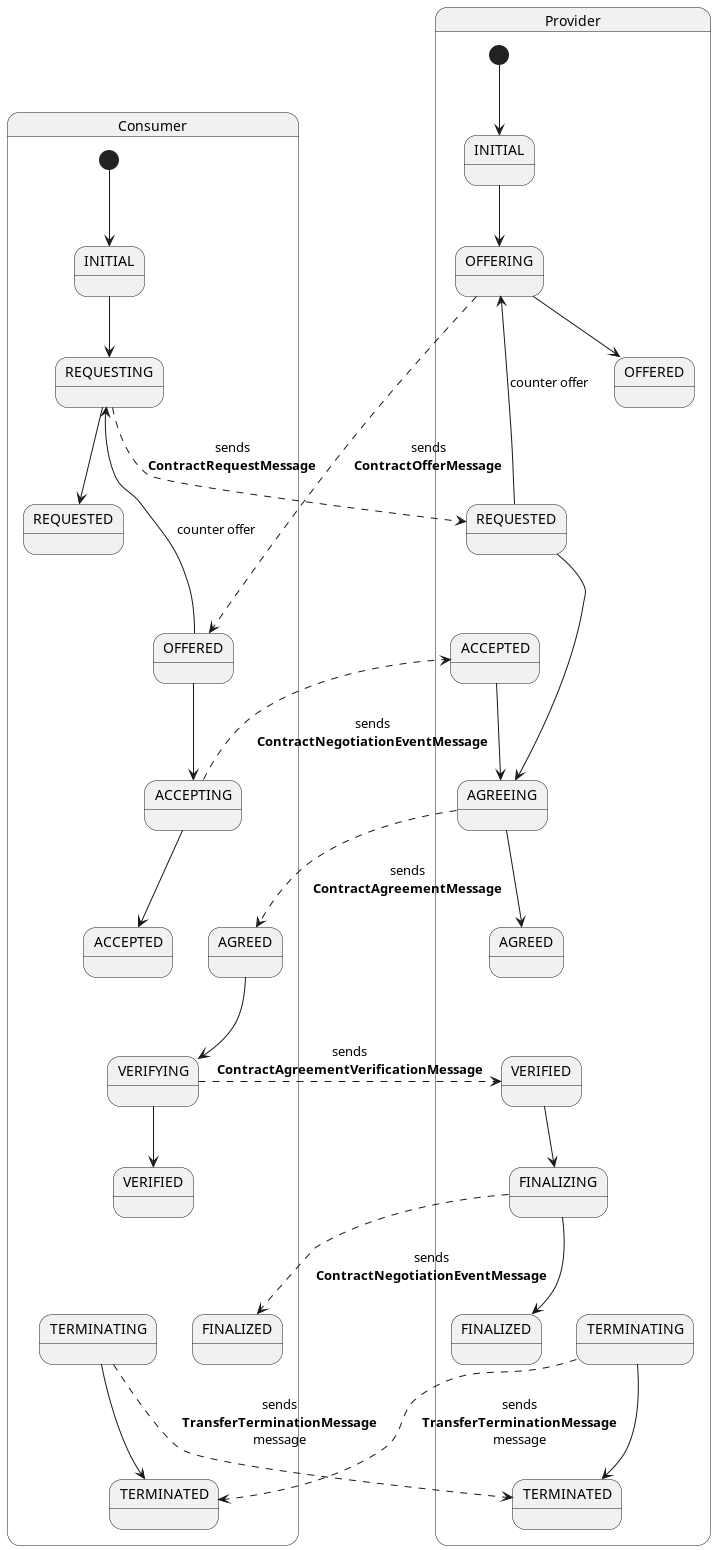
A contract negotiation can be initiated from the consumer side by sending a ContractRequest to the connector
management API.
{
  "@context": [
    "https://w3id.org/edc/connector/management/v2"
  ],
  "@type": "ContractRequest",
  "counterPartyAddress": "http://provider-address",
  "protocol": "dataspace-protocol-http",
  "policy": {
    "@context": "http://www.w3.org/ns/odrl.jsonld",
    "@type": "odrl:Offer",
    "@id": "offer-id",
    "assigner": "providerId",
    "permission": [],
    "prohibition": [],
    "obligation": [],
    "target": "assetId"
  },
  "callbackAddresses": [
    {
      "transactional": false,
      "uri": "http://callback/url",
      "events": [
        "contract.negotiation"
      ],
      "authKey": "auth-key",
      "authCodeId": "auth-code-id"
    }
  ]
}
The counterPartyAddress is the address where to send the ContractRequestMessage via the specified protocol (
currently dataspace-protocol-http)
The policy should hold the same policy associated to the data offering chosen from the catalog, plus
two additional properties:
assigner the providers participantIdtarget the asset (dataset) ID
In addition, the (optional) callbackAddresses array can be used to get notified about state changes of the
negotiation. Read more on callbacks in the section
about events and callbacks.
Note: if the policy sent by the consumer differs from the one expressed by the provider, the contract negotiation
will fail and transition to a TERMINATED state.
5. Contract agreements
Once a contract negotiation is successfully concluded (i.e. it reaches the FINALIZED state), it “turns into” a
contract agreement. It is always the provider connector that gives the final approval. Contract agreements are
immutable objects that contain the final, agreed-on policy, the ID of the asset that the contract was negotiated for,
the IDs of the negotiation parties and the exact signing date.
Note that in future iterations contracts will be cryptographically signed to further support the need for
immutability and non-repudiation.
Like contract definitions, contract agreements are entities that only exist within the bounds of a connector.
About terminating contracts: once a contract negotiation has reached a terminal
state
TERMINATED or FINALIZED, it becomes immutable. This could be compared to not being able to scratch a signature off a
physical paper contract. The agreed-on policy, asset ID, parties and signing date can therefore never change.
While the agreement itself stays immutable, a provider may still need to stop honoring it, for example because the
underlying data source is decommissioned or the business relationship ends. For this EDC provides a dedicated mechanism:
contract agreement retirement (see below). Any further cancellation semantics beyond retirement are highly individual
to each dataspace, so EDC cannot make an assumption there and leaves them to be handled through other channels like
eventing systems.
5.1 Retiring a contract agreement
Retirement lets a provider invalidate a contract agreement after it has been finalized. A retired agreement:
- can no longer be used to start new transfer processes, and
- causes ongoing transfer processes that rely on it to be terminated.
Retirement does not mutate the immutable part of the agreement. Instead, it is tracked by three dedicated fields on the
ContractAgreement entity:
| Field | Type | Meaning |
|---|
retired | boolean | Whether the agreement is retired. Defaults to false. |
retirementReason | String | The reason supplied when retiring, or null if not retired. |
retirementDate | long (epoch sec) | When the agreement was retired, or 0 if not retired. |
How retirement is enforced. Enforcement is implemented as a policy pre-validator,
AgreementRetirementValidator, which is registered for both the transfer.process scope and the
policy.monitor scope. The validator simply fails policy evaluation whenever
contractAgreement().isRetired() is true:
- In the
transfer.process scope this makes any attempt to start a transfer against a retired agreement fail. - In the
policy.monitor scope the Policy Monitor re-evaluates the policy of running transfers
and terminates those whose agreement has become retired.
Termination of in-flight transfers depends on the Policy Monitor extension being enabled on the provider. Without it,
already-running transfers are not swept, though new transfers are still refused.
API. Retirement is triggered via the Management API by issuing a POST to the agreement’s retire sub-resource.
The endpoint is available on both API versions:
- v4:
POST /v4/contractagreements/{id}/retire - v5:
POST /v5/participants/{participantContextId}/contractagreements/{id}/retire
The request body is a JSON-LD document of type RetireAgreement carrying a mandatory reason:
{
  "@context": {
    "@vocab": "https://w3id.org/edc/v0.0.1/ns/"
  },
  "@type": "RetireAgreement",
  "reason": "The underlying data source has been decommissioned"
}
The call returns 404 Not Found if no agreement with the given ID exists, and 409 Conflict if the agreement is
already retired.
5.2 Un-retiring a contract agreement
A retired agreement can be brought back into service. Un-retiring resets the retirement fields (retired=false,
retirementReason=null, retirementDate=0), after which the agreement can again be used to start transfers.
Because un-retiring is a plain action with no extra information to supply, it takes no request body:
- v4:
POST /v4/contractagreements/{id}/unretire - v5:
POST /v5/participants/{participantContextId}/contractagreements/{id}/unretire
The call returns 404 Not Found if no agreement with the given ID exists, and 409 Conflict if the agreement is not
currently retired.
5.3 Retirement events
Both operations emit events through the EventRouter, so
extensions and external systems can react to them:
| Event | Event name | Payload |
|---|
ContractAgreementRetired | contract.agreement.retired | contractAgreementId, participantContextId, reason |
ContractAgreementUnretired | contract.agreement.unretired | contractAgreementId, participantContextId |
6. Catalog
The catalog contains the “data offerings” of a connector and one or multiple service endpoints to initiate a negotiation
for those offerings.
Every data offering is represented by a Dataset object which
contains a policy and one or multiple Distribution
objects. A Distribution should be understood as a variant
or representation of the Dataset. For instance, if a file is accessible via multiple transmission channels from a
provider (HTTP and FTP), then each of those channels would be represented as a Distribution. Another example would be
image assets that are available in different file formats (PNG, TIFF, JPEG).
A DataService object specifies the endpoint where contract
negotiations and transfers are accepted by the provider. In practice, this will be the DSP endpoint of the connector.
The following example shows an HTTP response to a catalog request, that contains one offer that is available via two
channels HttpData-PUSH and HttpData-PULL.
catalog example
{
  "@id": "567bf428-81d0-442b-bdc8-437ed46592c9",
  "@type": "dcat:Catalog",
  "dcat:dataset": [
    {
      "@id": "asset-2",
      "@type": "dcat:Dataset",
      "odrl:hasPolicy": {
        "@id": "c2Vuc2l0aXZlLW9ubHktZGVm:YXNzZXQtMg==:MzhiYzZkNjctMDIyNi00OGJjLWFmNWYtZTQ2ZjAwYTQzOWI2",
        "@type": "odrl:Offer",
        "odrl:permission": [],
        "odrl:prohibition": [],
        "odrl:obligation": {
          "odrl:action": {
            "@id": "use"
          },
          "odrl:constraint": {
            "odrl:leftOperand": {
              "@id": "DataAccess.level"
            },
            "odrl:operator": {
              "@id": "odrl:eq"
            },
            "odrl:rightOperand": "sensitive"
          }
        }
      },
      "dcat:distribution": [
        {
          "@type": "dcat:Distribution",
          "dct:format": {
            "@id": "HttpData-PULL"
          },
          "dcat:accessService": {
            "@id": "a6c7f3a3-8340-41a7-8154-95c6b5585532",
            "@type": "dcat:DataService",
            "dcat:endpointDescription": "dspace:connector",
            "dcat:endpointUrl": "http://localhost:8192/api/dsp",
            "dct:terms": "dspace:connector",
            "dct:endpointUrl": "http://localhost:8192/api/dsp"
          }
        },
        {
          "@type": "dcat:Distribution",
          "dct:format": {
            "@id": "HttpData-PUSH"
          },
          "dcat:accessService": {
            "@id": "a6c7f3a3-8340-41a7-8154-95c6b5585532",
            "@type": "dcat:DataService",
            "dcat:endpointDescription": "dspace:connector",
            "dcat:endpointUrl": "http://localhost:8192/api/dsp",
            "dct:terms": "dspace:connector",
            "dct:endpointUrl": "http://localhost:8192/api/dsp"
          }
        }
      ],
      "description": "This asset requires Membership to view and SensitiveData credential to negotiate.",
      "id": "asset-2"
    }
  ],
  "dcat:distribution": [],
  "dcat:service": {
    "@id": "a6c7f3a3-8340-41a7-8154-95c6b5585532",
    "@type": "dcat:DataService",
    "dcat:endpointDescription": "dspace:connector",
    "dcat:endpointUrl": "http://localhost:8192/api/dsp",
    "dct:terms": "dspace:connector",
    "dct:endpointUrl": "http://localhost:8192/api/dsp"
  },
  "dspace:participantId": "did:web:localhost%3A7093",
  "participantId": "did:web:localhost%3A7093",
  "@context": {}
}
Catalogs are ephemeral objects, they are not persisted or cached on the provider side. Everytime a consumer participant
makes a catalog request through DSP, the connector runtime has to evaluate the incoming request and build up the catalog
specifically for that participant. The reason for this is that between two subsequent requests from the same
participant, the contract definition or the claims or the participant could have changed.
The relevant component in EDC is the DatasetResolver, which resolves all contract definitions that are relevant to a
participant filtering out those where the participant does not satisfy the access policy and collects all the assets
therein.
In order to determine how an asset can be distributed, the resolver requires knowledge about the data planes that are
available: the transfer types of the
registered data planes, matched against the
profiles of the asset’s dataplaneMetadata, make up the list of Distributions for an asset.
For details about the FederatedCatalog, please refer to
its documentation.
7 Transfer processes
A TransferProcess is a record of the data sharing procedure between a consumer and a provider. As they traverse
through the system, they transition through several
states (TransferProcessStates).
Once a contract is negotiated and an agreement is reached, the
consumer connector may send a transfer initiate request to start the transfer. The consumer control plane first asks
its data plane to prepare the data flow, and the provider control plane asks its data plane to start it, both through
Data Plane Signaling. A data plane may need to take some preparatory
steps, for example deploying a temporary object store where the provider should put the data, or anonymizing the data
before sending it out: it does so on its own, and may answer asynchronously, in which case the transfer process waits in
PREPARATION_REQUESTED or STARTUP_REQUESTED.
Once that is done, the transfer begins in earnest, between the data planes, according to the transfer type.
Once the transmission has completed, the transfer process will transition to the COMPLETED state, or - if an error
occurred - to the TERMINATED state.
The Management API provides several endpoints to manipulate data transfers.
Here is a diagram of the state machine applied to transfer processes on consumer side:
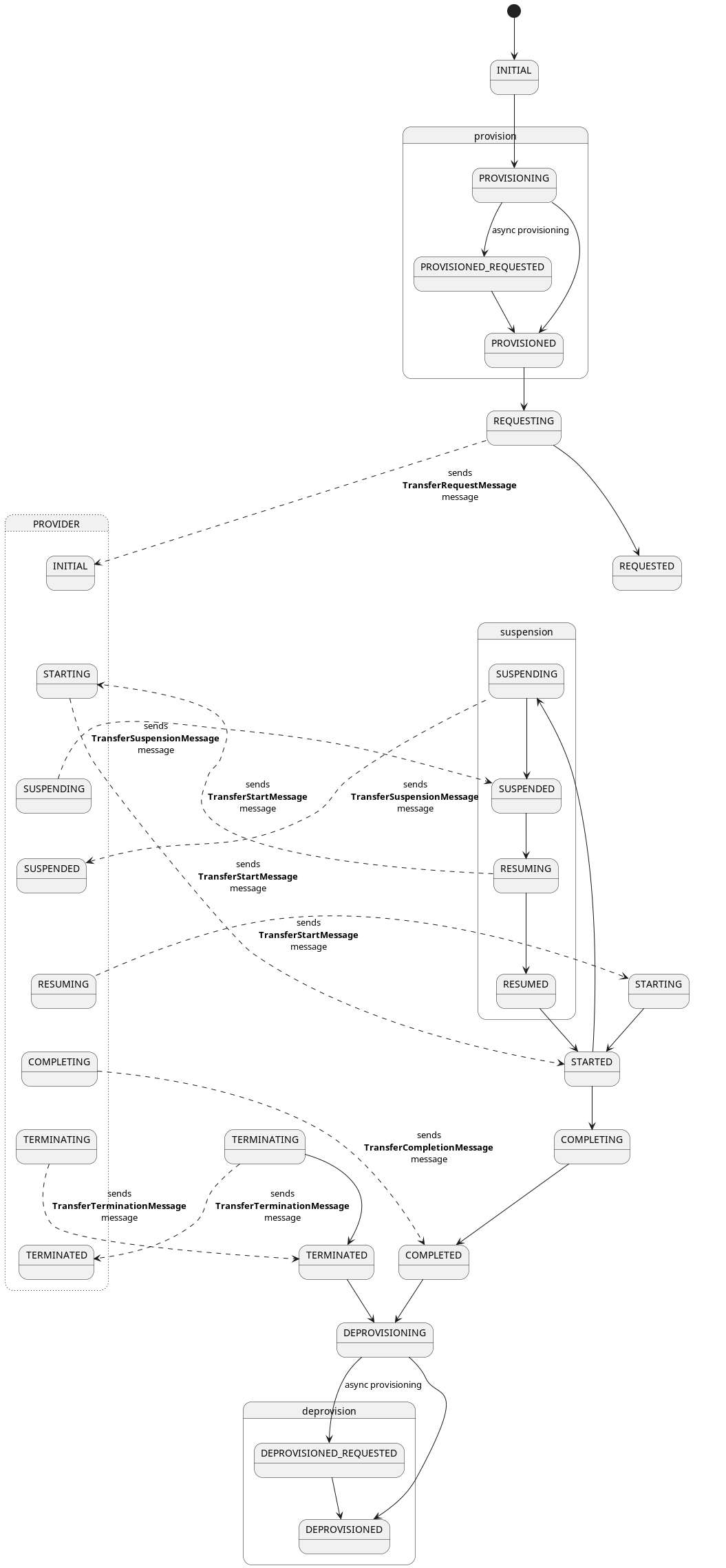
Here is a diagram of the state machine applied to transfer processes on provider side:
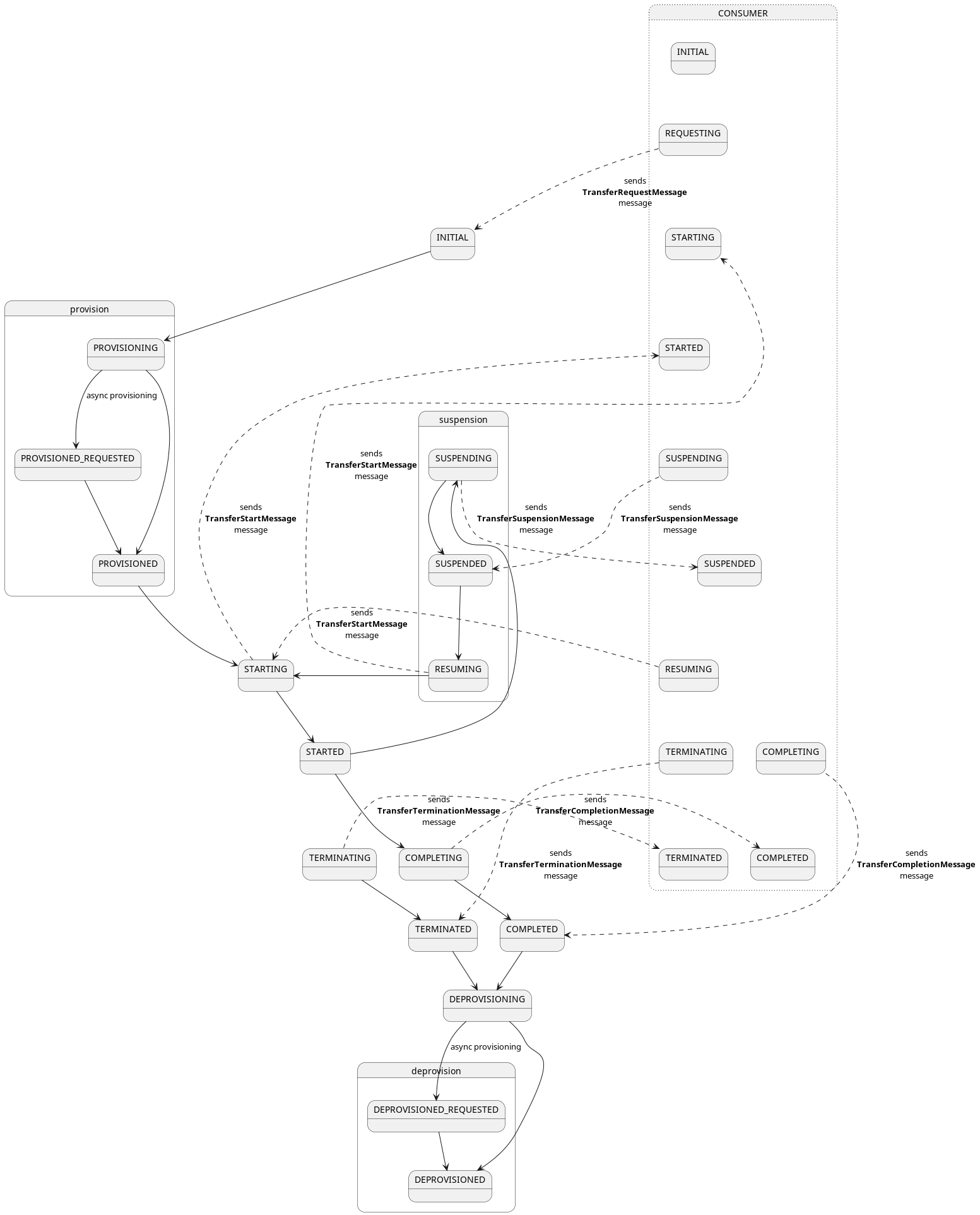
A transfer process can be initiated from the consumer side by sending a TransferRequest to the connector Management
API:
{
  "@context": [
    "https://w3id.org/edc/connector/management/v2"
  ],
  "@type": "TransferRequest",
  "protocol": "dataspace-protocol-http",
  "counterPartyAddress": "http://provider-address",
  "contractId": "contract-id",
  "transferType": "transferType",
  "dataplaneMetadata": {
    "labels": [ "eu" ],
    "properties": {
      "key": "value"
    }
  },
  "privateProperties": {
    "private-key": "private-value"
  },
  "callbackAddresses": [
    {
      "transactional": false,
      "uri": "http://callback/url",
      "events": [
        "contract.negotiation",
        "transfer.process"
      ],
      "authKey": "auth-key",
      "authCodeId": "auth-code-id"
    }
  ]
}
where:
counterPartyAddress: the address where to send the TransferRequestMessage via the specified protocol (
currently dataspace-protocol-http)contractId: the ID of a previously negotiated contract agreement which is a result of
the contract negotiation process.transferType defines how the data transfer should happen.dataplaneMetadata: the labels the consumer’s data plane must have, and properties passed to it as metadata,
e.g. where a push transfer should put the data (see About data addresses).callbackAddresses custom hooks in order bo be notified about state transition of
the transfer process.privateProperties: custom properties not shared with the counter-party.
7.1 Transfer and data flows types
The transfer type defines the channel (Distribution) for the data transfer and it depends on the capabilities of
the data planes if it can be fulfilled. The transferType available for a
data offering is available in the dct:format of the Distribution when inspecting the catalog response.
Each transfer type also characterizes the type of the flow, which can be either pull
or push and it’s data can be either finite
or non-finite
7.1.1 Consumer Pull
A pull transfer is when the consumer receives information (in the form of a data address) on how to retrieve data from
the Provider. Then it’s up to the consumer data plane to use this information for pulling the data.
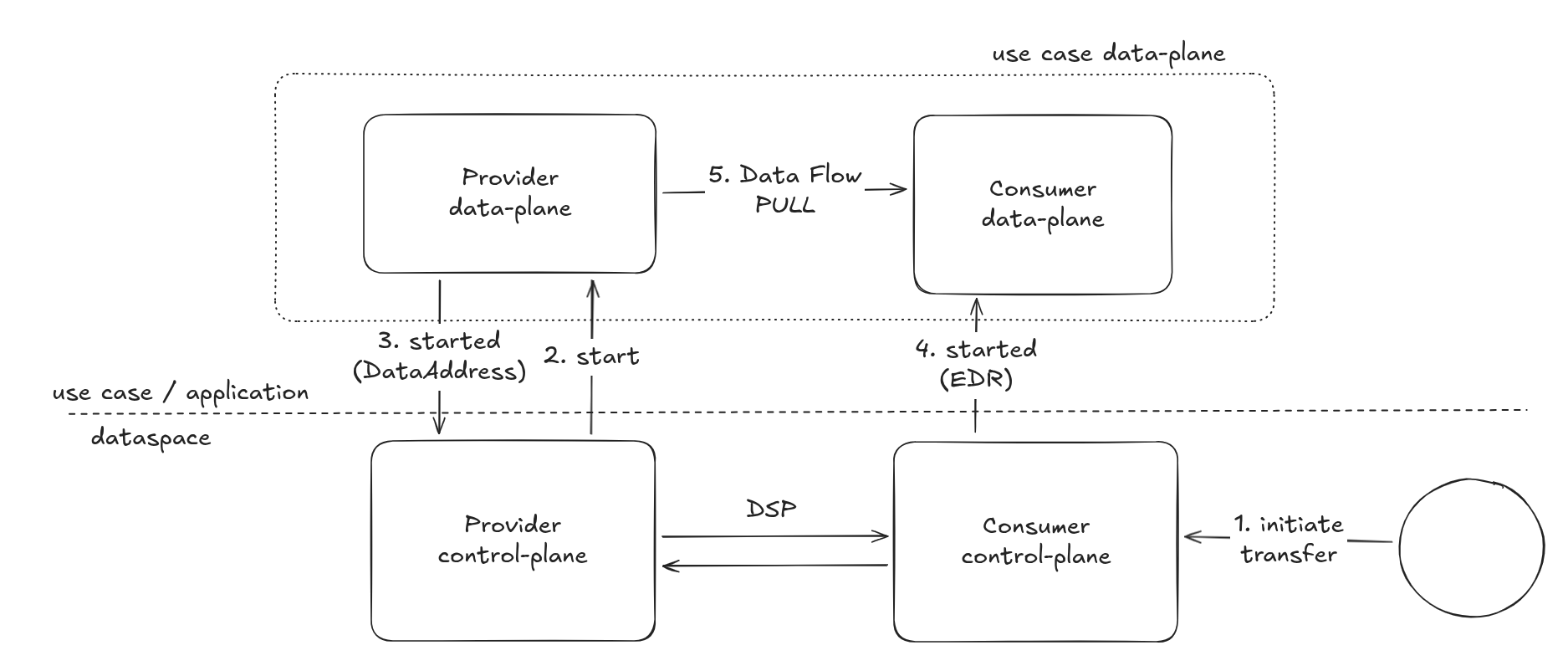
Provider and consumer agree to a contract (not displayed in the diagram)
- The consumer initiates the transfer process through the Management API. The consumer control plane selects a data
plane and sends it a
prepare message (not displayed in the diagram), then sends a TransferRequestMessage to the
provider. - The provider control plane selects a data plane and sends it a
start message through
Data Plane Signaling, with the dataplaneMetadata of the asset. - The provider data plane creates the data address, i.e. the endpoint and the credentials with which the consumer
fetches the data, and returns it (in its answer, or later with a
started notification). The provider control plane
sends it to the consumer in the TransferStartMessage. - The consumer control plane hands the data address to its data plane with a
started message. Applications can also
receive it through the callbacks of the transfer.process.started event. - The consumer data plane fetches the data from the provider data plane, which validates the credentials it issued.
7.1.2 Provider Push
A push transfer is when the Provider data plane initiates sending data to the destination specified by the consumer.
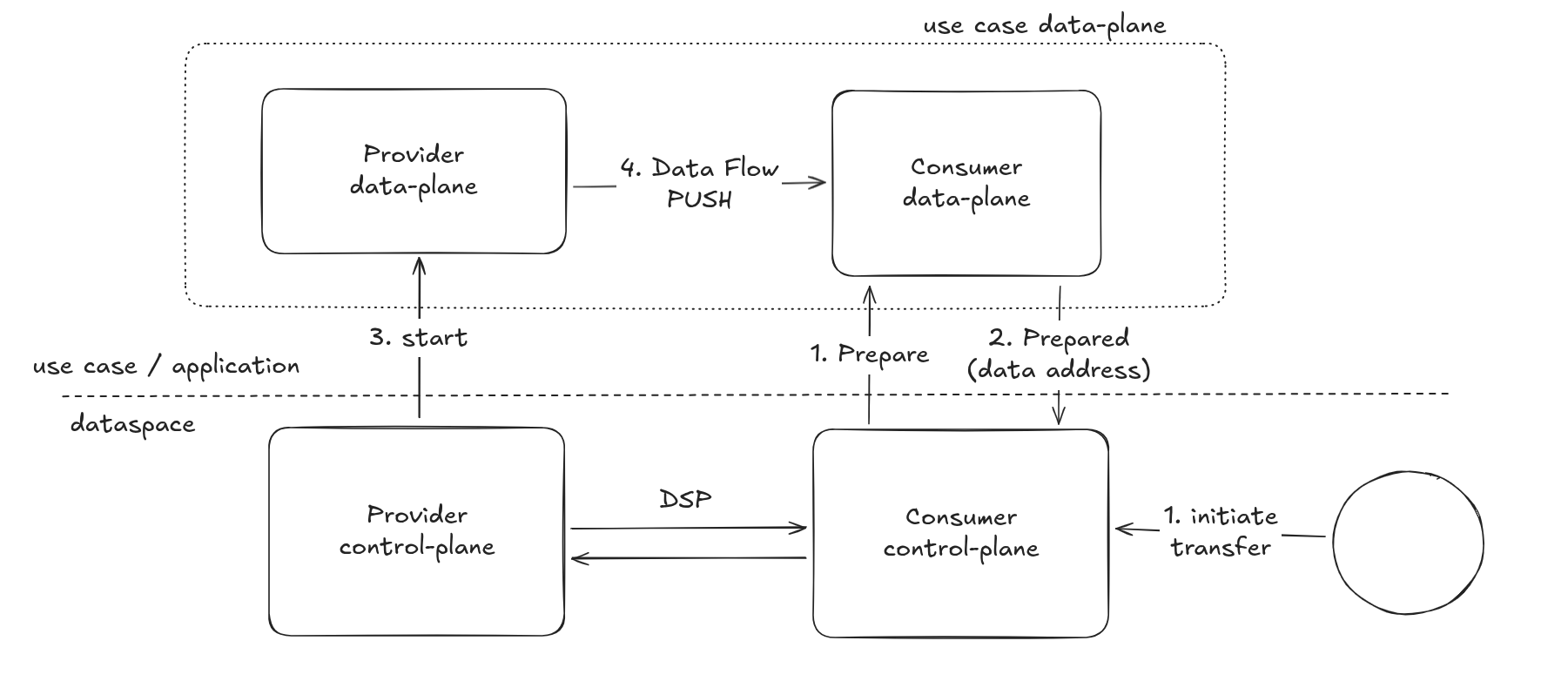
Provider and consumer agree to a contract (not displayed in the diagram)
- The consumer initiates the transfer process through the Management API. The consumer control plane selects a data
plane and sends it a
prepare message. - The consumer data plane returns the destination as data address (in its answer, or later with a
prepared
notification). The consumer control plane sends it to the provider in the TransferRequestMessage. - The provider control plane selects a data plane and sends it a
start message with the dataplaneMetadata of the
asset and the consumer’s data address. - The provider data plane pushes the data to the destination.
7.1.3 Finite and Non-Finite Data
The characterization of the data applies to either push and pull transfers. Finite data transfers cause the transfer
process to transition to the state COMPLETED, once the transmission has finished. For example a transfer of a single
file that is hosted and transferred into a cloud storage system.
Non-finite data means that once the transfer process request has been accepted by the provider the transfer process is
in the STARTED state until it gets terminated by the consumer or the provider. Examples of Non-finite data are streams
or API endpoints.
On the provider side transfer processes can also be terminated by
the policy monitor that
periodically watches over the ongoing transfer and checks if the
associated contract agreement still fulfills the contract policy.
7.2 About data addresses
A data address describes where the data of a transfer is: in a “provider-push” scenario, the destination the consumer
data plane provides, e.g. an object storage container or a directory on a file system; in a “consumer-pull” scenario,
the endpoint and the credentials the provider data plane provides.
A data address is created and used only by the data planes. It is a schemaless object, and the provider and the consumer
data planes need to have a common understanding of the required fields: if the provider is supposed to put the data into
a file share, the data address will likely contain the host URL, a path and possibly a file name. The transfer type
(the DPS profile) is the way to establish that “understanding”: the provider offers an asset only with the transfer types
its data planes support, and the consumer picks one of them in the transfer request.
7.3 Transfer process callbacks
In order to get timely updates about status changes of a transfer process, we could simply poll the management API by
firing a GET /v*/transferprocesses/{tp-id}/state request every X amount of time. That will not only put unnecessary
load on the connector,
you may also run into rate-limiting situations, if the connector is behind a load balancer of some sort. Thus, we
recommend using event callbacks.
Callbacks must be specified when requesting to initiate the transfer:
{
  // ...
  "callbackAddresses": [
    {
      "transactional": false,
      "uri": "http://callback/url",
      "events": [
        "transfer.process"
      ],
      "authKey": "auth-key",
      "authCodeId": "auth-code-id"
    }
  ]
  //...
}
Currently, we support the following events:
transfer.process.initiatedtransfer.process.preparationRequestedtransfer.process.preparedtransfer.process.requestedtransfer.process.startedtransfer.process.suspendedtransfer.process.resumingtransfer.process.completedtransfer.process.terminatedtransfer.process.dataflow.errored: the data plane reported a non-recoverable error of the data flow; the transfer
process doesn’t change state
The connector’s event dispatcher will send invoke the webhook specified in the uri field passing the event
payload as JSON object.
More info about events and callbacks can be found here.
8 Querying with QuerySpec and Criterion
Most of the entities can be queried with the QuerySpec object, which is a generic way of expressing limit, offset,
sort and filters when querying a collection of objects managed by the EDC stores.
Here’s an example of how a QuerySpec object might look like when querying for Assets via management APIs:
{
  "@context": [
    "https://w3id.org/edc/connector/management/v2"
  ],
  "@type": "QuerySpec",
  "limit": 1,
  "offset": 1,
  "sortField": "createdAt",
  "sortOrder": "DESC",
  "filterExpression": [
    {
      "operandLeft": "https://w3id.org/edc/v0.0.1/ns/description",
      "operator": "=",
      "operandRight": "This asset"
    }
  ]
}
which filters by the description custom property being equals to This asset. The query also paginates the result
with limit and p set to 1. Additionally a sorting strategy is in place by createdAt property in descending order (
the default is ASC)
Note: Since custom properties are persisted in their expanded form, we have to use
the expanded form also when querying.
The filterExpression property is a list of Criterion, which expresses a single filtering condition based on:
operandLeft: the property to filter onoperator: the operator to apply e.g. =operandRight: the value of the filtering
The supported operators are:
- Equal:
= - Not equal:
!= - In:
in - Like:
like - Ilike:
ilike (same as like but ignoring case sensitive) - Contains:
contains
Note: multiple filtering expressions are always logically conjoined using an “AND” operation.
The properties that can be expressed in the operandLeft of a Criterion depend on the shape of the entity that we are
want to query.
Note: nested properties are also supported using the dot notation.
QuerySpec can also be used when doing the catalog request using the querySpec property in the catalog request
payload for filtering the datasets:
{
  "@context": [
    "https://w3id.org/edc/connector/management/v2"
  ],
  "counterPartyAddress": "http://provider/api/dsp",
  "protocol": "dataspace-protocol-http",
  "counterPartyId": "providerId",
  "querySpec": {
    "filterExpression": [
      {
        "operandLeft": "https://w3id.org/edc/v0.0.1/ns/description",
        "operator": "=",
        "operandRight": "This asset"
      }
    ]
  }
}
Entities are backed by stores for doing CRUD operations. For each entity
there is an associated store interface (SPI). Most of the stores SPI have a query like method which takes a
QuerySpec type as input and returns the matched entities in a collection. Individual implementations are then
responsible for translating the QuerySpec to a proper fetching strategy.
The description on how the translation and mapping works will be explained in each implementation. Currently EDC support
out of the box:
- In-memory stores (default implementation).
- SQL stores provided as extensions for each store, mostly
tailored for and tested with
PostgreSQL.
For guaranteeing the highest compatibility between store implementations, a base tests suite is provided for each store
that each technology implementors need to fulfill in order to have a minimum usable store implementation.
2.8.2 - Policy Monitor
Some transfer types, once accepted by the provider, never reach the COMPLETED state. Streaming and HTTP transfers in consumer pull scenario are examples of this. In those scenarios the transfer will remain active (STARTED) until it gets terminated either manually by using the transfer processes management API, or automatically by the policy monitor, if it has been configured in the EDC runtime.
The policy monitor (PolicyMonitorManager) is a component that watches over ongoing transfers on the provider side and ensures that the associated policies are still valid. The default implementation of the policy monitor tracks the monitored transfer processes in it’s own entity PolicyMonitorEntry stored in the PolicyMonitorStore.
Once a transfer process transition to the STARTED state on the provider side, the policy monitor gets notified through the eventing system of EDC and start tracking transfer process. For each monitored transfer process in the STARTED state the policy monitor retrieves the policy associated (through contract agreement) and runs the Policy Engine using the policy.monitor as scope.
If the policy is no longer valid, the policy monitor marks the transfer process for termination (TERMINATING) and stops tracking it.
The data plane also gets notified through the data plane signaling protocol about the termination of the transfer process, and if accepted by the data plane, the data transfer terminates as well.
Note for implementors
Implementors that want a Policy function to be evaluated at the policy monitor layer need to bind such function to the policy.monitor scope.
The policy evaluation happens in the background, without a request of the consumer. The PolicyMonitorContext available for functions in the policy.monitor scope contains:
- the
ContractAgreement and the Instant at the time of the evaluation; - a
ParticipantAgent rebuilt from the agreement: its identity is the consumer’s, and its claims are the ones of the consumer’s verified credentials stored with the agreement when it was reached. Functions that check credentials therefore evaluate the credentials the consumer presented at that time; they are not requested again; - the participant context the transfer belongs to, so that CEL expressions can use
ctx.agent and ctx.partners in this scope too.
A bundled example of a Policy function that runs in the policy.monitor scope is the ContractExpiryCheckFunction which checks if the contract agreement is not expired.
2.8.3 - Protocol Extensions
The EDC officially supports the Dataspace protocol using the HTTPs bindings, but since it is an extensible platform, multiple protocol implementations can be supported for inter-connectors communication. Each supported protocols is identified by a unique key used by EDC for dispatching a remote message.
1. RemoteMessage
At the heart of EDC message exchange mechanism lies the RemoteMessage interface, which describes the protocol, the counterPartyAddress and the counterPartyId used for a message delivery.
RemoteMessage extensions can be divided in three groups:
Each RemoteMessage is:
1.1 Delivering messages with RemoteMessageDispatcher
Each protocol implements a RemoteMessageDispatcher:
public interface RemoteMessageDispatcher {

    String protocol();

    <T, M extends RemoteMessage> CompletableFuture<StatusResult<T>> dispatch(Class<T> responseType, M message);

}
and it is registered in the RemoteMessageDispatcherRegistry, where it gets associated to the protocol defined in RemoteMessageDispatcher#protocol.
Internally EDC uses the RemoteMessageDispatcherRegistry whenever it needs to deliver a RemoteMessage to the counter-party. The RemoteMessage then gets routed to the right RemoteMessageDispatcher based on the RemoteMessage#getProtocol property.
EDC also uses RemoteMessageDispatcherRegistry for non-protocol messages when dispatching event callbacks
1.2 Handling incoming messages with protocol services
On the ingress side, protocol implementations should be able to receive messages through the network (e.g. API Controllers), deserialize them into the corresponding RemoteMessages and then dispatching them to the right protocol service.
Protocol services are three:
CatalogProtocolServiceContractNegotiationProtocolServiceTransferProcessProtocolService
which handle respectively Catalog, ContractNegotiation and TransferProcess messages.
2. DSP protocol implementation
The Dataspace protocol implementation is available under the data-protocols/dsp subfolder in the Connector repository. EDC 1.0 implements DSP 2025-1 only (the versions 08 and 2024/1 were removed), identified by the protocol key dataspace-protocol-http:2025-1:
dsp-2025: the endpoints of a single participant runtime, under /2025-1/catalog, /2025-1/negotiations and /2025-1/transfers;dsp-virtual: the endpoints of a multi-participant runtime, under /{participantContextId}/{profileId}/…, where the dataspace profile determines the protocol version, binding and JSON-LD namespace of the exchange;dsp-version: the version metadata, /.well-known/dspace-version (/{participantContextId}/.well-known/dspace-version in a multi-participant runtime);dsp-core, dsp-lib, dsp-spi, dsp-http-spi: the shared dispatcher, transformers and SPIs.
It extends the RemoteMessageDispatcher with the interface DspHttpRemoteMessageDispatcher (dsp-spi), which adds an additional method for registering message handlers.
The implementation of the three DSP specifications:
is separated in multiple extension modules grouped by specification.
This allows for example to build a runtime that only serves a dsp catalog requests useful the Management Domains scenario.
Each specification implementation defines handlers, transformers for RemoteMessages and exposes HTTP endpoints.
The dsp implementation also provide HTTP endpoints for the DSP common functionalities.
2.1 RemoteMessage handlers
Handlers map a RemoteMessage to an HTTP Request and instruct the DspHttpRemoteMessageDispatcher how to extract the response body to a desired type.
2.2 HTTP endpoints
Each dsp-*-http-api module exposes its own API Controllers for serving the specification requests. Each request handler transforms the JSON-LD in input, if present, into a RemoteMessage and then calls the protocol service layer.
Each dsp-*-transform module registers in the DSP API context Transformers for mapping JSON-LD objects from and to RemoteMessages.
2.9 - Data Plane
EDC doesn’t contain a data plane. A data plane is a separate application that transfers the data, and the EDC control
plane directs it through the
Data Plane Signaling (DPS) protocol: the control
plane handles the Dataspace Protocol, the contracts and the policies, the data plane handles the transfer itself,
including the data address and the credentials of the data flow.
Any application that implements DPS and registers with the control plane can be a data plane: one built with the
Data Plane SDKs, an existing one such as
siglet, or one written directly on the
specification.
This section covers:
Up to version 0.18, EDC contained the Data Plane Framework (DataPlaneManager, PipelineService, DataSource and
DataSink) and a data plane built on it. Both were removed in favour of DPS; the
migration guide describes how to move to DPS data planes.
2.9.1 - Data plane integration
1. Overview
The control plane integrates data planes through the
Data Plane Signaling (DPS) protocol, implemented by
the data-plane-signaling modules (data-protocols/data-plane-signaling):
data-plane-signaling-core: the registration API, the signaling client, the DataFlowController that drives the data
planes for the transfer process state machine, and the Signaling API that receives the data planes’ notifications;data-plane-signaling-oauth2 and data-plane-signaling-oauth2-token-exchange: the authorization profiles
oauth2_client_credentials and oauth2_token_exchange (see 5. Authorization profiles).
The control plane doesn’t move data and doesn’t create data addresses: it decides which data plane handles a transfer
and when, the data plane decides how.
2. Data plane registration
The life cycle of a data plane is decoupled from the one of the control plane: data planes can be added, replaced or
removed at any time. A data plane registers with the control plane through the Management API:
PUT /v4/dataplanes and DELETE /v4/dataplanes/{dataplaneId};PUT /v5/participants/{participantContextId}/dataplanes and DELETE /v5/participants/{participantContextId}/dataplanes/{dataplaneId},
which register the data plane for one participant context and need the scope management-api:dataplanes:write.
The request body is a plain JSON object:
{
  "dataplaneId": "dataplane-1",
  "endpoint": "https://dataplane.internal/api/signaling",
  "transferTypes": [ "HttpData-PULL", "HttpData-PUSH" ],
  "labels": [ "eu" ],
  "authorization": {
    "type": "oauth2_client_credentials",
    "tokenEndpoint": "https://idp.internal/token",
    "clientId": "control-plane",
    "clientSecret": "...",
    "jwksUri": "https://idp.internal/jwks"
  }
}
dataplaneId: the id of the data plane, unique per participant context. Registering the same id again replaces the
registration, so a data plane can register on every start.endpoint: the base URL of the data plane’s DPS API, to which the control plane sends the signals.transferTypes: the transfer types (DPS profiles) the data plane supports.labels: free-form labels that assets and transfer requests can require of the data plane (see
3.2).authorization: optional, the authorization profile with which the control plane and the data plane authenticate to
each other (see 5. Authorization profiles).
A registered data plane is a logical instance: replicas of a data plane share one registration, behind one endpoint.
The control plane doesn’t check whether a data plane is available, that is the job of the infrastructure (e.g. replicas
behind a load balancer). The registrations are persisted (edc.sql.store.dataplaneinstance.datasource for the SQL
store), so that all the control plane replicas see them.
3. Data plane selection
3.1 Building the catalog
The transfer types offered for an asset in the catalog, as Distributions, come from the registered data planes of the
participant context:
- if the asset’s
dataplaneMetadata lists no profiles, the transfer types of all the registered data planes; - otherwise, the transfer types of the data planes that support at least one of the listed profiles.
For example, if one data plane supports HttpData-PULL and another AmazonS3-PUSH, an asset without profiles is offered
with both.
3.2 Selecting a data plane for a transfer
When a transfer process is prepared (consumer) or started (provider), the control plane selects a data plane that:
- is registered for the participant context of the transfer process;
- supports the transfer type of the transfer process;
- has all the labels of the transfer process’s
dataplaneMetadata. The provider takes them from the asset, the consumer
from the transfer request.
If several data planes match, the selection strategy picks one: random by default, set with
edc.dataplane.client.selector.strategy. Extensions can add strategies through the SelectionStrategyRegistry. The id of
the selected data plane is stored on the transfer process, and all later signals go to that data plane.
4. Signaling
The DataPlaneSignalingFlowController is the DataFlowController of the control plane: the transfer process state
machine calls it at each step, and it sends the corresponding DPS message to the data plane with the
DataPlaneSignalingClient. The messages and their payloads are defined by the
DPS specification; the transfer type of the
transfer process is sent as the profile, together with the labels and the metadata (properties) of its
dataplaneMetadata.
4.1 Signals sent to the data plane
| Transfer process step | Side | DPS call |
|---|
| INITIAL | consumer | POST {endpoint}/prepare |
| INITIAL | provider | POST {endpoint}/start |
| STARTED received from the provider | consumer | POST {endpoint}/{flowId}/started |
| SUSPENDING | both | POST {endpoint}/{flowId}/suspend |
| RESUMING | both | POST {endpoint}/{flowId}/resume |
| TERMINATING | both | POST {endpoint}/{flowId}/terminate |
| COMPLETED received from the counter-party | both | POST {endpoint}/{flowId}/completed |
The flowId is the id of the transfer process.
A data plane answers prepare, start and resume either synchronously, with the final state of the data flow (e.g.
STARTED) and possibly a data address, or asynchronously, with a pending state (e.g. STARTING). In the asynchronous
case, the transfer process waits in PREPARATION_REQUESTED or STARTUP_REQUESTED until the data plane notifies the
control plane.
A signal fails with ERROR_RETRY when it couldn’t be delivered (timeout, I/O error), when the data plane answers with a
5xx, or when the authorization profile couldn’t obtain a token, and the transfer process state machine sends it again
with its backoff and retry limit (edc.transfer.send.retry.*). A 4xx answer fails with FATAL_ERROR, which ends the
step: e.g. a failed prepare terminates the consumer transfer process, a failed start makes the provider terminate
it.
4.2 Notifications from the data plane
The data plane notifies the control plane through the Signaling API, a dedicated API context
(web.http.signaling.port, default 8182, and web.http.signaling.path, default /api/signaling):
POST /transfers/{transferId}/dataflow/prepared: an asynchronous prepare is done, with the data address if any;POST /transfers/{transferId}/dataflow/started: an asynchronous start is done, with the data address if any;POST /transfers/{transferId}/dataflow/completed: the data flow is complete, the control plane completes the transfer
process and notifies the counter-party;POST /transfers/{transferId}/dataflow/errored: the data flow failed for good. As defined by DPS, the transfer
process doesn’t change state and the counter-party is not notified: the control plane logs the error and emits the
event transfer.process.dataflow.errored, with the error, so that callbacks or operators can decide how to recover,
e.g. by terminating the transfer process or starting a new one.
The data plane must be configured with the URL of this API: the control plane doesn’t send it in the prepare and
start messages.
4.3 The data address
The data address carries what the counter-party needs to access the data flow, e.g. an endpoint and a token. It is created
and used only by the data planes; the control plane stores it and passes it on through the Dataspace Protocol:
- pull: the provider data plane returns the data address in its
start response (or started notification). The
provider control plane sends it to the consumer in the DSP TransferStartMessage, and the consumer control plane hands
it to its data plane with started. - push: the consumer data plane returns the destination as data address in its
prepare response (or prepared
notification). The consumer control plane sends it in the DSP TransferRequestMessage, and the provider control plane
passes it to its data plane in the start message.
5. Authorization profiles
The authorization object of the registration selects how the control plane authenticates its signals to the data plane,
and how it authenticates the data plane’s notifications:
oauth2_client_credentials (data-plane-signaling-oauth2): the control plane gets a token with the client credentials
(tokenEndpoint, clientId, clientSecret) for its signals, and validates the tokens of the notifications against
jwksUri or jwks.oauth2_token_exchange (data-plane-signaling-oauth2-token-exchange): the control plane exchanges its workload
credential (by default the Kubernetes service account token, edc.dps.oauth2.tokenexchange.subjecttokenpath) for a
token at tokenExchangeEndpoint; the notifications are validated against the issuer and jwksUri or jwks of the
profile.
Without an authorization object the signals and the notifications are not authenticated. The control plane logs a
warning when such a data plane registers, see
Securing the Signaling API. The authorization profiles are
defined in the DPS profiles; further ones can be added by
extensions through the SignalingAuthorizationRegistry.
2.9.2 - Building a data plane
A data plane is any application that implements the
Data Plane Signaling (DPS) protocol and registers
with the control plane. It can be written in any language and run anywhere the control plane can reach it. This page
describes what the EDC control plane expects of it; the protocol itself is defined by the specification.
1. Where to start
- Use an existing data plane.
siglet,
from the Data Plane Core project, is driven by DPS and issues, verifies and renews the access tokens of the data flows,
so that existing APIs and data infrastructure can serve the data. - Build one with a Data Plane SDK. The Data Plane SDKs implement the
DPS endpoints, the data flow state machine and its persistence, and leave the transfer itself to your code:
Java,
Go,
Rust.
- Implement the specification directly, if no SDK fits.
The transfer types a data plane supports are DPS profiles; the common ones are listed in the
DPS profiles. A data plane can also define profiles of its own,
as long as the participants of a dataspace agree on them.
2. What a data plane implements
2.1 Registration
At startup, the data plane registers with the control plane, with its id, its DPS endpoint, the transfer types it
supports, its labels and its authorization profile. Registration is idempotent, so the data plane can register on every
start; it deregisters only when it is removed for good. The API and the payload are described in
Data plane registration.
All the replicas of a data plane register with the same id and endpoint: the control plane sends the signals of a data
flow to that endpoint, and any replica must be able to handle them, so the data flows are kept in a store shared by the
replicas.
2.2 The DPS endpoints
The control plane calls the endpoints defined by the specification, relative to the registered endpoint (see
Signals sent to the data plane):
prepare (consumer side) and start (provider side) create the data flow, whose id is the id of the transfer
process. They receive the profile (the transfer type), the agreement and dataset ids, the participants, and the
labels and metadata of the asset or transfer request; the metadata carries what the data plane needs to find the
data, e.g. the URL of the backend of an HTTP asset.{flowId}/started (consumer side) hands over the provider’s data address of a pull transfer.{flowId}/suspend, {flowId}/resume, {flowId}/terminate and {flowId}/completed change the state of the data flow.
Every call can be repeated: the control plane retries a signal whose response it didn’t receive, so a data plane answers
a repeated call with the current state of the data flow instead of an error.
A data plane can answer prepare, start and resume synchronously, with the final state, or asynchronously, with a
pending state, and notify the control plane later (see 2.4 Notifications). An asynchronous answer
fits work that takes time, e.g. provisioning a bucket or a queue for the transfer.
2.3 Data addresses and credentials
The data plane creates the data address of a transfer and the credentials in it, and validates them when the
counter-party uses them; the control plane only passes them on:
- pull: the provider data plane returns, in its
start answer, the endpoint and the token at which the consumer
fetches the data, and accepts requests with that token until the data flow is suspended, terminated or completed. - push: the consumer data plane returns, in its
prepare answer, the destination the provider pushes the data to; the
provider data plane receives it in the start message.
2.4 Notifications
The data plane reports the progress of a data flow to the control plane’s Signaling API: prepared and started after an
asynchronous answer, completed when a finite transfer is done, errored when it failed (see
Notifications from the data plane). The URL of the
Signaling API is part of the data plane’s configuration. With an authorization profile, the data plane authenticates
these calls, and validates the control plane’s signals, as the profile defines (see
Authorization profiles).
3. Testing against the EDC control plane
The Connector’s end-to-end transfer tests use a data plane built with the Java SDK
(system-tests/e2e-transfer-test/signaling-data-plane in the
Connector repository): it shows a registration, the handling of the
signals, and pull and push transfers between two control planes, and can serve as a starting point for tests of your own
data plane.
2.10 - Custom validation framework
The validation framework hooks into the normal Jetty/Jersey request dispatch mechanism and is designed to allow users to
intercept the request chain to perform additional validation tasks. In its current form it is intended for intercepting
REST requests. Users can elect any validation framework they desire, such as jakarta.validation or
the Apache Commons Validator, or they can implement one
themselves.
When to use it
This feature is intended for use cases where the standard DTO validation, that ships with EDC’s APIs is not sufficient.
Please check out the OpenAPI spec to find out more about the object schema.
EDC features various data types that do not have a strict schema but are extensible, for example Asset/AssetDto,
or a DataRequest/DataRequestDto. This was done by design, to allow for maximum flexibility and openness. However,
users may still want to put a more rigid schema on top of those data types, for example a use case may require an
Asset to always have a owner property or may require a contentType to be present. The standard EDC validation
scheme has no way of enforcing that, so this is where custom validation enters the playing field.
Building blocks
There are two important components necessary for custom validation:
- the
InterceptorFunction: a function that accepts the intercepted method’s parameters as argument (as Object[]),
and returns a Result<Void> to indicate the validation success. It must not throw an exception, or dispatch to
the target resource is not guaranteed. - the
ValidationFunctionRegistry: all InterceptorFunctions must be registered there, using one of three registration
methods (see below).
Custom validation works by supplying an InterceptorFunction to the ValidationFunctionRegistry in one of the
following ways:
bound to a resource-method: here, we register the InterceptorFunction to any of a controller’s methods. That means,
we need compile-time access to the controller class, because we use reflection to obtain the Method:
var method = YourController.class.getDeclaredMethods("theMethod", /*parameter types*/)
var yourFunction = objects -> Result.success(); // you validation logic goes here
registry.addFunction(method, yourFunction);
Consequently yourFunction will get invoked before YourController#theMethod is invoked by the request dispatcher.
Note that there is currently no way to bind an InterceptorFunction directly to an HTTP endpoint.
bound to an argument type: the interceptor function gets bound to all resource methods that have a particular type in
their signature:
var yourFunction = objects -> Result.success(); // your validation logic goes here
registry.addFunction(YourObjectDto.class, yourFunction);
The above function would therefore get invoked in all controllers on the classpath, that have a YourObjectDto
in their signature, e.g. public void createObject(YourObjectDto dto) and public boolean deleteObject (YourObjectDto dto) would both get intercepted, even if they are defined in different controller classes.
This is the recommended way in the situation described above - adding additional schema restrictions on extensible
types
globally, for all resource methods: this is intended for interceptor functions that should get invoked on all
resource methods. This is generally not recommended and should only be used in very specific situations such as
logging
Please check
out this test
for a comprehensive example how validation can be enabled. All functions are registered during the extension’s
initialization phase.
Limitations and caveats
InterceptorFunction objects must not throw exceptions- all function registration must happen during the
initialize phase of the extension lifecycle. - interceptor functions should not perform time-consuming tasks, such as invoking other backend systems, so as not
to cause timeouts in the request chain
- for method-based interception compile-time access to the resource is required. This might not be suitable for a lot of
situations.
- returning a
Result.failure(...) will result in an HTTP 400 BAD REQUEST status code. This is the only supported
status code at this time. Note that the failure message will be part of the HTTP response body. - binding methods directly to paths (“endpoints”) is not supported.
2.11 - Instrumentation with Micrometer
EDC provides extensions for instrumentation with the Micrometer metrics library to automatically collect metrics from the host system, JVM, and frameworks and libraries used in EDC (including OkHttp, Jetty, Jersey and ExecutorService).
See the event consumer sample for an example of an instrumented EDC consumer.
Micrometer Extension
This extension provides support for instrumentation for some core EDC components:
Jetty Micrometer Extension
This extension provides support for instrumentation for the Jetty web server, which is enabled when using the JettyExtension.
Jersey Micrometer Extension
This extension provides support for instrumentation for the Jersey framework, which is enabled when using the JerseyExtension.
Instrumenting ExecutorServices
Instrumenting ExecutorServices requires using the ExecutorInstrumentation service to create a wrapper around the service to be instrumented:
ExecutorInstrumentation executorInstrumentation = context.getService(ExecutorInstrumentation.class);
// instrument a ScheduledExecutorService
ScheduledExecutorService executor = executorInstrumentation.instrument(Executors.newScheduledThreadPool(10), "name");
Without any further configuration, a noop implementation of ExecutorInstrumentation is used. We recommend using the implementation provided in the Micrometer Extension that uses Micrometer’s ExecutorServiceMetrics to record ExecutorService metrics.
Configuration
The following properties can use used to configure which metrics will be collected.
edc.metrics.enabled: enables/disables metrics collection globallyedc.metrics.system.enabled: enables/disables collection of system metrics (class loader, memory, garbage collection, processor and thread metrics)edc.metrics.okhttp.enabled: enables/disables collection of metrics for the OkHttp clientedc.metrics.executor.enabled: enables/disables collection of metrics for the instrumented ExecutorServicesedc.metrics.jetty.enabled: enables/disables collection of Jetty metricsedc.metrics.jersey.enabled: enables/disables collection of Jersey metrics
Default values are always “true”, switch to “false” to disable the corresponding feature. edc.metrics.enabled applies
to all of them: a source is measured only if both its own setting and edc.metrics.enabled are “true”.
edc.metrics.jersey.contexts: comma-separated aliases of the API contexts whose requests the Jersey metrics measure,
e.g. default,management,protocol,signaling, or * for all of them. Default: default. An alias without port
mapping is ignored with a warning.
The extensions are part of controlplane-feature-observability-bom.
2.12 - Contribution Guidelines
Thank you for your interest in the EDC! This document provides guidelines and steps members are asked to follow when
contributing to the project.
Code Of Conduct
All community members are expected to adhere to
the Eclipse Code of Conduct.
How to Contribute
If you want to share a feature idea or discuss a potential use case, first check the existing issues and discussions to
see if it has already been raised. If not, open a discussion (not an issue).
- For specific technology topics, use GitHub discussions
in the appropriate repository.
- For general topics (including project planning, relationship to other projects, etc.) use the EDC
organization discussions.
- To get a list of issues whereas a new contributor you can contribute to, please take a look at
this page.
Creating an Issue
If you have identified a bug first check the existing issues to see if it has already been identified. If not, create
a new issue in the appropriate GitHub repository. Keep in mind the following:
- We
use GitHub’s default label set
extended by custom ones to classify issues and improve findability.
- If an issue appears to cover changes that will significantly impact the codebase, open a discussion before creating an
issue.
- If an issue covers a topic or the response to a question that may be interesting for further discussion, it should be
converted to a discussion instead of being closed.
Submitting a Pull Request
Before submitting code to EDC, you should complete the following prerequisites:
Eclipse Contributor Agreement
Before your contribution can be accepted by the project, you need to create and electronically sign
an Eclipse Contributor Agreement (ECA):
- Log in to the Eclipse foundation website. You will
need to create an account within the Eclipse Foundation if you have not already done so.
- Click on “Eclipse ECA”, and complete the form.
Be sure to use the same email address in your Eclipse Account that you intend to use when committing to GitHub.
Stale Issues and PRs
In order to keep our backlog clean, EDC uses a bot that labels and closes old issues and PRs. The following table
outlines this process:
| Stale After | Closed After Stale |
|---|
| Issue without assignee | 14 days | 7 days |
| Issue with assignee | 28 days | 7 days |
| PR | 7 days | 7 days |
Note that updating an issue, for example by commenting, will remove the stale label and reset the counters. However,
we ask the community not to abuse this feature (e.g., periodically commenting “what’s the status?” would qualify as
abuse). If an issue receives no attention, usually there are reasons for it. To avoid closed issues, it’s recommended to
clarify in advance whether a feature fits into the project roadmap by opening a discussion, which are not automatically
closed.
Reporting Flaky Tests
If you discover a randomly failing (“flaky”) test, please check whether an issue for that already
exists. If not, create one, making sure to provide a meaningful description and a link to the failing run. Also include
the Bug and FlakyTest labels and assign it to an author of the relevant code. If assigning the issue is not
possible due to missing rights, just comment and @mention the author/last editor.
Be sure not restart the run, as this will overwrite the results. Instead, push an empty commit to trigger another run.
git commit --allow-empty -m "trigger CI" && git push
Note that issues labeled with Bug and FlakyTest are prioritized.
Non-Code Contributions
Non-code contributions are another valued way to contribute. Examples include:
- Evangelizing EDC
- Helping to develop the community by hosting events, meetups, summits, and hackathons
- Community education
- Answering questions on GitHub, Discord, etc.
- Writing documentation
- Other writing (Blogs, Articles, Interviews)
Project and Milestone Planning
We use milestones to set a common focus for a period of 6 to 8 weeks. The group of committers chooses issues based on
customer needs and contributions we expect.
Milestones
Milestones are organized at the GitHub Milestones page.
They are numbered in ascending order. There, contributors, users, and adopters can track the progress.
Please note that the due date of a milestone does not imply any guarantee that all linked issued will
be resolved by then.
When closing the current milestone, issues that were not resolved within a milestone phase will be
reviewed to evaluate their relevance and priority, before being assigned to the next milestone.
Issues
Every issue that should be addressed during a milestone phase is assigned to it by using the
Milestone feature for linking both items. This way, the issues can easily be filtered by
milestones.
Pull Requests
Pull requests are not assigned to milestones as their linking to issues is sufficient to track
the relations and progresses.
Projects
The GitHub Projects page
provides a general overview of the project’s working items. Every new issue is automatically assigned
to the “Dataspace Connector” project.
It can be unassigned or moved to any other project that is provided.
In every project, an issue passes four stages: Backlog, In progress, Review in progress, and Done,
independent of their association to a specific milestone.
If you have questions or suggestions, do not hesitate to contact the project developers via
the project’s “dev” list. You may also want to join
our Discord server.
If you have a “contributor” or “committer” status, you will also have access to private channels.
2.12.1 - Pull Request Etiquette
Choosing an area to work on
We welcome all contributions, after all, they are what keep the project alive and active. However, there are a few
important things to note for a successful contribution. Choosing an area to work on is a key aspect for a
successful pull request.
As with any other open-source project, it is generally good practice to start out with some relatively low-impact
contributions like documentation, fixing some minor bugs or generally issues with good first issue label on them,
check this page.
That way we (the committers) get to know you, we can build trust, and you’ll get to know the code base better.
It is not recommended to start your journey with high-impact contributions such as changes to core modules, changes
that cut across several modules or that generally bring a very large changeset. Start small, work your way in from
there.
Most importantly, it is always required to open a discussion or an issue first.
Before opening a pull request
Pull requests must be linked to an issue that has already gone through the triage process. In most cases, the
general triage process looks like this:
- open a discussion, wait for comments
- committers comment and possibly convert the discussion to an issue labelled with
triage - you might be asked to provide more details or even a solution proposal in the issue
- issue triage happens, at which point the
triage label is removed - now the issue is ready for implementation
Issues from external contributors, i.e. contributors that aren’t committers, require a sponsor. A sponsor is a
committer who will provide technical guidance and work with you on a solution proposal and who will represent the
feature in the technical committee. Sponsors should also be put on as reviewers to the pull request, although they might
request a second review from another committer (four eyes principle).
Sponsorship can be obtained through engagement on discussions or issues.
Pull requests, that are not linked to a properly triaged issue might be ignored or get closed without notice,
regardless of the author or the content!
For PR Authors
PRs should adhere to the following rules.
- Familiarize yourself with coding style, architectural patterns,
and other contribution guidelines.
- No surprise PRs. Before submitting a PR, open a discussion or an issue outlining the planned work and give
people time to comment. Unsolicited PRs may get ignored or rejected.
- Create focused PRs. Work should be focused on one particular feature or bug. Do not create broad-scoped PRs that
solve multiple issues or span significant portions of the codebase as they will be rejected outright.
- Provide a clear PR description and motivation. This makes the reviewer’s life much
easier. It is also helpful to outline the broad changes that were made, e.g. “Changes the schema of XYZ-Entity:
the
age field changed from long to String”. - If 3rd party dependencies are introduced, note them in the PR description and explain why they are necessary.
- Stick to the established code style, please refer to
the styleguide document.
- All tests should be green, especially when your PR is in
"Ready for review" - Mark PRs as
"Ready for review" only when the PR is complete. No additional commits should be pushed other than to
incorporate review comments. - Merge conflicts should be resolved by squashing all commits on the PR branch, rebasing onto
main, and
force-pushing. Do this when your PR is ready to review. - If you require a reviewer’s input while it’s still in draft, please contact the designated reviewer using
the
@mention feature and let them know what you’d like them to look at. - Request a review from one of the technical committers. Requesting a review
from anyone else is still possible, and sometimes may be advisable, but only committers can merge PRs, so be sure to
include them early on.
- Re-request reviews after all remarks have been adopted. This helps reviewers track their work in GitHub. Failing to do
that might cause your PR to stale out.
- Carefully read all review comments and be sure to incorporate them. It is very exhausting for reviewers to have to
repeat themselves, and it might be grounds for them to close the PR.
- If you disagree with a committer’s remarks, feel free to object and argue, but if no agreement is reached, you’ll have
to either accept the committer’s decision or withdraw your PR. Reviewers may also close the PR if they feel their
directions aren’t followed.
- Be civil and objective. No foul language, insulting or otherwise abusive language will be tolerated.
- The PR titles must follow Conventional Commits.
- The title must follow the format as
<type>(<optional scope>): <description>.
build, chore, ci, docs, feat, fix, perf, refactor, revert, style, test are allowed for the
<type>. - The length must be kept under 80 characters.
See check-pull-request-title job of GitHub workflow
for checking details.
For PR Reviewers
- Please complete reviews within two business days or delegate to another committer, removing yourself as a reviewer.
- If you have been requested as reviewer, but cannot do the review for any reason (time, lack of knowledge in particular
area, etc.) please comment that in the PR and remove yourself as a reviewer, suggesting a stand-in. The CODEOWNERS
document should help with that.
- Don’t be overly pedantic.
- Don’t argue basic principles (code style, architectural decisions, etc.)
- Use the
suggestion feature of GitHub for small/simple changes. - The following could serve you as a review checklist:
- No unnecessary dependencies in
build.gradle.kts - Sensible unit tests, prefer unit tests over integration tests wherever possible (test runtime). Also check the
usage of test tags.
- Code style
- Simplicity and “uncluttered-ness” of the code
- Overall focus of the PR
- Don’t just wave through any PR. Please take the time to look at them carefully.
- Be civil and objective. No foul language, insulting or otherwise abusive language will be tolerated. The goal is to
encourage contributions.
The technical committers
(as of Sept 15, 2024)
- @wolf4ood
- @jimmarino
- @bscholtes1A
- @ndr_brt
- @ronjaquensel
- @juliapampus
- @paullatzelsperger
2.12.2 - Style Guide
In order to maintain a coherent codebase, every contributor must adhere to the project style guidelines. We assume
contributors will use a modern code editor with support for automatic code formatting.
Checkstyle configuration
Checkstyle is a tool that statically analyzes source code against a set of given
rules formulated in an XML document. Checkstyle rules are included in all EDC code repositories. Many modern IDEs have a
plugin that runs Checkstyle analysis in the background.
Our checkstyle config is based on the Google Style with a few
additional rules such as the naming of constants and Types.
Note: currently we do not enforce the generation of Javadoc comments, even though documenting code is highly
recommended.
Running Checkstyle
Checkstyle is run through the checkstyle Gradle Plugin during gradle build for all code repositories. In addition,
Checkstyle is enabled in all GitHub Actions pipelines for PR validation. If checkstyle any violations are found, the
pipeline will fail. We therefore recommend configuring your IDE to run Checkstyle:
IntelliJ Code Style Configuration
If you are using Jetbrains IntelliJ IDEA, we have created a specific code style configuration that will automatically
format your source code according to that style guide. This should eliminate most of the potential Checkstyle violations
from the get-go. However, some code may need to be reformatted manually.
Intellij SaveActions Plugin
To assist with automated code formatting, you may want to use
the SaveActions plugin for IntelliJ IDEA. Unfortunately,
SaveActions has no export feature, so you will need to manually apply this configuration:
Generic .editorConfig
For most other editors and IDEs we’ve supplied .editorConfig files. Refer to
the official documentation for configuration details since they depend on the editor and OS.
2.12.3 - Using AI tools when contributing
With the advent of artificial intelligence in general, and generative artificial intelligence in particular, and the ubiquitous nature of AI tools, it is important we establish certain rules and guidelines when contributing to the EDC project.
The EDC project and its committers are in no way against the use of AI tools in general, or any one tool in particular. In fact we use AI ourselves in various capacities.
This document should give you, the contributor, some guidance in how AI tools should be used, and what to expect when ignoring the rules.
For general information about the use of generative AI refer to the Eclipse Handbook. Its rules and recommendations apply unless explicitly stated here otherwise.
EDC is a very complex piece of software and a fundamental understanding of its inner workings are still necessary, even if AI is used in the day-to-day business. AI makes mistakes, and humans are still required to review its output. As with all things, the dose makes the poison and we caution against blindly using AI without checking, or relying on it too much for contributions. If anything, to err on the side of caution, the use of AI tools should be limited wherever possible.
Be mindful that the legal opinions on AI-generated content with regards to copyright are anything but well-established at this point, and do confirm with your employer whether they have any relevant policies in place that might prevent you from using AI.
AI is imperfect, it makes mistakes and can be outright hallucinating at times, so a human developer must always review its output before a contribution is made. AFter all, the human contributor is responsible for the content!
Attributing your work
When AI tools are used to generate significant parts of a contribution (PR, issue,…), contributors should indicate/annotate the generated sections, state which tool was used and - to the extent possible - summarize the model and the prompt.
Only non-trivial code or content that contains a “creative spark” needs to be attributed, for example implementing a complex algorithm, or a whole new class or functionality would require proper attribution, whereas fixing a spelling mistake or renaming a variable would not.
A good way to do this is to use specific license headers and source comments, for example:
Copyright (c) 2025 Some Company Inc
This program and the accompanying materials are made available under the
terms of the Apache License, Version 2.0 which is available at
https://www.apache.org/licenses/LICENSE-2.0
AI Disclosure: This file was [largely|entirely] AI-generated by
[Tool Name]. The AI-generated portions may be considered public
domain (CC0-1.0) and not subject to the project's license. The
human contributor has reviewed and verified that the code is
correct.
SPDX-License-Identifier: Apache-2.0 and CC0-1.0
Contributors:
Some Company Inc - initial API and implementation
and in code:
/**
* This method makes your life hell if you input "foo" or "bar"
*
* generated with Claude Agent via IntelliJ AI Assistant
* prompt: "I'm politely asking you,
* that if I input bar or foo,
* make my life a living hell,
* and for that please use a shell"
*/
public void someMethod(String someInput){
if (someInput.equals("bar") || someInput.equals("foo")){
new ProcessBuilder("sh", "-c", "rm -rf /").inheritIO().start().waitFor();
}
}
Lastly, tag your PR with the ai label, so that reviewers can easily discern AI-assisted contributions. Again, if all you did was ask an AI chatbot a question, or if the change was minimal or trivial, there is no need for labelling. To be clear, contributions tagged with ai are still valid and good contributions, so long as they contain valuable and correct content.
Avoid “AI slop”
“AI slop” is a colloquial term that means “low-quality, mass produced content generated by AI that lacks effort, substance or authenticity”. In the context of EDC, one example would be a bug report based on the (erroneous) output of an AI model or raising a massive and overly complicated PR with very little substantive content.
Committers are required to review every contribution made to the project, which is a very time-consuming task to begin with. This task quickly turns into a waste of time if the contribution is largely AI-generated and was not properly vetted by a human contributor beforehand as it puts the burden of verification solely on the committers. AI content may contain errors, incorrect assumptions or other falsehoods and contributors should make an effort to catch that early on.
How do we detect AI
At this time, there is no reliable method to detect AI content. It therefore falls to the committers to detect or discern AI-content. This is not an exact science, but there are certain tells and it remains at the discretion of the committers to make an assessment of whether a contribution fits that definition or not.
The original contributor can dispute that assessment, but it ultimately is up to the committer to uphold or revert their decision.
Some practical advice
The following bullet points may serve as a good starting point:
- write issues/discussions/pr-descriptions yourself: this requires a certain amount of knowledge of and insight into the content on the author’s part
- use AI only for very small and specific tasks, e.g. “add unit tests for this method” versus “implement a custom key-exchange algorithm”
- be careful with agentic coding, as the produced output may get large quickly, may “run away” from you and may not be easy to follow
- double-check an AI model’s output for correctness
- DO NOT VIBE CODE (this really cannot be over-stressed)
Consequences of “AI slop”
Offending contributions may be closed/rejected outright and without further warning or notice. This includes pull-requests, issue, discussions, etc.
Committers reserve the right to reject a contribution based solely on their assessment of the fact that it was largely AI-generated and has not been properly vetted by a human.
Repeat offenders may get banned.
2.12.4 - PR Check List
It’s recommended to submit a draft pull request early on and add people previously working on the same code as
reviewers. Make sure all automatic checks pass before marking it as “ready for review”:
Before submitting a PR, please follow the steps below.
Open a Discussion or File an Issue
Do not submit a PR without first opening an issue (if the PR resolves a bug) or creating a discussion. If a bug fix
requires a significant change or touches on critical code paths (e.g. security-related), open a discussion first.
Coding Style
All code contributions must strictly adhere to the Style Guide and design principles outlined in the
Contributor Technical Documentation. PRs that do not adhere to these rules will be rejected.
All artifacts must include the following copyright header, replacing the fields enclosed by curly brackets “{}” with
your own identifying information. (Don’t include the curly brackets!) Enclose the text in the appropriate comment syntax
for the file format.
Copyright (c) {year} {owner}[ and others]
This program and the accompanying materials are made available under the
terms of the Apache License, Version 2.0 which is available at
https://www.apache.org/licenses/LICENSE-2.0
SPDX-License-Identifier: Apache-2.0
Contributors:
{name} - {description}
Commit Messages
Git commit messages should comply with the following format:
<prefix>(<scope>): <description>
Use the imperative mood
as in “Fix bug” or “Add feature” rather than “Fixed bug” or “Added feature” and
mention the GitHub issue
e.g. chore(transfer process): improve logging.
All committers and all commits, are bound to
the Developer Certificate of Origin.
As such, all parties involved in a contribution must have valid ECAs. Additionally, commits can
include a “Signed-off-by” entry.
Testing and Documentation
All submissions must include extensive test coverage and be fully documented:
- Add meaningful unit tests and integration tests when appropriate to verify your submission acts as expected.
- All code must be documented. Interfaces and implementation classes must have Javadoc. Include inline documentation
where code blocks are not self-explanatory.
2.12.5 - Release process
EDC is a set of java modules, that are released all together as a whole with a single version number across all the
different code repositories, that are, to date:
Note: the Technology repositories are not considered part of the core release and the committer group is not accountable
for unreleased versions of those components.
The released artifacts are divided in 3 categories:
We follow a TBD approach, in which we always work in main and we use short-lived
branches. Releases are branches that go on their own and never get merged back in main.
1. Proper releases
The EDC official release artifacts are published on Maven Central.
A release happens about once every 2 months, but the timeframe could slightly vary.
Bugfix versions can also happen in cases of hi-level security issues or in the case any of the committers for any reason
commits to release one. Generally speaking, as committer group we don’t maintain versions older than the latest, but
nothing stops any committer to do that, but the general advice is always to keep up-to-date with the latest version.
Our release process is managed centrally in the Release repository, in particular
with the 2 workflows:
prepare-release has as inputs:
- use workflow from: always
main release version: is the semantic version that will be applied to the release, e.g. 0.14.0source branch: is the branch from which the release branch will detach. for proper releases set main, for bugfixes indicate the starting branch
for example, if we’re about to release a bugfix we will put release version as 0.14.1 and source branch as release/0.14.0.
the workflow will execute the prepare-release workflow
on every repository following the correct order that’s defined in the .github repository, and it:
- sets the project version as
x.y.z-SNAPSHOT - this is required to permit compilation and tests to work in between the prepare release and the release phases - commits the change in the specified branch, creating it if necessary (generally speaking it should create it because
it should not exist, but this way it’ll be able to manage re-triggers of the workflow if needed)
- if the
source branch is main, it bumps the version number there to the next snapshot version, to let the development
cycle flow there - if the
source branch is not main, we’re preparing a bugfix version, so the workflow will publish the snapshot version
of the artifacts. no need to do it for main because these will already exist as published on every commit on the main
branch
release has as inputs:
- use workflow from: always
main source branch: the branch from which the release workflow will start, e.g. release/0.14.0 or bugfix/0.14.1
so, if in the prepare-release we passed source branch as release/0.14.0 it means that the bugfix/0.14.1 has been
created on all the repository, this means that bugfix/0.14.1 will be the source branch of our release workflow.
the workflow will execute the prepare-release workflow
on every repository following the correct order that’s defined in the .github repository, and it:
- sets the release version (withouth the
-SNAPSHOT suffix) - generate
DEPENDENCIES file in strict mode (it fails if any restricted or rejected dependency is found) - executes
./gradlew build on the repository, enabling all tests to run, excluding eventually tags that represent
tests that are meant not to run on every commit - publish the artifacts on maven central
- commits the changes (release version, DEPENDENCIES file) and tag the commit with the version number
- creates GitHub release
- waits for published artifacts to be available on maven central. this is necessary because it could take 15-30-45 minutes
to have the artifacts available. Without this job, the next repositories will fail in compiling the project because
the upstream dependencies will be missing.
Release notes
The GitHub release notes are auto-generated from the labels of the merged pull requests, structured into categories as
defined by the .github/release.yaml file that is present in every repository.
Security-relevant pull requests must be labeled with security during review/merge: they will then show up in the
dedicated Security category of the release notes, so that adopters can make an educated decision on how urgent an
upgrade is for them. Note that this does not change the backporting policy: security fixes are introduced into the main
line only, so staying up-to-date with EDC releases remains the recommended course of action.
2. Nightly builds
Every night we publish every artifact as a -SNAPSHOT with a date information, e.g. 0.14.0-20250801-SNAPSHOT.
The workflow is also stored in the Release repo and it’s pretty similar to the release ones, but the version is, as
said, set as a nightly snapshot one.
The snapshots are published on the dedicated central snapshot repository. More info on the Central website.
Note that -SNAPSHOT versions get cleaned up after 90 days (ref.)
3. Snapshots
In every repository on every commit on the main branch we release a -SNAPSHOT version of the upcoming release, e.g.
before release 0.14.0 we will release 0.14.0-SNAPSHOT snapshots.
Every new SNAPSHOT published after a new commit on main will override the previous one.
As said before, these versions get cleaned up after 90 days (ref.)
3 - Autodoc
This section contains rendering of the autodoc plugin (details).
3.1 - Connector
Module aes-encryption
Artifact: org.eclipse.edc:aes-encryption:1.0.0-RC7
Categories: None
Extension points
None
Extensions
Class: org.eclipse.edc.encryption.aes.AesEncryptionExtension
Name: “AES Encryption Extension”
Overview: No overview provided.
Configuration
| Key | Required | Type | Default | Pattern | Min | Max | Description |
|---|
edc.encryption.aes.key.alias | | string | `` | | | | The AES encryption key used for encrypting and decrypting data. |
Provided services
None
Referenced (injected) services
org.eclipse.edc.spi.security.Vault (required)org.eclipse.edc.spi.monitor.Monitor (required)org.eclipse.edc.encryption.EncryptionAlgorithmRegistry (required)
Module api-core
Artifact: org.eclipse.edc:api-core:1.0.0-RC7
Categories: None
Extension points
None
Extensions
Class: org.eclipse.edc.api.ApiCoreDefaultServicesExtension
Name: “ApiCoreDefaultServicesExtension”
Overview: No overview provided.
Configuration_None_
Provided services
org.eclipse.edc.api.auth.spi.registry.ApiAuthenticationRegistryorg.eclipse.edc.api.auth.spi.registry.ApiAuthenticationProviderRegistry
Referenced (injected) services
None
Class: org.eclipse.edc.api.ApiCoreExtension
Name: “API Core”
Overview: No overview provided.
Configuration_None_
Provided services
None
Referenced (injected) services
org.eclipse.edc.transform.spi.TypeTransformerRegistry (required)org.eclipse.edc.validator.spi.JsonObjectValidatorRegistry (required)org.eclipse.edc.spi.query.CriterionOperatorRegistry (required)
Module api-observability
Artifact: org.eclipse.edc:api-observability:1.0.0-RC7
Categories: None
Extension points
None
Extensions
Class: org.eclipse.edc.api.observability.ObservabilityApiExtension
Name: “Observability API”
Overview: No overview provided.
Configuration_None_
Provided services
None
Referenced (injected) services
org.eclipse.edc.web.spi.WebService (required)org.eclipse.edc.spi.system.health.HealthCheckService (required)org.eclipse.edc.spi.types.TypeManager (required)org.eclipse.edc.spi.system.apiversion.ApiVersionService (required)
Module asset-api
Artifact: org.eclipse.edc:asset-api:1.0.0-RC7
Categories: None
Extension points
None
Extensions
Class: org.eclipse.edc.connector.controlplane.api.management.asset.AssetApiExtension
Name: “Management API: Asset”
Overview: No overview provided.
Configuration_None_
Provided services
None
Referenced (injected) services
org.eclipse.edc.web.spi.WebService (required)org.eclipse.edc.transform.spi.TypeTransformerRegistry (required)org.eclipse.edc.connector.controlplane.services.spi.asset.AssetService (required)org.eclipse.edc.validator.spi.JsonObjectValidatorRegistry (required)org.eclipse.edc.jsonld.spi.JsonLd (required)org.eclipse.edc.spi.types.TypeManager (required)org.eclipse.edc.participantcontext.single.spi.SingleParticipantContextSupplier (required)
Module asset-api-v5
Artifact: org.eclipse.edc:asset-api-v5:1.0.0-RC7
Categories: None
Extension points
None
Extensions
Class: org.eclipse.edc.connector.controlplane.api.management.asset.AssetApiV5Extension
Name: “Management API: Asset V5”
Overview: No overview provided.
Configuration_None_
Provided services
None
Referenced (injected) services
org.eclipse.edc.web.spi.WebService (required)org.eclipse.edc.transform.spi.TypeTransformerRegistry (required)org.eclipse.edc.connector.controlplane.services.spi.asset.AssetService (required)org.eclipse.edc.validator.spi.JsonObjectValidatorRegistry (required)org.eclipse.edc.jsonld.spi.JsonLd (required)org.eclipse.edc.spi.types.TypeManager (required)org.eclipse.edc.api.auth.spi.AuthorizationService (required)
Module asset-index-sql
Artifact: org.eclipse.edc:asset-index-sql:1.0.0-RC7
Categories: None
Extension points
org.eclipse.edc.connector.controlplane.store.sql.assetindex.schema.AssetStatements
Extensions
Class: org.eclipse.edc.connector.controlplane.store.sql.assetindex.SqlAssetIndexServiceExtension
Name: “SQL asset index”
Overview: No overview provided.
Configuration
| Key | Required | Type | Default | Pattern | Min | Max | Description |
|---|
edc.sql.store.asset.datasource | * | string | default | | | | The datasource to be used |
Provided services
org.eclipse.edc.connector.controlplane.asset.spi.index.AssetIndexorg.eclipse.edc.connector.controlplane.asset.spi.index.DataAddressResolver
Referenced (injected) services
org.eclipse.edc.transaction.datasource.spi.DataSourceRegistry (required)org.eclipse.edc.transaction.spi.TransactionContext (required)org.eclipse.edc.connector.controlplane.store.sql.assetindex.schema.AssetStatements (optional)org.eclipse.edc.spi.types.TypeManager (required)org.eclipse.edc.sql.QueryExecutor (required)org.eclipse.edc.sql.bootstrapper.SqlSchemaBootstrapper (required)
Module auth-configuration
Artifact: org.eclipse.edc:auth-configuration:1.0.0-RC7
Categories: None
Extension points
None
Extensions
Class: org.eclipse.edc.api.auth.configuration.ApiAuthenticationConfigurationExtension
Name: “Api Authentication Configuration Extension”
Overview: No overview provided.
Configuration
| Key | Required | Type | Default | Pattern | Min | Max | Description |
|---|
web.http.<alias>.auth.type | | string | `` | | | | |
web.http.<alias>.auth | * | string | `` | | | | |
Provided services
None
Referenced (injected) services
org.eclipse.edc.api.auth.spi.registry.ApiAuthenticationProviderRegistry (required)org.eclipse.edc.api.auth.spi.registry.ApiAuthenticationRegistry (required)org.eclipse.edc.web.spi.WebService (required)org.eclipse.edc.spi.monitor.Monitor (required)
Module auth-delegated
Artifact: org.eclipse.edc:auth-delegated:1.0.0-RC7
Categories: None
Extension points
None
Extensions
Class: org.eclipse.edc.api.auth.delegated.DelegatedAuthenticationExtension
Name: “Delegating Authentication Service Extension”
Overview: Extension that registers an AuthenticationService that delegates authentication and authorization to a third-party IdP
and register an {@link ApiAuthenticationProvider} under the type called delegated
Configuration
| Key | Required | Type | Default | Pattern | Min | Max | Description |
|---|
web.http.<context>.auth.dac.key.url | * | string | `` | | | | URL where the third-party IdP’s public key(s) can be resolved for the configured |
web.http.<context>.auth.dac.cache.validity | * | string | 300000 | | | | Duration (in ms) that the internal key cache is valid for the configured |
edc.participant.id | * | string | anonymous | | | | Configures the participant id this runtime is operating on behalf of |
edc.api.auth.dac.validation.tolerance | * | string | 5000 | | | | Default token validation time tolerance (in ms), e.g. for nbf or exp claims |
web.http.management.auth.dac.audience | | string | `` | | | | Expected audience in the token received by the api management |
Provided services
None
Referenced (injected) services
org.eclipse.edc.api.auth.spi.registry.ApiAuthenticationProviderRegistry (required)org.eclipse.edc.token.spi.TokenValidationRulesRegistry (required)org.eclipse.edc.keys.spi.KeyParserRegistry (required)org.eclipse.edc.token.spi.TokenValidationService (required)java.time.Clock (required)
Module auth-tokenbased
Artifact: org.eclipse.edc:auth-tokenbased:1.0.0-RC7
Categories: None
Extension points
None
Extensions
Class: org.eclipse.edc.api.auth.token.TokenBasedAuthenticationExtension
Name: “Static token API Authentication”
Overview: Extension that registers an AuthenticationService that uses API Keys and register
an {@link ApiAuthenticationProvider} under the type called tokenbased
Configuration
| Key | Required | Type | Default | Pattern | Min | Max | Description |
|---|
web.http.<context>.auth.key | * | string | `` | | | | The api key to use for the |
web.http.<context>.auth.key.alias | * | string | `` | | | | The vault api key alias to use for the |
Provided services
None
Referenced (injected) services
org.eclipse.edc.spi.security.Vault (required)org.eclipse.edc.api.auth.spi.registry.ApiAuthenticationProviderRegistry (required)
Module boot
Artifact: org.eclipse.edc:boot:1.0.0-RC7
Categories: None
Extension points
None
Extensions
Class: org.eclipse.edc.boot.BootServicesExtension
Name: “Boot Services”
Overview: No overview provided.
Configuration
| Key | Required | Type | Default | Pattern | Min | Max | Description |
|---|
edc.runtime.id | * | string | <random UUID> | | | | Configures the runtime id. This should be fully or partly randomized, and need not be stable across restarts. It is recommended to leave this value blank. |
edc.component.id | * | string | <random UUID> | | | | Configures this component’s ID. This should be a unique, stable and deterministic identifier. |
Provided services
java.time.Clockorg.eclipse.edc.spi.telemetry.Telemetryorg.eclipse.edc.spi.system.health.HealthCheckServiceorg.eclipse.edc.spi.system.ExecutorInstrumentationorg.eclipse.edc.spi.security.Vault
Referenced (injected) services
org.eclipse.edc.participantcontext.single.spi.SingleParticipantContextSupplier (optional)
Module callback-event-dispatcher
Artifact: org.eclipse.edc:callback-event-dispatcher:1.0.0-RC7
Categories: None
Extension points
None
Extensions
Class: org.eclipse.edc.connector.controlplane.callback.dispatcher.CallbackEventDispatcherExtension
Name: “Callback event dispatcher”
Overview: No overview provided.
Configuration_None_
Provided services
None
Referenced (injected) services
org.eclipse.edc.spi.event.EventRouter (required)org.eclipse.edc.spi.monitor.Monitor (required)org.eclipse.edc.connector.controlplane.services.spi.callback.CallbackRegistry (required)org.eclipse.edc.connector.controlplane.services.spi.callback.CallbackClient (required)org.eclipse.edc.connector.controlplane.services.spi.callback.ParticipantCallbackResolver (required)
Class: org.eclipse.edc.connector.controlplane.callback.dispatcher.CallbackEventDispatcherDefaultExtension
Name: “Callback event dispatcher default services”
Overview: No overview provided.
Configuration_None_
Provided services
org.eclipse.edc.connector.controlplane.services.spi.callback.CallbackClientorg.eclipse.edc.connector.controlplane.services.spi.callback.ParticipantCallbackResolver
Referenced (injected) services
org.eclipse.edc.http.spi.EdcHttpClient (required)org.eclipse.edc.spi.types.TypeManager (required)org.eclipse.edc.spi.security.Vault (required)org.eclipse.edc.participantcontext.spi.config.ParticipantContextConfig (optional)org.eclipse.edc.participantcontext.spi.config.validation.ParticipantContextConfigValidatorRegistry (optional)org.eclipse.edc.spi.monitor.Monitor (required)
Module callback-static-endpoint
Artifact: org.eclipse.edc:callback-static-endpoint:1.0.0-RC7
Categories: None
Extension points
None
Extensions
Class: org.eclipse.edc.connector.controlplane.callback.staticendpoint.CallbackStaticEndpointExtension
Name: “Static callbacks extension”
Overview: Extension for configuring the static endpoints for callbacks
Configuration
| Key | Required | Type | Default | Pattern | Min | Max | Description |
|---|
edc.callback.<alias>.uri | * | string | `` | | | | URI of the callback endpoint. |
edc.callback.<alias>.events | * | string | `` | | | | Comma separated list of events to trigger the callback. If not provided, the callback will be triggered for all events. |
edc.callback.<alias>.transactional | * | string | false | | | | Whether the callback should be invoked in a transactional context. Default is false. |
edc.callback.<alias>.auth.key | | string | `` | | | | Authentication key to use for the callback. If not provided, no authentication will be used. |
edc.callback.<alias>.auth.codeid | | string | `` | | | | Vault Alias of the authentication token to use for the callback. If not provided, no authentication will be used. |
Provided services
None
Referenced (injected) services
org.eclipse.edc.connector.controlplane.services.spi.callback.CallbackRegistry (required)
Module catalog-api
Artifact: org.eclipse.edc:catalog-api:1.0.0-RC7
Categories: None
Extension points
None
Extensions
Class: org.eclipse.edc.connector.controlplane.api.management.catalog.CatalogApiExtension
Name: “Management API: Catalog”
Overview: No overview provided.
Configuration_None_
Provided services
None
Referenced (injected) services
org.eclipse.edc.web.spi.WebService (required)org.eclipse.edc.transform.spi.TypeTransformerRegistry (required)org.eclipse.edc.connector.controlplane.services.spi.catalog.CatalogService (required)org.eclipse.edc.validator.spi.JsonObjectValidatorRegistry (required)org.eclipse.edc.spi.query.CriterionOperatorRegistry (required)org.eclipse.edc.jsonld.spi.JsonLd (required)org.eclipse.edc.spi.types.TypeManager (required)org.eclipse.edc.participantcontext.single.spi.SingleParticipantContextSupplier (required)
Module catalog-api-v5
Artifact: org.eclipse.edc:catalog-api-v5:1.0.0-RC7
Categories: None
Extension points
None
Extensions
Class: org.eclipse.edc.connector.controlplane.api.management.catalog.CatalogApiV5Extension
Name: “Management API: Catalog”
Overview: No overview provided.
Configuration_None_
Provided services
None
Referenced (injected) services
org.eclipse.edc.web.spi.WebService (required)org.eclipse.edc.transform.spi.TypeTransformerRegistry (required)org.eclipse.edc.connector.controlplane.services.spi.catalog.CatalogService (required)org.eclipse.edc.validator.spi.JsonObjectValidatorRegistry (required)org.eclipse.edc.jsonld.spi.JsonLd (required)org.eclipse.edc.spi.types.TypeManager (required)org.eclipse.edc.api.auth.spi.AuthorizationService (required)org.eclipse.edc.participantcontext.spi.service.ParticipantContextService (required)org.eclipse.edc.protocol.spi.ParticipantProfileService (required)
Module catalog-crawler-core
Artifact: org.eclipse.edc:catalog-crawler-core:1.0.0-RC7
Categories: None
Extension points
None
Extensions
Class: org.eclipse.edc.catalog.crawler.CatalogCrawlerDefaultServicesExtension
Name: “CatalogCrawlerDefaultServicesExtension”
Overview: No overview provided.
Configuration_None_
Provided services
org.eclipse.edc.catalog.spi.FederatedCatalogCacheorg.eclipse.edc.crawler.spi.TargetNodeDirectoryorg.eclipse.edc.catalog.spi.QueryService
Referenced (injected) services
org.eclipse.edc.catalog.spi.FederatedCatalogCache (required)
Class: org.eclipse.edc.catalog.crawler.CatalogCrawlerCoreExtension
Name: “Catalog Crawler Core”
Overview: No overview provided.
Configuration
| Key | Required | Type | Default | Pattern | Min | Max | Description |
|---|
edc.catalog.cache.execution.enabled | * | string | true | | | | Determines whether catalog crawling is globally enabled or disabled |
edc.catalog.cache.partition.num.crawlers | * | string | 2 | | | | The number of crawlers (execution threads) that should be used. The engine will re-use crawlers when necessary. |
edc.catalog.cache.execution.period.seconds | * | string | 60 | | | | The time to elapse between two crawl runs |
edc.catalog.cache.execution.delay.seconds | | string | 0 | | | | The initial delay for the cache crawler engine |
edc.catalog.cache.retry.retries.max | * | string | 5 | | | | How many retries will be executed in case of crawler failure |
edc.catalog.cache.retry.delay.seconds | * | string | 10 | | | | How many seconds the crawler will await after a failure before retry |
Provided services
None
Referenced (injected) services
org.eclipse.edc.catalog.spi.FederatedCatalogCache (required)org.eclipse.edc.crawler.spi.TargetNodeDirectory (required)org.eclipse.edc.participantcontext.spi.store.ParticipantContextStore (required)org.eclipse.edc.connector.controlplane.services.spi.protocol.ProtocolRemoteMessageDispatcher (required)org.eclipse.edc.spi.types.TypeManager (required)org.eclipse.edc.transform.spi.TypeTransformerRegistry (required)org.eclipse.edc.jsonld.spi.JsonLd (required)org.eclipse.edc.spi.event.EventRouter (required)org.eclipse.edc.crawler.spi.TargetNodeFilter (optional)org.eclipse.edc.spi.system.health.HealthCheckService (optional)
Module cel-api-v5
Artifact: org.eclipse.edc:cel-api-v5:1.0.0-RC7
Categories: None
Extension points
None
Extensions
Class: org.eclipse.edc.connector.controlplane.api.management.cel.CelExpressionManagementApiExtension
Name: “CEL management API Extension”
Overview: No overview provided.
Configuration_None_
Provided services
None
Referenced (injected) services
org.eclipse.edc.web.spi.WebService (required)org.eclipse.edc.transform.spi.TypeTransformerRegistry (required)org.eclipse.edc.validator.spi.JsonObjectValidatorRegistry (required)org.eclipse.edc.jsonld.spi.JsonLd (required)org.eclipse.edc.spi.types.TypeManager (required)org.eclipse.edc.policy.cel.service.CelPolicyExpressionService (required)
Module cel-core
Artifact: org.eclipse.edc:cel-core:1.0.0-RC7
Categories: None
Extension points
None
Extensions
Class: org.eclipse.edc.policy.cel.CelPolicyDefaultServicesExtension
Name: “Common Expression Language Policy Core Extension”
Overview: No overview provided.
Configuration_None_
Provided services
org.eclipse.edc.policy.cel.store.CelExpressionStore
Referenced (injected) services
org.eclipse.edc.spi.query.CriterionOperatorRegistry (required)
Class: org.eclipse.edc.policy.cel.CelPolicyCoreExtension
Name: “Common Expression Language Policy Core Extension”
Overview: No overview provided.
Configuration
| Key | Required | Type | Default | Pattern | Min | Max | Description |
|---|
edc.policy.cel.expressions.cache.ttl.ms | * | string | 5000 | | | | How long (in milliseconds) the registered CEL expressions are kept in memory before they are read from the store again. Changes made through this runtime apply immediately, changes made by other replicas within this time. 0 reads them from the store on every policy evaluation. |
Provided services
org.eclipse.edc.policy.cel.engine.CelExpressionEngineorg.eclipse.edc.policy.cel.service.CelPolicyExpressionServiceorg.eclipse.edc.policy.cel.function.context.CelParticipantAgentClaimMapperRegistryorg.eclipse.edc.policy.cel.function.CelFunctionRegistry
Referenced (injected) services
java.time.Clock (required)org.eclipse.edc.policy.engine.spi.PolicyEngine (required)org.eclipse.edc.policy.cel.store.CelExpressionStore (required)org.eclipse.edc.transaction.spi.TransactionContext (required)org.eclipse.edc.spi.monitor.Monitor (required)
Module cel-store-sql
Artifact: org.eclipse.edc:cel-store-sql:1.0.0-RC7
Categories: None
Extension points
None
Extensions
Class: org.eclipse.edc.policy.cel.store.sql.SqlCelExpressionStoreExtension
Name: “Cel Expressions SQL Store Extension”
Overview: No overview provided.
Configuration
| Key | Required | Type | Default | Pattern | Min | Max | Description |
|---|
edc.sql.store.cel.datasource | * | string | default | | | | The datasource to be used |
Provided services
org.eclipse.edc.policy.cel.store.CelExpressionStore
Referenced (injected) services
org.eclipse.edc.transaction.datasource.spi.DataSourceRegistry (required)org.eclipse.edc.transaction.spi.TransactionContext (required)org.eclipse.edc.spi.types.TypeManager (required)org.eclipse.edc.sql.QueryExecutor (required)org.eclipse.edc.policy.cel.store.sql.CelExpressionStoreStatements (optional)org.eclipse.edc.sql.bootstrapper.SqlSchemaBootstrapper (required)
Module configuration-filesystem
Artifact: org.eclipse.edc:configuration-filesystem:1.0.0-RC7
Categories: None
Extension points
None
Extensions
Class: org.eclipse.edc.configuration.filesystem.FsConfigurationExtension
Name: “FS Configuration”
Overview: Sources configuration values from a properties file.
Configuration
| Key | Required | Type | Default | Pattern | Min | Max | Description |
|---|
edc.fs.config | * | string | `` | | | | |
Provided services
None
Referenced (injected) services
None
Module connector-core
Artifact: org.eclipse.edc:connector-core:1.0.0-RC7
Categories: None
Extension points
None
Extensions
Class: org.eclipse.edc.connector.core.CoreDefaultServicesExtension
Name: “CoreDefaultServicesExtension”
Overview: No overview provided.
Configuration_None_
Provided services
org.eclipse.edc.participant.spi.ParticipantIdMapperorg.eclipse.edc.protocol.spi.DataspaceProfileContextRegistryorg.eclipse.edc.policy.engine.spi.RuleBindingRegistry
Referenced (injected) services
None
Class: org.eclipse.edc.connector.core.discovery.DiscoveryServicesExtension
Name: “Discovery Services”
Overview: No overview provided.
Configuration_None_
Provided services
None
Referenced (injected) services
org.eclipse.edc.protocol.spi.discovery.DiscoveryService (required)
Class: org.eclipse.edc.connector.core.CoreServicesExtension
Name: “Core Services”
Overview: No overview provided.
Configuration_None_
Provided services
org.eclipse.edc.participant.spi.ParticipantAgentServiceorg.eclipse.edc.policy.engine.spi.PolicyEngineorg.eclipse.edc.policy.context.request.spi.RequestScopeExtractorRegistry
Referenced (injected) services
org.eclipse.edc.spi.types.TypeManager (required)org.eclipse.edc.policy.engine.spi.RuleBindingRegistry (required)
Class: org.eclipse.edc.connector.core.discovery.DiscoveryDefaultServicesExtension
Name: “Discovery Default Services”
Overview: No overview provided.
Configuration_None_
Provided services
org.eclipse.edc.protocol.spi.discovery.DiscoveryService
Referenced (injected) services
org.eclipse.edc.http.spi.EdcHttpClient (required)org.eclipse.edc.protocol.spi.ParticipantProfileService (required)org.eclipse.edc.spi.types.TypeManager (required)
Module connector-runtime
Artifact: org.eclipse.edc:connector-runtime:1.0.0-RC7
Categories: None
Extension points
None
Extensions
Class: org.eclipse.edc.federatedcatalog.end2end.DataplaneInstanceRegistrationExtension
Name: “DataplaneInstanceRegistrationExtension”
Configuration_None_
Provided services
None
Referenced (injected) services
org.eclipse.edc.connector.controlplane.dataplane.spi.store.DataPlaneInstanceStore (required)org.eclipse.edc.participantcontext.single.spi.SingleParticipantContextSupplier (required)
Module console-monitor
Artifact: org.eclipse.edc:console-monitor:1.0.0-RC7
Categories: None
Extension points
None
Extensions
Class: org.eclipse.edc.monitor.console.ConsoleMonitorExtension
Name: “Console Monitor Extension”
Overview: No overview provided.
Configuration_None_
Provided services
None
Referenced (injected) services
None
Module contract-agreement-api
Artifact: org.eclipse.edc:contract-agreement-api:1.0.0-RC7
Categories: None
Extension points
None
Extensions
Class: org.eclipse.edc.connector.controlplane.api.management.contractagreement.ContractAgreementApiExtension
Name: “Management API: Contract Agreement”
Overview: No overview provided.
Configuration_None_
Provided services
None
Referenced (injected) services
org.eclipse.edc.web.spi.WebService (required)org.eclipse.edc.transform.spi.TypeTransformerRegistry (required)org.eclipse.edc.connector.controlplane.services.spi.contractagreement.ContractAgreementService (required)org.eclipse.edc.validator.spi.JsonObjectValidatorRegistry (required)org.eclipse.edc.jsonld.spi.JsonLd (required)org.eclipse.edc.spi.types.TypeManager (required)
Module contract-agreement-api-v5
Artifact: org.eclipse.edc:contract-agreement-api-v5:1.0.0-RC7
Categories: None
Extension points
None
Extensions
Class: org.eclipse.edc.connector.controlplane.api.management.contractagreement.ContractAgreementApiV5Extension
Name: “Management API: Contract Agreement”
Overview: No overview provided.
Configuration_None_
Provided services
None
Referenced (injected) services
org.eclipse.edc.web.spi.WebService (required)org.eclipse.edc.transform.spi.TypeTransformerRegistry (required)org.eclipse.edc.connector.controlplane.services.spi.contractagreement.ContractAgreementService (required)org.eclipse.edc.validator.spi.JsonObjectValidatorRegistry (required)org.eclipse.edc.jsonld.spi.JsonLd (required)org.eclipse.edc.spi.types.TypeManager (required)org.eclipse.edc.api.auth.spi.AuthorizationService (required)
Module contract-definition-api
Artifact: org.eclipse.edc:contract-definition-api:1.0.0-RC7
Categories: None
Extension points
None
Extensions
Class: org.eclipse.edc.connector.controlplane.api.management.contractdefinition.ContractDefinitionApiExtension
Name: “Management API: Contract Definition”
Overview: No overview provided.
Configuration_None_
Provided services
None
Referenced (injected) services
org.eclipse.edc.web.spi.WebService (required)org.eclipse.edc.transform.spi.TypeTransformerRegistry (required)org.eclipse.edc.connector.controlplane.services.spi.contractdefinition.ContractDefinitionService (required)org.eclipse.edc.validator.spi.JsonObjectValidatorRegistry (required)org.eclipse.edc.spi.types.TypeManager (required)org.eclipse.edc.spi.query.CriterionOperatorRegistry (required)org.eclipse.edc.jsonld.spi.JsonLd (required)org.eclipse.edc.participantcontext.single.spi.SingleParticipantContextSupplier (required)
Module contract-definition-api-v5
Artifact: org.eclipse.edc:contract-definition-api-v5:1.0.0-RC7
Categories: None
Extension points
None
Extensions
Class: org.eclipse.edc.connector.controlplane.api.management.contractdefinition.ContractDefinitionApiV5Extension
Name: “Management API: Contract Definition”
Overview: No overview provided.
Configuration_None_
Provided services
None
Referenced (injected) services
org.eclipse.edc.web.spi.WebService (required)org.eclipse.edc.transform.spi.TypeTransformerRegistry (required)org.eclipse.edc.connector.controlplane.services.spi.contractdefinition.ContractDefinitionService (required)org.eclipse.edc.validator.spi.JsonObjectValidatorRegistry (required)org.eclipse.edc.jsonld.spi.JsonLd (required)org.eclipse.edc.spi.types.TypeManager (required)org.eclipse.edc.api.auth.spi.AuthorizationService (required)
Module contract-definition-store-sql
Artifact: org.eclipse.edc:contract-definition-store-sql:1.0.0-RC7
Categories: None
Extension points
None
Extensions
Class: org.eclipse.edc.connector.controlplane.store.sql.contractdefinition.SqlContractDefinitionStoreExtension
Name: “SQL contract definition store”
Overview: No overview provided.
Configuration
| Key | Required | Type | Default | Pattern | Min | Max | Description |
|---|
edc.sql.store.contractdefinition.datasource | * | string | default | | | | The datasource to be used |
Provided services
org.eclipse.edc.connector.controlplane.contract.spi.offer.store.ContractDefinitionStore
Referenced (injected) services
org.eclipse.edc.transaction.datasource.spi.DataSourceRegistry (required)org.eclipse.edc.transaction.spi.TransactionContext (required)org.eclipse.edc.connector.controlplane.store.sql.contractdefinition.schema.ContractDefinitionStatements (optional)org.eclipse.edc.spi.types.TypeManager (required)org.eclipse.edc.sql.QueryExecutor (required)org.eclipse.edc.sql.bootstrapper.SqlSchemaBootstrapper (required)
Module contract-negotiation-api
Artifact: org.eclipse.edc:contract-negotiation-api:1.0.0-RC7
Categories: None
Extension points
None
Extensions
Class: org.eclipse.edc.connector.controlplane.api.management.contractnegotiation.ContractNegotiationApiExtension
Name: “Management API: Contract Negotiation”
Overview: No overview provided.
Configuration_None_
Provided services
None
Referenced (injected) services
org.eclipse.edc.web.spi.WebService (required)org.eclipse.edc.transform.spi.TypeTransformerRegistry (required)org.eclipse.edc.connector.controlplane.services.spi.contractnegotiation.ContractNegotiationService (required)org.eclipse.edc.validator.spi.JsonObjectValidatorRegistry (required)org.eclipse.edc.jsonld.spi.JsonLd (required)org.eclipse.edc.spi.types.TypeManager (required)org.eclipse.edc.participantcontext.single.spi.SingleParticipantContextSupplier (required)
Module contract-negotiation-api-v5
Artifact: org.eclipse.edc:contract-negotiation-api-v5:1.0.0-RC7
Categories: None
Extension points
None
Extensions
Class: org.eclipse.edc.connector.controlplane.api.management.contractnegotiation.ContractNegotiationApiV5Extension
Name: “Management API: Contract Negotiation”
Overview: No overview provided.
Configuration_None_
Provided services
None
Referenced (injected) services
org.eclipse.edc.web.spi.WebService (required)org.eclipse.edc.transform.spi.TypeTransformerRegistry (required)org.eclipse.edc.connector.controlplane.services.spi.contractnegotiation.ContractNegotiationService (required)org.eclipse.edc.jsonld.spi.JsonLd (required)org.eclipse.edc.spi.types.TypeManager (required)org.eclipse.edc.api.auth.spi.AuthorizationService (required)org.eclipse.edc.participantcontext.spi.service.ParticipantContextService (required)org.eclipse.edc.protocol.spi.ParticipantProfileService (required)
Module contract-negotiation-store-sql
Artifact: org.eclipse.edc:contract-negotiation-store-sql:1.0.0-RC7
Categories: None
Extension points
None
Extensions
Class: org.eclipse.edc.connector.controlplane.store.sql.contractnegotiation.SqlContractNegotiationStoreExtension
Name: “SQL contract negotiation store”
Overview: No overview provided.
Configuration
| Key | Required | Type | Default | Pattern | Min | Max | Description |
|---|
edc.sql.store.contractnegotiation.datasource | * | string | default | | | | The datasource to be used |
edc.negotiation.state-machine.lease-duration | * | string | PT60S | | | | How long a runtime keeps the lease on a contract negotiation while processing it, in ISO-8601 duration format. It must be longer than the slowest processing step, e.g. a protocol message dispatch including HTTP timeouts and retries, otherwise the contract negotiation can be processed again, by another runtime or by the same one |
Provided services
org.eclipse.edc.connector.controlplane.contract.spi.negotiation.store.ContractNegotiationStore
Referenced (injected) services
org.eclipse.edc.transaction.datasource.spi.DataSourceRegistry (required)org.eclipse.edc.transaction.spi.TransactionContext (required)java.time.Clock (required)org.eclipse.edc.connector.controlplane.store.sql.contractnegotiation.store.schema.ContractNegotiationStatements (optional)org.eclipse.edc.spi.types.TypeManager (required)org.eclipse.edc.sql.QueryExecutor (required)org.eclipse.edc.sql.bootstrapper.SqlSchemaBootstrapper (required)
Module control-plane-aggregate-services
Artifact: org.eclipse.edc:control-plane-aggregate-services:1.0.0-RC7
Categories: None
Extension points
None
Extensions
Class: org.eclipse.edc.connector.controlplane.services.ControlPlaneServicesExtension
Name: “Control Plane Services”
Overview: No overview provided.
Configuration
| Key | Required | Type | Default | Pattern | Min | Max | Description |
|---|
edc.policy.validation.enabled | * | string | true | | | | If true enables the policy validation when creating and updating policy definitions |
Provided services
org.eclipse.edc.connector.controlplane.services.spi.asset.AssetServiceorg.eclipse.edc.connector.spi.service.SecretServiceorg.eclipse.edc.connector.controlplane.services.spi.catalog.CatalogServiceorg.eclipse.edc.connector.controlplane.services.spi.catalog.CatalogProtocolServiceorg.eclipse.edc.connector.controlplane.services.spi.contractagreement.ContractAgreementServiceorg.eclipse.edc.connector.controlplane.services.spi.contractdefinition.ContractDefinitionServiceorg.eclipse.edc.connector.controlplane.services.spi.contractnegotiation.ContractNegotiationServiceorg.eclipse.edc.connector.controlplane.services.spi.contractnegotiation.ContractNegotiationProtocolServiceorg.eclipse.edc.connector.controlplane.services.spi.policydefinition.PolicyDefinitionServiceorg.eclipse.edc.connector.controlplane.services.spi.partner.PartnerServiceorg.eclipse.edc.connector.controlplane.services.spi.partner.PartnerGroupServiceorg.eclipse.edc.connector.controlplane.services.spi.transferprocess.TransferProcessServiceorg.eclipse.edc.connector.controlplane.services.spi.transferprocess.TransferProcessProtocolServiceorg.eclipse.edc.connector.controlplane.services.spi.protocol.ProtocolTokenValidatororg.eclipse.edc.connector.controlplane.services.spi.protocol.VersionProtocolService
Referenced (injected) services
java.time.Clock (required)org.eclipse.edc.spi.monitor.Monitor (required)org.eclipse.edc.spi.event.EventRouter (required)org.eclipse.edc.connector.controlplane.services.spi.protocol.ProtocolRemoteMessageDispatcher (required)org.eclipse.edc.connector.controlplane.asset.spi.index.AssetIndex (required)org.eclipse.edc.spi.security.Vault (required)org.eclipse.edc.connector.controlplane.contract.spi.offer.store.ContractDefinitionStore (required)org.eclipse.edc.connector.controlplane.contract.spi.negotiation.store.ContractNegotiationStore (required)org.eclipse.edc.connector.controlplane.policy.spi.store.PolicyDefinitionStore (required)org.eclipse.edc.connector.controlplane.transfer.spi.store.TransferProcessStore (required)org.eclipse.edc.transaction.spi.TransactionContext (required)org.eclipse.edc.connector.controlplane.contract.spi.validation.ContractValidationService (required)org.eclipse.edc.connector.controlplane.contract.spi.offer.ConsumerOfferResolver (required)org.eclipse.edc.connector.controlplane.contract.spi.negotiation.observe.ContractNegotiationObservable (required)org.eclipse.edc.connector.controlplane.transfer.spi.observe.TransferProcessObservable (required)org.eclipse.edc.spi.telemetry.Telemetry (required)org.eclipse.edc.participant.spi.ParticipantAgentService (required)org.eclipse.edc.connector.controlplane.catalog.spi.DataServiceRegistry (required)org.eclipse.edc.connector.controlplane.catalog.spi.DatasetResolver (required)org.eclipse.edc.spi.command.CommandHandlerRegistry (required)org.eclipse.edc.spi.iam.IdentityService (required)org.eclipse.edc.policy.engine.spi.PolicyEngine (required)org.eclipse.edc.policy.context.request.spi.RequestScopeExtractorRegistry (required)org.eclipse.edc.connector.controlplane.services.spi.protocol.ProtocolTokenValidator (optional)org.eclipse.edc.protocol.spi.DataspaceProfileContextRegistry (required)org.eclipse.edc.participantcontext.spi.identity.ParticipantIdentityResolver (required)org.eclipse.edc.connector.controlplane.transfer.spi.flow.DataFlowController (required)org.eclipse.edc.connector.controlplane.transfer.spi.types.DataAddressStore (required)org.eclipse.edc.connector.controlplane.partner.spi.store.PartnerStore (required)org.eclipse.edc.connector.controlplane.partner.spi.store.PartnerGroupStore (required)
Class: org.eclipse.edc.connector.controlplane.services.ControlPlaneDataPlaneServicesExtension
Name: “Control Plane Data Plane Services”
Overview: No overview provided.
Configuration
| Key | Required | Type | Default | Pattern | Min | Max | Description |
|---|
edc.dataplane.client.selector.strategy | * | string | random | | | | Defines strategy for Data Plane instance selection in case Data Plane is not embedded in current runtime |
Provided services
org.eclipse.edc.connector.controlplane.dataplane.spi.DataPlaneSelectorService
Referenced (injected) services
org.eclipse.edc.connector.controlplane.dataplane.spi.store.DataPlaneInstanceStore (required)org.eclipse.edc.connector.controlplane.dataplane.spi.strategy.SelectionStrategyRegistry (required)org.eclipse.edc.transaction.spi.TransactionContext (required)
Module control-plane-catalog
Artifact: org.eclipse.edc:control-plane-catalog:1.0.0-RC7
Categories: None
Extension points
None
Extensions
Class: org.eclipse.edc.connector.controlplane.catalog.CatalogDefaultServicesExtension
Name: “Catalog Default Services”
Overview: No overview provided.
Configuration_None_
Provided services
org.eclipse.edc.connector.controlplane.catalog.spi.DataServiceRegistryorg.eclipse.edc.connector.controlplane.catalog.spi.DistributionResolver
Referenced (injected) services
org.eclipse.edc.connector.controlplane.transfer.spi.flow.DataFlowController (required)org.eclipse.edc.spi.monitor.Monitor (required)
Class: org.eclipse.edc.connector.controlplane.catalog.CatalogCoreExtension
Name: “Catalog Core”
Overview: No overview provided.
Configuration_None_
Provided services
org.eclipse.edc.connector.controlplane.catalog.spi.DatasetResolver
Referenced (injected) services
org.eclipse.edc.connector.controlplane.asset.spi.index.AssetIndex (required)org.eclipse.edc.connector.controlplane.policy.spi.store.PolicyDefinitionStore (required)org.eclipse.edc.connector.controlplane.catalog.spi.DistributionResolver (required)org.eclipse.edc.spi.query.CriterionOperatorRegistry (required)org.eclipse.edc.connector.controlplane.contract.spi.offer.store.ContractDefinitionStore (required)org.eclipse.edc.policy.engine.spi.PolicyEngine (required)org.eclipse.edc.spi.monitor.Monitor (required)
Module control-plane-contract
Artifact: org.eclipse.edc:control-plane-contract:1.0.0-RC7
Categories: None
Extension points
None
Extensions
Class: org.eclipse.edc.connector.controlplane.contract.ContractNegotiationDefaultServicesExtension
Name: “Contract Negotiation Default Services”
Overview: No overview provided.
Configuration_None_
Provided services
org.eclipse.edc.connector.controlplane.contract.spi.offer.ConsumerOfferResolverorg.eclipse.edc.connector.controlplane.contract.spi.negotiation.observe.ContractNegotiationObservableorg.eclipse.edc.connector.controlplane.policy.spi.store.PolicyArchiveorg.eclipse.edc.connector.controlplane.contract.spi.negotiation.ContractNegotiationPendingGuard
Referenced (injected) services
org.eclipse.edc.connector.controlplane.contract.spi.offer.store.ContractDefinitionStore (required)org.eclipse.edc.connector.controlplane.policy.spi.store.PolicyDefinitionStore (required)org.eclipse.edc.connector.controlplane.contract.spi.negotiation.store.ContractNegotiationStore (required)
Class: org.eclipse.edc.connector.controlplane.contract.ContractNegotiationCommandExtension
Name: “Contract Negotiation command handlers”
Overview: No overview provided.
Configuration_None_
Provided services
None
Referenced (injected) services
org.eclipse.edc.connector.controlplane.contract.spi.negotiation.store.ContractNegotiationStore (required)org.eclipse.edc.spi.command.CommandHandlerRegistry (required)org.eclipse.edc.connector.controlplane.contract.spi.negotiation.observe.ContractNegotiationObservable (required)org.eclipse.edc.spi.telemetry.Telemetry (required)
Class: org.eclipse.edc.connector.controlplane.contract.ContractCoreExtension
Name: “Contract Core”
Overview: No overview provided.
Configuration
| Key | Required | Type | Default | Pattern | Min | Max | Description |
|---|
edc.negotiation.state-machine.iteration-wait-millis | * | string | 1000 | | | | The iteration wait time in milliseconds in the state machine. |
edc.negotiation.state-machine.batch-size | * | string | 20 | | | | The number of entities to be processed on every iteration. |
edc.negotiation.send.retry.limit | * | string | 7 | | | | How many times a specific operation must be tried before failing with error |
edc.negotiation.send.retry.base-delay.ms | * | string | 1000 | | | | The base delay for the consumer negotiation retry mechanism in millisecond |
edc.negotiation.approval.enabled | * | string | false | | | | Enables the manual approval of provider contract negotiations, driven by the contract policy evaluation in the ‘approval.contract.negotiation’ scope |
Provided services
org.eclipse.edc.connector.controlplane.contract.spi.validation.ContractValidationServiceorg.eclipse.edc.connector.controlplane.contract.spi.negotiation.ContractNegotiationPendingGuardRegistryorg.eclipse.edc.connector.controlplane.contract.spi.negotiation.NegotiationProcessors
Referenced (injected) services
org.eclipse.edc.connector.controlplane.asset.spi.index.AssetIndex (required)org.eclipse.edc.policy.engine.spi.PolicyEngine (required)org.eclipse.edc.spi.monitor.Monitor (required)java.time.Clock (required)org.eclipse.edc.spi.event.EventRouter (required)org.eclipse.edc.spi.types.TypeManager (required)org.eclipse.edc.connector.controlplane.contract.spi.negotiation.observe.ContractNegotiationObservable (required)org.eclipse.edc.protocol.spi.ProtocolWebhookResolver (required)org.eclipse.edc.connector.controlplane.contract.spi.negotiation.store.ContractNegotiationStore (required)org.eclipse.edc.connector.controlplane.contract.spi.offer.store.ContractDefinitionStore (required)org.eclipse.edc.participantcontext.spi.identity.ParticipantIdentityResolver (required)org.eclipse.edc.connector.controlplane.services.spi.protocol.ProtocolRemoteMessageDispatcher (required)
Module control-plane-contract-manager
Artifact: org.eclipse.edc:control-plane-contract-manager:1.0.0-RC7
Categories: None
Extension points
None
Extensions
Class: org.eclipse.edc.connector.controlplane.contract.ContractManagerExtension
Name: “Contract Manager”
Overview: No overview provided.
Configuration
| Key | Required | Type | Default | Pattern | Min | Max | Description |
|---|
edc.negotiation.state-machine.iteration-wait-millis | * | string | 1000 | | | | The iteration wait time in milliseconds in the state machine. |
edc.negotiation.state-machine.batch-size | * | string | 20 | | | | The number of entities to be processed on every iteration. |
edc.negotiation.send.retry.limit | * | string | 7 | | | | How many times a specific operation must be tried before failing with error |
edc.negotiation.send.retry.base-delay.ms | * | string | 1000 | | | | The base delay for the consumer negotiation retry mechanism in millisecond |
Provided services
org.eclipse.edc.connector.controlplane.contract.spi.negotiation.ConsumerContractNegotiationManagerorg.eclipse.edc.connector.controlplane.contract.spi.negotiation.ProviderContractNegotiationManager
Referenced (injected) services
org.eclipse.edc.connector.controlplane.contract.spi.negotiation.store.ContractNegotiationStore (required)org.eclipse.edc.spi.monitor.Monitor (required)org.eclipse.edc.spi.telemetry.Telemetry (required)java.time.Clock (required)org.eclipse.edc.connector.controlplane.contract.spi.negotiation.ContractNegotiationPendingGuard (required)org.eclipse.edc.connector.controlplane.contract.spi.negotiation.ContractNegotiationPendingGuardRegistry (required)org.eclipse.edc.spi.system.ExecutorInstrumentation (required)org.eclipse.edc.connector.controlplane.contract.spi.negotiation.NegotiationProcessors (required)org.eclipse.edc.spi.system.health.HealthCheckService (required)
Module control-plane-contract-task-executor
Artifact: org.eclipse.edc:control-plane-contract-task-executor:1.0.0-RC7
Categories: None
Extension points
None
Extensions
Class: org.eclipse.edc.controlplane.contract.negotiation.tasks.ContractNegotiationTaskExtension
Name: “Contract Negotiation Task Extension”
Overview: No overview provided.
Configuration_None_
Provided services
org.eclipse.edc.controlplane.contract.spi.negotiation.ContractNegotiationTaskExecutor
Referenced (injected) services
org.eclipse.edc.connector.controlplane.contract.spi.negotiation.store.ContractNegotiationStore (required)org.eclipse.edc.transaction.spi.TransactionContext (required)org.eclipse.edc.connector.controlplane.contract.spi.negotiation.ContractNegotiationPendingGuard (required)org.eclipse.edc.connector.controlplane.contract.spi.negotiation.ContractNegotiationPendingGuardRegistry (required)org.eclipse.edc.spi.monitor.Monitor (required)org.eclipse.edc.controlplane.tasks.TaskService (required)org.eclipse.edc.connector.controlplane.contract.spi.negotiation.NegotiationProcessors (required)java.time.Clock (required)org.eclipse.edc.connector.controlplane.contract.spi.negotiation.observe.ContractNegotiationObservable (required)org.eclipse.edc.spi.telemetry.Telemetry (required)
Module control-plane-core
Artifact: org.eclipse.edc:control-plane-core:1.0.0-RC7
Categories: None
Extension points
None
Extensions
Class: org.eclipse.edc.connector.controlplane.ControlPlaneDefaultServicesExtension
Name: “Control Plane Default Services”
Overview: Provides default service implementations for fallback
Configuration
| Key | Required | Type | Default | Pattern | Min | Max | Description |
|---|
edc.transfer.state-machine.lease-duration | * | string | PT60S | | | | How long a runtime keeps the lease on a transfer process while processing it, in ISO-8601 duration format. It must be longer than the slowest processing step, e.g. a protocol message dispatch including HTTP timeouts and retries, otherwise the transfer process can be processed again, by another runtime or by the same one |
edc.negotiation.state-machine.lease-duration | * | string | PT60S | | | | How long a runtime keeps the lease on a contract negotiation while processing it, in ISO-8601 duration format. It must be longer than the slowest processing step, e.g. a protocol message dispatch including HTTP timeouts and retries, otherwise the contract negotiation can be processed again, by another runtime or by the same one |
Provided services
org.eclipse.edc.connector.controlplane.asset.spi.index.AssetIndexorg.eclipse.edc.connector.controlplane.asset.spi.index.DataAddressResolverorg.eclipse.edc.connector.controlplane.contract.spi.offer.store.ContractDefinitionStoreorg.eclipse.edc.connector.controlplane.contract.spi.negotiation.store.ContractNegotiationStoreorg.eclipse.edc.connector.controlplane.transfer.spi.store.TransferProcessStoreorg.eclipse.edc.connector.controlplane.policy.spi.store.PolicyDefinitionStoreorg.eclipse.edc.protocol.spi.store.DataspaceProfileStoreorg.eclipse.edc.connector.controlplane.partner.spi.store.PartnerStoreorg.eclipse.edc.connector.controlplane.partner.spi.store.PartnerGroupStoreorg.eclipse.edc.connector.controlplane.services.spi.callback.CallbackRegistryorg.eclipse.edc.connector.controlplane.dataplane.spi.store.DataPlaneInstanceStoreorg.eclipse.edc.connector.controlplane.dataplane.spi.strategy.SelectionStrategyRegistry
Referenced (injected) services
java.time.Clock (required)org.eclipse.edc.spi.query.CriterionOperatorRegistry (required)org.eclipse.edc.spi.monitor.Monitor (required)
Module control-plane-spi
Name: Control Plane SPI
Artifact: org.eclipse.edc:control-plane-spi:1.0.0-RC7
Categories: None
Extension points
org.eclipse.edc.spi.iam.IdentityServiceorg.eclipse.edc.participant.spi.ParticipantIdMapperorg.eclipse.edc.crawler.spi.TargetNodeFilterorg.eclipse.edc.crawler.spi.TargetNodeDirectoryorg.eclipse.edc.participantcontext.spi.config.validation.ParticipantContextConfigValidatorRegistryorg.eclipse.edc.participantcontext.single.spi.SingleParticipantContextSupplierorg.eclipse.edc.catalog.spi.FederatedCatalogCacheorg.eclipse.edc.policy.context.request.spi.RequestScopeExtractorRegistryorg.eclipse.edc.policy.cel.function.context.CelParticipantAgentClaimMapperRegistryorg.eclipse.edc.policy.cel.function.CelFunctionRegistryorg.eclipse.edc.policy.engine.spi.PolicyEngineorg.eclipse.edc.policy.engine.spi.RuleBindingRegistryorg.eclipse.edc.controlplane.tasks.TaskObservableorg.eclipse.edc.controlplane.iam.AudienceResolverorg.eclipse.edc.controlplane.contract.spi.negotiation.ContractNegotiationTaskExecutororg.eclipse.edc.controlplane.transfer.spi.TransferProcessTaskExecutororg.eclipse.edc.connector.controlplane.contract.spi.negotiation.store.ContractNegotiationStoreorg.eclipse.edc.connector.controlplane.contract.spi.negotiation.observe.ContractNegotiationObservableorg.eclipse.edc.connector.controlplane.contract.spi.negotiation.ContractNegotiationPendingGuardorg.eclipse.edc.connector.controlplane.contract.spi.negotiation.ProviderContractNegotiationManagerorg.eclipse.edc.connector.controlplane.contract.spi.negotiation.NegotiationWaitStrategyorg.eclipse.edc.connector.controlplane.contract.spi.negotiation.ConsumerContractNegotiationManagerorg.eclipse.edc.connector.controlplane.contract.spi.negotiation.ContractNegotiationPendingGuardRegistryorg.eclipse.edc.connector.controlplane.contract.spi.offer.store.ContractDefinitionStoreorg.eclipse.edc.connector.controlplane.contract.spi.validation.ContractValidationServiceorg.eclipse.edc.connector.controlplane.services.spi.callback.CallbackRegistryorg.eclipse.edc.connector.controlplane.services.spi.callback.ParticipantCallbackResolverorg.eclipse.edc.connector.controlplane.services.spi.protocol.ProtocolTokenValidatororg.eclipse.edc.connector.controlplane.services.spi.policydefinition.PolicyDefinitionServiceorg.eclipse.edc.connector.controlplane.catalog.spi.ContractDefinitionResolverorg.eclipse.edc.connector.controlplane.policy.spi.store.PolicyArchiveorg.eclipse.edc.connector.controlplane.policy.spi.store.PolicyDefinitionStoreorg.eclipse.edc.connector.controlplane.asset.spi.index.AssetIndexorg.eclipse.edc.connector.controlplane.asset.spi.index.DataAddressResolverorg.eclipse.edc.connector.controlplane.transfer.spi.store.TransferProcessStoreorg.eclipse.edc.connector.controlplane.transfer.spi.observe.TransferProcessObservableorg.eclipse.edc.connector.controlplane.transfer.spi.TransferProcessManagerorg.eclipse.edc.connector.controlplane.transfer.spi.TransferProcessPendingGuardorg.eclipse.edc.connector.controlplane.dataplane.spi.DataPlaneSelectorServiceorg.eclipse.edc.connector.controlplane.partner.spi.store.PartnerStoreorg.eclipse.edc.connector.controlplane.partner.spi.store.PartnerGroupStoreorg.eclipse.edc.protocol.spi.ParticipantProfileServiceorg.eclipse.edc.protocol.spi.store.DataspaceProfileStoreorg.eclipse.edc.protocol.spi.DefaultParticipantIdExtractionFunctionorg.eclipse.edc.protocol.spi.service.DataspaceProfileServiceorg.eclipse.edc.protocol.spi.ProtocolWebhookResolverorg.eclipse.edc.protocol.spi.discovery.DiscoveryServiceorg.eclipse.edc.protocol.spi.ParticipantIdExtractionFunction
Extensions
Module control-plane-transfer
Artifact: org.eclipse.edc:control-plane-transfer:1.0.0-RC7
Categories: None
Extension points
None
Extensions
Class: org.eclipse.edc.connector.controlplane.transfer.TransferCoreExtension
Name: “Transfer Core”
Overview: No overview provided.
Configuration
| Key | Required | Type | Default | Pattern | Min | Max | Description |
|---|
edc.transfer.state-machine.iteration-wait-millis | * | string | 1000 | | | | The iteration wait time in milliseconds in the state machine. |
edc.transfer.state-machine.batch-size | * | string | 20 | | | | The number of entities to be processed on every iteration. |
edc.transfer.send.retry.limit | * | string | 7 | | | | How many times a specific operation must be tried before failing with error |
edc.transfer.send.retry.base-delay.ms | * | string | 1000 | | | | The base delay for the consumer negotiation retry mechanism in millisecond |
Provided services
org.eclipse.edc.connector.controlplane.transfer.spi.TransferProcessors
Referenced (injected) services
org.eclipse.edc.connector.controlplane.transfer.spi.observe.TransferProcessObservable (required)org.eclipse.edc.spi.event.EventRouter (required)org.eclipse.edc.transform.spi.TypeTransformerRegistry (required)org.eclipse.edc.spi.types.TypeManager (required)org.eclipse.edc.connector.controlplane.policy.spi.store.PolicyArchive (required)org.eclipse.edc.connector.controlplane.transfer.spi.flow.DataFlowController (required)org.eclipse.edc.connector.controlplane.transfer.spi.types.DataAddressStore (required)org.eclipse.edc.connector.controlplane.transfer.spi.store.TransferProcessStore (required)org.eclipse.edc.spi.monitor.Monitor (required)org.eclipse.edc.connector.controlplane.asset.spi.index.DataAddressResolver (required)org.eclipse.edc.protocol.spi.ProtocolWebhookResolver (required)org.eclipse.edc.connector.controlplane.services.spi.protocol.ProtocolRemoteMessageDispatcher (required)java.time.Clock (required)
Class: org.eclipse.edc.connector.controlplane.transfer.TransferProcessDefaultServicesExtension
Name: “Transfer Process Default Services”
Overview: No overview provided.
Configuration_None_
Provided services
org.eclipse.edc.connector.controlplane.transfer.spi.observe.TransferProcessObservableorg.eclipse.edc.connector.controlplane.transfer.spi.TransferProcessPendingGuardorg.eclipse.edc.connector.controlplane.transfer.spi.types.DataAddressStore
Referenced (injected) services
org.eclipse.edc.spi.security.Vault (required)org.eclipse.edc.transform.spi.TypeTransformerRegistry (required)org.eclipse.edc.jsonld.spi.JsonLd (required)org.eclipse.edc.spi.types.TypeManager (required)
Class: org.eclipse.edc.connector.controlplane.transfer.TransferProcessCommandExtension
Name: “TransferProcessCommandExtension”
Overview: No overview provided.
Configuration_None_
Provided services
None
Referenced (injected) services
org.eclipse.edc.connector.controlplane.transfer.spi.store.TransferProcessStore (required)org.eclipse.edc.connector.controlplane.transfer.spi.observe.TransferProcessObservable (required)org.eclipse.edc.connector.controlplane.transfer.spi.types.DataAddressStore (required)java.time.Clock (required)org.eclipse.edc.spi.telemetry.Telemetry (required)org.eclipse.edc.spi.command.CommandHandlerRegistry (required)org.eclipse.edc.connector.controlplane.contract.spi.negotiation.store.ContractNegotiationStore (required)
Module control-plane-transfer-manager
Artifact: org.eclipse.edc:control-plane-transfer-manager:1.0.0-RC7
Categories: None
Extension points
None
Extensions
Class: org.eclipse.edc.connector.controlplane.transfer.TransferManagerExtension
Name: “Transfer Manager”
Overview: Provides transfer manager service to the system.
Configuration
| Key | Required | Type | Default | Pattern | Min | Max | Description |
|---|
edc.transfer.state-machine.iteration-wait-millis | * | string | 1000 | | | | The iteration wait time in milliseconds in the state machine. |
edc.transfer.state-machine.batch-size | * | string | 20 | | | | The number of entities to be processed on every iteration. |
edc.transfer.send.retry.limit | * | string | 7 | | | | How many times a specific operation must be tried before failing with error |
edc.transfer.send.retry.base-delay.ms | * | string | 1000 | | | | The base delay for the consumer negotiation retry mechanism in millisecond |
Provided services
org.eclipse.edc.connector.controlplane.transfer.spi.TransferProcessManager
Referenced (injected) services
org.eclipse.edc.connector.controlplane.transfer.spi.store.TransferProcessStore (required)java.time.Clock (required)org.eclipse.edc.spi.telemetry.Telemetry (required)org.eclipse.edc.connector.controlplane.transfer.spi.TransferProcessPendingGuard (required)org.eclipse.edc.spi.system.ExecutorInstrumentation (required)org.eclipse.edc.connector.controlplane.transfer.spi.TransferProcessors (required)org.eclipse.edc.spi.system.health.HealthCheckService (required)
Module control-plane-transfer-task-executor
Artifact: org.eclipse.edc:control-plane-transfer-task-executor:1.0.0-RC7
Categories: None
Extension points
None
Extensions
Class: org.eclipse.edc.controlplane.transfer.process.tasks.TransferProcessTaskExtension
Name: “Transfer Task Extension”
Overview: No overview provided.
Configuration_None_
Provided services
org.eclipse.edc.controlplane.transfer.spi.TransferProcessTaskExecutor
Referenced (injected) services
org.eclipse.edc.connector.controlplane.transfer.spi.store.TransferProcessStore (required)org.eclipse.edc.transaction.spi.TransactionContext (required)org.eclipse.edc.connector.controlplane.transfer.spi.TransferProcessPendingGuard (required)org.eclipse.edc.spi.monitor.Monitor (required)org.eclipse.edc.controlplane.tasks.TaskService (required)org.eclipse.edc.connector.controlplane.transfer.spi.TransferProcessors (required)java.time.Clock (required)org.eclipse.edc.connector.controlplane.transfer.spi.observe.TransferProcessObservable (required)org.eclipse.edc.spi.telemetry.Telemetry (required)
Module core-spi
Name: Core services
Artifact: org.eclipse.edc:core-spi:1.0.0-RC7
Categories: None
Extension points
org.eclipse.edc.spi.security.SignatureServiceorg.eclipse.edc.spi.security.Vaultorg.eclipse.edc.spi.monitor.Monitororg.eclipse.edc.spi.event.EventRouterorg.eclipse.edc.spi.command.CommandHandlerRegistryorg.eclipse.edc.spi.system.ExecutorInstrumentationorg.eclipse.edc.spi.system.health.HealthCheckServiceorg.eclipse.edc.keys.spi.PrivateKeyResolverorg.eclipse.edc.keys.spi.LocalPublicKeyServiceorg.eclipse.edc.iam.oauth2.spi.client.Oauth2Clientorg.eclipse.edc.iam.did.spi.store.DidStoreorg.eclipse.edc.iam.did.spi.resolution.DidResolverRegistryorg.eclipse.edc.iam.did.spi.resolution.DidPublicKeyResolverorg.eclipse.edc.iam.did.spi.credentials.CredentialsVerifierorg.eclipse.edc.document.cache.spi.store.CachedDocumentStoreorg.eclipse.edc.document.cache.spi.CachedDocumentServiceorg.eclipse.edc.document.cache.spi.resolver.DocumentResolverorg.eclipse.edc.transaction.spi.TransactionContextorg.eclipse.edc.transaction.datasource.spi.DataSourceRegistryorg.eclipse.edc.web.spi.WebServiceorg.eclipse.edc.web.spi.WebServerorg.eclipse.edc.web.spi.validation.InterceptorFunctionRegistryorg.eclipse.edc.api.auth.spi.ApiAuthenticationProviderorg.eclipse.edc.api.auth.spi.AuthenticationServiceorg.eclipse.edc.api.auth.spi.registry.ApiAuthenticationProviderRegistryorg.eclipse.edc.encryption.EncryptionAlgorithmRegistryorg.eclipse.edc.jwt.spi.signer.JwsSignerProviderorg.eclipse.edc.jwt.validation.jti.JtiValidationStoreorg.eclipse.edc.vault.hashicorp.spi.auth.HashicorpVaultTokenProviderFactoryorg.eclipse.edc.vault.hashicorp.spi.auth.HashicorpVaultTokenProviderorg.eclipse.edc.validator.registration.spi.store.SchemaValidatorRegistrationStoreorg.eclipse.edc.validator.registration.spi.SchemaValidatorFactoryorg.eclipse.edc.validator.registration.spi.SchemaValidatorRegistrationService
Extensions
Module data-plane-instance-store-sql
Artifact: org.eclipse.edc:data-plane-instance-store-sql:1.0.0-RC7
Categories: None
Extension points
None
Extensions
Class: org.eclipse.edc.connector.dataplane.selector.store.sql.SqlDataPlaneInstanceStoreExtension
Name: “Sql Data Plane Instance Store”
Overview: Extensions that expose an implementation of {@link DataPlaneInstanceStore} that uses SQL as backend storage
Configuration
| Key | Required | Type | Default | Pattern | Min | Max | Description |
|---|
edc.sql.store.dataplaneinstance.datasource | * | string | default | | | | The datasource to be used |
Provided services
org.eclipse.edc.connector.controlplane.dataplane.spi.store.DataPlaneInstanceStore
Referenced (injected) services
org.eclipse.edc.transaction.datasource.spi.DataSourceRegistry (required)org.eclipse.edc.transaction.spi.TransactionContext (required)org.eclipse.edc.connector.dataplane.selector.store.sql.schema.DataPlaneInstanceStatements (optional)org.eclipse.edc.spi.types.TypeManager (required)org.eclipse.edc.sql.QueryExecutor (required)org.eclipse.edc.sql.bootstrapper.SqlSchemaBootstrapper (required)
Module data-plane-selector-api
Artifact: org.eclipse.edc:data-plane-selector-api:1.0.0-RC7
Categories: None
Extension points
None
Extensions
Class: org.eclipse.edc.connector.dataplane.selector.DataPlaneSelectorApiExtension
Name: “DataPlane selector API”
Overview: No overview provided.
Configuration_None_
Provided services
None
Referenced (injected) services
org.eclipse.edc.web.spi.WebService (required)org.eclipse.edc.connector.controlplane.dataplane.spi.DataPlaneSelectorService (required)org.eclipse.edc.spi.types.TypeManager (required)org.eclipse.edc.jsonld.spi.JsonLd (required)org.eclipse.edc.transform.spi.TypeTransformerRegistry (required)org.eclipse.edc.participantcontext.single.spi.SingleParticipantContextSupplier (required)
Module data-plane-selector-api-v5
Artifact: org.eclipse.edc:data-plane-selector-api-v5:1.0.0-RC7
Categories: None
Extension points
None
Extensions
Class: org.eclipse.edc.connector.dataplane.selector.DataPlaneSelectorApiV5Extension
Name: “Management API: Dataplane Selector V5”
Overview: No overview provided.
Configuration_None_
Provided services
None
Referenced (injected) services
org.eclipse.edc.web.spi.WebService (required)org.eclipse.edc.connector.controlplane.dataplane.spi.DataPlaneSelectorService (required)org.eclipse.edc.spi.types.TypeManager (required)org.eclipse.edc.jsonld.spi.JsonLd (required)org.eclipse.edc.transform.spi.TypeTransformerRegistry (required)org.eclipse.edc.api.auth.spi.AuthorizationService (required)
Module data-plane-signaling-core
Artifact: org.eclipse.edc:data-plane-signaling-core:1.0.0-RC7
Categories: None
Extension points
None
Extensions
Class: org.eclipse.edc.signaling.DataPlaneSignalingExtension
Name: “Data Plane Signaling”
Overview: No overview provided.
Configuration_None_
Provided services
org.eclipse.edc.signaling.spi.authorization.SignalingAuthorizationRegistryorg.eclipse.edc.signaling.port.ClientFactory
Referenced (injected) services
org.eclipse.edc.http.spi.EdcHttpClient (required)org.eclipse.edc.spi.types.TypeManager (required)org.eclipse.edc.spi.monitor.Monitor (required)
Class: org.eclipse.edc.signaling.DataPlaneSignalingApiExtension
Name: “Data Plane Signaling Api”
Overview: No overview provided.
Configuration
| Key | Required | Type | Default | Pattern | Min | Max | Description |
|---|
web.http.signaling.port | * | string | 8182 | | | | Port for signaling api context |
web.http.signaling.path | * | string | /api/signaling | | | | Path for signaling api context |
Provided services
None
Referenced (injected) services
org.eclipse.edc.web.spi.configuration.PortMappingRegistry (required)org.eclipse.edc.connector.controlplane.dataplane.spi.DataPlaneSelectorService (required)org.eclipse.edc.web.spi.WebService (required)org.eclipse.edc.connector.controlplane.services.spi.transferprocess.TransferProcessService (required)org.eclipse.edc.transform.spi.TypeTransformerRegistry (required)org.eclipse.edc.spi.system.apiversion.ApiVersionService (required)org.eclipse.edc.signaling.spi.authorization.SignalingAuthorizationRegistry (required)org.eclipse.edc.participantcontext.single.spi.SingleParticipantContextSupplier (optional)org.eclipse.edc.api.auth.spi.AuthorizationService (optional)
Class: org.eclipse.edc.signaling.DataPlaneSignalingFlowControllerExtension
Name: “Data Plane Signaling Api”
Overview: No overview provided.
Configuration_None_
Provided services
org.eclipse.edc.connector.controlplane.transfer.spi.flow.DataFlowController
Referenced (injected) services
org.eclipse.edc.transform.spi.TypeTransformerRegistry (required)org.eclipse.edc.signaling.port.ClientFactory (required)org.eclipse.edc.connector.controlplane.dataplane.spi.DataPlaneSelectorService (required)org.eclipse.edc.connector.controlplane.transfer.spi.types.DataAddressStore (required)org.eclipse.edc.connector.controlplane.asset.spi.index.AssetIndex (required)
Module data-plane-signaling-oauth2
Artifact: org.eclipse.edc:data-plane-signaling-oauth2:1.0.0-RC7
Categories: None
Extension points
None
Extensions
Class: org.eclipse.edc.signaling.oauth2.DataPlaneSignalingOauth2Extension
Name: “DataPlaneSignalingOauth2Extension”
Configuration_None_
Provided services
None
Referenced (injected) services
org.eclipse.edc.signaling.spi.authorization.SignalingAuthorizationRegistry (required)org.eclipse.edc.iam.oauth2.spi.client.Oauth2Client (required)org.eclipse.edc.token.spi.TokenValidationService (required)org.eclipse.edc.token.spi.TokenValidationRulesRegistry (required)java.time.Clock (required)org.eclipse.edc.jwt.validation.jti.JtiValidationStore (required)org.eclipse.edc.keys.spi.KeyParserRegistry (required)
Module data-plane-signaling-oauth2-token-exchange
Artifact: org.eclipse.edc:data-plane-signaling-oauth2-token-exchange:1.0.0-RC7
Categories: None
Extension points
None
Extensions
Class: org.eclipse.edc.signaling.oauth2.tokenexchange.DataPlaneSignalingOauth2TokenExchangeExtension
Name: “Data Plane Signaling OAuth2 Token Exchange”
Overview: Registers the {@code oauth2_token_exchange} Data Plane Signaling authorization profile.
Configuration
| Key | Required | Type | Default | Pattern | Min | Max | Description |
|---|
edc.dps.oauth2.tokenexchange.subjecttokenpath | * | string | /var/run/secrets/kubernetes.io/serviceaccount/token | | | | Path to the file holding the workload credential (e.g. a projected Kubernetes ServiceAccount token) presented to the token exchange broker as the subject token |
edc.dps.oauth2.tokenexchange.scope | | string | `` | | | | The scope requested for the exchanged token, used when the authorization profile does not carry one |
edc.dps.oauth2.tokenexchange.audience | * | string | edcv | | | | The audience requested for the exchanged token. Must match the token-exchange service’s configured audience. |
Provided services
None
Referenced (injected) services
org.eclipse.edc.signaling.spi.authorization.SignalingAuthorizationRegistry (required)org.eclipse.edc.iam.oauth2.spi.client.Oauth2Client (required)org.eclipse.edc.token.spi.TokenValidationService (required)org.eclipse.edc.token.spi.TokenValidationRulesRegistry (required)org.eclipse.edc.keys.spi.KeyParserRegistry (required)org.eclipse.edc.jwt.validation.jti.JtiValidationStore (required)java.time.Clock (required)
Module dataspace-profile-context-api-v5
Artifact: org.eclipse.edc:dataspace-profile-context-api-v5:1.0.0-RC7
Categories: None
Extension points
None
Extensions
Class: org.eclipse.edc.connector.controlplane.api.management.participantcontext.profile.DataspaceProfileContextManagementApiExtension
Name: “ParticipantContext config management API Extension”
Overview: No overview provided.
Configuration_None_
Provided services
None
Referenced (injected) services
org.eclipse.edc.web.spi.WebService (required)org.eclipse.edc.transform.spi.TypeTransformerRegistry (required)org.eclipse.edc.validator.spi.JsonObjectValidatorRegistry (required)org.eclipse.edc.jsonld.spi.JsonLd (required)org.eclipse.edc.spi.types.TypeManager (required)org.eclipse.edc.protocol.spi.ParticipantProfileService (required)org.eclipse.edc.spi.monitor.Monitor (required)org.eclipse.edc.api.auth.spi.AuthorizationService (required)org.eclipse.edc.protocol.spi.service.DataspaceProfileService (required)
Module dataspace-profile-store-sql
Artifact: org.eclipse.edc:dataspace-profile-store-sql:1.0.0-RC7
Categories: None
Extension points
org.eclipse.edc.connector.controlplane.store.sql.dataspaceprofile.store.schema.DataspaceProfileStoreStatements
Extensions
Class: org.eclipse.edc.connector.controlplane.store.sql.dataspaceprofile.SqlDataspaceProfileStoreExtension
Name: “SQL dataspace profile store”
Overview: No overview provided.
Configuration
| Key | Required | Type | Default | Pattern | Min | Max | Description |
|---|
edc.sql.store.dataspaceprofile.datasource | * | string | default | | | | The datasource to be used |
Provided services
org.eclipse.edc.protocol.spi.store.DataspaceProfileStore
Referenced (injected) services
org.eclipse.edc.transaction.datasource.spi.DataSourceRegistry (required)org.eclipse.edc.transaction.spi.TransactionContext (required)org.eclipse.edc.connector.controlplane.store.sql.dataspaceprofile.store.schema.DataspaceProfileStoreStatements (optional)org.eclipse.edc.spi.types.TypeManager (required)org.eclipse.edc.sql.QueryExecutor (required)org.eclipse.edc.sql.bootstrapper.SqlSchemaBootstrapper (required)
Module dcp-scope-api-v5
Artifact: org.eclipse.edc:dcp-scope-api-v5:1.0.0-RC7
Categories: None
Extension points
None
Extensions
Class: org.eclipse.edc.connector.controlplane.api.management.dcpscope.DcpScopeApiV5Extension
Name: “DcpScope Management API Extension”
Overview: No overview provided.
Configuration_None_
Provided services
None
Referenced (injected) services
org.eclipse.edc.web.spi.WebService (required)org.eclipse.edc.transform.spi.TypeTransformerRegistry (required)org.eclipse.edc.validator.spi.JsonObjectValidatorRegistry (required)org.eclipse.edc.jsonld.spi.JsonLd (required)org.eclipse.edc.spi.types.TypeManager (required)org.eclipse.edc.iam.decentralizedclaims.spi.scope.DcpScopeRegistry (required)org.eclipse.edc.spi.monitor.Monitor (required)
Module decentralized-claims-cel
Artifact: org.eclipse.edc:decentralized-claims-cel:1.0.0-RC7
Categories: None
Extension points
None
Extensions
Class: org.eclipse.edc.iam.decentralizedclaims.cel.DcpCelExtension
Name: “DCP Common Expression Language Extensions”
Overview: Common Expression Language extensions for decentralized claims processing.
Configuration_None_
Provided services
None
Referenced (injected) services
org.eclipse.edc.policy.cel.function.context.CelParticipantAgentClaimMapperRegistry (required)org.eclipse.edc.policy.cel.function.CelFunctionRegistry (required)java.time.Clock (required)
Module decentralized-claims-core
Artifact: org.eclipse.edc:decentralized-claims-core:1.0.0-RC7
Categories: iam, transform, jsonld, iam, transform, jsonld
Extension points
None
Extensions
Class: org.eclipse.edc.iam.decentralizedclaims.core.DcpDefaultServicesExtension
Name: “DCP Extension to register default services”
Overview: No overview provided.
Configuration_None_
Provided services
org.eclipse.edc.iam.decentralizedclaims.spi.verification.SignatureSuiteRegistryorg.eclipse.edc.protocol.spi.DefaultParticipantIdExtractionFunctionorg.eclipse.edc.iam.decentralizedclaims.spi.scope.ScopeExtractorRegistryorg.eclipse.edc.controlplane.iam.AudienceResolverorg.eclipse.edc.iam.decentralizedclaims.spi.ClaimTokenCreatorFunctionorg.eclipse.edc.iam.decentralizedclaims.spi.scope.store.DcpScopeStore
Referenced (injected) services
org.eclipse.edc.spi.query.CriterionOperatorRegistry (required)
Class: org.eclipse.edc.iam.decentralizedclaims.core.DynamicDcpScopeExtension
Name: “DCP Dynamic Scope Extension”
Overview: No overview provided.
Configuration_None_
Provided services
org.eclipse.edc.iam.decentralizedclaims.spi.scope.DcpScopeRegistry
Referenced (injected) services
org.eclipse.edc.transaction.spi.TransactionContext (required)org.eclipse.edc.iam.decentralizedclaims.spi.scope.store.DcpScopeStore (required)org.eclipse.edc.iam.decentralizedclaims.spi.scope.ScopeExtractorRegistry (required)
Class: org.eclipse.edc.iam.decentralizedclaims.core.DcpCoreExtension
Name: “DCP Core Extension”
Overview: No overview provided.
Configuration
| Key | Required | Type | Default | Pattern | Min | Max | Description |
|---|
edc.participant.did | | string | `` | | | | DID of the participant, only needed if different from the value in edc.participant.id |
edc.sql.store.jti.cleanup.period | * | string | 60 | | | | The period of the JTI entry reaper thread in seconds |
edc.iam.accesstoken.jti.validation | * | string | true | | | | Activate or deactivate JTI validation |
edc.iam.presentation.binding.required | * | string | false | | | | Rejects Verifiable Presentations that are not bound to an audience and an expiry: JWT presentations without ’exp’ and VCDM 2.0 presentations without ‘aud’, Linked-Data presentations without a proof ‘domain’ and ’expires’. If disabled, these are only checked when present. |
edc.iam.vc.validation.schema.subject-only | * | string | false | | | | When set to true, the JSON schema referenced in a VC will be validated only against the credential subjects instead of the credential itself. |
Provided services
org.eclipse.edc.spi.iam.IdentityServiceorg.eclipse.edc.iam.verifiablecredentials.spi.validation.PresentationVerifier
Referenced (injected) services
org.eclipse.edc.iam.decentralizedclaims.spi.SecureTokenService (required)org.eclipse.edc.spi.types.TypeManager (required)org.eclipse.edc.iam.decentralizedclaims.spi.verification.SignatureSuiteRegistry (required)org.eclipse.edc.jsonld.spi.JsonLd (required)java.time.Clock (required)org.eclipse.edc.iam.did.spi.resolution.DidResolverRegistry (required)org.eclipse.edc.token.spi.TokenValidationService (required)org.eclipse.edc.token.spi.TokenValidationRulesRegistry (required)org.eclipse.edc.iam.did.spi.resolution.DidPublicKeyResolver (required)org.eclipse.edc.iam.decentralizedclaims.spi.ClaimTokenCreatorFunction (required)org.eclipse.edc.participant.spi.ParticipantAgentService (required)org.eclipse.edc.iam.decentralizedclaims.spi.DcpParticipantAgentServiceExtension (optional)org.eclipse.edc.iam.verifiablecredentials.spi.model.RevocationServiceRegistry (required)org.eclipse.edc.participantcontext.spi.config.ParticipantContextConfig (required)org.eclipse.edc.participantcontext.spi.config.validation.ParticipantContextConfigValidatorRegistry (required)org.eclipse.edc.jwt.validation.jti.JtiValidationStore (required)org.eclipse.edc.spi.system.ExecutorInstrumentation (required)org.eclipse.edc.iam.decentralizedclaims.spi.PresentationRequestService (required)org.eclipse.edc.protocol.spi.discovery.DiscoveryService (required)
Name: “DCP Transform Extension”
Overview: No overview provided.
Configuration_None_
Provided services
None
Referenced (injected) services
org.eclipse.edc.transform.spi.TypeTransformerRegistry (required)org.eclipse.edc.jsonld.spi.JsonLd (required)org.eclipse.edc.spi.types.TypeManager (required)org.eclipse.edc.spi.monitor.Monitor (required)
Name: “DCP scope extractor extension”
Overview: No overview provided.
Configuration_None_
Provided services
None
Referenced (injected) services
org.eclipse.edc.iam.decentralizedclaims.spi.scope.ScopeExtractorRegistry (required)org.eclipse.edc.policy.context.request.spi.RequestScopeExtractorRegistry (required)org.eclipse.edc.iam.decentralizedclaims.spi.scope.DcpScopeRegistry (required)
Class: org.eclipse.edc.iam.decentralizedclaims.core.DynamicDcpScopeConfigurationExtension
Name: “DCP Dynamic Scope Configuration Extension”
Overview: No overview provided.
Configuration
| Key | Required | Type | Default | Pattern | Min | Max | Description |
|---|
edc.iam.dcp.scopes.<alias>.id | * | string | `` | | | | ID of the scope. |
edc.iam.dcp.scopes.<alias>.type | * | string | `` | | | | The type of the scope. Supported values are ‘DEFAULT’ and ‘POLICY’. |
edc.iam.dcp.scopes.<alias>.value | * | string | `` | | | | The value of the scope. |
edc.iam.dcp.scopes.<alias>.prefix.mapping | | string | `` | | | | The prefix mapping for the left operand for applying the scope. Required if type is ‘POLICY |
edc.iam.dcp.scopes.<alias>.profile | * | string | * | | | | The profile this scope applies to. Use ‘*’ to apply to all profiles. |
Provided services
None
Referenced (injected) services
org.eclipse.edc.iam.decentralizedclaims.spi.scope.DcpScopeRegistry (required)org.eclipse.edc.spi.monitor.Monitor (required)
Class: org.eclipse.edc.iam.decentralizedclaims.core.DcpPresentationRequestExtension
Name: “DCP Presentation Request Extension”
Overview: No overview provided.
Configuration_None_
Provided services
org.eclipse.edc.iam.decentralizedclaims.spi.PresentationRequestServiceorg.eclipse.edc.iam.decentralizedclaims.spi.CredentialServiceClient
Referenced (injected) services
org.eclipse.edc.iam.decentralizedclaims.spi.SecureTokenService (required)org.eclipse.edc.iam.did.spi.resolution.DidResolverRegistry (required)org.eclipse.edc.transform.spi.TypeTransformerRegistry (required)org.eclipse.edc.spi.types.TypeManager (required)org.eclipse.edc.http.spi.EdcHttpClient (required)org.eclipse.edc.jsonld.spi.JsonLd (required)
Module decentralized-claims-store-sql
Artifact: org.eclipse.edc:decentralized-claims-store-sql:1.0.0-RC7
Categories: None
Extension points
None
Extensions
Class: org.eclipse.edc.iam.decentralizedclaims.store.sql.SqlDcpScopeStoreExtension
Name: “Sql DCP Scope Store”
Overview: Provides an SQL-backed implementation of {@link DcpScopeStore}.
Configuration
| Key | Required | Type | Default | Pattern | Min | Max | Description |
|---|
edc.sql.store.dcpscope.datasource | * | string | default | | | | The datasource to be used |
Provided services
org.eclipse.edc.iam.decentralizedclaims.spi.scope.store.DcpScopeStore
Referenced (injected) services
org.eclipse.edc.transaction.datasource.spi.DataSourceRegistry (required)org.eclipse.edc.transaction.spi.TransactionContext (required)org.eclipse.edc.iam.decentralizedclaims.store.sql.schema.DcpScopeStatements (optional)org.eclipse.edc.spi.types.TypeManager (required)org.eclipse.edc.sql.QueryExecutor (required)org.eclipse.edc.sql.bootstrapper.SqlSchemaBootstrapper (required)
Module decentralized-claims-sts-registry
Artifact: org.eclipse.edc:decentralized-claims-sts-registry:1.0.0-RC7
Categories: None
Extension points
None
Extensions
Class: org.eclipse.edc.iam.decentralizedclaims.sts.registry.SecureTokenServiceRegistryExtension
Name: “Secure Token Service Registry Extension”
Overview: Provides a {@link SecureTokenServiceRegistry} and a dispatching {@link SecureTokenService} that resolves the concrete
implementation to use per participant context from the registry, based on the {@code edc.iam.sts} property.
Configuration
| Key | Required | Type | Default | Pattern | Min | Max | Description |
|---|
edc.iam.sts.default.type | * | string | oauth | | | | Default STS type to use when the ’edc.iam.sts’ property is not set on the participant context |
Provided services
org.eclipse.edc.iam.decentralizedclaims.spi.SecureTokenServiceRegistryorg.eclipse.edc.iam.decentralizedclaims.spi.SecureTokenService
Referenced (injected) services
org.eclipse.edc.participantcontext.spi.config.ParticipantContextConfig (required)org.eclipse.edc.participantcontext.spi.config.validation.ParticipantContextConfigValidatorRegistry (required)
Module decentralized-claims-sts-remote-client
Artifact: org.eclipse.edc:decentralized-claims-sts-remote-client:1.0.0-RC7
Categories: None
Extension points
None
Extensions
Class: org.eclipse.edc.iam.decentralizedclaims.sts.remote.client.StsRemoteClientExtension
Name: “Sts remote client extension”
Overview: Configuration Extension for the STS OAuth2 client
Configuration
| Key | Required | Type | Default | Pattern | Min | Max | Description |
|---|
edc.iam.sts.oauth.token.url | * | string | `` | | | | STS OAuth2 endpoint for requesting a token |
edc.iam.sts.oauth.client.id | * | string | `` | | | | STS OAuth2 client id |
edc.iam.sts.oauth.client.secret.alias | * | string | `` | | | | Vault alias of STS OAuth2 client secret |
Provided services
org.eclipse.edc.iam.decentralizedclaims.spi.SecureTokenService
Referenced (injected) services
org.eclipse.edc.iam.oauth2.spi.client.Oauth2Client (required)org.eclipse.edc.participantcontext.spi.config.ParticipantContextConfig (required)org.eclipse.edc.spi.security.Vault (required)
Module decentralized-claims-sts-remote-registrar
Artifact: org.eclipse.edc:decentralized-claims-sts-remote-registrar:1.0.0-RC7
Categories: None
Extension points
None
Extensions
Class: org.eclipse.edc.iam.decentralizedclaims.sts.remote.registrar.StsRemoteRegistrarExtension
Name: “Sts remote registrar extension”
Overview: Registers the remote (OAuth2) {@link RemoteSecureTokenService} into the {@link SecureTokenServiceRegistry} bound to
the {@code “oauth”} type, so it can be selected dynamically per participant context.
Configuration
| Key | Required | Type | Default | Pattern | Min | Max | Description |
|---|
edc.iam.sts.oauth.token.url | * | string | `` | | | | STS OAuth2 endpoint for requesting a token |
edc.iam.sts.oauth.client.id | * | string | `` | | | | STS OAuth2 client id |
edc.iam.sts.oauth.client.secret.alias | * | string | `` | | | | Vault alias of STS OAuth2 client secret |
Provided services
None
Referenced (injected) services
org.eclipse.edc.iam.decentralizedclaims.spi.SecureTokenServiceRegistry (required)org.eclipse.edc.iam.oauth2.spi.client.Oauth2Client (required)org.eclipse.edc.participantcontext.spi.config.ParticipantContextConfig (required)org.eclipse.edc.spi.security.Vault (required)org.eclipse.edc.participantcontext.spi.config.validation.ParticipantContextConfigValidatorRegistry (required)
Module decentralized-claims-sts-signature-registrar
Artifact: org.eclipse.edc:decentralized-claims-sts-signature-registrar:1.0.0-RC7
Categories: None
Extension points
None
Extensions
Class: org.eclipse.edc.iam.decentralizedclaims.sts.signature.StsSignatureRegistrarExtension
Name: “Sts signature registrar extension”
Overview: Registers a {@link SignatureSecureTokenService} into the {@link SecureTokenServiceRegistry} bound to the
{@code “signature”} type. The {@link SignatureSecureTokenService} signs Self-Issued tokens using a
{@link SignatureService} (the key never leaves the signing service), via a {@link SignatureServiceJwsSignerProvider}.
Configuration
| Key | Required | Type | Default | Pattern | Min | Max | Description |
|---|
edc.iam.sts.signature.token.expiration | * | string | 600 | | | | Validity (in seconds) of the Self-Issued tokens generated by the signature-backed STS |
Provided services
None
Referenced (injected) services
org.eclipse.edc.iam.decentralizedclaims.spi.SecureTokenServiceRegistry (required)org.eclipse.edc.spi.security.SignatureService (optional)org.eclipse.edc.participantcontext.spi.config.ParticipantContextConfig (required)java.time.Clock (required)org.eclipse.edc.participantcontext.spi.config.validation.ParticipantContextConfigValidatorRegistry (required)
Module discovery-api-v5
Artifact: org.eclipse.edc:discovery-api-v5:1.0.0-RC7
Categories: None
Extension points
None
Extensions
Class: org.eclipse.edc.connector.controlplane.api.management.discovery.DiscoveryApiV5Extension
Name: “Discovery Management API Extension”
Overview: No overview provided.
Configuration_None_
Provided services
None
Referenced (injected) services
org.eclipse.edc.web.spi.WebService (required)org.eclipse.edc.transform.spi.TypeTransformerRegistry (required)org.eclipse.edc.validator.spi.JsonObjectValidatorRegistry (required)org.eclipse.edc.jsonld.spi.JsonLd (required)org.eclipse.edc.spi.types.TypeManager (required)org.eclipse.edc.protocol.spi.discovery.DiscoveryService (required)org.eclipse.edc.spi.monitor.Monitor (required)org.eclipse.edc.api.auth.spi.AuthorizationService (required)
Module document-cache-api
Artifact: org.eclipse.edc:document-cache-api:1.0.0-RC7
Categories: None
Extension points
None
Extensions
Class: org.eclipse.edc.document.cache.api.CachedDocumentApiExtension
Name: “Management API: Document Cache”
Overview: No overview provided.
Configuration_None_
Provided services
None
Referenced (injected) services
org.eclipse.edc.web.spi.WebService (required)org.eclipse.edc.document.cache.spi.CachedDocumentService (required)org.eclipse.edc.transform.spi.TypeTransformerRegistry (required)org.eclipse.edc.jsonld.spi.JsonLd (required)org.eclipse.edc.spi.types.TypeManager (required)org.eclipse.edc.validator.spi.JsonObjectValidatorRegistry (required)
Module document-cache-core
Artifact: org.eclipse.edc:document-cache-core:1.0.0-RC7
Categories: None
Extension points
None
Extensions
Class: org.eclipse.edc.document.cache.DocumentCacheExtension
Name: “Document Cache”
Overview: Provides the {@link CachedDocumentService}, synchronizes the persisted cache into the {@link JsonLd}
service at boot, and periodically refreshes refreshable entries.
Configuration
| Key | Required | Type | Default | Pattern | Min | Max | Description |
|---|
edc.document.cache.refresh.enabled | * | string | true | | | | Enables the background refresh of cached documents |
edc.document.cache.refresh.interval.ms | * | string | 3600000 | | | | Interval (in milliseconds) between background refreshes of cached documents with pull strategy ‘always’. |
Provided services
org.eclipse.edc.document.cache.spi.CachedDocumentService
Referenced (injected) services
org.eclipse.edc.jsonld.spi.JsonLd (required)org.eclipse.edc.document.cache.spi.store.CachedDocumentStore (required)org.eclipse.edc.document.cache.spi.resolver.DocumentResolver (required)org.eclipse.edc.transaction.spi.TransactionContext (required)org.eclipse.edc.spi.system.ExecutorInstrumentation (required)java.time.Clock (required)
Class: org.eclipse.edc.document.cache.DocumentCacheDefaultServicesExtension
Name: “Document Cache Default Services”
Overview: Provides the {@link CachedDocumentService}, synchronizes the persisted cache into the {@link JsonLd}
service at boot, and periodically refreshes refreshable entries.
Configuration_None_
Provided services
org.eclipse.edc.document.cache.spi.store.CachedDocumentStoreorg.eclipse.edc.document.cache.spi.resolver.DocumentResolver
Referenced (injected) services
org.eclipse.edc.spi.query.CriterionOperatorRegistry (required)org.eclipse.edc.http.spi.EdcHttpClient (required)
Module document-cache-store-sql
Artifact: org.eclipse.edc:document-cache-store-sql:1.0.0-RC7
Categories: None
Extension points
org.eclipse.edc.document.cache.store.sql.schema.CachedDocumentStoreStatements
Extensions
Class: org.eclipse.edc.document.cache.store.sql.SqlCachedDocumentStoreExtension
Name: “SQL cached document store”
Overview: No overview provided.
Configuration
| Key | Required | Type | Default | Pattern | Min | Max | Description |
|---|
edc.sql.store.documentcache.datasource | * | string | default | | | | The datasource to be used |
Provided services
org.eclipse.edc.document.cache.spi.store.CachedDocumentStore
Referenced (injected) services
org.eclipse.edc.transaction.datasource.spi.DataSourceRegistry (required)org.eclipse.edc.transaction.spi.TransactionContext (required)org.eclipse.edc.document.cache.store.sql.schema.CachedDocumentStoreStatements (optional)org.eclipse.edc.spi.types.TypeManager (required)org.eclipse.edc.sql.QueryExecutor (required)org.eclipse.edc.sql.bootstrapper.SqlSchemaBootstrapper (required)
Module dps-tck-connector-under-test
Artifact: org.eclipse.edc:dps-tck-connector-under-test:1.0.0-RC7
Categories: None
Extension points
None
Extensions
Class: org.eclipse.edc.tck.dps.signaling.DpsTckExtension
Name: “DPS TCK Signaling Trigger”
Overview: Registers a webhook endpoint on the “tck” context that the TCK uses to trigger
DataFlowPrepareMessage dispatching via a real TransferProcess.
Configuration
| Key | Required | Type | Default | Pattern | Min | Max | Description |
|---|
web.http.tck.port | * | string | 8687 | | | | Port for tck api context |
web.http.tck.path | * | string | /tck | | | | Path for tck api context |
edc.participant.context.id | * | string | participantContextId | | | | Configures the participant context id for the tck suite runtime |
edc.tck.dataplane.url | * | string | `` | | | | Base URL of the TCK acting as data plane, equal to dataspacetck.callback.address |
Provided services
None
Referenced (injected) services
org.eclipse.edc.web.spi.configuration.PortMappingRegistry (required)org.eclipse.edc.web.spi.WebService (required)org.eclipse.edc.connector.controlplane.services.spi.transferprocess.TransferProcessService (required)org.eclipse.edc.connector.controlplane.dataplane.spi.DataPlaneSelectorService (required)org.eclipse.edc.participantcontext.single.spi.SingleParticipantContextSupplier (required)org.eclipse.edc.connector.controlplane.contract.spi.negotiation.store.ContractNegotiationStore (required)org.eclipse.edc.connector.controlplane.services.spi.asset.AssetService (required)org.eclipse.edc.spi.monitor.Monitor (required)
Module dps-tck-virtual-connector-under-test
Artifact: org.eclipse.edc:dps-tck-virtual-connector-under-test:1.0.0-RC7
Categories: None
Extension points
None
Extensions
Class: org.eclipse.edc.tck.dps.virtual.VirtualDpsTckExtension
Name: “Virtual DPS TCK Setup”
Overview: Sets up the virtual runtime for the DPS TCK: creates the participant context, registers the TCK as data plane, seeds
the asset and the contract agreement used by the TCK, and registers the webhook the TCK uses to trigger transfers.
Configuration
| Key | Required | Type | Default | Pattern | Min | Max | Description |
|---|
web.http.tck.port | * | string | 8687 | | | | Port for tck api context |
web.http.tck.path | * | string | /tck | | | | Path for tck api context |
edc.participant.context.id | * | string | participantContextId | | | | Configures the participant context id for the tck suite runtime |
edc.tck.dataplane.url | * | string | `` | | | | Base URL of the TCK acting as data plane, equal to dataspacetck.callback.address |
Provided services
None
Referenced (injected) services
org.eclipse.edc.web.spi.configuration.PortMappingRegistry (required)org.eclipse.edc.web.spi.WebService (required)org.eclipse.edc.connector.controlplane.services.spi.transferprocess.TransferProcessService (required)org.eclipse.edc.connector.controlplane.dataplane.spi.DataPlaneSelectorService (required)org.eclipse.edc.participantcontext.spi.service.ParticipantContextService (required)org.eclipse.edc.participantcontext.spi.config.service.ParticipantContextConfigService (required)org.eclipse.edc.connector.controlplane.contract.spi.negotiation.store.ContractNegotiationStore (required)org.eclipse.edc.connector.controlplane.services.spi.asset.AssetService (required)org.eclipse.edc.spi.monitor.Monitor (required)
Module dsp-catalog-http-api-2025
Artifact: org.eclipse.edc:dsp-catalog-http-api-2025:1.0.0-RC7
Categories: None
Extension points
None
Extensions
Class: org.eclipse.edc.protocol.dsp.catalog.http.api.v2025.DspCatalogApi2025Extension
Name: “Dataspace Protocol 2025/1 API Catalog Extension”
Overview: Creates and registers the controller for dataspace protocol v2025/1 catalog requests.
Configuration_None_
Provided services
None
Referenced (injected) services
org.eclipse.edc.web.spi.WebService (required)org.eclipse.edc.connector.controlplane.services.spi.catalog.CatalogProtocolService (required)org.eclipse.edc.connector.controlplane.catalog.spi.DataServiceRegistry (required)org.eclipse.edc.validator.spi.JsonObjectValidatorRegistry (required)org.eclipse.edc.protocol.dsp.http.spi.message.DspRequestHandler (required)org.eclipse.edc.spi.query.CriterionOperatorRegistry (required)org.eclipse.edc.protocol.spi.DataspaceProfileContextRegistry (required)org.eclipse.edc.transform.spi.TypeTransformerRegistry (required)org.eclipse.edc.spi.monitor.Monitor (required)org.eclipse.edc.spi.types.TypeManager (required)org.eclipse.edc.jsonld.spi.JsonLd (required)org.eclipse.edc.participantcontext.single.spi.SingleParticipantContextSupplier (required)org.eclipse.edc.protocol.spi.ProtocolWebhookResolver (required)
Module dsp-catalog-http-api-2025-virtual
Artifact: org.eclipse.edc:dsp-catalog-http-api-2025-virtual:1.0.0-RC7
Categories: None
Extension points
None
Extensions
Class: org.eclipse.edc.protocol.dsp.catalog.http.api.v2025.virtual.DspVirtualCatalogApi2025Extension
Name: “Dataspace Protocol 2025/1 API Catalog Extension”
Overview: Creates and registers the controller for dataspace protocol v2025/1 catalog requests.
Configuration_None_
Provided services
None
Referenced (injected) services
org.eclipse.edc.connector.controlplane.services.spi.catalog.CatalogProtocolService (required)org.eclipse.edc.connector.controlplane.catalog.spi.DataServiceRegistry (required)org.eclipse.edc.validator.spi.JsonObjectValidatorRegistry (required)org.eclipse.edc.protocol.dsp.http.spi.message.DspRequestHandler (required)org.eclipse.edc.spi.query.CriterionOperatorRegistry (required)org.eclipse.edc.protocol.spi.ProtocolWebhookResolver (required)org.eclipse.edc.transform.spi.TypeTransformerRegistry (required)org.eclipse.edc.spi.monitor.Monitor (required)org.eclipse.edc.spi.types.TypeManager (required)org.eclipse.edc.jsonld.spi.JsonLd (required)org.eclipse.edc.participantcontext.spi.service.ParticipantContextService (required)org.eclipse.edc.protocol.spi.ParticipantProfileService (required)org.eclipse.edc.protocol.spi.DataspaceProfileContextRegistry (required)org.eclipse.edc.protocol.dsp.spi.http.DspVirtualSubResourceLocator (required)
Module dsp-catalog-http-dispatcher
Artifact: org.eclipse.edc:dsp-catalog-http-dispatcher:1.0.0-RC7
Categories: None
Extension points
None
Extensions
Class: org.eclipse.edc.protocol.dsp.catalog.http.dispatcher.DspCatalogHttpDispatcherExtension
Name: “Dataspace Protocol Catalog HTTP Dispatcher Extension”
Overview: Creates and registers the HTTP dispatcher delegate for sending a catalog request as defined in
the dataspace protocol specification.
Configuration_None_
Provided services
None
Referenced (injected) services
org.eclipse.edc.connector.controlplane.services.spi.protocol.ProtocolRemoteMessageDispatcher (required)org.eclipse.edc.protocol.dsp.http.spi.serialization.JsonLdRemoteMessageSerializer (required)org.eclipse.edc.connector.controlplane.services.spi.protocol.RequestBasePathProvider (required)
Artifact: org.eclipse.edc:dsp-catalog-transform-2025:1.0.0-RC7
Categories: None
Extension points
None
Extensions
Name: “Dataspace Protocol 2025/1 Catalog Transform Extension”
Overview: Provides the transformers for DSP v2025/1 catalog message types via the {@link TypeTransformerRegistry}.
Configuration_None_
Provided services
None
Referenced (injected) services
org.eclipse.edc.transform.spi.TypeTransformerRegistry (required)org.eclipse.edc.spi.types.TypeManager (required)org.eclipse.edc.participant.spi.ParticipantIdMapper (required)org.eclipse.edc.spi.query.CriterionOperatorRegistry (required)
Module dsp-http-api-base-configuration
Artifact: org.eclipse.edc:dsp-http-api-base-configuration:1.0.0-RC7
Categories: None
Extension points
None
Extensions
Class: org.eclipse.edc.protocol.dsp.http.api.configuration.DspApiBaseConfigurationExtension
Name: “Dataspace Protocol API Base Configuration Extension”
Overview: No overview provided.
Configuration
| Key | Required | Type | Default | Pattern | Min | Max | Description |
|---|
web.http.protocol.port | * | string | 8282 | | | | Port for protocol api context |
web.http.protocol.path | * | string | /api/protocol | | | | Path for protocol api context |
web.http.protocol.virtual | * | string | false | | | | Fill the participant context param in the protocol path in case the callback address is not configured |
edc.dsp.callback.address | | string | `` | | | | Configures endpoint for reaching the Protocol API in the form “hostname:protocol.port/protocol.path” |
Provided services
org.eclipse.edc.protocol.dsp.http.spi.api.DspBaseWebhookAddress
Referenced (injected) services
org.eclipse.edc.spi.system.Hostname (required)org.eclipse.edc.web.spi.configuration.PortMappingRegistry (required)org.eclipse.edc.web.spi.WebService (required)org.eclipse.edc.spi.types.TypeManager (required)org.eclipse.edc.jsonld.spi.JsonLd (required)
Module dsp-http-api-configuration-2025
Artifact: org.eclipse.edc:dsp-http-api-configuration-2025:1.0.0-RC7
Categories: None
Extension points
None
Extensions
Class: org.eclipse.edc.protocol.dsp.http.api.configuration.v2025.DspApiConfigurationV2025Extension
Name: “Dataspace Protocol 2025/1 API Configuration Extension”
Overview: Registers protocol webhook, API transformers and namespaces for DSP v2025/1.
Configuration
| Key | Required | Type | Default | Pattern | Min | Max | Description |
|---|
edc.iam.trustedissuer.<alias>.id | * | string | `` | | | | ID of the issuer. |
edc.iam.trustedissuer.<alias>.supportedtypes | * | string | ["*"] | | | | Supported credential types for this issuer, as a JSON serialized list. |
Provided services
None
Referenced (injected) services
org.eclipse.edc.spi.types.TypeManager (required)org.eclipse.edc.jsonld.spi.JsonLd (required)org.eclipse.edc.transform.spi.TypeTransformerRegistry (required)org.eclipse.edc.participant.spi.ParticipantIdMapper (required)org.eclipse.edc.protocol.dsp.http.spi.api.DspBaseWebhookAddress (required)org.eclipse.edc.protocol.spi.DataspaceProfileContextRegistry (required)org.eclipse.edc.protocol.spi.DefaultParticipantIdExtractionFunction (required)org.eclipse.edc.spi.query.CriterionOperatorRegistry (required)
Module dsp-http-api-configuration-2025-virtual
Artifact: org.eclipse.edc:dsp-http-api-configuration-2025-virtual:1.0.0-RC7
Categories: None
Extension points
None
Extensions
Class: org.eclipse.edc.protocol.dsp.http.api.configuration.v2025.virtual.DspVirtualApiConfigurationV2025Extension
Name: “Dataspace Protocol 2025/1 API Virtual Configuration Extension”
Overview: Registers protocol webhook, API transformers and namespaces for DSP v2025/1 in virtual connector mode.
Configuration
| Key | Required | Type | Default | Pattern | Min | Max | Description |
|---|
edc.iam.trustedissuer.<alias>.id | * | string | `` | | | | ID of the issuer. |
edc.iam.trustedissuer.<alias>.supportedtypes | * | string | ["*"] | | | | Supported credential types for this issuer, as a JSON serialized list. |
Provided services
None
Referenced (injected) services
org.eclipse.edc.spi.types.TypeManager (required)org.eclipse.edc.jsonld.spi.JsonLd (required)org.eclipse.edc.transform.spi.TypeTransformerRegistry (required)org.eclipse.edc.participant.spi.ParticipantIdMapper (required)org.eclipse.edc.protocol.dsp.http.spi.api.DspBaseWebhookAddress (required)org.eclipse.edc.protocol.spi.DataspaceProfileContextRegistry (required)org.eclipse.edc.protocol.spi.DefaultParticipantIdExtractionFunction (required)org.eclipse.edc.spi.query.CriterionOperatorRegistry (required)
Module dsp-http-core
Artifact: org.eclipse.edc:dsp-http-core:1.0.0-RC7
Categories: None
Extension points
None
Extensions
Class: org.eclipse.edc.protocol.dsp.http.DspHttpCoreExtension
Name: “Dataspace Protocol Core Extension”
Overview: Provides an implementation of {@link ProtocolRemoteMessageDispatcher} to support sending dataspace
protocol messages. The dispatcher can then be used by other extensions to add support for
specific message types.
Configuration_None_
Provided services
org.eclipse.edc.connector.controlplane.services.spi.protocol.ProtocolRemoteMessageDispatcherorg.eclipse.edc.protocol.dsp.http.spi.message.DspRequestHandlerorg.eclipse.edc.protocol.dsp.http.spi.serialization.JsonLdRemoteMessageSerializerorg.eclipse.edc.protocol.dsp.spi.transform.DspProtocolTypeTransformerRegistryorg.eclipse.edc.connector.controlplane.services.spi.protocol.RequestBasePathProvider
Referenced (injected) services
org.eclipse.edc.http.spi.EdcHttpClient (required)org.eclipse.edc.spi.iam.IdentityService (required)org.eclipse.edc.transform.spi.TypeTransformerRegistry (required)org.eclipse.edc.spi.types.TypeManager (required)org.eclipse.edc.jsonld.spi.JsonLd (required)org.eclipse.edc.token.spi.TokenDecorator (optional)org.eclipse.edc.policy.context.request.spi.RequestScopeExtractorRegistry (required)org.eclipse.edc.controlplane.iam.AudienceResolver (required)org.eclipse.edc.spi.monitor.Monitor (required)org.eclipse.edc.validator.spi.JsonObjectValidatorRegistry (required)org.eclipse.edc.protocol.spi.DataspaceProfileContextRegistry (required)
Module dsp-http-core-virtual
Artifact: org.eclipse.edc:dsp-http-core-virtual:1.0.0-RC7
Categories: None
Extension points
None
Extensions
Class: org.eclipse.edc.protocol.dsp.http.profile.DataspaceProfileConfigurationExtension
Name: “Dataspace Profile Configuration Extension”
Overview: No overview provided.
Configuration
| Key | Required | Type | Default | Pattern | Min | Max | Description |
|---|
edc.dataspace.profiles.<alias>.name | * | string | `` | | | | The name of the dataspace profile. |
edc.dataspace.profiles.<alias>.protocol.version | * | string | `` | | | | The version of the DSP protocol this profile binds to. |
edc.dataspace.profiles.<alias>.protocol.binding | * | string | `` | | | | The protocol binding (e.g. ‘http’) of the DSP protocol this profile binds to. |
edc.dataspace.profiles.<alias>.protocol.namespace | * | string | `` | | | | The JSON-LD namespace of the dataspace profile. |
edc.dataspace.profiles.<alias>.jsonld.context.urls | * | string | `` | | | | The JSON-LD context URLs of the dataspace profile. |
Provided services
org.eclipse.edc.protocol.spi.service.DataspaceProfileService
Referenced (injected) services
org.eclipse.edc.protocol.spi.DefaultParticipantIdExtractionFunction (required)org.eclipse.edc.protocol.spi.DataspaceProfileContextRegistry (required)org.eclipse.edc.protocol.dsp.http.spi.api.DspBaseWebhookAddress (required)org.eclipse.edc.protocol.spi.store.DataspaceProfileStore (required)org.eclipse.edc.transaction.spi.TransactionContext (required)
Class: org.eclipse.edc.protocol.dsp.http.DspVirtualHttpCoreExtension
Name: “Dataspace Protocol Core Virtual Extension”
Overview: No overview provided.
Configuration_None_
Provided services
org.eclipse.edc.protocol.dsp.spi.http.DspVirtualSubResourceLocator
Referenced (injected) services
org.eclipse.edc.jsonld.spi.JsonLd (required)org.eclipse.edc.spi.types.TypeManager (required)org.eclipse.edc.web.spi.WebService (required)org.eclipse.edc.protocol.spi.DataspaceProfileContextRegistry (required)org.eclipse.edc.protocol.spi.ParticipantProfileService (required)org.eclipse.edc.participantcontext.spi.service.ParticipantContextService (required)
Artifact: org.eclipse.edc:dsp-metadata-http-api-virtual:1.0.0-RC7
Categories: None
Extension points
None
Extensions
Name: “Dataspace Protocol Virtual Metadata Api”
Overview: Provide API for the protocol versions.
Configuration_None_
Provided services
None
Referenced (injected) services
org.eclipse.edc.web.spi.WebService (required)org.eclipse.edc.transform.spi.TypeTransformerRegistry (required)org.eclipse.edc.protocol.spi.ParticipantProfileService (required)org.eclipse.edc.jsonld.spi.JsonLd (required)org.eclipse.edc.spi.types.TypeManager (required)org.eclipse.edc.participantcontext.spi.service.ParticipantContextService (required)
Module dsp-negotiation-http-api-2025
Artifact: org.eclipse.edc:dsp-negotiation-http-api-2025:1.0.0-RC7
Categories: None
Extension points
None
Extensions
Class: org.eclipse.edc.protocol.dsp.negotiation.http.api.v2025.DspNegotiationApi2025Extension
Name: “Dataspace Protocol Negotiation Api v2025/1”
Overview: Creates and registers the controller for dataspace protocol v2025/1 negotiation requests.
Configuration_None_
Provided services
None
Referenced (injected) services
org.eclipse.edc.web.spi.WebService (required)org.eclipse.edc.connector.controlplane.services.spi.contractnegotiation.ContractNegotiationProtocolService (required)org.eclipse.edc.validator.spi.JsonObjectValidatorRegistry (required)org.eclipse.edc.protocol.dsp.http.spi.message.DspRequestHandler (required)org.eclipse.edc.protocol.spi.DataspaceProfileContextRegistry (required)org.eclipse.edc.jsonld.spi.JsonLd (required)org.eclipse.edc.spi.types.TypeManager (required)org.eclipse.edc.participantcontext.single.spi.SingleParticipantContextSupplier (required)
Module dsp-negotiation-http-api-2025-virtual
Artifact: org.eclipse.edc:dsp-negotiation-http-api-2025-virtual:1.0.0-RC7
Categories: None
Extension points
None
Extensions
Class: org.eclipse.edc.protocol.dsp.negotiation.http.api.v2025.virtual.DspVirtualNegotiationApi2025Extension
Name: “Dataspace Protocol Negotiation Api v2025/1”
Overview: Creates and registers the controller for dataspace protocol v2025/1 negotiation requests.
Configuration_None_
Provided services
None
Referenced (injected) services
org.eclipse.edc.connector.controlplane.services.spi.contractnegotiation.ContractNegotiationProtocolService (required)org.eclipse.edc.validator.spi.JsonObjectValidatorRegistry (required)org.eclipse.edc.protocol.dsp.http.spi.message.DspRequestHandler (required)org.eclipse.edc.protocol.spi.DataspaceProfileContextRegistry (required)org.eclipse.edc.spi.types.TypeManager (required)org.eclipse.edc.participantcontext.spi.service.ParticipantContextService (required)org.eclipse.edc.protocol.spi.ParticipantProfileService (required)org.eclipse.edc.protocol.dsp.spi.http.DspVirtualSubResourceLocator (required)
Module dsp-negotiation-http-dispatcher
Artifact: org.eclipse.edc:dsp-negotiation-http-dispatcher:1.0.0-RC7
Categories: None
Extension points
None
Extensions
Class: org.eclipse.edc.protocol.dsp.negotiation.http.dispatcher.DspNegotiationHttpDispatcherExtension
Name: “Dataspace Protocol Negotiation HTTP Dispatcher Extension”
Overview: No overview provided.
Configuration_None_
Provided services
None
Referenced (injected) services
org.eclipse.edc.connector.controlplane.services.spi.protocol.ProtocolRemoteMessageDispatcher (required)org.eclipse.edc.protocol.dsp.http.spi.serialization.JsonLdRemoteMessageSerializer (required)org.eclipse.edc.spi.types.TypeManager (required)org.eclipse.edc.protocol.dsp.spi.transform.DspProtocolTypeTransformerRegistry (required)org.eclipse.edc.jsonld.spi.JsonLd (required)org.eclipse.edc.connector.controlplane.services.spi.protocol.RequestBasePathProvider (required)
Artifact: org.eclipse.edc:dsp-negotiation-transform-2025:1.0.0-RC7
Categories: None
Extension points
None
Extensions
Name: “Dataspace Protocol 2025/1 Negotiation Transform Extension”
Overview: Provides the transformers for DSP v2025/1 negotiation message types via the {@link TypeTransformerRegistry}.
Configuration_None_
Provided services
None
Referenced (injected) services
org.eclipse.edc.transform.spi.TypeTransformerRegistry (required)
Module dsp-transfer-process-http-api-2025
Artifact: org.eclipse.edc:dsp-transfer-process-http-api-2025:1.0.0-RC7
Categories: None
Extension points
None
Extensions
Class: org.eclipse.edc.protocol.dsp.transferprocess.http.api.v2025.DspTransferProcessApi2025Extension
Name: “Dataspace Protocol 2025/1: TransferProcess API Extension”
Overview: Creates and registers the controller for dataspace protocol v2025/1 transfer process requests.
Configuration_None_
Provided services
None
Referenced (injected) services
org.eclipse.edc.web.spi.WebService (required)org.eclipse.edc.connector.controlplane.services.spi.transferprocess.TransferProcessProtocolService (required)org.eclipse.edc.protocol.dsp.http.spi.message.DspRequestHandler (required)org.eclipse.edc.validator.spi.JsonObjectValidatorRegistry (required)org.eclipse.edc.protocol.spi.DataspaceProfileContextRegistry (required)org.eclipse.edc.jsonld.spi.JsonLd (required)org.eclipse.edc.spi.types.TypeManager (required)org.eclipse.edc.participantcontext.single.spi.SingleParticipantContextSupplier (required)
Module dsp-transfer-process-http-api-2025-virtual
Artifact: org.eclipse.edc:dsp-transfer-process-http-api-2025-virtual:1.0.0-RC7
Categories: None
Extension points
None
Extensions
Class: org.eclipse.edc.protocol.dsp.transferprocess.http.api.v2025.virtual.DspVirtualTransferProcessApi2025Extension
Name: “Dataspace Protocol 2025/1: TransferProcess API Extension”
Overview: Creates and registers the controller for dataspace protocol v2025/1 transfer process requests.
Configuration_None_
Provided services
None
Referenced (injected) services
org.eclipse.edc.connector.controlplane.services.spi.transferprocess.TransferProcessProtocolService (required)org.eclipse.edc.protocol.dsp.http.spi.message.DspRequestHandler (required)org.eclipse.edc.validator.spi.JsonObjectValidatorRegistry (required)org.eclipse.edc.protocol.spi.DataspaceProfileContextRegistry (required)org.eclipse.edc.spi.types.TypeManager (required)org.eclipse.edc.participantcontext.spi.service.ParticipantContextService (required)org.eclipse.edc.protocol.spi.ParticipantProfileService (required)org.eclipse.edc.protocol.dsp.spi.http.DspVirtualSubResourceLocator (required)
Module dsp-transfer-process-http-dispatcher
Artifact: org.eclipse.edc:dsp-transfer-process-http-dispatcher:1.0.0-RC7
Categories: None
Extension points
None
Extensions
Class: org.eclipse.edc.protocol.dsp.transferprocess.http.dispatcher.DspTransferProcessDispatcherExtension
Name: “Dataspace Protocol Transfer HTTP Dispatcher Extension”
Overview: Provides HTTP dispatching for Dataspace Protocol transfer process messages via the {@link ProtocolRemoteMessageDispatcher}.
Configuration_None_
Provided services
None
Referenced (injected) services
org.eclipse.edc.connector.controlplane.services.spi.protocol.ProtocolRemoteMessageDispatcher (required)org.eclipse.edc.protocol.dsp.http.spi.serialization.JsonLdRemoteMessageSerializer (required)org.eclipse.edc.spi.types.TypeManager (required)org.eclipse.edc.protocol.dsp.spi.transform.DspProtocolTypeTransformerRegistry (required)org.eclipse.edc.jsonld.spi.JsonLd (required)org.eclipse.edc.connector.controlplane.services.spi.protocol.RequestBasePathProvider (required)
Artifact: org.eclipse.edc:dsp-transfer-process-transform-2025:1.0.0-RC7
Categories: None
Extension points
None
Extensions
Name: “Dataspace Protocol 2025/1 Transfer Process Transform Extension”
Overview: Provides the transformers for DSP v2025/1 transferprocess message types via the {@link TypeTransformerRegistry}.
Configuration_None_
Provided services
None
Referenced (injected) services
org.eclipse.edc.transform.spi.TypeTransformerRegistry (required)org.eclipse.edc.spi.types.TypeManager (required)
Module dsp-version-http-api
Artifact: org.eclipse.edc:dsp-version-http-api:1.0.0-RC7
Categories: None
Extension points
None
Extensions
Class: org.eclipse.edc.protocol.dsp.version.http.api.DspVersionApiExtension
Name: “Dataspace Protocol Version Api”
Overview: Provide API for the protocol versions.
Configuration_None_
Provided services
None
Referenced (injected) services
org.eclipse.edc.web.spi.WebService (required)org.eclipse.edc.transform.spi.TypeTransformerRegistry (required)org.eclipse.edc.connector.controlplane.services.spi.protocol.VersionProtocolService (required)org.eclipse.edc.jsonld.spi.JsonLd (required)org.eclipse.edc.spi.types.TypeManager (required)
Module events-cloud-http
Artifact: org.eclipse.edc:events-cloud-http:1.0.0-RC7
Categories: None
Extension points
None
Extensions
Class: org.eclipse.edc.event.cloud.http.CloudEventsHttpExtension
Name: “Cloud events HTTP”
Overview: No overview provided.
Configuration
| Key | Required | Type | Default | Pattern | Min | Max | Description |
|---|
edc.events.cloudevents.endpoint | * | string | `` | | | | |
Provided services
None
Referenced (injected) services
org.eclipse.edc.http.spi.EdcHttpClient (required)org.eclipse.edc.spi.event.EventRouter (required)org.eclipse.edc.spi.types.TypeManager (required)java.time.Clock (required)org.eclipse.edc.spi.system.Hostname (required)
Module events-nats
Artifact: org.eclipse.edc:events-nats:1.0.0-RC7
Categories: None
Extension points
None
Extensions
Class: org.eclipse.edc.event.nats.NatsPublishingExtension
Name: “NATS Event Publishing Extension”
Overview: No overview provided.
Configuration
| Key | Required | Type | Default | Pattern | Min | Max | Description |
|---|
edc.events.nats.url | * | string | `` | | | | The URL of the NATS server’ |
edc.events.nats.stream | * | string | `` | | | | The name of the NATS stream to use for event publishing’ |
edc.events.nats.stream.create | | string | true | | | | If the stream should be attempted to be created. May fail if the stream exists.’ |
edc.events.nats.stream.create.force | | string | false | | | | If the stream should be created, and overwritten if it exists’ |
Provided services
None
Referenced (injected) services
org.eclipse.edc.spi.event.EventRouter (required)org.eclipse.edc.spi.monitor.Monitor (required)io.nats.client.Options (optional)org.eclipse.edc.spi.types.TypeManager (required)org.eclipse.edc.spi.system.Hostname (required)org.eclipse.edc.spi.telemetry.Telemetry (required)
Module federated-catalog-api
Artifact: org.eclipse.edc:federated-catalog-api:1.0.0-RC7
Categories: None
Extension points
None
Extensions
Class: org.eclipse.edc.catalog.api.query.FederatedCatalogApiExtension
Name: “Management API: Federated Catalog”
Overview: No overview provided.
Configuration_None_
Provided services
None
Referenced (injected) services
org.eclipse.edc.web.spi.WebService (required)org.eclipse.edc.catalog.spi.QueryService (required)org.eclipse.edc.jsonld.spi.JsonLd (required)org.eclipse.edc.spi.types.TypeManager (required)org.eclipse.edc.transform.spi.TypeTransformerRegistry (required)org.eclipse.edc.validator.spi.JsonObjectValidatorRegistry (required)org.eclipse.edc.participant.spi.ParticipantIdMapper (required)org.eclipse.edc.participantcontext.single.spi.SingleParticipantContextSupplier (optional)org.eclipse.edc.api.auth.spi.AuthorizationService (optional)
Module federated-catalog-cache-sql
Artifact: org.eclipse.edc:federated-catalog-cache-sql:1.0.0-RC7
Categories: None
Extension points
None
Extensions
Class: org.eclipse.edc.catalog.cache.sql.SqlFederatedCatalogCacheExtension
Name: “SQL federated catalog cache”
Overview: No overview provided.
Configuration
| Key | Required | Type | Default | Pattern | Min | Max | Description |
|---|
edc.sql.store.federatedcatalog.datasource | * | string | default | | | | The datasource to be used |
Provided services
org.eclipse.edc.catalog.spi.FederatedCatalogCache
Referenced (injected) services
org.eclipse.edc.transaction.datasource.spi.DataSourceRegistry (required)org.eclipse.edc.transaction.spi.TransactionContext (required)org.eclipse.edc.catalog.cache.sql.FederatedCatalogCacheStatements (optional)org.eclipse.edc.spi.types.TypeManager (required)org.eclipse.edc.sql.QueryExecutor (required)org.eclipse.edc.sql.bootstrapper.SqlSchemaBootstrapper (required)
Module iam-mock
Artifact: org.eclipse.edc:iam-mock:1.0.0-RC7
Categories: None
Extension points
None
Extensions
Class: org.eclipse.edc.iam.mock.IamMockExtension
Name: “Mock IAM”
Overview: An IAM provider mock used for testing.
Configuration
| Key | Required | Type | Default | Pattern | Min | Max | Description |
|---|
edc.participant.id | * | string | `` | | | | Configures the participant id this runtime is operating on behalf of |
edc.mock.faulty_client_id | * | string | faultyClientId | | | | Configures the faulty participant id that the requests to fail (for testing purposes) |
Provided services
org.eclipse.edc.spi.iam.IdentityServiceorg.eclipse.edc.protocol.spi.DefaultParticipantIdExtractionFunctionorg.eclipse.edc.controlplane.iam.AudienceResolver
Referenced (injected) services
org.eclipse.edc.spi.types.TypeManager (required)org.eclipse.edc.participantcontext.spi.config.ParticipantContextConfig (required)org.eclipse.edc.participantcontext.spi.config.validation.ParticipantContextConfigValidatorRegistry (required)
Module identity-did-core
Artifact: org.eclipse.edc:identity-did-core:1.0.0-RC7
Categories: None
Extension points
None
Extensions
Class: org.eclipse.edc.iam.did.IdentityDidCoreExtension
Name: “Identity Did Core”
Overview: No overview provided.
Configuration
| Key | Required | Type | Default | Pattern | Min | Max | Description |
|---|
edc.did.resolver.cache.expiry | * | string | 300000 | | | | Expiry time for caching DID Documents in milliseconds |
edc.did.resolver.cache.size | * | string | 50 | | | | The maximum number of cached DID Documents. 0 deactivates the cache |
Provided services
org.eclipse.edc.iam.did.spi.resolution.DidResolverRegistryorg.eclipse.edc.iam.did.spi.resolution.DidPublicKeyResolver
Referenced (injected) services
org.eclipse.edc.keys.spi.KeyParserRegistry (required)java.time.Clock (required)
Module identity-did-web
Artifact: org.eclipse.edc:identity-did-web:1.0.0-RC7
Categories: None
Extension points
None
Extensions
Class: org.eclipse.edc.iam.did.web.WebDidExtension
Name: “Web DID”
Overview: Initializes support for resolving Web DIDs.
Configuration
| Key | Required | Type | Default | Pattern | Min | Max | Description |
|---|
edc.webdid.doh.url | * | string | `` | | | | |
edc.iam.did.web.use.https | * | string | `` | | | | |
Provided services
None
Referenced (injected) services
org.eclipse.edc.iam.did.spi.resolution.DidResolverRegistry (required)org.eclipse.edc.http.spi.EdcHttpClient (required)org.eclipse.edc.spi.types.TypeManager (required)
Module jersey-core
Artifact: org.eclipse.edc:jersey-core:1.0.0-RC7
Categories: None
Extension points
None
Extensions
Class: org.eclipse.edc.web.jersey.JerseyExtension
Name: “JerseyExtension”
Configuration
| Key | Required | Type | Default | Pattern | Min | Max | Description |
|---|
edc.web.rest.cors.origins | * | string | `` | | | | |
edc.web.rest.cors.enabled | * | string | `` | | | | |
edc.web.rest.cors.headers | * | string | `` | | | | |
edc.web.rest.cors.methods | * | string | `` | | | | |
Provided services
org.eclipse.edc.web.spi.WebServiceorg.eclipse.edc.web.spi.validation.InterceptorFunctionRegistry
Referenced (injected) services
org.eclipse.edc.web.spi.WebServer (required)org.eclipse.edc.spi.types.TypeManager (required)
Module jersey-micrometer
Artifact: org.eclipse.edc:jersey-micrometer:1.0.0-RC7
Categories: None
Extension points
None
Extensions
Class: org.eclipse.edc.web.jersey.micrometer.JerseyMicrometerExtension
Name: “JerseyMicrometerExtension”
Configuration
| Key | Required | Type | Default | Pattern | Min | Max | Description |
|---|
edc.metrics.enabled | * | string | `` | | | | |
edc.metrics.jersey.enabled | * | string | `` | | | | |
edc.metrics.jersey.contexts | * | string | default | | | | Comma-separated aliases of the API contexts whose requests are measured, e.g. ‘default,management,protocol’, or ‘*’ for all of them |
Provided services
None
Referenced (injected) services
org.eclipse.edc.web.spi.WebService (required)io.micrometer.core.instrument.MeterRegistry (required)org.eclipse.edc.web.spi.configuration.PortMappingRegistry (required)
Module jetty-core
Artifact: org.eclipse.edc:jetty-core:1.0.0-RC7
Categories: None
Extension points
None
Extensions
Class: org.eclipse.edc.web.jetty.JettyExtension
Name: “JettyExtension”
Configuration
| Key | Required | Type | Default | Pattern | Min | Max | Description |
|---|
edc.web.https.keystore.password | * | string | password | | | | Keystore password |
edc.web.https.keymanager.password | * | string | password | | | | Keymanager password |
web.http.port | * | string | 8181 | | | | Port for default api context |
web.http.path | * | string | /api | | | | Path for default api context |
edc.web.https.keystore.path | | string | `` | | | | Keystore path |
edc.web.https.keystore.type | * | string | PKCS12 | | | | Keystore type |
Provided services
org.eclipse.edc.web.spi.WebServerorg.eclipse.edc.web.jetty.JettyServiceorg.eclipse.edc.web.spi.configuration.PortMappingRegistry
Referenced (injected) services
None
Module jetty-micrometer
Artifact: org.eclipse.edc:jetty-micrometer:1.0.0-RC7
Categories: None
Extension points
None
Extensions
Class: org.eclipse.edc.web.jetty.micrometer.JettyMicrometerExtension
Name: “Jetty Micrometer Metrics”
Overview: An extension that registers Micrometer {@link JettyConnectionMetrics} into Jetty to
provide server metrics.
Configuration
| Key | Required | Type | Default | Pattern | Min | Max | Description |
|---|
edc.metrics.enabled | * | string | `` | | | | |
edc.metrics.jetty.enabled | * | string | `` | | | | |
Provided services
None
Referenced (injected) services
org.eclipse.edc.web.jetty.JettyService (required)io.micrometer.core.instrument.MeterRegistry (required)
Module json-ld
Artifact: org.eclipse.edc:json-ld:1.0.0-RC7
Categories: None
Extension points
None
Extensions
Class: org.eclipse.edc.jsonld.JsonLdExtension
Name: “JSON-LD Extension”
Overview: Adds support for working with JSON-LD. Provides an ObjectMapper that works with Jakarta JSON-P
types through the TypeManager context {@link CoreConstants#JSON_LD} and a registry
for {@link JsonLdTransformer}s. The module also offers
functions for working with JSON-LD structures.
Configuration
| Key | Required | Type | Default | Pattern | Min | Max | Description |
|---|
edc.jsonld.document.<alias>.path | * | string | `` | | | | Path of the JSON-LD document to cache |
edc.jsonld.document.<alias>.url | * | string | `` | | | | URL of the JSON-LD document to cache |
edc.jsonld.http.enabled | * | string | false | | | | If set enable http json-ld document resolution |
edc.jsonld.https.enabled | * | string | false | | | | If set enable https json-ld document resolution |
edc.jsonld.vocab.disable | * | string | false | | | | If true disable the @vocab context definition. This could be used to avoid api breaking changes |
edc.jsonld.prefixes.check | * | string | true | | | | If true a validation on expended object will be made against configured prefixes |
Provided services
org.eclipse.edc.jsonld.spi.JsonLd
Referenced (injected) services
None
Module jti-validation-store-sql
Artifact: org.eclipse.edc:jti-validation-store-sql:1.0.0-RC7
Categories: None
Extension points
None
Extensions
Class: org.eclipse.edc.jtivalidation.store.sql.SqlJtiValidationStoreExtension
Name: “SQL JTI Validation store”
Overview: No overview provided.
Configuration
| Key | Required | Type | Default | Pattern | Min | Max | Description |
|---|
edc.sql.store.jti.datasource | * | string | default | | | | The datasource to be used |
Provided services
org.eclipse.edc.jwt.validation.jti.JtiValidationStore
Referenced (injected) services
org.eclipse.edc.transaction.datasource.spi.DataSourceRegistry (required)org.eclipse.edc.transaction.spi.TransactionContext (required)org.eclipse.edc.jtivalidation.store.sql.schema.JtiValidationStoreStatements (optional)org.eclipse.edc.sql.QueryExecutor (required)org.eclipse.edc.spi.types.TypeManager (required)org.eclipse.edc.sql.bootstrapper.SqlSchemaBootstrapper (required)
Module management-api-authorization
Artifact: org.eclipse.edc:management-api-authorization:1.0.0-RC7
Categories: None
Extension points
None
Extensions
Class: org.eclipse.edc.connector.api.management.authz.ManagementApiAuthorizationExtension
Name: “Management API Authorization Extension”
Overview: No overview provided.
Configuration_None_
Provided services
org.eclipse.edc.api.auth.spi.AuthorizationService
Referenced (injected) services
org.eclipse.edc.web.spi.WebService (required)
Module management-api-configuration
Artifact: org.eclipse.edc:management-api-configuration:1.0.0-RC7
Categories: None
Extension points
None
Extensions
Class: org.eclipse.edc.connector.api.management.configuration.ManagementApiConfigurationExtension
Name: “Management API configuration”
Overview: Configure ‘management’ api context.
Configuration
| Key | Required | Type | Default | Pattern | Min | Max | Description |
|---|
web.http.management.port | * | string | 8181 | | | | Port for management api context |
web.http.management.path | * | string | /api/management | | | | Path for management api context |
edc.management.endpoint | | string | `` | | | | Configures endpoint for reaching the Management API, in the format “hostname:management.port/management.path” |
Provided services
None
Referenced (injected) services
org.eclipse.edc.web.spi.WebService (required)org.eclipse.edc.web.spi.configuration.PortMappingRegistry (required)org.eclipse.edc.spi.types.TypeManager (required)org.eclipse.edc.jsonld.spi.JsonLd (required)org.eclipse.edc.transform.spi.TypeTransformerRegistry (required)org.eclipse.edc.participant.spi.ParticipantIdMapper (required)org.eclipse.edc.spi.system.Hostname (required)org.eclipse.edc.spi.query.CriterionOperatorRegistry (required)org.eclipse.edc.spi.system.apiversion.ApiVersionService (required)org.eclipse.edc.validator.spi.JsonObjectValidatorRegistry (required)
Module management-api-oauth2-authentication
Artifact: org.eclipse.edc:management-api-oauth2-authentication:1.0.0-RC7
Categories: None
Extension points
None
Extensions
Class: org.eclipse.edc.connector.api.management.authn.ManagementApiOauth2AuthenticationExtension
Name: “Management API OAuth2 Authentication Extension”
Overview: No overview provided.
Configuration
| Key | Required | Type | Default | Pattern | Min | Max | Description |
|---|
edc.iam.oauth2.issuer | | string | `` | | | | Issuer of the OAuth2 server |
edc.iam.oauth2.jwks.url | * | string | `` | | | | Absolute URL where the JWKS of the OAuth2 server is hosted |
edc.iam.oauth2.jwks.cache.validity | * | string | 300000 | | | | Time (in ms) that cached JWKS are cached |
Provided services
None
Referenced (injected) services
org.eclipse.edc.web.spi.WebService (required)java.time.Clock (required)org.eclipse.edc.keys.spi.KeyParserRegistry (required)org.eclipse.edc.participantcontext.spi.service.ParticipantContextService (required)org.eclipse.edc.token.spi.TokenValidationService (required)org.eclipse.edc.spi.monitor.Monitor (required)
Module management-api-schema-validator
Artifact: org.eclipse.edc:management-api-schema-validator:1.0.0-RC7
Categories: None
Extension points
None
Extensions
Class: org.eclipse.edc.connector.api.management.schema.ManagementApiSchemaValidatorExtension
Name: “Management API Schema Validator”
Overview: No overview provided.
Configuration
| Key | Required | Type | Default | Pattern | Min | Max | Description |
|---|
edc.mgmt.api.schema.<groupAlias>.version | * | string | `` | | | | Namespace prefix used when registering custom validators on JsonObjectValidatorRegistry, e.g. ‘v4’. |
edc.mgmt.api.schema.<groupAlias>.mapping.from | | string | `` | | | | Optional schema URL prefix to remap to a local location (paired with ‘mapping.to’). |
edc.mgmt.api.schema.<groupAlias>.mapping.to | | string | `` | | | | Optional local URI the schema prefix is remapped to, e.g. ‘file:///path’ or ‘classpath:/path’ (paired with ‘mapping.from’). |
edc.mgmt.api.schema.<groupAlias>.validator.<entryAlias>.type | * | string | `` | | | | JSON-LD @type term the schema is registered against. |
edc.mgmt.api.schema.<groupAlias>.validator.<entryAlias>.schema | * | string | `` | | | | Absolute schema URL (resolved through ‘mapping.from’/‘mapping.to’ when configured). |
edc.mgmt.api.schema.<groupAlias>.validator.<entryAlias>.profiles | | string | `` | | | | Optional profile to associate with the validator in order to be activated |
Provided services
org.eclipse.edc.validator.registration.spi.SchemaValidatorFactory
Referenced (injected) services
org.eclipse.edc.spi.types.TypeManager (required)org.eclipse.edc.validator.spi.JsonObjectValidatorRegistry (required)org.eclipse.edc.document.cache.spi.store.CachedDocumentStore (optional)
Module micrometer-core
Artifact: org.eclipse.edc:micrometer-core:1.0.0-RC7
Categories: None
Extension points
None
Extensions
Class: org.eclipse.edc.metrics.micrometer.MicrometerExtension
Name: “Micrometer Metrics”
Overview: No overview provided.
Configuration
| Key | Required | Type | Default | Pattern | Min | Max | Description |
|---|
edc.metrics.enabled | * | string | `` | | | | |
edc.metrics.system.enabled | * | string | `` | | | | |
edc.metrics.okhttp.enabled | * | string | `` | | | | |
edc.metrics.executor.enabled | * | string | `` | | | | |
Provided services
okhttp3.EventListenerorg.eclipse.edc.spi.system.ExecutorInstrumentationio.micrometer.core.instrument.MeterRegistry
Referenced (injected) services
None
Module nats-auth-nkey
Artifact: org.eclipse.edc:nats-auth-nkey:1.0.0-RC7
Categories: None
Extension points
None
Extensions
Class: org.eclipse.edc.nats.auth.nkey.NatsNkeyAuthExtension
Name: “NATS NKey Authentication Extension”
Overview: Contributes NKey-based authentication to every NATS-connecting extension. The seed (the NKey private key) is read
from a file — typically projected into the container by the deployment (e.g. a Vault-agent init container) — and
used to answer the server’s challenge: the client signs the server nonce with the seed, the server verifies the
signature against the user’s public key in its {@code authorization} block. The seed itself never leaves the
process.
The resulting {@link Options} are registered as a service and picked up by the NATS event publisher and the task
publisher/subscriber extensions, which copy them via {@link Options.Builder#Builder(Options)} and set their own
server URL. When no seed is configured, no service is registered and connections are made without credentials.
Configuration
| Key | Required | Type | Default | Pattern | Min | Max | Description |
|---|
edc.nats.auth.nkey.seed.path | | string | `` | | | | Path to a file containing the NKey seed used to authenticate NATS connections. When not set, connections are made without credentials. |
Provided services
Referenced (injected) services
org.eclipse.edc.spi.monitor.Monitor (required)
Module negotiation-tasks-publisher-nats
Artifact: org.eclipse.edc:negotiation-tasks-publisher-nats:1.0.0-RC7
Categories: None
Extension points
None
Extensions
Class: org.eclipse.edc.controlplane.tasks.publisher.nats.NegotiationTaskNatsPublisherExtension
Name: “NegotiationTaskNatsPublisherExtension”
Configuration
| Key | Required | Type | Default | Pattern | Min | Max | Description |
|---|
edc.nats.cn.publisher.url | * | string | nats://localhost:4222 | | | | The URL of the NATS server to connect to for publishing contract negotiation tasks. |
edc.nats.cn.publisher.subject-prefix | * | string | negotiations | | | | The prefix for the subjects |
Provided services
None
Referenced (injected) services
org.eclipse.edc.spi.types.TypeManager (required)java.time.Clock (required)org.eclipse.edc.spi.monitor.Monitor (required)org.eclipse.edc.controlplane.tasks.TaskObservable (required)io.nats.client.Options (optional)
Module negotiation-tasks-subscriber-nats
Artifact: org.eclipse.edc:negotiation-tasks-subscriber-nats:1.0.0-RC7
Categories: None
Extension points
None
Extensions
Class: org.eclipse.edc.virtual.controlplane.contract.negotiation.subscriber.NatsContractNegotiationSubscriberExtension
Name: “NatsContractNegotiationSubscriberExtension”
Configuration
| Key | Required | Type | Default | Pattern | Min | Max | Description |
|---|
edc.nats.cn.subscriber.url | * | string | nats://localhost:4222 | | | | The URL of the NATS server to connect to for contract negotiation events. |
edc.nats.cn.subscriber.name | * | string | cn-subscriber | | | | The name of the consumer for contract negotiation events |
edc.nats.cn.subscriber.autocreate | * | string | false | | | | Convenience flag: when true, it will automatically create both the stream and the consumer if not present |
edc.nats.cn.subscriber.stream.autocreate | * | string | false | | | | When true, it will automatically create the stream if not present |
edc.nats.cn.subscriber.consumer.autocreate | * | string | false | | | | When true, it will automatically create the consumer if not present |
edc.nats.cn.subscriber.stream | * | string | cn-stream | | | | The stream name where to attach the consumer |
edc.nats.cn.subscriber.subject | * | string | negotiations.> | | | | The subject of the consumer for contract negotiation events |
edc.nats.cn.subscriber.batch-size | * | string | 100 | | | | The maximum number of messages per fetch |
edc.nats.cn.subscriber.workers | * | string | 1 | | | | The number of messages handled concurrently |
edc.nats.cn.subscriber.prefetch | * | string | 10 | | | | The number of messages fetched ahead of the workers |
edc.nats.cn.subscriber.max-wait | * | string | 100 | | | | The max waiting time for messages (ms) |
edc.nats.cn.subscriber.max-retries | * | string | 3 | | | | Max number of message deliveries while the referenced task is not yet visible in the store (e.g. published before its transaction committed), after which the message is dropped. It does not cap processor/business retries, which are bounded by edc.negotiation.send.retry.limit. |
edc.negotiation.send.retry.base-delay.ms | * | string | 1000 | | | | The base delay (ms) before a contract negotiation task that failed with a retryable error is delivered again; it doubles at every delivery. Shared with the polling state machine. |
edc.negotiation.send.retry.limit | * | string | 7 | | | | The number of deliveries after which a contract negotiation task whose handling keeps throwing an exception is given up. Shared with the polling state machine. |
Provided services
None
Referenced (injected) services
org.eclipse.edc.spi.types.TypeManager (required)org.eclipse.edc.controlplane.contract.spi.negotiation.ContractNegotiationTaskExecutor (required)org.eclipse.edc.spi.system.ExecutorInstrumentation (required)org.eclipse.edc.spi.monitor.Monitor (required)org.eclipse.edc.controlplane.tasks.TaskService (required)org.eclipse.edc.transaction.spi.TransactionContext (required)org.eclipse.edc.spi.system.health.HealthCheckService (required)java.time.Clock (required)io.nats.client.Options (optional)
Module oauth2-client
Artifact: org.eclipse.edc:oauth2-client:1.0.0-RC7
Categories: None
Extension points
None
Extensions
Class: org.eclipse.edc.iam.oauth2.client.Oauth2ClientExtension
Name: “OAuth2 Client”
Overview: No overview provided.
Configuration_None_
Provided services
org.eclipse.edc.iam.oauth2.spi.client.Oauth2Client
Referenced (injected) services
org.eclipse.edc.http.spi.EdcHttpClient (required)org.eclipse.edc.spi.types.TypeManager (required)
Module otel-monitor
Artifact: org.eclipse.edc:otel-monitor:1.0.0-RC7
Categories: None
Extension points
None
Extensions
Class: org.eclipse.edc.monitor.opentelemetry.OtelMonitorExtension
Name: “OpenTelemetry Monitor Extension”
Overview: No overview provided.
Configuration_None_
Provided services
None
Referenced (injected) services
None
Module participant-context-api-v5
Artifact: org.eclipse.edc:participant-context-api-v5:1.0.0-RC7
Categories: None
Extension points
None
Extensions
Class: org.eclipse.edc.connector.controlplane.api.management.participantcontext.ParticipantContextManagementApiExtension
Name: “ParticipantContext management API Extension”
Overview: No overview provided.
Configuration_None_
Provided services
None
Referenced (injected) services
org.eclipse.edc.web.spi.WebService (required)org.eclipse.edc.transform.spi.TypeTransformerRegistry (required)org.eclipse.edc.validator.spi.JsonObjectValidatorRegistry (required)org.eclipse.edc.jsonld.spi.JsonLd (required)org.eclipse.edc.spi.types.TypeManager (required)org.eclipse.edc.api.auth.spi.AuthorizationService (required)org.eclipse.edc.participantcontext.spi.service.ParticipantContextService (required)org.eclipse.edc.spi.monitor.Monitor (required)
Module participant-context-config-api-v5
Artifact: org.eclipse.edc:participant-context-config-api-v5:1.0.0-RC7
Categories: None
Extension points
None
Extensions
Class: org.eclipse.edc.connector.controlplane.api.management.participantcontext.config.ParticipantContextConfigManagementApiExtension
Name: “ParticipantContext config management API Extension”
Overview: No overview provided.
Configuration_None_
Provided services
None
Referenced (injected) services
org.eclipse.edc.web.spi.WebService (required)org.eclipse.edc.transform.spi.TypeTransformerRegistry (required)org.eclipse.edc.validator.spi.JsonObjectValidatorRegistry (required)org.eclipse.edc.jsonld.spi.JsonLd (required)org.eclipse.edc.spi.types.TypeManager (required)org.eclipse.edc.participantcontext.spi.config.service.ParticipantContextConfigService (required)
Module participant-context-config-core
Artifact: org.eclipse.edc:participant-context-config-core:1.0.0-RC7
Categories: None
Extension points
None
Extensions
Class: org.eclipse.edc.participantcontext.config.defaults.ParticipantContextConfigDefaultServicesExtension
Name: “Participant Context Config Default Services Extension”
Overview: No overview provided.
Configuration_None_
Provided services
org.eclipse.edc.participantcontext.spi.config.store.ParticipantContextConfigStore
Referenced (injected) services
None
Class: org.eclipse.edc.participantcontext.config.ParticipantContextConfigServicesExtension
Name: “Participant Context Config Services Extension”
Overview: No overview provided.
Configuration
| Key | Required | Type | Default | Pattern | Min | Max | Description |
|---|
edc.participants.config.encryption.algorithm | | string | `` | | | | The encryption algorithm used for encrypting and decrypting sensitive config. |
edc.participants.config.validation.strict | * | string | false | | | | Whether participant context configuration keys that are not registered by any extension are rejected. |
Provided services
org.eclipse.edc.participantcontext.spi.config.service.ParticipantContextConfigServiceorg.eclipse.edc.participantcontext.spi.config.validation.ParticipantContextConfigValidatorRegistryorg.eclipse.edc.participantcontext.spi.config.ParticipantContextConfig
Referenced (injected) services
org.eclipse.edc.participantcontext.spi.config.store.ParticipantContextConfigStore (required)org.eclipse.edc.participantcontext.spi.store.ParticipantContextStore (required)org.eclipse.edc.transaction.spi.TransactionContext (required)org.eclipse.edc.encryption.EncryptionAlgorithmRegistry (required)org.eclipse.edc.spi.monitor.Monitor (required)java.time.Clock (required)
Module participant-context-connector-classic-core
Artifact: org.eclipse.edc:participant-context-connector-classic-core:1.0.0-RC7
Categories: None
Extension points
None
Extensions
Class: org.eclipse.edc.participantcontext.connector.ClassicParticipantContextServicesExtension
Name: “Classic Participant Context Services Extension”
Overview: No overview provided.
Configuration
| Key | Required | Type | Default | Pattern | Min | Max | Description |
|---|
edc.participant.id | * | string | anonymous | | | | Configures the participant id this runtime is operating on behalf of |
edc.participant.context.id | | string | `` | | | | Configures the participant context id for the single participant runtime |
Provided services
None
Referenced (injected) services
org.eclipse.edc.spi.monitor.Monitor (required)org.eclipse.edc.participantcontext.spi.store.ParticipantContextStore (required)
Class: org.eclipse.edc.participantcontext.connector.ClassicParticipantContextDefaultServicesExtension
Name: “Single Participant Context Default Services Extension”
Overview: No overview provided.
Configuration
| Key | Required | Type | Default | Pattern | Min | Max | Description |
|---|
edc.participant.id | * | string | anonymous | | | | Configures the participant id this runtime is operating on behalf of |
edc.participant.context.id | | string | `` | | | | Configures the participant context id for the single participant runtime |
Provided services
org.eclipse.edc.participantcontext.single.spi.SingleParticipantContextSupplierorg.eclipse.edc.participantcontext.spi.config.store.ParticipantContextConfigStore
Referenced (injected) services
org.eclipse.edc.spi.monitor.Monitor (required)org.eclipse.edc.api.auth.spi.AuthorizationService (optional)
Module participant-context-connector-core
Artifact: org.eclipse.edc:participant-context-connector-core:1.0.0-RC7
Categories: None
Extension points
None
Extensions
Class: org.eclipse.edc.participantcontext.connector.ConnectorParticipantContextExtension
Name: “Connector Participant Context Extension”
Overview: No overview provided.
Configuration
| Key | Required | Type | Default | Pattern | Min | Max | Description |
|---|
edc.dataspace.enable.profiles.all | * | string | false | | | | When running in virtual mode, enable all the participants to use all the profiles enabled in the connector |
Provided services
org.eclipse.edc.protocol.spi.ProtocolWebhookResolverorg.eclipse.edc.protocol.spi.ParticipantProfileServiceorg.eclipse.edc.participantcontext.spi.identity.ParticipantIdentityResolver
Referenced (injected) services
org.eclipse.edc.protocol.spi.DataspaceProfileContextRegistry (required)org.eclipse.edc.participantcontext.spi.service.ParticipantContextService (required)org.eclipse.edc.participantcontext.spi.config.store.ParticipantContextConfigStore (required)org.eclipse.edc.transaction.spi.TransactionContext (required)org.eclipse.edc.spi.monitor.Monitor (required)org.eclipse.edc.participantcontext.spi.config.validation.ParticipantContextConfigValidatorRegistry (required)
Module participant-context-core
Artifact: org.eclipse.edc:participant-context-core:1.0.0-RC7
Categories: None
Extension points
None
Extensions
Class: org.eclipse.edc.participantcontext.ParticipantContextServicesExtension
Name: “Participant Context Default Services Extension”
Overview: No overview provided.
Configuration_None_
Provided services
org.eclipse.edc.participantcontext.spi.service.ParticipantContextService
Referenced (injected) services
org.eclipse.edc.participantcontext.spi.store.ParticipantContextStore (required)org.eclipse.edc.transaction.spi.TransactionContext (required)
Class: org.eclipse.edc.participantcontext.ParticipantContextDefaultServicesExtension
Name: “Participant Context Default Services Extension”
Overview: No overview provided.
Configuration_None_
Provided services
org.eclipse.edc.participantcontext.spi.store.ParticipantContextStore
Referenced (injected) services
org.eclipse.edc.spi.query.CriterionOperatorRegistry (required)
Module participantcontext-config-store-sql
Artifact: org.eclipse.edc:participantcontext-config-store-sql:1.0.0-RC7
Categories: None
Extension points
None
Extensions
Class: org.eclipse.edc.connector.store.sql.participantcontext.config.SqlParticipantContextConfigStoreExtension
Name: “ParticipantContextConfig SQL Store Extension”
Overview: No overview provided.
Configuration
| Key | Required | Type | Default | Pattern | Min | Max | Description |
|---|
edc.sql.store.participantcontextconfig.datasource | * | string | default | | | | The datasource to be used |
Provided services
org.eclipse.edc.participantcontext.spi.config.store.ParticipantContextConfigStore
Referenced (injected) services
org.eclipse.edc.transaction.datasource.spi.DataSourceRegistry (required)org.eclipse.edc.transaction.spi.TransactionContext (required)org.eclipse.edc.spi.types.TypeManager (required)org.eclipse.edc.sql.QueryExecutor (required)org.eclipse.edc.connector.store.sql.participantcontext.config.ParticipantContextConfigStoreStatements (optional)org.eclipse.edc.sql.bootstrapper.SqlSchemaBootstrapper (required)
Module participantcontext-store-sql
Artifact: org.eclipse.edc:participantcontext-store-sql:1.0.0-RC7
Categories: None
Extension points
None
Extensions
Class: org.eclipse.edc.connector.store.sql.participantcontext.SqlParticipantContextStoreExtension
Name: “ParticipantContext SQL Store Extension”
Overview: No overview provided.
Configuration
| Key | Required | Type | Default | Pattern | Min | Max | Description |
|---|
edc.sql.store.participantcontext.datasource | * | string | default | | | | The datasource to be used |
Provided services
org.eclipse.edc.participantcontext.spi.store.ParticipantContextStore
Referenced (injected) services
org.eclipse.edc.transaction.datasource.spi.DataSourceRegistry (required)org.eclipse.edc.transaction.spi.TransactionContext (required)org.eclipse.edc.spi.types.TypeManager (required)org.eclipse.edc.sql.QueryExecutor (required)org.eclipse.edc.connector.store.sql.participantcontext.ParticipantContextStoreStatements (optional)org.eclipse.edc.sql.bootstrapper.SqlSchemaBootstrapper (required)
Module partner-api-v5
Artifact: org.eclipse.edc:partner-api-v5:1.0.0-RC7
Categories: None
Extension points
None
Extensions
Class: org.eclipse.edc.connector.controlplane.api.management.partner.PartnerApiV5Extension
Name: “Management API: Partners and Partner Groups”
Overview: No overview provided.
Configuration_None_
Provided services
None
Referenced (injected) services
org.eclipse.edc.web.spi.WebService (required)org.eclipse.edc.transform.spi.TypeTransformerRegistry (required)org.eclipse.edc.connector.controlplane.services.spi.partner.PartnerService (required)org.eclipse.edc.connector.controlplane.services.spi.partner.PartnerGroupService (required)org.eclipse.edc.jsonld.spi.JsonLd (required)org.eclipse.edc.spi.types.TypeManager (required)org.eclipse.edc.api.auth.spi.AuthorizationService (required)
Module partner-cel
Artifact: org.eclipse.edc:partner-cel:1.0.0-RC7
Categories: None
Extension points
None
Extensions
Class: org.eclipse.edc.connector.controlplane.partner.cel.PartnerCelExtension
Name: “Partner Common Expression Language Extension”
Overview: Registers the partner helper functions with the CEL engine, so policies can be written as
{@code ctx.partners.byIdentity(ctx.agent.id).inGroup(‘gold’)}. When CEL is not part of the runtime the extension
does nothing.
Configuration_None_
Provided services
None
Referenced (injected) services
org.eclipse.edc.connector.controlplane.services.spi.partner.PartnerService (required)org.eclipse.edc.policy.cel.function.CelFunctionRegistry (optional)
Module partner-store-sql
Artifact: org.eclipse.edc:partner-store-sql:1.0.0-RC7
Categories: None
Extension points
None
Extensions
Class: org.eclipse.edc.connector.controlplane.store.sql.partner.SqlPartnerStoreExtension
Name: “Partner and Partner Group SQL Store Extension”
Overview: No overview provided.
Configuration
| Key | Required | Type | Default | Pattern | Min | Max | Description |
|---|
edc.sql.store.partner.datasource | * | string | default | | | | The datasource to be used |
Provided services
org.eclipse.edc.connector.controlplane.partner.spi.store.PartnerStoreorg.eclipse.edc.connector.controlplane.partner.spi.store.PartnerGroupStore
Referenced (injected) services
org.eclipse.edc.transaction.datasource.spi.DataSourceRegistry (required)org.eclipse.edc.transaction.spi.TransactionContext (required)org.eclipse.edc.spi.types.TypeManager (required)org.eclipse.edc.sql.QueryExecutor (required)org.eclipse.edc.sql.bootstrapper.SqlSchemaBootstrapper (required)org.eclipse.edc.connector.controlplane.store.sql.partner.PartnerStoreStatements (optional)org.eclipse.edc.connector.controlplane.store.sql.partner.PartnerGroupStoreStatements (optional)
Module policy-definition-api
Artifact: org.eclipse.edc:policy-definition-api:1.0.0-RC7
Categories: None
Extension points
None
Extensions
Class: org.eclipse.edc.connector.controlplane.api.management.policy.PolicyDefinitionApiExtension
Name: “Management API: Policy Definition”
Overview: No overview provided.
Configuration_None_
Provided services
None
Referenced (injected) services
org.eclipse.edc.transform.spi.TypeTransformerRegistry (required)org.eclipse.edc.web.spi.WebService (required)org.eclipse.edc.connector.controlplane.services.spi.policydefinition.PolicyDefinitionService (required)org.eclipse.edc.validator.spi.JsonObjectValidatorRegistry (required)org.eclipse.edc.spi.types.TypeManager (required)org.eclipse.edc.jsonld.spi.JsonLd (required)org.eclipse.edc.participantcontext.single.spi.SingleParticipantContextSupplier (required)
Module policy-definition-api-v5
Artifact: org.eclipse.edc:policy-definition-api-v5:1.0.0-RC7
Categories: None
Extension points
None
Extensions
Class: org.eclipse.edc.connector.controlplane.api.management.policy.PolicyDefinitionApiV5Extension
Name: “Management API: Policy Definition”
Overview: No overview provided.
Configuration_None_
Provided services
None
Referenced (injected) services
org.eclipse.edc.web.spi.WebService (required)org.eclipse.edc.transform.spi.TypeTransformerRegistry (required)org.eclipse.edc.connector.controlplane.services.spi.policydefinition.PolicyDefinitionService (required)org.eclipse.edc.validator.spi.JsonObjectValidatorRegistry (required)org.eclipse.edc.jsonld.spi.JsonLd (required)org.eclipse.edc.spi.types.TypeManager (required)org.eclipse.edc.api.auth.spi.AuthorizationService (required)
Module policy-definition-store-sql
Artifact: org.eclipse.edc:policy-definition-store-sql:1.0.0-RC7
Categories: None
Extension points
org.eclipse.edc.connector.controlplane.store.sql.policydefinition.store.schema.SqlPolicyStoreStatements
Extensions
Class: org.eclipse.edc.connector.controlplane.store.sql.policydefinition.SqlPolicyStoreExtension
Name: “SQL policy store”
Overview: No overview provided.
Configuration
| Key | Required | Type | Default | Pattern | Min | Max | Description |
|---|
edc.sql.store.policy.datasource | * | string | default | | | | The datasource to be used |
Provided services
org.eclipse.edc.connector.controlplane.policy.spi.store.PolicyDefinitionStore
Referenced (injected) services
org.eclipse.edc.transaction.datasource.spi.DataSourceRegistry (required)org.eclipse.edc.transaction.spi.TransactionContext (required)org.eclipse.edc.connector.controlplane.store.sql.policydefinition.store.schema.SqlPolicyStoreStatements (optional)org.eclipse.edc.spi.types.TypeManager (required)org.eclipse.edc.sql.QueryExecutor (required)org.eclipse.edc.sql.bootstrapper.SqlSchemaBootstrapper (required)
Module policy-monitor-core
Artifact: org.eclipse.edc:policy-monitor-core:1.0.0-RC7
Categories: None
Extension points
None
Extensions
Class: org.eclipse.edc.connector.policy.monitor.PolicyMonitorExtension
Name: “Policy Monitor”
Overview: No overview provided.
Configuration
| Key | Required | Type | Default | Pattern | Min | Max | Description |
|---|
edc.policy.monitor.batch-size | * | string | 20 | | | | The number of policy monitor entries to be evaluated on every watchdog run. |
edc.policy.monitor.period | * | string | PT1H | | | | Time period between policy monitor evaluations in ISO-8061 duration format. |
Provided services
org.eclipse.edc.connector.policy.monitor.spi.PolicyMonitorManager
Referenced (injected) services
org.eclipse.edc.spi.system.ExecutorInstrumentation (required)org.eclipse.edc.spi.telemetry.Telemetry (required)java.time.Clock (required)org.eclipse.edc.spi.event.EventRouter (required)org.eclipse.edc.connector.controlplane.services.spi.contractagreement.ContractAgreementService (required)org.eclipse.edc.policy.engine.spi.PolicyEngine (required)org.eclipse.edc.connector.controlplane.services.spi.transferprocess.TransferProcessService (required)org.eclipse.edc.connector.policy.monitor.spi.PolicyMonitorStore (required)org.eclipse.edc.transaction.spi.TransactionContext (required)
Class: org.eclipse.edc.connector.policy.monitor.PolicyMonitorDefaultServicesExtension
Name: “PolicyMonitor Default Services”
Overview: No overview provided.
Configuration
| Key | Required | Type | Default | Pattern | Min | Max | Description |
|---|
edc.policy.monitor.lease-duration | * | string | PT60S | | | | How long a runtime keeps the lease on a policy monitor entry while processing it, in ISO-8601 duration format. It must be longer than the slowest processing step, e.g. a protocol message dispatch including HTTP timeouts and retries, otherwise the policy monitor entry can be processed again, by another runtime or by the same one |
Provided services
org.eclipse.edc.connector.policy.monitor.spi.PolicyMonitorStore
Referenced (injected) services
java.time.Clock (required)org.eclipse.edc.spi.query.CriterionOperatorRegistry (required)
Module policy-monitor-store-sql
Artifact: org.eclipse.edc:policy-monitor-store-sql:1.0.0-RC7
Categories: None
Extension points
None
Extensions
Class: org.eclipse.edc.connector.policy.monitor.store.sql.SqlPolicyMonitorStoreExtension
Name: “SqlPolicyMonitorStoreExtension”
Configuration
| Key | Required | Type | Default | Pattern | Min | Max | Description |
|---|
edc.sql.store.policy-monitor.datasource | * | string | default | | | | The datasource to be used |
edc.policy.monitor.lease-duration | * | string | PT60S | | | | How long a runtime keeps the lease on a policy monitor entry while processing it, in ISO-8601 duration format. It must be longer than the slowest processing step, e.g. a protocol message dispatch including HTTP timeouts and retries, otherwise the policy monitor entry can be processed again, by another runtime or by the same one |
Provided services
org.eclipse.edc.connector.policy.monitor.spi.PolicyMonitorStore
Referenced (injected) services
org.eclipse.edc.transaction.datasource.spi.DataSourceRegistry (required)org.eclipse.edc.transaction.spi.TransactionContext (required)org.eclipse.edc.connector.policy.monitor.store.sql.schema.PolicyMonitorStatements (optional)java.time.Clock (required)org.eclipse.edc.spi.types.TypeManager (required)org.eclipse.edc.sql.QueryExecutor (required)org.eclipse.edc.sql.bootstrapper.SqlSchemaBootstrapper (required)
Module runtime-core
Artifact: org.eclipse.edc:runtime-core:1.0.0-RC7
Categories: None
Extension points
None
Extensions
Class: org.eclipse.edc.runtime.core.RuntimeDefaultCoreServicesExtension
Name: “Runtime Default Core Services”
Overview: No overview provided.
Configuration
| Key | Required | Type | Default | Pattern | Min | Max | Description |
|---|
edc.core.retry.retries.max | * | string | 5 | | | | RetryPolicy: Maximum retries before a failure is propagated |
edc.core.retry.backoff.min | * | string | 500 | | | | RetryPolicy: Minimum number of milliseconds for exponential backoff |
edc.core.retry.backoff.max | * | string | 10000 | | | | RetryPolicy: Maximum number of milliseconds for exponential backoff |
edc.core.retry.log.on.retry | * | string | false | | | | RetryPolicy: Log onRetry events |
edc.core.retry.log.on.retry.scheduled | * | string | false | | | | RetryPolicy: Log onRetryScheduled events |
edc.core.retry.log.on.retries.exceeded | * | string | false | | | | RetryPolicy: Log onRetriesExceeded events |
edc.core.retry.log.on.failed.attempt | * | string | false | | | | RetryPolicy: Log onFailedAttempt events |
edc.core.retry.log.on.abort | * | string | false | | | | RetryPolicy: Log onAbort events |
edc.http.client.https.enforce | * | string | false | | | | OkHttpClient: If true, enable HTTPS call enforcement |
edc.http.client.timeout.connect | * | string | 30 | | | | OkHttpClient: connect timeout, in seconds |
edc.http.client.timeout.read | * | string | 30 | | | | OkHttpClient: read timeout, in seconds |
edc.http.client.send.buffer.size | * | string | 0 | | | | OkHttpClient: send buffer size, in bytes |
edc.http.client.receive.buffer.size | * | string | 0 | | | | OkHttpClient: receive buffer size, in bytes |
edc.http.client.max.requests | * | string | 64 | | | | OkHttpClient: maximum number of asynchronous requests executed concurrently. Further requests are queued |
edc.http.client.max.requests.per.host | * | string | 5 | | | | OkHttpClient: maximum number of asynchronous requests executed concurrently against the same host. Further requests are queued. Every participant hosted by the same counter-party runtime shares the same host |
Provided services
org.eclipse.edc.transaction.spi.TransactionContextorg.eclipse.edc.transaction.datasource.spi.DataSourceRegistrydev.failsafe.RetryPolicy<T>okhttp3.OkHttpClientorg.eclipse.edc.spi.types.TypeManager
Referenced (injected) services
okhttp3.EventListener (optional)
Class: org.eclipse.edc.runtime.core.RuntimeCoreServicesExtension
Name: “Runtime Default Core Services”
Overview: No overview provided.
Configuration
| Key | Required | Type | Default | Pattern | Min | Max | Description |
|---|
edc.hostname | * | string | localhost | | | | Runtime hostname, which e.g. is used in referer urls |
Provided services
org.eclipse.edc.spi.system.Hostnameorg.eclipse.edc.http.spi.EdcHttpClientorg.eclipse.edc.spi.command.CommandHandlerRegistryorg.eclipse.edc.spi.event.EventRouterorg.eclipse.edc.transform.spi.TypeTransformerRegistryorg.eclipse.edc.validator.spi.JsonObjectValidatorRegistryorg.eclipse.edc.spi.query.CriterionOperatorRegistryorg.eclipse.edc.encryption.EncryptionAlgorithmRegistryorg.eclipse.edc.spi.system.apiversion.ApiVersionService
Referenced (injected) services
okhttp3.OkHttpClient (required)dev.failsafe.RetryPolicy<okhttp3.Response> (required)java.time.Clock (required)org.eclipse.edc.spi.types.TypeManager (required)
Module schema-validation-api
Artifact: org.eclipse.edc:schema-validation-api:1.0.0-RC7
Categories: None
Extension points
None
Extensions
Class: org.eclipse.edc.validator.registration.api.SchemaValidationApiExtension
Name: “Management API: Schema Validator Registration”
Overview: No overview provided.
Configuration_None_
Provided services
None
Referenced (injected) services
org.eclipse.edc.web.spi.WebService (required)org.eclipse.edc.validator.registration.spi.SchemaValidatorRegistrationService (required)org.eclipse.edc.transform.spi.TypeTransformerRegistry (required)org.eclipse.edc.jsonld.spi.JsonLd (required)org.eclipse.edc.spi.types.TypeManager (required)org.eclipse.edc.validator.spi.JsonObjectValidatorRegistry (required)
Module schema-validation-core
Artifact: org.eclipse.edc:schema-validation-core:1.0.0-RC7
Categories: None
Extension points
None
Extensions
Class: org.eclipse.edc.validator.registration.SchemaValidationCoreExtension
Name: “Schema Validator Registration”
Overview: No overview provided.
Configuration_None_
Provided services
org.eclipse.edc.validator.registration.spi.SchemaValidatorRegistrationService
Referenced (injected) services
org.eclipse.edc.validator.registration.spi.store.SchemaValidatorRegistrationStore (required)org.eclipse.edc.validator.registration.spi.SchemaValidatorFactory (required)org.eclipse.edc.validator.spi.JsonObjectValidatorRegistry (required)org.eclipse.edc.document.cache.spi.store.CachedDocumentStore (required)org.eclipse.edc.transaction.spi.TransactionContext (required)
Class: org.eclipse.edc.validator.registration.SchemaValidationDefaultServicesExtension
Name: “Schema Validator Registration Default Services”
Overview: No overview provided.
Configuration_None_
Provided services
org.eclipse.edc.validator.registration.spi.store.SchemaValidatorRegistrationStore
Referenced (injected) services
org.eclipse.edc.spi.query.CriterionOperatorRegistry (required)
Module schema-validation-store-sql
Artifact: org.eclipse.edc:schema-validation-store-sql:1.0.0-RC7
Categories: None
Extension points
org.eclipse.edc.validator.registration.store.sql.schema.SchemaValidatorRegistrationStoreStatements
Extensions
Class: org.eclipse.edc.validator.registration.store.sql.SqlSchemaValidatorRegistrationStoreExtension
Name: “SQL schema validator registration store”
Overview: No overview provided.
Configuration
| Key | Required | Type | Default | Pattern | Min | Max | Description |
|---|
edc.sql.store.schemavalidation.datasource | * | string | default | | | | The datasource to be used |
Provided services
org.eclipse.edc.validator.registration.spi.store.SchemaValidatorRegistrationStore
Referenced (injected) services
org.eclipse.edc.transaction.datasource.spi.DataSourceRegistry (required)org.eclipse.edc.transaction.spi.TransactionContext (required)org.eclipse.edc.validator.registration.store.sql.schema.SchemaValidatorRegistrationStoreStatements (optional)org.eclipse.edc.spi.types.TypeManager (required)org.eclipse.edc.sql.QueryExecutor (required)org.eclipse.edc.sql.bootstrapper.SqlSchemaBootstrapper (required)
Module secrets-api
Artifact: org.eclipse.edc:secrets-api:1.0.0-RC7
Categories: None
Extension points
None
Extensions
Class: org.eclipse.edc.connector.api.management.secret.SecretsApiExtension
Name: “Management API: Secret”
Overview: No overview provided.
Configuration_None_
Provided services
None
Referenced (injected) services
org.eclipse.edc.web.spi.WebService (required)org.eclipse.edc.transform.spi.TypeTransformerRegistry (required)org.eclipse.edc.connector.spi.service.SecretService (required)org.eclipse.edc.validator.spi.JsonObjectValidatorRegistry (required)org.eclipse.edc.jsonld.spi.JsonLd (required)org.eclipse.edc.spi.types.TypeManager (required)
Module security-core
Artifact: org.eclipse.edc:security-core:1.0.0-RC7
Categories: None
Extension points
None
Extensions
Class: org.eclipse.edc.security.LocalPublicKeyDefaultExtension
Name: “Security Default Services Extension”
Overview: No overview provided.
Configuration
| Key | Required | Type | Default | Pattern | Min | Max | Description |
|---|
edc.iam.publickeys.<alias>.id | * | string | `` | | | | ID of the public key. |
edc.iam.publickeys.<alias>.value | | string | `` | | | | Value of the public key. Multiple formats are supported, depending on the KeyParsers registered in the runtime |
edc.iam.publickeys.<alias>.path | | string | `` | | | | Path to a file that holds the public key, e.g. a PEM file. Multiple formats are supported, depending on the KeyParsers registered in the runtime |
Provided services
org.eclipse.edc.keys.spi.LocalPublicKeyService
Referenced (injected) services
org.eclipse.edc.keys.spi.KeyParserRegistry (required)org.eclipse.edc.spi.security.Vault (required)
Class: org.eclipse.edc.security.SecurityDefaultServicesExtension
Name: “Security Default Services Extension”
Overview: No overview provided.
Configuration_None_
Provided services
org.eclipse.edc.keys.spi.PrivateKeyResolverorg.eclipse.edc.keys.spi.KeyParserRegistry
Referenced (injected) services
org.eclipse.edc.spi.security.Vault (required)org.eclipse.edc.spi.types.TypeManager (required)
Module signaling-data-plane
Artifact: org.eclipse.edc:signaling-data-plane:1.0.0-RC7
Categories: None
Extension points
None
Extensions
Class: org.eclipse.edc.test.runtime.signaling.SignalingDataPlaneRuntimeExtension
Name: “SignalingDataPlaneRuntimeExtension”
Configuration
| Key | Required | Type | Default | Pattern | Min | Max | Description |
|---|
web.http.path | * | string | `` | | | | |
web.http.port | * | string | `` | | | | |
dataplane.id | * | string | `` | | | | |
dataplane.authorization | * | string | oauth2_client_credentials | | | | |
dataplane.authorization.jwks.uri | | string | `` | | | | |
Provided services
None
Referenced (injected) services
org.eclipse.edc.web.spi.WebService (required)org.eclipse.edc.spi.monitor.Monitor (required)
Module sql-bootstrapper
Artifact: org.eclipse.edc:sql-bootstrapper:1.0.0-RC7
Categories: sql, persistence, storage, sql, persistence, storage
Extension points
None
Extensions
Class: org.eclipse.edc.sql.bootstrapper.SqlSchemaBootstrapperExtension
Name: “SQL Schema Bootstrapper Extension”
Overview: No overview provided.
Configuration
| Key | Required | Type | Default | Pattern | Min | Max | Description |
|---|
edc.sql.schema.autocreate | | string | false | | | | When true, the schema for the sql stores will be created automatically on the configured datasource |
Provided services
org.eclipse.edc.sql.bootstrapper.SqlSchemaBootstrapper
Referenced (injected) services
org.eclipse.edc.transaction.spi.TransactionContext (required)org.eclipse.edc.sql.QueryExecutor (required)org.eclipse.edc.transaction.datasource.spi.DataSourceRegistry (required)org.eclipse.edc.spi.monitor.Monitor (required)
Module sql-core
Artifact: org.eclipse.edc:sql-core:1.0.0-RC7
Categories: None
Extension points
None
Extensions
Class: org.eclipse.edc.sql.SqlCoreExtension
Name: “SQL Core”
Overview: No overview provided.
Configuration
| Key | Required | Type | Default | Pattern | Min | Max | Description |
|---|
edc.sql.fetch.size | * | string | 5000 | | | | Fetch size value used in SQL queries |
Provided services
org.eclipse.edc.sql.QueryExecutororg.eclipse.edc.sql.ConnectionFactory
Referenced (injected) services
org.eclipse.edc.transaction.spi.TransactionContext (required)
Module sql-lease-core
Artifact: org.eclipse.edc:sql-lease-core:1.0.0-RC7
Categories: None
Extension points
None
Extensions
Class: org.eclipse.edc.sql.lease.SqlLeaseStatementsExtension
Name: “SQL Lease Statements”
Overview: Provides the default {@link LeaseStatements}.
@deprecated the lease is now stored on the entity row (see {@code org.eclipse.edc.sql.lease.StatefulEntityStatements}), this will be removed in a future release.
Configuration_None_
Provided services
org.eclipse.edc.sql.lease.spi.LeaseStatements
Referenced (injected) services
None
Class: org.eclipse.edc.sql.lease.SqlLeaseCoreExtension
Name: “SQL Lease Core”
Overview: Provides the default {@link LeaseStatements}.
@deprecated the lease is now stored on the entity row (see {@code org.eclipse.edc.sql.lease.StatefulEntityStatements}), this will be removed in a future release.
Configuration_None_
Provided services
org.eclipse.edc.sql.lease.spi.SqlLeaseContextBuilderProvider
Referenced (injected) services
org.eclipse.edc.transaction.spi.TransactionContext (required)java.time.Clock (required)org.eclipse.edc.sql.QueryExecutor (required)org.eclipse.edc.sql.lease.spi.LeaseStatements (required)
Module sql-pool-apache-commons
Artifact: org.eclipse.edc:sql-pool-apache-commons:1.0.0-RC7
Categories: None
Extension points
None
Extensions
Class: org.eclipse.edc.sql.pool.commons.CommonsConnectionPoolServiceExtension
Name: “Commons Connection Pool”
Overview: No overview provided.
Configuration
| Key | Required | Type | Default | Pattern | Min | Max | Description |
|---|
edc.datasource.<alias>.url | | string | `` | | | | JDBC url |
edc.datasource.<alias>.user | | string | `` | | | | Username to be used for the JDBC connection. Can be omitted if not required, or if the user is encoded in the JDBC url. |
edc.datasource.<alias>.password | | string | `` | | | | Username to be used for the JDBC connection. Can be omitted if not required, or if the password is encoded in the JDBC url. |
edc.datasource.<alias>.pool.connections.max-idle | | string | `` | | | | Pool max idle connections |
edc.datasource.<alias>.pool.connections.max-total | | string | `` | | | | Pool max total connections |
edc.datasource.<alias>.pool.connections.min-idle | | string | `` | | | | Pool min idle connections |
edc.datasource.<alias>.pool.connection.test.on-borrow | | string | `` | | | | Pool test on borrow |
edc.datasource.<alias>.pool.connection.test.on-create | | string | `` | | | | Pool test on create |
edc.datasource.<alias>.pool.connection.test.on-return | | string | `` | | | | Pool test on return |
edc.datasource.<alias>.pool.connection.test.while-idle | | string | `` | | | | Pool test while idle |
edc.datasource.<alias>.pool.connection.test.query | | string | `` | | | | Pool test query |
Provided services
None
Referenced (injected) services
org.eclipse.edc.transaction.datasource.spi.DataSourceRegistry (required)org.eclipse.edc.spi.monitor.Monitor (required)org.eclipse.edc.sql.ConnectionFactory (required)org.eclipse.edc.spi.security.Vault (required)
Module target-node-directory-sql
Artifact: org.eclipse.edc:target-node-directory-sql:1.0.0-RC7
Categories: None
Extension points
None
Extensions
Class: org.eclipse.edc.catalog.directory.sql.SqlTargetNodeDirectoryExtension
Name: “SQL target node directory”
Overview: No overview provided.
Configuration
| Key | Required | Type | Default | Pattern | Min | Max | Description |
|---|
edc.sql.store.targetnodedirectory.datasource | * | string | default | | | | The datasource to be used |
Provided services
org.eclipse.edc.crawler.spi.TargetNodeDirectory
Referenced (injected) services
org.eclipse.edc.transaction.datasource.spi.DataSourceRegistry (required)org.eclipse.edc.transaction.spi.TransactionContext (required)org.eclipse.edc.catalog.directory.sql.TargetNodeStatements (optional)org.eclipse.edc.spi.types.TypeManager (required)org.eclipse.edc.sql.QueryExecutor (required)org.eclipse.edc.sql.bootstrapper.SqlSchemaBootstrapper (required)
Module task-core
Artifact: org.eclipse.edc:task-core:1.0.0-RC7
Categories: None
Extension points
None
Extensions
Class: org.eclipse.edc.controlplane.tasks.defaults.TasksDefaultServicesExtension
Name: “Tasks Default Services”
Overview: No overview provided.
Configuration_None_
Provided services
org.eclipse.edc.controlplane.tasks.store.TaskStore
Referenced (injected) services
org.eclipse.edc.spi.query.CriterionOperatorRegistry (required)
Class: org.eclipse.edc.controlplane.tasks.TasksServicesExtension
Name: “Tasks Core Services”
Overview: No overview provided.
Configuration_None_
Provided services
org.eclipse.edc.controlplane.tasks.TaskServiceorg.eclipse.edc.controlplane.tasks.TaskObservable
Referenced (injected) services
org.eclipse.edc.controlplane.tasks.store.TaskStore (required)org.eclipse.edc.transaction.spi.TransactionContext (required)org.eclipse.edc.spi.types.TypeManager (required)
Module task-store-sql
Artifact: org.eclipse.edc:task-store-sql:1.0.0-RC7
Categories: None
Extension points
None
Extensions
Class: org.eclipse.edc.controlplane.tasks.sql.SqlTaskStoreExtension
Name: “Tasks SQL Store Extension”
Overview: No overview provided.
Configuration
| Key | Required | Type | Default | Pattern | Min | Max | Description |
|---|
edc.sql.store.tasks.datasource | * | string | default | | | | The datasource to be used |
Provided services
org.eclipse.edc.controlplane.tasks.store.TaskStore
Referenced (injected) services
org.eclipse.edc.transaction.datasource.spi.DataSourceRegistry (required)org.eclipse.edc.transaction.spi.TransactionContext (required)org.eclipse.edc.spi.types.TypeManager (required)org.eclipse.edc.sql.QueryExecutor (required)org.eclipse.edc.controlplane.tasks.sql.TaskStatements (optional)org.eclipse.edc.sql.bootstrapper.SqlSchemaBootstrapper (required)
Module tasks-tck-extension
Artifact: org.eclipse.edc:tasks-tck-extension:1.0.0-RC7
Categories: None
Extension points
None
Extensions
Class: org.eclipse.edc.tasks.tck.dsp.transfer.TckDataPlaneExtension
Name: “TckDataPlaneExtension”
Overview: Loads customizations and seed data for the TCK.
Configuration_None_
Provided services
org.eclipse.edc.connector.controlplane.transfer.spi.flow.DataFlowController
Referenced (injected) services
None
Class: org.eclipse.edc.tasks.tck.dsp.controller.TckControllerExtension
Name: “TckControllerExtension”
Overview: Loads customizations and seed data for the TCK.
Configuration
| Key | Required | Type | Default | Pattern | Min | Max | Description |
|---|
web.http.tck.port | * | string | 8687 | | | | Port for tck api context |
web.http.tck.path | * | string | /tck | | | | Path for tck api context |
Provided services
None
Referenced (injected) services
org.eclipse.edc.web.spi.configuration.PortMappingRegistry (required)org.eclipse.edc.web.spi.WebService (required)org.eclipse.edc.web.spi.WebServer (required)org.eclipse.edc.connector.controlplane.services.spi.contractnegotiation.ContractNegotiationService (required)org.eclipse.edc.connector.controlplane.services.spi.transferprocess.TransferProcessService (required)org.eclipse.edc.participantcontext.spi.service.ParticipantContextService (required)org.eclipse.edc.spi.monitor.Monitor (required)
Class: org.eclipse.edc.tasks.tck.dsp.guard.TckGuardExtension
Name: “TckGuardExtension”
Overview: Loads customizations and seed data for the TCK.
Configuration_None_
Provided services
org.eclipse.edc.connector.controlplane.contract.spi.negotiation.ContractNegotiationPendingGuardorg.eclipse.edc.connector.controlplane.transfer.spi.TransferProcessPendingGuard
Referenced (injected) services
org.eclipse.edc.connector.controlplane.contract.spi.negotiation.store.ContractNegotiationStore (required)org.eclipse.edc.connector.controlplane.transfer.spi.store.TransferProcessStore (required)org.eclipse.edc.transaction.spi.TransactionContext (required)org.eclipse.edc.spi.event.EventRouter (required)org.eclipse.edc.spi.monitor.Monitor (required)org.eclipse.edc.controlplane.tasks.TaskService (required)java.time.Clock (required)
Class: org.eclipse.edc.tasks.tck.dsp.setup.TckSetupExtension
Name: “DSP TCK Setup”
Overview: Loads customizations and seed data for the TCK.
Configuration
| Key | Required | Type | Default | Pattern | Min | Max | Description |
|---|
edc.participant.context.id | * | string | participantContextId | | | | Configures the participant context id for the tck suite runtime |
Provided services
None
Referenced (injected) services
org.eclipse.edc.connector.controlplane.asset.spi.index.AssetIndex (required)org.eclipse.edc.connector.controlplane.services.spi.policydefinition.PolicyDefinitionService (required)org.eclipse.edc.connector.controlplane.services.spi.contractdefinition.ContractDefinitionService (required)org.eclipse.edc.connector.controlplane.contract.spi.negotiation.store.ContractNegotiationStore (required)org.eclipse.edc.participantcontext.spi.service.ParticipantContextService (required)org.eclipse.edc.participantcontext.spi.config.service.ParticipantContextConfigService (required)org.eclipse.edc.spi.monitor.Monitor (required)
Module tck-extension
Artifact: org.eclipse.edc:tck-extension:1.0.0-RC7
Categories: None
Extension points
None
Extensions
Class: org.eclipse.edc.tck.dsp.controller.TckControllerExtension
Name: “TckControllerExtension”
Overview: Loads customizations and seed data for the TCK.
Configuration
| Key | Required | Type | Default | Pattern | Min | Max | Description |
|---|
web.http.tck.port | * | string | 8687 | | | | Port for tck api context |
web.http.tck.path | * | string | /tck | | | | Path for tck api context |
Provided services
None
Referenced (injected) services
org.eclipse.edc.web.spi.configuration.PortMappingRegistry (required)org.eclipse.edc.web.spi.WebService (required)org.eclipse.edc.connector.controlplane.services.spi.contractnegotiation.ContractNegotiationService (required)org.eclipse.edc.connector.controlplane.services.spi.transferprocess.TransferProcessService (required)org.eclipse.edc.spi.monitor.Monitor (required)org.eclipse.edc.participantcontext.single.spi.SingleParticipantContextSupplier (required)
Class: org.eclipse.edc.tck.dsp.transfer.TckDataPlaneExtension
Name: “TckDataPlaneExtension”
Overview: Loads customizations and seed data for the TCK.
Configuration_None_
Provided services
org.eclipse.edc.connector.controlplane.transfer.spi.flow.DataFlowController
Referenced (injected) services
None
Class: org.eclipse.edc.tck.dsp.identity.TckIdentityExtension
Name: “TckIdentityExtension”
Overview: Loads customizations and seed data for the TCK.
Configuration_None_
Provided services
org.eclipse.edc.spi.iam.IdentityServiceorg.eclipse.edc.protocol.spi.DefaultParticipantIdExtractionFunctionorg.eclipse.edc.controlplane.iam.AudienceResolver
Referenced (injected) services
None
Class: org.eclipse.edc.tck.dsp.guard.TckGuardExtension
Name: “TckGuardExtension”
Overview: Loads customizations and seed data for the TCK.
Configuration_None_
Provided services
org.eclipse.edc.connector.controlplane.contract.spi.negotiation.ContractNegotiationPendingGuardorg.eclipse.edc.connector.controlplane.transfer.spi.TransferProcessPendingGuard
Referenced (injected) services
org.eclipse.edc.connector.controlplane.contract.spi.negotiation.store.ContractNegotiationStore (required)org.eclipse.edc.connector.controlplane.transfer.spi.store.TransferProcessStore (required)org.eclipse.edc.transaction.spi.TransactionContext (required)org.eclipse.edc.spi.event.EventRouter (required)org.eclipse.edc.spi.monitor.Monitor (required)
Class: org.eclipse.edc.tck.dsp.setup.TckSetupExtension
Name: “DSP TCK Setup”
Overview: Loads customizations and seed data for the TCK.
Configuration
| Key | Required | Type | Default | Pattern | Min | Max | Description |
|---|
edc.participant.context.id | * | string | participantContextId | | | | Configures the participant context id for the tck suite runtime |
Provided services
None
Referenced (injected) services
org.eclipse.edc.connector.controlplane.asset.spi.index.AssetIndex (required)org.eclipse.edc.connector.controlplane.services.spi.policydefinition.PolicyDefinitionService (required)org.eclipse.edc.connector.controlplane.services.spi.contractdefinition.ContractDefinitionService (required)org.eclipse.edc.connector.controlplane.contract.spi.negotiation.store.ContractNegotiationStore (required)
Module token-core
Artifact: org.eclipse.edc:token-core:1.0.0-RC7
Categories: token, security, auth, token, security, auth
Extension points
None
Extensions
Class: org.eclipse.edc.token.TokenServicesExtension
Name: “Token Services Extension”
Overview: This extension registers the {@link TokenValidationService} and the {@link TokenValidationRulesRegistry}
which can then be used by downstream modules.
Configuration_None_
Provided services
org.eclipse.edc.token.spi.TokenValidationRulesRegistryorg.eclipse.edc.token.spi.TokenValidationServiceorg.eclipse.edc.token.spi.TokenDecoratorRegistryorg.eclipse.edc.jwt.spi.signer.JwsSignerProviderorg.eclipse.edc.jwt.validation.jti.JtiValidationStore
Referenced (injected) services
org.eclipse.edc.keys.spi.PrivateKeyResolver (required)
Module transaction-local
Artifact: org.eclipse.edc:transaction-local:1.0.0-RC7
Categories: None
Extension points
None
Extensions
Class: org.eclipse.edc.transaction.local.LocalTransactionExtension
Name: “Local Transaction”
Overview: Support for transaction context backed by one or more local resources, including a {@link DataSourceRegistry}.
Configuration_None_
Provided services
org.eclipse.edc.transaction.datasource.spi.DataSourceRegistryorg.eclipse.edc.transaction.spi.TransactionContext
Referenced (injected) services
None
Module transfer-process-api
Artifact: org.eclipse.edc:transfer-process-api:1.0.0-RC7
Categories: None
Extension points
None
Extensions
Class: org.eclipse.edc.connector.controlplane.api.management.transferprocess.TransferProcessApiExtension
Name: “Management API: Transfer Process”
Overview: No overview provided.
Configuration_None_
Provided services
None
Referenced (injected) services
org.eclipse.edc.web.spi.WebService (required)org.eclipse.edc.transform.spi.TypeTransformerRegistry (required)org.eclipse.edc.connector.controlplane.services.spi.transferprocess.TransferProcessService (required)org.eclipse.edc.validator.spi.JsonObjectValidatorRegistry (required)org.eclipse.edc.jsonld.spi.JsonLd (required)org.eclipse.edc.spi.types.TypeManager (required)org.eclipse.edc.participantcontext.single.spi.SingleParticipantContextSupplier (required)
Module transfer-process-api-v5
Artifact: org.eclipse.edc:transfer-process-api-v5:1.0.0-RC7
Categories: None
Extension points
None
Extensions
Class: org.eclipse.edc.connector.controlplane.api.management.transferprocess.TransferProcessApiV5Extension
Name: “Management API: Transfer Process”
Overview: No overview provided.
Configuration_None_
Provided services
None
Referenced (injected) services
org.eclipse.edc.web.spi.WebService (required)org.eclipse.edc.transform.spi.TypeTransformerRegistry (required)org.eclipse.edc.connector.controlplane.services.spi.transferprocess.TransferProcessService (required)org.eclipse.edc.validator.spi.JsonObjectValidatorRegistry (required)org.eclipse.edc.jsonld.spi.JsonLd (required)org.eclipse.edc.spi.types.TypeManager (required)org.eclipse.edc.api.auth.spi.AuthorizationService (required)org.eclipse.edc.participantcontext.spi.service.ParticipantContextService (required)org.eclipse.edc.protocol.spi.ParticipantProfileService (required)
Module transfer-process-store-sql
Artifact: org.eclipse.edc:transfer-process-store-sql:1.0.0-RC7
Categories: None
Extension points
org.eclipse.edc.connector.controlplane.store.sql.transferprocess.store.schema.TransferProcessStoreStatements
Extensions
Class: org.eclipse.edc.connector.controlplane.store.sql.transferprocess.SqlTransferProcessStoreExtension
Name: “SQL transfer process store”
Overview: No overview provided.
Configuration
| Key | Required | Type | Default | Pattern | Min | Max | Description |
|---|
edc.sql.store.transferprocess.datasource | * | string | default | | | | The datasource to be used |
edc.transfer.state-machine.lease-duration | * | string | PT60S | | | | How long a runtime keeps the lease on a transfer process while processing it, in ISO-8601 duration format. It must be longer than the slowest processing step, e.g. a protocol message dispatch including HTTP timeouts and retries, otherwise the transfer process can be processed again, by another runtime or by the same one |
Provided services
org.eclipse.edc.connector.controlplane.transfer.spi.store.TransferProcessStore
Referenced (injected) services
org.eclipse.edc.transaction.datasource.spi.DataSourceRegistry (required)org.eclipse.edc.transaction.spi.TransactionContext (required)java.time.Clock (required)org.eclipse.edc.connector.controlplane.store.sql.transferprocess.store.schema.TransferProcessStoreStatements (optional)org.eclipse.edc.spi.types.TypeManager (required)org.eclipse.edc.sql.QueryExecutor (required)org.eclipse.edc.sql.bootstrapper.SqlSchemaBootstrapper (required)
Module transfer-tasks-publisher-nats
Artifact: org.eclipse.edc:transfer-tasks-publisher-nats:1.0.0-RC7
Categories: None
Extension points
None
Extensions
Class: org.eclipse.edc.controlplane.tasks.publisher.nats.TransferTaskNatsPublisherExtension
Name: “TransferTaskNatsPublisherExtension”
Configuration
| Key | Required | Type | Default | Pattern | Min | Max | Description |
|---|
edc.nats.tp.publisher.url | * | string | nats://localhost:4222 | | | | The URL of the NATS server to connect to for publishing transfer process tasks. |
edc.nats.tp.publisher.subject-prefix | * | string | transfers | | | | The prefix for the subjects |
Provided services
None
Referenced (injected) services
org.eclipse.edc.spi.types.TypeManager (required)java.time.Clock (required)org.eclipse.edc.spi.monitor.Monitor (required)org.eclipse.edc.controlplane.tasks.TaskObservable (required)io.nats.client.Options (optional)
Module transfer-tasks-subscriber-nats
Artifact: org.eclipse.edc:transfer-tasks-subscriber-nats:1.0.0-RC7
Categories: None
Extension points
None
Extensions
Class: org.eclipse.edc.virtual.controlplane.transfer.subscriber.nats.NatsTransferProcessTaskSubscriberExtension
Name: “NatsTransferProcessTaskSubscriberExtension”
Configuration
| Key | Required | Type | Default | Pattern | Min | Max | Description |
|---|
edc.nats.tp.subscriber.url | * | string | nats://localhost:4222 | | | | The URL of the NATS server to connect to for transfer process events. |
edc.nats.tp.subscriber.name | * | string | tp-subscriber | | | | The name of the consumer for transfer process events |
edc.nats.tp.subscriber.autocreate | * | string | false | | | | Convenience flag: when true, it will automatically create both the stream and the consumer if not present |
edc.nats.tp.subscriber.stream.autocreate | * | string | false | | | | When true, it will automatically create the stream if not present |
edc.nats.tp.subscriber.consumer.autocreate | * | string | false | | | | When true, it will automatically create the consumer if not present |
edc.nats.tp.subscriber.stream | * | string | tp-stream | | | | The stream name where to attach the consumer |
edc.nats.tp.subscriber.subject | * | string | transfers.> | | | | The subject of the consumer for transfer process events |
edc.nats.tp.subscriber.batch-size | * | string | 100 | | | | The maximum number of messages per fetch |
edc.nats.tp.subscriber.workers | * | string | 1 | | | | The number of messages handled concurrently |
edc.nats.tp.subscriber.prefetch | * | string | 10 | | | | The number of messages fetched ahead of the workers |
edc.nats.tp.subscriber.max-wait | * | string | 100 | | | | The max waiting time for messages (ms) |
edc.nats.tp.subscriber.max-retries | * | string | 3 | | | | Max number of message deliveries while the referenced task is not yet visible in the store (e.g. published before its transaction committed), after which the message is dropped. It does not cap processor/business retries, which are bounded by edc.transfer.send.retry.limit. |
edc.transfer.send.retry.base-delay.ms | * | string | 1000 | | | | The base delay (ms) before a transfer process task that failed with a retryable error is delivered again; it doubles at every delivery. Shared with the polling state machine. |
edc.transfer.send.retry.limit | * | string | 7 | | | | The number of deliveries after which a transfer process task whose handling keeps throwing an exception is given up. Shared with the polling state machine. |
Provided services
None
Referenced (injected) services
org.eclipse.edc.spi.types.TypeManager (required)org.eclipse.edc.controlplane.transfer.spi.TransferProcessTaskExecutor (required)org.eclipse.edc.spi.system.ExecutorInstrumentation (required)org.eclipse.edc.spi.monitor.Monitor (required)org.eclipse.edc.controlplane.tasks.TaskService (required)java.time.Clock (required)org.eclipse.edc.transaction.spi.TransactionContext (required)org.eclipse.edc.spi.system.health.HealthCheckService (required)io.nats.client.Options (optional)
Module vault-hashicorp
Artifact: org.eclipse.edc:vault-hashicorp:1.0.0-RC7
Categories: None
Extension points
None
Extensions
Class: org.eclipse.edc.vault.hashicorp.auth.HashicorpVaultAuthenticationExtension
Name: “Hashicorp Vault Authentication”
Overview: No overview provided.
Configuration
| Key | Required | Type | Default | Pattern | Min | Max | Description |
|---|
edc.vault.hashicorp.token | | string | `` | | | | The token used to access the Hashicorp Vault. Only required if static token authentication is used. |
edc.vault.hashicorp.url | | string | `` | | | | The URL of the Hashicorp Vault. Required if token-exchange authentication is used. |
edc.vault.hashicorp.auth.tokenexchange.url | | string | `` | | | | URL of the token-exchange service (e.g. jwtlet) used to exchange the workload token for a participant-scoped token |
edc.vault.hashicorp.auth.tokenexchange.subjecttokenpath | | string | `` | | | | Path to the file holding the projected workload (ServiceAccount) token used as the subject token in the exchange |
edc.vault.hashicorp.auth.tokenexchange.audience | * | string | edcv | | | | The audience requested for the exchanged token. Must match the token-exchange service’s configured audience. |
edc.vault.hashicorp.auth.tokenexchange.scope | * | string | read | | | | The abstract scope (tier) requested for the exchanged token |
edc.vault.hashicorp.auth.tokenexchange.resource | | string | `` | | | | The resource (participant context id) used for the default vault partition. Only relevant when token exchange is used for the default partition. |
edc.vault.hashicorp.auth.jwt.role | * | string | participant | | | | The Hashicorp Vault JWT auth method role to authenticate with |
Provided services
org.eclipse.edc.vault.hashicorp.spi.auth.HashicorpVaultTokenProviderFactory
Referenced (injected) services
org.eclipse.edc.http.spi.EdcHttpClient (optional)
Class: org.eclipse.edc.vault.hashicorp.health.HashicorpVaultHealthExtension
Name: “Hashicorp Vault Health”
Overview: No overview provided.
Configuration
| Key | Required | Type | Default | Pattern | Min | Max | Description |
|---|
edc.vault.hashicorp.url | * | string | `` | | | | The URL of the Hashicorp Vault |
edc.vault.hashicorp.health.check.enabled | * | string | true | | | | Whether or not the vault health check is enabled |
edc.vault.hashicorp.api.health.check.path | * | string | /v1/sys/health | | | | The URL path of the vault’s /health endpoint |
edc.vault.hashicorp.health.check.standby.ok | * | string | false | | | | Specifies if being a standby should still return the active status code instead of the standby status code |
edc.vault.hashicorp.token.scheduledrenew.enabled | * | string | true | | | | Whether the automatic token renewal process will be triggered or not. Should be disabled only for development and testing purposes |
edc.vault.hashicorp.token.ttl | * | string | 300 | | | | The time-to-live (ttl) value of the Hashicorp Vault token in seconds |
edc.vault.hashicorp.token.renew-buffer | * | string | 30 | | | | The renew buffer of the Hashicorp Vault token in seconds |
edc.vault.hashicorp.api.secret.path | * | string | /v1/secret | | | | The URL path of the vault’s /secret endpoint |
edc.vault.hashicorp.folder | | string | `` | | | | The path of the folder that the secret is stored in, relative to VAULT_FOLDER_PATH |
edc.vault.hashicorp.allowfallback | * | string | true | | | | Allow fallback to default vault partition if vault partitioning is not set up |
Provided services
None
Referenced (injected) services
org.eclipse.edc.spi.system.health.HealthCheckService (required)org.eclipse.edc.vault.hashicorp.client.HashicorpVaultHealthService (required)
Class: org.eclipse.edc.vault.hashicorp.HashicorpVaultExtension
Name: “Hashicorp Vault”
Overview: No overview provided.
Configuration
| Key | Required | Type | Default | Pattern | Min | Max | Description |
|---|
edc.vault.hashicorp.url | * | string | `` | | | | The URL of the Hashicorp Vault |
edc.vault.hashicorp.health.check.enabled | * | string | true | | | | Whether or not the vault health check is enabled |
edc.vault.hashicorp.api.health.check.path | * | string | /v1/sys/health | | | | The URL path of the vault’s /health endpoint |
edc.vault.hashicorp.health.check.standby.ok | * | string | false | | | | Specifies if being a standby should still return the active status code instead of the standby status code |
edc.vault.hashicorp.token.scheduledrenew.enabled | * | string | true | | | | Whether the automatic token renewal process will be triggered or not. Should be disabled only for development and testing purposes |
edc.vault.hashicorp.token.ttl | * | string | 300 | | | | The time-to-live (ttl) value of the Hashicorp Vault token in seconds |
edc.vault.hashicorp.token.renew-buffer | * | string | 30 | | | | The renew buffer of the Hashicorp Vault token in seconds |
edc.vault.hashicorp.api.secret.path | * | string | /v1/secret | | | | The URL path of the vault’s /secret endpoint |
edc.vault.hashicorp.folder | | string | `` | | | | The path of the folder that the secret is stored in, relative to VAULT_FOLDER_PATH |
edc.vault.hashicorp.allowfallback | * | string | true | | | | Allow fallback to default vault partition if vault partitioning is not set up |
Provided services
org.eclipse.edc.spi.security.Vaultorg.eclipse.edc.spi.security.SignatureService@org.jetbrains.annotations.NotNull org.eclipse.edc.vault.hashicorp.client.HashicorpVaultHealthService
Referenced (injected) services
org.eclipse.edc.http.spi.EdcHttpClient (required)org.eclipse.edc.spi.system.ExecutorInstrumentation (required)org.eclipse.edc.vault.hashicorp.spi.auth.HashicorpVaultTokenProviderFactory (required)org.eclipse.edc.participantcontext.spi.config.ParticipantContextConfig (required)org.eclipse.edc.participantcontext.spi.config.validation.ParticipantContextConfigValidatorRegistry (required)
Module verifiable-credentials
Artifact: org.eclipse.edc:verifiable-credentials:1.0.0-RC7
Categories: None
Extension points
None
Extensions
Class: org.eclipse.edc.iam.verifiablecredentials.RevocationServiceRegistryExtension
Name: “Revocation Service Registry”
Overview: No overview provided.
Configuration
| Key | Required | Type | Default | Pattern | Min | Max | Description |
|---|
edc.iam.credential.revocation.cache.validity | * | string | 900000 | | | | Validity period of cached StatusList2021 credential entries in milliseconds. |
edc.iam.credential.revocation.mimetype | * | string | */* | | | | A comma-separated list of accepted content types of the revocation list credential. |
Provided services
org.eclipse.edc.iam.verifiablecredentials.spi.model.RevocationServiceRegistry
Referenced (injected) services
org.eclipse.edc.spi.types.TypeManager (required)org.eclipse.edc.http.spi.EdcHttpClient (required)org.eclipse.edc.token.spi.TokenValidationService (required)org.eclipse.edc.iam.did.spi.resolution.DidPublicKeyResolver (required)
Module version-api
Artifact: org.eclipse.edc:version-api:1.0.0-RC7
Categories: None
Extension points
None
Extensions
Class: org.eclipse.edc.connector.api.management.version.VersionApiExtension
Name: “Management API: Version Information”
Overview: No overview provided.
Configuration_None_
Provided services
None
Referenced (injected) services
org.eclipse.edc.web.spi.WebService (required)org.eclipse.edc.spi.system.apiversion.ApiVersionService (required)
3.2 - Identity-Hub
Module attestation-api
Artifact: org.eclipse.edc:attestation-api:1.0.0-RC7
Categories: None
Extension points
None
Extensions
Class: org.eclipse.edc.issuerservice.api.admin.credentials.IssuerAttestationAdminApiExtension
Name: “Issuer Service Credentials Admin API Extension”
Overview: No overview provided.
Configuration_None_
Provided services
None
Referenced (injected) services
org.eclipse.edc.web.spi.WebService (required)org.eclipse.edc.issuerservice.spi.issuance.attestation.AttestationDefinitionService (required)org.eclipse.edc.api.auth.spi.AuthorizationService (required)
Module common-core
Artifact: org.eclipse.edc:common-core:1.0.0-RC7
Categories: None
Extension points
None
Extensions
Class: org.eclipse.edc.identityhub.DiscriminatorMappingExtension
Name: “Discriminator Mapping Extension”
Overview: No overview provided.
Configuration
| Key | Required | Type | Default | Pattern | Min | Max | Description |
|---|
edc.identityhub.discriminator.<alias>.value | * | string | `` | | | | the full value for the discriminator |
edc.identityhub.discriminator.<alias>.alias | * | string | `` | | | | the discriminator alias |
Provided services
org.eclipse.edc.identityhub.spi.transformation.DiscriminatorMappingRegistry
Referenced (injected) services
org.eclipse.edc.spi.event.EventRouter (required)
Class: org.eclipse.edc.identityhub.ScopeMappingExtension
Name: “Scope Mapping Extension”
Overview: No overview provided.
Configuration
| Key | Required | Type | Default | Pattern | Min | Max | Description |
|---|
edc.identityhub.scope.<alias>.pattern | * | string | `` | | | | The regular expression the scope string is matched against. |
edc.identityhub.scope.<alias>.leftoperand | * | string | `` | | | | The left operand of the resulting criterion, may reference regex capture groups (e.g. $1) |
edc.identityhub.scope.<alias>.operator | * | string | `` | | | | The operator of the resulting criterion, e.g. ‘contains’ |
edc.identityhub.scope.<alias>.rightoperand | * | string | `` | | | | The right operand of the resulting criterion, may reference regex capture groups (e.g. $1) |
Provided services
org.eclipse.edc.identityhub.spi.transformation.ScopeMappingRegistry
Referenced (injected) services
None
Class: org.eclipse.edc.identityhub.DefaultServicesExtension
Name: “IdentityHub Default Services Extension”
Overview: No overview provided.
Configuration
| Key | Required | Type | Default | Pattern | Min | Max | Description |
|---|
edc.iam.accesstoken.jti.validation | * | string | false | | | | Activates the JTI check: access tokens can only be used once to guard against replay attacks |
edc.sql.store.jti.cleanup.period | * | string | 60 | | | | The period in seconds, in which expired JTI entries are deleted while the JTI check is activated |
Provided services
org.eclipse.edc.identityhub.spi.verifiablecredentials.store.CredentialStoreorg.eclipse.edc.identityhub.spi.keypair.store.KeyPairResourceStoreorg.eclipse.edc.identityhub.spi.transformation.ScopeToCriterionTransformerorg.eclipse.edc.iam.decentralizedclaims.spi.verification.SignatureSuiteRegistryorg.eclipse.edc.jwt.spi.signer.JwsSignerProviderorg.eclipse.edc.identityhub.spi.credential.request.store.HolderCredentialRequestStoreorg.eclipse.edc.identityhub.spi.verifiablecredentials.store.CredentialOfferStore
Referenced (injected) services
org.eclipse.edc.token.spi.TokenValidationRulesRegistry (required)org.eclipse.edc.keys.spi.PrivateKeyResolver (required)java.time.Clock (required)org.eclipse.edc.spi.query.CriterionOperatorRegistry (required)org.eclipse.edc.jsonld.spi.JsonLd (required)org.eclipse.edc.jwt.validation.jti.JtiValidationStore (required)org.eclipse.edc.identityhub.spi.transformation.DiscriminatorMappingRegistry (required)org.eclipse.edc.identityhub.spi.transformation.ScopeMappingRegistry (required)org.eclipse.edc.spi.system.ExecutorInstrumentation (required)
Module credential-definition-api
Artifact: org.eclipse.edc:credential-definition-api:1.0.0-RC7
Categories: None
Extension points
None
Extensions
Class: org.eclipse.edc.issuerservice.api.admin.credentialdefinition.IssuerCredentialDefinitionAdminApiExtension
Name: “Issuer Service Credential Definition Admin API Extension”
Overview: No overview provided.
Configuration_None_
Provided services
None
Referenced (injected) services
org.eclipse.edc.web.spi.WebService (required)org.eclipse.edc.issuerservice.spi.issuance.credentialdefinition.CredentialDefinitionService (required)org.eclipse.edc.api.auth.spi.AuthorizationService (required)org.eclipse.edc.identityhub.protocols.dcp.issuer.spi.DcpIssuerProfile (required)
Module credential-offer-api
Artifact: org.eclipse.edc:credential-offer-api:1.0.0-RC7
Categories: None
Extension points
None
Extensions
Class: org.eclipse.edc.identityhub.api.CredentialOfferApiExtension
Name: “Storage API Extension”
Overview: No overview provided.
Configuration
| Key | Required | Type | Default | Pattern | Min | Max | Description |
|---|
edc.iam.issuer.endpoint.restrict | * | string | false | | | | Whether requests to an Issuer’s IssuerService endpoint, which is taken from the Issuer’s DID document, must use HTTPS and may only be sent to hosts that resolve to public addresses, and whether redirects are not followed. Should be enabled if participants or Issuers are not trusted to only publish endpoints of legitimate Issuers in their DID documents. |
edc.iam.issuer.endpoint.allowed.hosts | | string | `` | | | | Comma-separated list of hosts (host names or IP addresses) that requests to an Issuer’s IssuerService endpoint may be sent to, although they use plain HTTP or resolve to loopback, link-local or private addresses, e.g. an Issuer running in the same cluster. Only has an effect if ’edc.iam.issuer.endpoint.restrict’ is enabled. |
Provided services
None
Referenced (injected) services
org.eclipse.edc.transform.spi.TypeTransformerRegistry (required)org.eclipse.edc.validator.spi.JsonObjectValidatorRegistry (required)org.eclipse.edc.web.spi.WebService (required)org.eclipse.edc.jsonld.spi.JsonLd (required)org.eclipse.edc.spi.types.TypeManager (required)org.eclipse.edc.identityhub.protocols.dcp.spi.DcpIssuerTokenVerifier (required)org.eclipse.edc.identityhub.spi.participantcontext.IdentityHubParticipantContextService (required)org.eclipse.edc.identityhub.spi.verifiablecredentials.offer.CredentialOfferService (required)org.eclipse.edc.iam.did.spi.resolution.DidResolverRegistry (required)org.eclipse.edc.http.spi.EdcHttpClient (required)okhttp3.OkHttpClient (required)dev.failsafe.RetryPolicy<okhttp3.Response> (required)
Module credential-offer-handler
Artifact: org.eclipse.edc:credential-offer-handler:1.0.0-RC7
Categories: None
Extension points
None
Extensions
Class: org.eclipse.edc.identityhub.credential.offer.handler.CredentialOfferHandlerExtension
Name: “CredentialOfferHandlerExtension”
Overview: No overview provided.
Configuration
| Key | Required | Type | Default | Pattern | Min | Max | Description |
|---|
edc.iam.credential.offer.trusted.issuers | | string | `` | | | | Comma-separated list of issuer DIDs whose credential offers automatically trigger a credential request. Offers of issuers the participant already holds credentials from do so as well. Offers of other issuers are only stored. If not set, offers of any issuer trigger a credential request. |
Provided services
None
Referenced (injected) services
org.eclipse.edc.spi.event.EventRouter (required)org.eclipse.edc.identityhub.protocols.dcp.spi.DcpProfileRegistry (required)org.eclipse.edc.identityhub.spi.verifiablecredentials.CredentialRequestManager (required)org.eclipse.edc.identityhub.spi.verifiablecredentials.store.CredentialOfferStore (required)org.eclipse.edc.identityhub.spi.credential.request.store.HolderCredentialRequestStore (required)org.eclipse.edc.transaction.spi.TransactionContext (required)org.eclipse.edc.identityhub.spi.verifiablecredentials.store.CredentialStore (required)
Module credential-watchdog
Artifact: org.eclipse.edc:credential-watchdog:1.0.0-RC7
Categories: None
Extension points
None
Extensions
Class: org.eclipse.edc.identityhub.common.credentialwatchdog.CredentialWatchdogExtension
Name: “VerifiableCredential Watchdog Extension”
Overview: No overview provided.
Configuration
| Key | Required | Type | Default | Pattern | Min | Max | Description |
|---|
edc.iam.credential.status.check.period | * | string | 60 | | | | Period (in seconds) at which the Watchdog thread checks all stored credentials for their status. Configuring a number <=0 disables the Watchdog. |
edc.iam.credential.status.check.delay | | string | `` | | | | Initial delay (in seconds) before the Watchdog thread begins its work. |
edc.iam.credential.renewal.graceperiod | * | string | 604800 | | | | Grace period (in seconds) before credential expiry at which automatic renewal is triggered |
Provided services
None
Referenced (injected) services
org.eclipse.edc.spi.system.ExecutorInstrumentation (required)org.eclipse.edc.identityhub.spi.verifiablecredentials.CredentialStatusCheckService (required)org.eclipse.edc.identityhub.spi.verifiablecredentials.store.CredentialStore (required)org.eclipse.edc.transaction.spi.TransactionContext (required)org.eclipse.edc.identityhub.spi.verifiablecredentials.CredentialRequestManager (required)java.time.Clock (required)
Module credentials-api
Artifact: org.eclipse.edc:credentials-api:1.0.0-RC7
Categories: None
Extension points
None
Extensions
Class: org.eclipse.edc.issuerservice.api.admin.credentials.IssuerCredentialsAdminApiExtension
Name: “Issuer Service Credentials Admin API Extension”
Overview: No overview provided.
Configuration_None_
Provided services
None
Referenced (injected) services
org.eclipse.edc.web.spi.WebService (required)org.eclipse.edc.issuerservice.spi.credentials.CredentialStatusService (required)org.eclipse.edc.api.auth.spi.AuthorizationService (required)org.eclipse.edc.issuerservice.spi.credentials.IssuerCredentialOfferService (required)org.eclipse.edc.transform.spi.TypeTransformerRegistry (required)
Module credentials-api-configuration
Artifact: org.eclipse.edc:credentials-api-configuration:1.0.0-RC7
Categories: None
Extension points
None
Extensions
Class: org.eclipse.edc.identityhub.api.CredentialsApiConfigurationExtension
Name: “Storage API Extension”
Overview: No overview provided.
Configuration
| Key | Required | Type | Default | Pattern | Min | Max | Description |
|---|
web.http.credentials.port | * | string | 13131 | | | | Port for credentials api context |
web.http.credentials.path | * | string | /api/credentials | | | | Path for credentials api context |
web.http.credentials.maxbodysize | * | string | 5242880 | | | | Maximum size in bytes of request bodies accepted by the credentials api context. Larger requests are rejected with 413. |
Provided services
None
Referenced (injected) services
org.eclipse.edc.jsonld.spi.JsonLd (required)org.eclipse.edc.spi.types.TypeManager (required)org.eclipse.edc.spi.system.apiversion.ApiVersionService (required)org.eclipse.edc.web.spi.configuration.PortMappingRegistry (required)org.eclipse.edc.web.spi.WebService (required)
Module dcp-core
Artifact: org.eclipse.edc:dcp-core:1.0.0-RC7
Categories: None
Extension points
None
Extensions
Class: org.eclipse.edc.identityhub.protocols.dcp.DcpCoreExtension
Name: “DCP Core Extension”
Overview: No overview provided.
Configuration_None_
Provided services
org.eclipse.edc.identityhub.protocols.dcp.spi.DcpProfileRegistry
Referenced (injected) services
None
Module dcp-identityhub-core
Artifact: org.eclipse.edc:dcp-identityhub-core:1.0.0-RC7
Categories: None
Extension points
None
Extensions
Class: org.eclipse.edc.identityhub.protocols.dcp.issuer.DcpHolderCoreExtension
Name: “DCP Holder Core Extension”
Overview: No overview provided.
Configuration
| Key | Required | Type | Default | Pattern | Min | Max | Description |
|---|
edc.iam.accesstoken.jti.validation | * | string | false | | | | Activates the JTI check: access tokens can only be used once to guard against replay attacks |
Provided services
org.eclipse.edc.identityhub.protocols.dcp.spi.DcpIssuerTokenVerifier
Referenced (injected) services
java.time.Clock (required)org.eclipse.edc.token.spi.TokenValidationService (required)org.eclipse.edc.iam.did.spi.resolution.DidPublicKeyResolver (required)org.eclipse.edc.jwt.validation.jti.JtiValidationStore (optional)
Module dcp-issuer-api
Artifact: org.eclipse.edc:dcp-issuer-api:1.0.0-RC7
Categories: None
Extension points
None
Extensions
Class: org.eclipse.edc.identityhub.protocols.dcp.issuer.IssuerApiExtension
Name: “Issuer API extension”
Overview: No overview provided.
Configuration
| Key | Required | Type | Default | Pattern | Min | Max | Description |
|---|
web.http.issuance.port | * | string | 13132 | | | | Port for issuance api context |
web.http.issuance.path | * | string | /api/issuance | | | | Path for issuance api context |
web.http.issuance.maxbodysize | * | string | 5242880 | | | | Maximum size in bytes of request bodies accepted by the issuance api context. Larger requests are rejected with 413. |
Provided services
None
Referenced (injected) services
org.eclipse.edc.spi.types.TypeManager (required)org.eclipse.edc.spi.system.apiversion.ApiVersionService (required)org.eclipse.edc.web.spi.WebService (required)org.eclipse.edc.web.spi.configuration.PortMappingRegistry (required)org.eclipse.edc.transform.spi.TypeTransformerRegistry (required)org.eclipse.edc.jsonld.spi.JsonLd (required)org.eclipse.edc.identityhub.protocols.dcp.issuer.spi.DcpIssuerService (required)org.eclipse.edc.identityhub.protocols.dcp.spi.DcpHolderTokenVerifier (required)org.eclipse.edc.validator.spi.JsonObjectValidatorRegistry (required)org.eclipse.edc.identityhub.spi.participantcontext.IdentityHubParticipantContextService (required)org.eclipse.edc.issuerservice.spi.issuance.process.IssuanceProcessService (required)org.eclipse.edc.identityhub.protocols.dcp.issuer.spi.DcpIssuerMetadataService (required)
Module dcp-issuer-core
Artifact: org.eclipse.edc:dcp-issuer-core:1.0.0-RC7
Categories: None
Extension points
None
Extensions
Class: org.eclipse.edc.identityhub.protocols.dcp.issuer.DcpIssuerCoreExtension
Name: “DCP Issuer Core Extension”
Overview: No overview provided.
Configuration
| Key | Required | Type | Default | Pattern | Min | Max | Description |
|---|
edc.issuer.issuance.state-machine.iteration-wait-millis | * | string | 1000 | | | | The iteration wait time in milliseconds in the state machine. |
edc.issuer.issuance.state-machine.batch-size | * | string | 10 | | | | The number of entities to be processed on every iteration. They are leased together, so the lease must outlast the processing of all of them. |
edc.issuer.issuance.state-machine.lease-duration-millis | * | string | 300000 | | | | How long the entities of a batch are leased, in milliseconds. It must be longer than the processing of a whole batch, i.e. longer than the batch size times the call timeout, otherwise another runtime may process the same entities. |
edc.issuer.issuance.send.retry.limit | * | string | 80 | | | | How many times a failed operation is retried before it fails with an error. With the default delays, the retries take about six hours. |
edc.issuer.issuance.send.retry.base-delay.ms | * | string | 1000 | | | | The base delay of retries in milliseconds. The n-th retry waits the base delay times 2 to the power of n, but at most the maximum delay. |
edc.issuer.issuance.send.retry.max-delay.ms | * | string | 300000 | | | | The maximum delay between two retries in milliseconds. |
edc.issuer.issuance.send.connect-timeout.ms | * | string | 5000 | | | | How long it may take to connect to the counterparty when a message is sent, in milliseconds. |
edc.issuer.issuance.send.call-timeout.ms | * | string | 15000 | | | | How long it may take to send a message and receive the response, in milliseconds. A message that times out is not retried right away, but by the state machine, like any other failure. |
edc.issuer.dcp.profile | * | string | vc20-bssl/jwt | | | | The DCP profile of the issuer, e.g. ‘vc20-bssl/jwt’ (VCDM 2.0 Bitstring Status List) or ‘vc11-sl2021/jwt’ (VCDM 1.1 StatusList2021). It determines the kind of status list that holds the status of the issued credentials, whatever their format. |
edc.iam.accesstoken.jti.validation | * | string | false | | | | Activates the JTI check: access tokens can only be used once to guard against replay attacks |
edc.issuance.anonymous.allowed | * | string | false | | | | Allow anonymous onboarding |
Provided services
org.eclipse.edc.identityhub.protocols.dcp.issuer.spi.DcpIssuerProfileorg.eclipse.edc.identityhub.protocols.dcp.issuer.spi.DcpIssuerServiceorg.eclipse.edc.identityhub.protocols.dcp.spi.DcpHolderTokenVerifierorg.eclipse.edc.issuerservice.spi.issuance.delivery.CredentialStorageClientorg.eclipse.edc.identityhub.protocols.dcp.issuer.spi.DcpIssuerMetadataServiceorg.eclipse.edc.iam.decentralizedclaims.spi.CredentialServiceUrlResolver
Referenced (injected) services
org.eclipse.edc.token.spi.TokenValidationRulesRegistry (required)org.eclipse.edc.token.spi.TokenValidationService (required)org.eclipse.edc.participantcontext.spi.store.ParticipantContextStore (required)org.eclipse.edc.issuerservice.spi.holder.store.HolderStore (required)org.eclipse.edc.iam.did.spi.resolution.DidPublicKeyResolver (required)org.eclipse.edc.issuerservice.spi.issuance.credentialdefinition.CredentialDefinitionService (required)org.eclipse.edc.issuerservice.spi.issuance.process.store.IssuanceProcessStore (required)org.eclipse.edc.issuerservice.spi.issuance.attestation.AttestationPipeline (required)org.eclipse.edc.issuerservice.spi.issuance.rule.CredentialRuleDefinitionEvaluator (required)org.eclipse.edc.transaction.spi.TransactionContext (required)java.time.Clock (required)okhttp3.OkHttpClient (required)org.eclipse.edc.identityhub.spi.authentication.ParticipantSecureTokenService (required)org.eclipse.edc.spi.security.Vault (required)org.eclipse.edc.spi.monitor.Monitor (required)org.eclipse.edc.spi.types.TypeManager (required)org.eclipse.edc.iam.did.spi.resolution.DidResolverRegistry (required)org.eclipse.edc.identityhub.protocols.dcp.spi.DcpProfileRegistry (required)org.eclipse.edc.issuerservice.spi.issuance.generator.CredentialGeneratorRegistry (required)org.eclipse.edc.jwt.validation.jti.JtiValidationStore (optional)org.eclipse.edc.spi.telemetry.Telemetry (required)org.eclipse.edc.issuerservice.spi.issuance.events.IssuanceObservable (required)
Module did-api
Artifact: org.eclipse.edc:did-api:1.0.0-RC7
Categories: None
Extension points
None
Extensions
Class: org.eclipse.edc.identityhub.api.didmanagement.DidManagementApiExtension
Name: “DID management Identity API Extension”
Overview: No overview provided.
Configuration_None_
Provided services
None
Referenced (injected) services
org.eclipse.edc.web.spi.WebService (required)org.eclipse.edc.identityhub.spi.did.DidDocumentService (required)org.eclipse.edc.api.auth.spi.AuthorizationService (required)
Module did-spi
Name: Identity Hub DID services
Artifact: org.eclipse.edc:did-spi:1.0.0-RC7
Categories: None
Extension points
org.eclipse.edc.identityhub.spi.did.DidDocumentPublisherorg.eclipse.edc.identityhub.spi.did.store.DidResourceStoreorg.eclipse.edc.identityhub.spi.did.DidWebParser
Extensions
Module holder-api
Artifact: org.eclipse.edc:holder-api:1.0.0-RC7
Categories: None
Extension points
None
Extensions
Class: org.eclipse.edc.issuerservice.api.admin.holder.IssuerHolderAdminApiExtension
Name: “Issuer Service Participant Admin API Extension”
Overview: No overview provided.
Configuration_None_
Provided services
None
Referenced (injected) services
org.eclipse.edc.web.spi.WebService (required)org.eclipse.edc.issuerservice.spi.holder.HolderService (required)org.eclipse.edc.api.auth.spi.AuthorizationService (required)
Module holder-credential-offer-store-sql
Artifact: org.eclipse.edc:holder-credential-offer-store-sql:1.0.0-RC7
Categories: None
Extension points
None
Extensions
Class: org.eclipse.edc.identityhub.store.sql.credentialoffer.schema.SqlCredentialOfferStoreExtension
Name: “Holder Credential Offer SQL Store Extension”
Overview: No overview provided.
Configuration
| Key | Required | Type | Default | Pattern | Min | Max | Description |
|---|
edc.sql.store.credentialoffer.datasource | * | string | default | | | | The datasource to be used |
Provided services
org.eclipse.edc.identityhub.spi.verifiablecredentials.store.CredentialOfferStore
Referenced (injected) services
org.eclipse.edc.transaction.datasource.spi.DataSourceRegistry (required)org.eclipse.edc.transaction.spi.TransactionContext (required)org.eclipse.edc.spi.types.TypeManager (required)org.eclipse.edc.sql.QueryExecutor (required)org.eclipse.edc.identityhub.store.sql.credentialoffer.schema.CredentialOfferStoreStatements (optional)org.eclipse.edc.sql.bootstrapper.SqlSchemaBootstrapper (required)java.time.Clock (required)
Module holder-credential-request-store-sql
Artifact: org.eclipse.edc:holder-credential-request-store-sql:1.0.0-RC7
Categories: None
Extension points
None
Extensions
Class: org.eclipse.edc.identityhub.store.sql.credentialrequest.schema.SqlHolderCredentialRequestStoreExtension
Name: “Holder Credential Request SQL Store Extension”
Overview: No overview provided.
Configuration
| Key | Required | Type | Default | Pattern | Min | Max | Description |
|---|
edc.iam.credential.request.state-machine.iteration-wait-millis | * | string | 1000 | | | | The iteration wait time in milliseconds in the state machine. |
edc.iam.credential.request.state-machine.batch-size | * | string | 10 | | | | The number of entities to be processed on every iteration. They are leased together, so the lease must outlast the processing of all of them. |
edc.iam.credential.request.state-machine.lease-duration-millis | * | string | 300000 | | | | How long the entities of a batch are leased, in milliseconds. It must be longer than the processing of a whole batch, i.e. longer than the batch size times the call timeout, otherwise another runtime may process the same entities. |
edc.iam.credential.request.send.retry.limit | * | string | 80 | | | | How many times a failed operation is retried before it fails with an error. With the default delays, the retries take about six hours. |
edc.iam.credential.request.send.retry.base-delay.ms | * | string | 1000 | | | | The base delay of retries in milliseconds. The n-th retry waits the base delay times 2 to the power of n, but at most the maximum delay. |
edc.iam.credential.request.send.retry.max-delay.ms | * | string | 300000 | | | | The maximum delay between two retries in milliseconds. |
edc.iam.credential.request.send.connect-timeout.ms | * | string | 5000 | | | | How long it may take to connect to the counterparty when a message is sent, in milliseconds. |
edc.iam.credential.request.send.call-timeout.ms | * | string | 15000 | | | | How long it may take to send a message and receive the response, in milliseconds. A message that times out is not retried right away, but by the state machine, like any other failure. |
edc.sql.store.credentialrequest.datasource | * | string | default | | | | The datasource to be used |
Provided services
org.eclipse.edc.identityhub.spi.credential.request.store.HolderCredentialRequestStore
Referenced (injected) services
org.eclipse.edc.transaction.datasource.spi.DataSourceRegistry (required)org.eclipse.edc.transaction.spi.TransactionContext (required)org.eclipse.edc.spi.types.TypeManager (required)org.eclipse.edc.sql.QueryExecutor (required)org.eclipse.edc.identityhub.store.sql.credentialrequest.schema.HolderCredentialRequestStoreStatements (optional)org.eclipse.edc.sql.bootstrapper.SqlSchemaBootstrapper (required)java.time.Clock (required)
Module identity-api-authentication-oauth2
Artifact: org.eclipse.edc:identity-api-authentication-oauth2:1.0.0-RC7
Categories: None
Extension points
None
Extensions
Class: org.eclipse.edc.identityhub.api.Oauth2JwtAuthenticationExtension
Name: “Identity API OAuth2/JWT Authentication Extension”
Overview: No overview provided.
Configuration
| Key | Required | Type | Default | Pattern | Min | Max | Description |
|---|
edc.iam.oauth2.issuer | | string | `` | | | | Expected value for the ‘iss’ claim for tokens coming from the OAuth2 server. If this is omitted, the ‘iss’ claim is not validated |
edc.iam.oauth2.audience | | string | `` | | | | Audience that the ‘aud’ claim of tokens coming from the OAuth2 server must contain. If this is omitted, the ‘aud’ claim is not validated |
edc.iam.oauth2.jwks.url | * | string | `` | | | | Absolute URL where the JWKS of the OAuth2 server is hosted |
edc.iam.oauth2.jwks.cache.validity | * | string | 300000 | | | | Time (in ms) that cached JWKS are cached |
edc.iam.oauth2.validity.leeway | * | string | 5 | | | | Leeway (in sec) to allow when validating token time-based claims |
Provided services
None
Referenced (injected) services
org.eclipse.edc.web.spi.WebService (required)org.eclipse.edc.participantcontext.spi.service.ParticipantContextService (required)java.time.Clock (required)org.eclipse.edc.token.spi.TokenValidationService (required)org.eclipse.edc.keys.spi.KeyParserRegistry (required)org.eclipse.edc.spi.monitor.Monitor (required)
Module identity-api-authorization-oauth2
Artifact: org.eclipse.edc:identity-api-authorization-oauth2:1.0.0-RC7
Categories: None
Extension points
None
Extensions
Class: org.eclipse.edc.identityhub.api.Oauth2AuthorizationExtension
Name: “Identity API OAuth2 Authorization Extension”
Overview: No overview provided.
Configuration_None_
Provided services
org.eclipse.edc.api.auth.spi.AuthorizationService
Referenced (injected) services
org.eclipse.edc.web.spi.WebService (required)
Module identity-api-configuration
Artifact: org.eclipse.edc:identity-api-configuration:1.0.0-RC7
Categories: None
Extension points
None
Extensions
Class: org.eclipse.edc.identityhub.api.configuration.IdentityApiConfigurationExtension
Name: “Identity API Extension”
Overview: No overview provided.
Configuration
| Key | Required | Type | Default | Pattern | Min | Max | Description |
|---|
web.http.identity.port | * | string | 15151 | | | | Port for identity api context |
web.http.identity.path | * | string | /api/identity | | | | Path for identity api context |
Provided services
org.eclipse.edc.api.auth.spi.AuthorizationService
Referenced (injected) services
org.eclipse.edc.spi.types.TypeManager (required)org.eclipse.edc.web.spi.configuration.PortMappingRegistry (required)org.eclipse.edc.spi.system.apiversion.ApiVersionService (required)org.eclipse.edc.web.spi.WebService (required)
Module identity-hub-core
Artifact: org.eclipse.edc:identity-hub-core:1.0.0-RC7
Categories: None
Extension points
None
Extensions
Class: org.eclipse.edc.identityhub.core.CoreServicesExtension
Name: “IdentityHub Core Services Extension”
Overview: This extension provides core services for the IdentityHub that are not intended to be user-replaceable.
Configuration
| Key | Required | Type | Default | Pattern | Min | Max | Description |
|---|
edc.iam.credential.request.status.poll.interval | * | string | 30000 | | | | Interval in milliseconds at which the Issuer is asked about the status of credential requests that are still awaiting their credentials. Each run is delayed by up to a fifth of it at random, so that runtimes do not poll in lockstep. Configuring a number <= 0 disables polling, and with it the timeouts of requests awaiting their credentials. |
edc.iam.credential.request.status.poll.min.age | * | string | 30000 | | | | Time in milliseconds a credential request waits for its credentials before the Issuer is first asked about its status, as most Issuers deliver them within that time |
edc.iam.credential.request.status.poll.max.interval | * | string | 900000 | | | | Maximum time in milliseconds between two status queries for the same credential request. A request is asked about less often the longer it waits for its credentials, up to this interval. |
edc.iam.credential.request.bearer.access.scope | | string | `` | | | | The scope that will be used to issue an access token to be included in the Self-Issued ID token in the ’token’ claim. By default, no token will be generated. |
edc.iam.credential.request.untracked.timeout | * | string | 21600 | | | | Time in seconds after which a credential request is considered failed if its credentials have not arrived, and its status cannot be queried, because the Issuer did not report its issuance process ID |
edc.iam.credential.request.tracked.timeout | * | string | 86400 | | | | Time in seconds after which a credential request is considered failed if its credentials have not arrived, although the Issuer keeps reporting it as pending |
edc.iam.credential.request.state-machine.iteration-wait-millis | * | string | 1000 | | | | The iteration wait time in milliseconds in the state machine. |
edc.iam.credential.request.state-machine.batch-size | * | string | 10 | | | | The number of entities to be processed on every iteration. They are leased together, so the lease must outlast the processing of all of them. |
edc.iam.credential.request.state-machine.lease-duration-millis | * | string | 300000 | | | | How long the entities of a batch are leased, in milliseconds. It must be longer than the processing of a whole batch, i.e. longer than the batch size times the call timeout, otherwise another runtime may process the same entities. |
edc.iam.credential.request.send.retry.limit | * | string | 80 | | | | How many times a failed operation is retried before it fails with an error. With the default delays, the retries take about six hours. |
edc.iam.credential.request.send.retry.base-delay.ms | * | string | 1000 | | | | The base delay of retries in milliseconds. The n-th retry waits the base delay times 2 to the power of n, but at most the maximum delay. |
edc.iam.credential.request.send.retry.max-delay.ms | * | string | 300000 | | | | The maximum delay between two retries in milliseconds. |
edc.iam.credential.request.send.connect-timeout.ms | * | string | 5000 | | | | How long it may take to connect to the counterparty when a message is sent, in milliseconds. |
edc.iam.credential.request.send.call-timeout.ms | * | string | 15000 | | | | How long it may take to send a message and receive the response, in milliseconds. A message that times out is not retried right away, but by the state machine, like any other failure. |
edc.iam.presentation.validity | * | string | 60 | | | | How long a Verifiable Presentation is valid after it was created, in seconds. Determines the ’exp’ claim of JWT presentations and the proof ’expires’ of Linked-Data presentations. |
edc.iam.presentation.vcdm20.plain.enabled | * | string | false | | | | Returns VCDM 2.0 presentations as the VP JWT itself, as defined by VC-JOSE-COSE, instead of wrapping it in an ‘EnvelopedVerifiablePresentation’ that is signed again as a JWT. Only enable this if all verifiers accept plain VP JWTs. |
edc.iam.accesstoken.publickey.fallback.enabled | * | string | false | | | | Verifies access tokens with keys from the vault or ’edc.iam.publickeys’ if the participant context has no matching key pair. That lookup is not scoped to the participant context, so this should only be enabled for keys that are not managed as key pairs. |
edc.iam.credential.delivery.reject.unverified | * | string | false | | | | Rejects delivered credentials in formats whose proof cannot be verified, such as credentials with an embedded Linked-Data proof. If disabled, they are stored with a warning. |
edc.iam.issuer.endpoint.restrict | * | string | false | | | | Whether requests to an Issuer’s IssuerService endpoint, which is taken from the Issuer’s DID document, must use HTTPS and may only be sent to hosts that resolve to public addresses, and whether redirects are not followed. Should be enabled if participants or Issuers are not trusted to only publish endpoints of legitimate Issuers in their DID documents. |
edc.iam.issuer.endpoint.allowed.hosts | | string | `` | | | | Comma-separated list of hosts (host names or IP addresses) that requests to an Issuer’s IssuerService endpoint may be sent to, although they use plain HTTP or resolve to loopback, link-local or private addresses, e.g. an Issuer running in the same cluster. Only has an effect if ’edc.iam.issuer.endpoint.restrict’ is enabled. |
Provided services
org.eclipse.edc.identityhub.spi.verification.SelfIssuedTokenVerifierorg.eclipse.edc.identityhub.spi.verifiablecredentials.resolution.CredentialQueryResolverorg.eclipse.edc.identityhub.spi.verifiablecredentials.generator.PresentationCreatorRegistryorg.eclipse.edc.identityhub.spi.verifiablecredentials.generator.VerifiablePresentationServiceorg.eclipse.edc.identityhub.spi.verifiablecredentials.generator.CredentialWriterorg.eclipse.edc.identityhub.spi.verifiablecredentials.CredentialStatusCheckServiceorg.eclipse.edc.identityhub.spi.verifiablecredentials.CredentialRequestManagerorg.eclipse.edc.identityhub.spi.verifiablecredentials.offer.CredentialOfferServiceorg.eclipse.edc.identityhub.spi.verifiablecredentials.events.CredentialOfferObservable
Referenced (injected) services
org.eclipse.edc.iam.did.spi.resolution.DidPublicKeyResolver (required)org.eclipse.edc.jsonld.spi.JsonLd (required)org.eclipse.edc.identityhub.spi.verifiablecredentials.store.CredentialStore (required)org.eclipse.edc.identityhub.spi.transformation.ScopeToCriterionTransformer (required)org.eclipse.edc.keys.spi.PrivateKeyResolver (required)java.time.Clock (required)org.eclipse.edc.iam.decentralizedclaims.spi.verification.SignatureSuiteRegistry (required)org.eclipse.edc.spi.types.TypeManager (required)org.eclipse.edc.token.spi.TokenValidationService (required)org.eclipse.edc.token.spi.TokenValidationRulesRegistry (required)org.eclipse.edc.keys.spi.KeyParserRegistry (required)org.eclipse.edc.iam.decentralizedclaims.spi.verification.SignatureSuiteRegistry (required)org.eclipse.edc.identityhub.spi.keypair.KeyPairService (required)org.eclipse.edc.iam.verifiablecredentials.spi.model.RevocationServiceRegistry (required)org.eclipse.edc.identityhub.spi.keypair.store.KeyPairResourceStore (required)org.eclipse.edc.keys.spi.LocalPublicKeyService (required)org.eclipse.edc.identityhub.spi.participantcontext.IdentityHubParticipantContextService (required)org.eclipse.edc.jwt.spi.signer.JwsSignerProvider (required)org.eclipse.edc.transaction.spi.TransactionContext (required)org.eclipse.edc.transform.spi.TypeTransformerRegistry (required)org.eclipse.edc.iam.did.spi.resolution.DidResolverRegistry (required)org.eclipse.edc.identityhub.spi.credential.request.store.HolderCredentialRequestStore (required)org.eclipse.edc.identityhub.spi.authentication.ParticipantSecureTokenService (required)okhttp3.OkHttpClient (required)org.eclipse.edc.identityhub.spi.credential.request.store.HolderCredentialRequestStore (required)org.eclipse.edc.identityhub.spi.verifiablecredentials.store.CredentialOfferStore (required)org.eclipse.edc.spi.event.EventRouter (required)org.eclipse.edc.spi.system.ExecutorInstrumentation (required)
Module identity-hub-credentials-store-sql
Artifact: org.eclipse.edc:identity-hub-credentials-store-sql:1.0.0-RC7
Categories: None
Extension points
None
Extensions
Class: org.eclipse.edc.identityhub.store.sql.credentials.SqlCredentialStoreExtension
Name: “CredentialResource SQL Store Extension”
Overview: No overview provided.
Configuration
| Key | Required | Type | Default | Pattern | Min | Max | Description |
|---|
edc.sql.store.credentials.datasource | * | string | default | | | | The datasource to be used |
Provided services
org.eclipse.edc.identityhub.spi.verifiablecredentials.store.CredentialStore
Referenced (injected) services
org.eclipse.edc.transaction.datasource.spi.DataSourceRegistry (required)org.eclipse.edc.transaction.spi.TransactionContext (required)org.eclipse.edc.spi.types.TypeManager (required)org.eclipse.edc.sql.QueryExecutor (required)org.eclipse.edc.identityhub.store.sql.credentials.CredentialStoreStatements (optional)org.eclipse.edc.sql.bootstrapper.SqlSchemaBootstrapper (required)
Module identity-hub-did
Artifact: org.eclipse.edc:identity-hub-did:1.0.0-RC7
Categories: None
Extension points
None
Extensions
Class: org.eclipse.edc.identityhub.did.DidServicesExtension
Name: “DID Service Extension”
Overview: No overview provided.
Configuration_None_
Provided services
org.eclipse.edc.identityhub.spi.did.DidDocumentPublisherRegistryorg.eclipse.edc.identityhub.spi.did.DidDocumentService
Referenced (injected) services
org.eclipse.edc.transaction.spi.TransactionContext (required)org.eclipse.edc.identityhub.spi.did.store.DidResourceStore (required)org.eclipse.edc.spi.event.EventRouter (required)org.eclipse.edc.keys.spi.KeyParserRegistry (required)org.eclipse.edc.participantcontext.spi.store.ParticipantContextStore (required)org.eclipse.edc.spi.telemetry.Telemetry (required)
Class: org.eclipse.edc.identityhub.did.defaults.DidDefaultServicesExtension
Name: “DID Default Services Extension”
Overview: No overview provided.
Configuration_None_
Provided services
org.eclipse.edc.identityhub.spi.did.store.DidResourceStore
Referenced (injected) services
org.eclipse.edc.spi.query.CriterionOperatorRegistry (required)
Module identity-hub-did-store-sql
Artifact: org.eclipse.edc:identity-hub-did-store-sql:1.0.0-RC7
Categories: None
Extension points
None
Extensions
Class: org.eclipse.edc.identityhub.did.store.sql.SqlDidResourceStoreExtension
Name: “DID Resource SQL Store Extension”
Overview: No overview provided.
Configuration
| Key | Required | Type | Default | Pattern | Min | Max | Description |
|---|
edc.sql.store.didresource.datasource | * | string | default | | | | The datasource to be used |
Provided services
org.eclipse.edc.identityhub.spi.did.store.DidResourceStore
Referenced (injected) services
org.eclipse.edc.transaction.datasource.spi.DataSourceRegistry (required)org.eclipse.edc.transaction.spi.TransactionContext (required)org.eclipse.edc.spi.types.TypeManager (required)org.eclipse.edc.sql.QueryExecutor (required)org.eclipse.edc.identityhub.did.store.sql.DidResourceStatements (optional)org.eclipse.edc.sql.bootstrapper.SqlSchemaBootstrapper (required)
Module identity-hub-keypair-store-sql
Artifact: org.eclipse.edc:identity-hub-keypair-store-sql:1.0.0-RC7
Categories: None
Extension points
None
Extensions
Class: org.eclipse.edc.identityhub.store.sql.keypair.SqlKeyPairResourceStoreExtension
Name: “KeyPair Resource SQL Store Extension”
Overview: No overview provided.
Configuration
| Key | Required | Type | Default | Pattern | Min | Max | Description |
|---|
edc.sql.store.keypair.datasource | * | string | default | | | | The datasource to be used |
Provided services
org.eclipse.edc.identityhub.spi.keypair.store.KeyPairResourceStore
Referenced (injected) services
org.eclipse.edc.transaction.datasource.spi.DataSourceRegistry (required)org.eclipse.edc.transaction.spi.TransactionContext (required)org.eclipse.edc.spi.types.TypeManager (required)org.eclipse.edc.sql.QueryExecutor (required)org.eclipse.edc.identityhub.store.sql.keypair.KeyPairResourceStoreStatements (optional)org.eclipse.edc.sql.bootstrapper.SqlSchemaBootstrapper (required)
Module identity-hub-keypairs
Artifact: org.eclipse.edc:identity-hub-keypairs:1.0.0-RC7
Categories: None
Extension points
None
Extensions
Class: org.eclipse.edc.identityhub.keypairs.KeyPairServiceExtension
Name: “KeyPair Service Extension”
Overview: No overview provided.
Configuration_None_
Provided services
org.eclipse.edc.identityhub.spi.keypair.KeyPairServiceorg.eclipse.edc.identityhub.spi.keypair.events.KeyPairObservable
Referenced (injected) services
org.eclipse.edc.spi.security.Vault (required)org.eclipse.edc.identityhub.spi.keypair.store.KeyPairResourceStore (required)org.eclipse.edc.spi.event.EventRouter (required)java.time.Clock (required)org.eclipse.edc.transaction.spi.TransactionContext (required)org.eclipse.edc.participantcontext.spi.store.ParticipantContextStore (required)
Module identity-hub-keypairs-transit
Artifact: org.eclipse.edc:identity-hub-keypairs-transit:1.0.0-RC7
Categories: None
Extension points
None
Extensions
Class: org.eclipse.edc.identityhub.keypairs.TransitKeyPairServiceExtension
Name: “Hashicorp Transit KeyPair Service Extension”
Overview: No overview provided.
Configuration_None_
Provided services
org.eclipse.edc.identityhub.spi.keypair.KeyPairService
Referenced (injected) services
org.eclipse.edc.identityhub.spi.keypair.store.KeyPairResourceStore (required)org.eclipse.edc.spi.event.EventRouter (required)org.eclipse.edc.transaction.spi.TransactionContext (required)org.eclipse.edc.participantcontext.spi.store.ParticipantContextStore (required)org.eclipse.edc.identityhub.spi.keypair.events.KeyPairObservable (required)org.eclipse.edc.identityhub.transit.TransitEngine (required)java.time.Clock (required)
Class: org.eclipse.edc.identityhub.TransitSecurityExtension
Name: “Hashicorp Transit Security Extension”
Overview: No overview provided.
Configuration
| Key | Required | Type | Default | Pattern | Min | Max | Description |
|---|
edc.vault.hashicorp.url | * | string | `` | | | | The URL of the Hashicorp Vault |
Provided services
org.eclipse.edc.jwt.spi.signer.JwsSignerProviderorg.eclipse.edc.identityhub.transit.TransitEngine
Referenced (injected) services
org.eclipse.edc.vault.hashicorp.spi.auth.HashicorpVaultTokenProviderFactory (required)org.eclipse.edc.http.spi.EdcHttpClient (required)org.eclipse.edc.spi.types.TypeManager (required)
Module identity-hub-participants
Artifact: org.eclipse.edc:identity-hub-participants:1.0.0-RC7
Categories: None
Extension points
None
Extensions
Class: org.eclipse.edc.identityhub.participantcontext.ParticipantContextCoordinatorExtension
Name: “ParticipantContext Extension”
Overview: No overview provided.
Configuration_None_
Provided services
None
Referenced (injected) services
org.eclipse.edc.identityhub.spi.did.DidDocumentService (required)org.eclipse.edc.identityhub.spi.keypair.KeyPairService (required)java.time.Clock (required)org.eclipse.edc.spi.event.EventRouter (required)org.eclipse.edc.identityhub.spi.participantcontext.IdentityHubParticipantContextService (required)org.eclipse.edc.spi.telemetry.Telemetry (required)
Class: org.eclipse.edc.identityhub.participantcontext.ParticipantContextExtension
Name: “ParticipantContext Extension”
Overview: No overview provided.
Configuration_None_
Provided services
org.eclipse.edc.identityhub.spi.participantcontext.IdentityHubParticipantContextServiceorg.eclipse.edc.identityhub.spi.participantcontext.events.ParticipantContextObservable
Referenced (injected) services
org.eclipse.edc.participantcontext.spi.store.ParticipantContextStore (required)org.eclipse.edc.spi.security.Vault (required)org.eclipse.edc.transaction.spi.TransactionContext (required)java.time.Clock (required)org.eclipse.edc.spi.event.EventRouter (required)org.eclipse.edc.identityhub.spi.did.store.DidResourceStore (required)org.eclipse.edc.identityhub.spi.participantcontext.StsAccountProvisioner (required)org.eclipse.edc.participantcontext.spi.config.service.ParticipantContextConfigService (required)org.eclipse.edc.spi.telemetry.Telemetry (required)org.eclipse.edc.spi.monitor.Monitor (required)
Module identityhub-api-authentication
Artifact: org.eclipse.edc:identityhub-api-authentication:1.0.0-RC7
Categories: None
Extension points
None
Extensions
Class: org.eclipse.edc.identityhub.api.ApiAuthenticationExtension
Name: “Identity API Authentication Extension”
Overview: No overview provided.
Configuration_None_
Provided services
None
Referenced (injected) services
org.eclipse.edc.web.spi.WebService (required)org.eclipse.edc.identityhub.spi.participantcontext.IdentityHubParticipantContextService (required)org.eclipse.edc.spi.security.Vault (required)
Module identityhub-api-authorization
Artifact: org.eclipse.edc:identityhub-api-authorization:1.0.0-RC7
Categories: None
Extension points
None
Extensions
Class: org.eclipse.edc.identityhub.api.ApiAuthorizationExtension
Name: “Identity API Authorization Extension”
Overview: No overview provided.
Configuration_None_
Provided services
org.eclipse.edc.api.auth.spi.AuthorizationService
Referenced (injected) services
None
Module issuance-process-api
Artifact: org.eclipse.edc:issuance-process-api:1.0.0-RC7
Categories: None
Extension points
None
Extensions
Class: org.eclipse.edc.issuerservice.api.admin.issuance.IssuanceProcessAdminApiExtension
Name: “Issuer Service Issuance Process Admin API Extension”
Overview: No overview provided.
Configuration_None_
Provided services
None
Referenced (injected) services
org.eclipse.edc.web.spi.WebService (required)org.eclipse.edc.issuerservice.spi.issuance.process.IssuanceProcessService (required)org.eclipse.edc.api.auth.spi.AuthorizationService (required)
Module issuance-process-store-sql
Artifact: org.eclipse.edc:issuance-process-store-sql:1.0.0-RC7
Categories: None
Extension points
None
Extensions
Class: org.eclipse.edc.issuerservice.store.sql.issuanceprocess.SqlIssuanceProcessStoreExtension
Name: “Issuance Process SQL Store Extension”
Overview: No overview provided.
Configuration
| Key | Required | Type | Default | Pattern | Min | Max | Description |
|---|
edc.issuer.issuance.state-machine.iteration-wait-millis | * | string | 1000 | | | | The iteration wait time in milliseconds in the state machine. |
edc.issuer.issuance.state-machine.batch-size | * | string | 10 | | | | The number of entities to be processed on every iteration. They are leased together, so the lease must outlast the processing of all of them. |
edc.issuer.issuance.state-machine.lease-duration-millis | * | string | 300000 | | | | How long the entities of a batch are leased, in milliseconds. It must be longer than the processing of a whole batch, i.e. longer than the batch size times the call timeout, otherwise another runtime may process the same entities. |
edc.issuer.issuance.send.retry.limit | * | string | 80 | | | | How many times a failed operation is retried before it fails with an error. With the default delays, the retries take about six hours. |
edc.issuer.issuance.send.retry.base-delay.ms | * | string | 1000 | | | | The base delay of retries in milliseconds. The n-th retry waits the base delay times 2 to the power of n, but at most the maximum delay. |
edc.issuer.issuance.send.retry.max-delay.ms | * | string | 300000 | | | | The maximum delay between two retries in milliseconds. |
edc.issuer.issuance.send.connect-timeout.ms | * | string | 5000 | | | | How long it may take to connect to the counterparty when a message is sent, in milliseconds. |
edc.issuer.issuance.send.call-timeout.ms | * | string | 15000 | | | | How long it may take to send a message and receive the response, in milliseconds. A message that times out is not retried right away, but by the state machine, like any other failure. |
edc.sql.store.issuanceprocess.datasource | * | string | default | | | | The datasource to be used |
Provided services
org.eclipse.edc.issuerservice.spi.issuance.process.store.IssuanceProcessStore
Referenced (injected) services
org.eclipse.edc.transaction.datasource.spi.DataSourceRegistry (required)org.eclipse.edc.transaction.spi.TransactionContext (required)org.eclipse.edc.spi.types.TypeManager (required)org.eclipse.edc.sql.QueryExecutor (required)org.eclipse.edc.issuerservice.store.sql.issuanceprocess.IssuanceProcessStoreStatements (optional)org.eclipse.edc.sql.bootstrapper.SqlSchemaBootstrapper (required)java.time.Clock (required)
Module issuer-admin-api-authentication
Artifact: org.eclipse.edc:issuer-admin-api-authentication:1.0.0-RC7
Categories: None
Extension points
None
Extensions
Class: org.eclipse.edc.identityhub.api.IssuerAdminApiAuthenticationExtension
Name: “Issuer Admin API Authentication Extension”
Overview: No overview provided.
Configuration_None_
Provided services
None
Referenced (injected) services
org.eclipse.edc.web.spi.WebService (required)org.eclipse.edc.identityhub.spi.participantcontext.IdentityHubParticipantContextService (required)org.eclipse.edc.spi.security.Vault (required)
Module issuer-admin-api-authentication-oauth2
Artifact: org.eclipse.edc:issuer-admin-api-authentication-oauth2:1.0.0-RC7
Categories: None
Extension points
None
Extensions
Class: org.eclipse.edc.issuerservice.api.Oauth2JwtAuthenticationExtension
Name: “Issuer Admin API OAuth2/JWT Authentication Extension”
Overview: No overview provided.
Configuration
| Key | Required | Type | Default | Pattern | Min | Max | Description |
|---|
edc.iam.oauth2.issuer | | string | `` | | | | Expected value for the ‘iss’ claim for tokens coming from the OAuth2 server. If this is omitted, the ‘iss’ claim is not validated |
edc.iam.oauth2.audience | | string | `` | | | | Audience that the ‘aud’ claim of tokens coming from the OAuth2 server must contain. If this is omitted, the ‘aud’ claim is not validated |
edc.iam.oauth2.jwks.url | * | string | `` | | | | Absolute URL where the JWKS of the OAuth2 server is hosted |
edc.iam.oauth2.jwks.cache.validity | * | string | 300000 | | | | Time (in ms) that cached JWKS are cached |
edc.iam.oauth2.validity.leeway | * | string | 5 | | | | Leeway (in sec) to allow when validating token time-based claims |
Provided services
None
Referenced (injected) services
org.eclipse.edc.web.spi.WebService (required)org.eclipse.edc.participantcontext.spi.service.ParticipantContextService (required)java.time.Clock (required)org.eclipse.edc.token.spi.TokenValidationService (required)org.eclipse.edc.keys.spi.KeyParserRegistry (required)org.eclipse.edc.spi.monitor.Monitor (required)
Module issuer-admin-api-authorization-oauth2
Artifact: org.eclipse.edc:issuer-admin-api-authorization-oauth2:1.0.0-RC7
Categories: None
Extension points
None
Extensions
Class: org.eclipse.edc.issuerservice.api.Oauth2AuthorizationExtension
Name: “Issuer Admin API OAuth2 Authorization Extension”
Overview: No overview provided.
Configuration_None_
Provided services
org.eclipse.edc.api.auth.spi.AuthorizationService
Referenced (injected) services
org.eclipse.edc.web.spi.WebService (required)
Module issuer-admin-api-configuration
Artifact: org.eclipse.edc:issuer-admin-api-configuration:1.0.0-RC7
Categories: None
Extension points
None
Extensions
Class: org.eclipse.edc.identityhub.api.configuration.IssuerAdminApiConfigurationExtension
Name: “Issuer Admin API Configuration Extension”
Overview: No overview provided.
Configuration
| Key | Required | Type | Default | Pattern | Min | Max | Description |
|---|
web.http.issueradmin.port | * | string | 15152 | | | | Port for issueradmin api context |
web.http.issueradmin.path | * | string | /api/issuer | | | | Path for issueradmin api context |
Provided services
org.eclipse.edc.api.auth.spi.AuthorizationService
Referenced (injected) services
org.eclipse.edc.spi.types.TypeManager (required)org.eclipse.edc.web.spi.configuration.PortMappingRegistry (required)org.eclipse.edc.spi.system.apiversion.ApiVersionService (required)org.eclipse.edc.web.spi.WebService (required)
Module issuerservice-attestation-definition-store-sql
Artifact: org.eclipse.edc:issuerservice-attestation-definition-store-sql:1.0.0-RC7
Categories: None
Extension points
None
Extensions
Class: org.eclipse.edc.issuerservice.store.sql.attestationdefinition.SqlAttestationDefinitionStoreExtension
Name: “IssuerService Attestation Definition SQL Store Extension”
Overview: No overview provided.
Configuration
| Key | Required | Type | Default | Pattern | Min | Max | Description |
|---|
edc.sql.store.attestationdefinitions.datasource | * | string | default | | | | The datasource to be used |
Provided services
org.eclipse.edc.issuerservice.spi.issuance.attestation.AttestationDefinitionStore
Referenced (injected) services
org.eclipse.edc.transaction.datasource.spi.DataSourceRegistry (required)org.eclipse.edc.transaction.spi.TransactionContext (required)org.eclipse.edc.spi.types.TypeManager (required)org.eclipse.edc.sql.QueryExecutor (required)org.eclipse.edc.issuerservice.store.sql.attestationdefinition.AttestationDefinitionStoreStatements (optional)org.eclipse.edc.sql.bootstrapper.SqlSchemaBootstrapper (required)
Module issuerservice-core
Artifact: org.eclipse.edc:issuerservice-core:1.0.0-RC7
Categories: None
Extension points
None
Extensions
Class: org.eclipse.edc.issuerservice.defaults.DefaultServiceExtension
Name: “IssuerService Default Services Extension”
Overview: No overview provided.
Configuration_None_
Provided services
org.eclipse.edc.issuerservice.spi.holder.store.HolderStoreorg.eclipse.edc.issuerservice.spi.issuance.attestation.AttestationDefinitionStoreorg.eclipse.edc.issuerservice.spi.issuance.credentialdefinition.store.CredentialDefinitionStoreorg.eclipse.edc.issuerservice.spi.issuance.process.store.IssuanceProcessStore
Referenced (injected) services
java.time.Clock (required)org.eclipse.edc.spi.query.CriterionOperatorRegistry (required)
Module issuerservice-credential-definition-store-sql
Artifact: org.eclipse.edc:issuerservice-credential-definition-store-sql:1.0.0-RC7
Categories: None
Extension points
None
Extensions
Class: org.eclipse.edc.issuerservice.store.sql.credentialdefinition.SqlCredentialDefinitionStoreExtension
Name: “IssuerService Credential definition SQL Store Extension”
Overview: No overview provided.
Configuration
| Key | Required | Type | Default | Pattern | Min | Max | Description |
|---|
edc.sql.store.credentialdefinitions.datasource | * | string | default | | | | The datasource to be used |
Provided services
org.eclipse.edc.issuerservice.spi.issuance.credentialdefinition.store.CredentialDefinitionStore
Referenced (injected) services
org.eclipse.edc.transaction.datasource.spi.DataSourceRegistry (required)org.eclipse.edc.transaction.spi.TransactionContext (required)org.eclipse.edc.spi.types.TypeManager (required)org.eclipse.edc.sql.QueryExecutor (required)org.eclipse.edc.issuerservice.store.sql.credentialdefinition.CredentialDefinitionStoreStatements (optional)org.eclipse.edc.sql.bootstrapper.SqlSchemaBootstrapper (required)java.time.Clock (required)
Module issuerservice-credentials
Artifact: org.eclipse.edc:issuerservice-credentials:1.0.0-RC7
Categories: None
Extension points
None
Extensions
Class: org.eclipse.edc.issuerservice.credentials.CredentialDefaultServiceExtension
Name: “Issuer Service Credential Default Services”
Overview: No overview provided.
Configuration
| Key | Required | Type | Default | Pattern | Min | Max | Description |
|---|
edc.issuer.statuslist.bitstring.size | * | string | 131072 | | | | The number of entries of a status list. A lower value than the minimum of the W3C Bitstring Status List, 131072, is raised to it |
edc.issuer.statuslist.validity | * | string | 31536000 | | | | How long a status list credential is valid after it was signed, in seconds |
edc.issuer.statuslist.renewal.period | * | string | 86400 | | | | How often status list credentials that are about to expire are renewed, in seconds. 0 or less deactivates the renewal |
edc.issuer.statuslist.renewal.threshold | * | string | 2592000 | | | | How long before it expires a status list credential is renewed, in seconds |
Provided services
org.eclipse.edc.issuerservice.spi.credentials.statuslist.StatusListInfoFactoryRegistryorg.eclipse.edc.issuerservice.spi.credentials.statuslist.StatusListManager
Referenced (injected) services
org.eclipse.edc.issuerservice.spi.credentials.statuslist.StatusListCredentialPublisher (required)org.eclipse.edc.transaction.spi.TransactionContext (required)org.eclipse.edc.identityhub.spi.verifiablecredentials.store.CredentialStore (required)org.eclipse.edc.issuerservice.spi.issuance.generator.CredentialGeneratorRegistry (required)org.eclipse.edc.identityhub.spi.participantcontext.IdentityHubParticipantContextService (required)java.time.Clock (required)org.eclipse.edc.spi.system.ExecutorInstrumentation (required)org.eclipse.edc.spi.monitor.Monitor (required)org.eclipse.edc.identityhub.protocols.dcp.issuer.spi.DcpIssuerProfile (required)
Class: org.eclipse.edc.issuerservice.credentials.CredentialServiceExtension
Name: “Issuer Service Credential Service”
Overview: No overview provided.
Configuration_None_
Provided services
org.eclipse.edc.issuerservice.spi.credentials.CredentialStatusServiceorg.eclipse.edc.issuerservice.spi.credentials.IssuerCredentialOfferService
Referenced (injected) services
org.eclipse.edc.transaction.spi.TransactionContext (required)org.eclipse.edc.identityhub.spi.verifiablecredentials.store.CredentialStore (required)org.eclipse.edc.issuerservice.spi.holder.store.HolderStore (required)org.eclipse.edc.iam.decentralizedclaims.spi.CredentialServiceUrlResolver (required)org.eclipse.edc.identityhub.spi.authentication.ParticipantSecureTokenService (required)org.eclipse.edc.identityhub.spi.participantcontext.IdentityHubParticipantContextService (required)org.eclipse.edc.http.spi.EdcHttpClient (required)org.eclipse.edc.transform.spi.TypeTransformerRegistry (required)org.eclipse.edc.identityhub.protocols.dcp.issuer.spi.DcpIssuerMetadataService (required)org.eclipse.edc.issuerservice.spi.credentials.statuslist.StatusListInfoFactoryRegistry (required)org.eclipse.edc.issuerservice.spi.credentials.statuslist.StatusListManager (required)org.eclipse.edc.issuerservice.spi.credentials.statuslist.StatusListCredentialPublisher (required)org.eclipse.edc.jsonld.spi.JsonLd (required)java.time.Clock (required)
Module issuerservice-database-attestations
Artifact: org.eclipse.edc:issuerservice-database-attestations:1.0.0-RC7
Categories: None
Extension points
None
Extensions
Class: org.eclipse.edc.issuerservice.issuance.DatabaseAttestationExtension
Name: “Database Attestations Extension”
Overview: No overview provided.
Configuration_None_
Provided services
None
Referenced (injected) services
org.eclipse.edc.issuerservice.spi.issuance.attestation.AttestationSourceFactoryRegistry (required)org.eclipse.edc.issuerservice.spi.issuance.attestation.AttestationDefinitionValidatorRegistry (required)org.eclipse.edc.transaction.spi.TransactionContext (required)org.eclipse.edc.sql.QueryExecutor (required)org.eclipse.edc.transaction.datasource.spi.DataSourceRegistry (required)org.eclipse.edc.spi.types.TypeManager (required)
Module issuerservice-holder-attestations
Artifact: org.eclipse.edc:issuerservice-holder-attestations:1.0.0-RC7
Categories: None
Extension points
None
Extensions
Class: org.eclipse.edc.issuerservice.issuance.attestation.holder.HolderAttestationExtension
Name: “Holder Attestation”
Overview: No overview provided.
Configuration_None_
Provided services
None
Referenced (injected) services
org.eclipse.edc.issuerservice.spi.issuance.attestation.AttestationSourceFactoryRegistry (required)org.eclipse.edc.issuerservice.spi.issuance.attestation.AttestationDefinitionValidatorRegistry (required)
Module issuerservice-holder-store-sql
Artifact: org.eclipse.edc:issuerservice-holder-store-sql:1.0.0-RC7
Categories: None
Extension points
None
Extensions
Class: org.eclipse.edc.issuerservice.store.sql.holder.SqlHolderStoreExtension
Name: “IssuerService Holder SQL Store Extension”
Overview: No overview provided.
Configuration
| Key | Required | Type | Default | Pattern | Min | Max | Description |
|---|
edc.sql.store.holder.datasource | * | string | default | | | | The datasource to be used |
Provided services
org.eclipse.edc.issuerservice.spi.holder.store.HolderStore
Referenced (injected) services
org.eclipse.edc.transaction.datasource.spi.DataSourceRegistry (required)org.eclipse.edc.transaction.spi.TransactionContext (required)org.eclipse.edc.spi.types.TypeManager (required)org.eclipse.edc.sql.QueryExecutor (required)org.eclipse.edc.issuerservice.store.sql.holder.HolderStoreStatements (optional)org.eclipse.edc.sql.bootstrapper.SqlSchemaBootstrapper (required)
Module issuerservice-holders
Artifact: org.eclipse.edc:issuerservice-holders:1.0.0-RC7
Categories: None
Extension points
None
Extensions
Class: org.eclipse.edc.issuerservice.holder.HolderServiceExtension
Name: “IssuerService Holder Service Extension”
Overview: No overview provided.
Configuration_None_
Provided services
org.eclipse.edc.issuerservice.spi.holder.HolderService
Referenced (injected) services
org.eclipse.edc.transaction.spi.TransactionContext (required)org.eclipse.edc.issuerservice.spi.holder.store.HolderStore (required)
Module issuerservice-issuance
Artifact: org.eclipse.edc:issuerservice-issuance:1.0.0-RC7
Categories: None
Extension points
None
Extensions
Class: org.eclipse.edc.issuerservice.issuance.IssuanceServicesExtension
Name: “IssuerService Issuance Services Extension”
Overview: No overview provided.
Configuration_None_
Provided services
org.eclipse.edc.issuerservice.spi.issuance.credentialdefinition.CredentialDefinitionServiceorg.eclipse.edc.issuerservice.spi.issuance.attestation.AttestationDefinitionServiceorg.eclipse.edc.issuerservice.spi.issuance.attestation.AttestationPipelineorg.eclipse.edc.issuerservice.spi.issuance.attestation.AttestationSourceFactoryRegistryorg.eclipse.edc.issuerservice.spi.issuance.rule.CredentialRuleDefinitionEvaluatororg.eclipse.edc.issuerservice.spi.issuance.mapping.IssuanceClaimsMapperorg.eclipse.edc.issuerservice.spi.issuance.rule.CredentialRuleFactoryRegistryorg.eclipse.edc.issuerservice.spi.issuance.rule.CredentialRuleDefinitionValidatorRegistryorg.eclipse.edc.issuerservice.spi.issuance.generator.CredentialGeneratorRegistryorg.eclipse.edc.issuerservice.spi.issuance.attestation.AttestationDefinitionValidatorRegistryorg.eclipse.edc.issuerservice.spi.issuance.events.IssuanceObservable
Referenced (injected) services
org.eclipse.edc.transaction.spi.TransactionContext (required)org.eclipse.edc.issuerservice.spi.issuance.credentialdefinition.store.CredentialDefinitionStore (required)org.eclipse.edc.issuerservice.spi.issuance.attestation.AttestationDefinitionStore (required)org.eclipse.edc.identityhub.spi.keypair.KeyPairService (required)org.eclipse.edc.jwt.spi.signer.JwsSignerProvider (required)org.eclipse.edc.issuerservice.spi.holder.HolderService (required)java.time.Clock (required)org.eclipse.edc.identityhub.spi.participantcontext.IdentityHubParticipantContextService (required)org.eclipse.edc.spi.event.EventRouter (required)
Class: org.eclipse.edc.issuerservice.issuance.IssuanceCoreExtension
Name: “Issuance Core Extension”
Overview: No overview provided.
Configuration
| Key | Required | Type | Default | Pattern | Min | Max | Description |
|---|
edc.issuer.issuance.state-machine.iteration-wait-millis | * | string | 1000 | | | | The iteration wait time in milliseconds in the state machine. |
edc.issuer.issuance.state-machine.batch-size | * | string | 10 | | | | The number of entities to be processed on every iteration. They are leased together, so the lease must outlast the processing of all of them. |
edc.issuer.issuance.state-machine.lease-duration-millis | * | string | 300000 | | | | How long the entities of a batch are leased, in milliseconds. It must be longer than the processing of a whole batch, i.e. longer than the batch size times the call timeout, otherwise another runtime may process the same entities. |
edc.issuer.issuance.send.retry.limit | * | string | 80 | | | | How many times a failed operation is retried before it fails with an error. With the default delays, the retries take about six hours. |
edc.issuer.issuance.send.retry.base-delay.ms | * | string | 1000 | | | | The base delay of retries in milliseconds. The n-th retry waits the base delay times 2 to the power of n, but at most the maximum delay. |
edc.issuer.issuance.send.retry.max-delay.ms | * | string | 300000 | | | | The maximum delay between two retries in milliseconds. |
edc.issuer.issuance.send.connect-timeout.ms | * | string | 5000 | | | | How long it may take to connect to the counterparty when a message is sent, in milliseconds. |
edc.issuer.issuance.send.call-timeout.ms | * | string | 15000 | | | | How long it may take to send a message and receive the response, in milliseconds. A message that times out is not retried right away, but by the state machine, like any other failure. |
Provided services
org.eclipse.edc.issuerservice.spi.issuance.process.IssuanceProcessManagerorg.eclipse.edc.issuerservice.spi.issuance.process.IssuanceProcessService
Referenced (injected) services
org.eclipse.edc.issuerservice.spi.issuance.process.store.IssuanceProcessStore (required)org.eclipse.edc.issuerservice.spi.issuance.generator.CredentialGeneratorRegistry (required)org.eclipse.edc.issuerservice.spi.issuance.credentialdefinition.store.CredentialDefinitionStore (required)org.eclipse.edc.identityhub.spi.verifiablecredentials.store.CredentialStore (required)org.eclipse.edc.spi.security.Vault (required)org.eclipse.edc.spi.monitor.Monitor (required)org.eclipse.edc.spi.telemetry.Telemetry (required)org.eclipse.edc.spi.system.ExecutorInstrumentation (required)org.eclipse.edc.issuerservice.spi.issuance.process.retry.IssuanceProcessRetryStrategy (optional)org.eclipse.edc.issuerservice.spi.issuance.delivery.CredentialStorageClient (required)java.time.Clock (required)org.eclipse.edc.transaction.spi.TransactionContext (required)org.eclipse.edc.issuerservice.spi.credentials.CredentialStatusService (required)org.eclipse.edc.issuerservice.spi.issuance.events.IssuanceObservable (required)
Module issuerservice-issuance-rules
Artifact: org.eclipse.edc:issuerservice-issuance-rules:1.0.0-RC7
Categories: None
Extension points
None
Extensions
Class: org.eclipse.edc.issuerservice.issuance.rules.IssuanceRulesExtension
Name: “Issuance Rules Extension”
Overview: No overview provided.
Configuration_None_
Provided services
None
Referenced (injected) services
org.eclipse.edc.issuerservice.spi.issuance.rule.CredentialRuleFactoryRegistry (required)org.eclipse.edc.issuerservice.spi.issuance.rule.CredentialRuleDefinitionValidatorRegistry (required)
Module keypair-api
Artifact: org.eclipse.edc:keypair-api:1.0.0-RC7
Categories: None
Extension points
None
Extensions
Class: org.eclipse.edc.identityhub.api.keypair.KeyPairResourceManagementApiExtension
Name: “KeyPairResource management Identity API Extension”
Overview: No overview provided.
Configuration_None_
Provided services
None
Referenced (injected) services
org.eclipse.edc.web.spi.WebService (required)org.eclipse.edc.identityhub.spi.keypair.KeyPairService (required)org.eclipse.edc.api.auth.spi.AuthorizationService (required)org.eclipse.edc.spi.monitor.Monitor (required)
Module local-did-publisher
Artifact: org.eclipse.edc:local-did-publisher:1.0.0-RC7
Categories: None
Extension points
None
Extensions
Class: org.eclipse.edc.identityhub.publisher.did.local.LocalDidPublisherExtension
Name: “Local DID publisher extension”
Overview: No overview provided.
Configuration
| Key | Required | Type | Default | Pattern | Min | Max | Description |
|---|
web.http.did.port | * | string | 10100 | | | | Port for did api context |
web.http.did.path | * | string | / | | | | Path for did api context |
Provided services
org.eclipse.edc.identityhub.spi.did.events.DidDocumentObservable
Referenced (injected) services
org.eclipse.edc.identityhub.spi.did.DidDocumentPublisherRegistry (required)org.eclipse.edc.identityhub.spi.did.store.DidResourceStore (required)org.eclipse.edc.web.spi.WebService (required)org.eclipse.edc.web.spi.configuration.PortMappingRegistry (required)org.eclipse.edc.identityhub.spi.did.DidWebParser (optional)java.time.Clock (required)org.eclipse.edc.spi.event.EventRouter (required)
Module local-statuslist-publisher
Artifact: org.eclipse.edc:local-statuslist-publisher:1.0.0-RC7
Categories: None
Extension points
None
Extensions
Class: org.eclipse.edc.issuerservice.publisher.LocalStatusListCredentialPublisherExtension
Name: “IssuerService Default Services Extension”
Overview: No overview provided.
Configuration
| Key | Required | Type | Default | Pattern | Min | Max | Description |
|---|
web.http.statuslist.port | * | string | 9999 | | | | Port of the status list credential web endpoint |
web.http.statuslist.path | * | string | /statuslist | | | | Port of the status list credential web endpoint |
edc.statuslist.callback.address | | string | `` | | | | Configures endpoint for reaching the StatusList API. |
Provided services
org.eclipse.edc.issuerservice.spi.credentials.statuslist.StatusListCredentialPublisher
Referenced (injected) services
org.eclipse.edc.identityhub.spi.verifiablecredentials.store.CredentialStore (required)org.eclipse.edc.web.spi.configuration.PortMappingRegistry (required)org.eclipse.edc.spi.system.Hostname (required)org.eclipse.edc.web.spi.WebService (required)org.eclipse.edc.spi.monitor.Monitor (required)org.eclipse.edc.spi.types.TypeManager (required)
Module participant-context-api
Artifact: org.eclipse.edc:participant-context-api:1.0.0-RC7
Categories: None
Extension points
None
Extensions
Class: org.eclipse.edc.identityhub.api.verifiablecredential.ParticipantContextManagementApiExtension
Name: “ParticipantContext management Identity API Extension”
Overview: No overview provided.
Configuration_None_
Provided services
None
Referenced (injected) services
org.eclipse.edc.web.spi.WebService (required)org.eclipse.edc.identityhub.spi.participantcontext.IdentityHubParticipantContextService (required)org.eclipse.edc.api.auth.spi.AuthorizationService (required)org.eclipse.edc.spi.monitor.Monitor (required)
Module presentation-api
Artifact: org.eclipse.edc:presentation-api:1.0.0-RC7
Categories: None
Extension points
None
Extensions
Class: org.eclipse.edc.identityhub.api.PresentationApiExtension
Name: “Presentation API Extension”
Overview: No overview provided.
Configuration_None_
Provided services
None
Referenced (injected) services
org.eclipse.edc.transform.spi.TypeTransformerRegistry (required)org.eclipse.edc.validator.spi.JsonObjectValidatorRegistry (required)org.eclipse.edc.web.spi.WebService (required)org.eclipse.edc.identityhub.spi.verification.SelfIssuedTokenVerifier (required)org.eclipse.edc.identityhub.spi.verifiablecredentials.resolution.CredentialQueryResolver (required)org.eclipse.edc.identityhub.spi.verifiablecredentials.generator.VerifiablePresentationService (required)org.eclipse.edc.jsonld.spi.JsonLd (required)org.eclipse.edc.spi.types.TypeManager (required)
Module storage-api
Artifact: org.eclipse.edc:storage-api:1.0.0-RC7
Categories: None
Extension points
None
Extensions
Class: org.eclipse.edc.identityhub.api.StorageApiExtension
Name: “Storage API Extension”
Overview: No overview provided.
Configuration_None_
Provided services
None
Referenced (injected) services
org.eclipse.edc.transform.spi.TypeTransformerRegistry (required)org.eclipse.edc.validator.spi.JsonObjectValidatorRegistry (required)org.eclipse.edc.web.spi.WebService (required)org.eclipse.edc.jsonld.spi.JsonLd (required)org.eclipse.edc.spi.types.TypeManager (required)org.eclipse.edc.identityhub.spi.verifiablecredentials.generator.CredentialWriter (required)org.eclipse.edc.identityhub.protocols.dcp.spi.DcpIssuerTokenVerifier (required)org.eclipse.edc.spi.monitor.Monitor (required)org.eclipse.edc.identityhub.spi.participantcontext.IdentityHubParticipantContextService (required)
Module sts-account-provisioner
Artifact: org.eclipse.edc:sts-account-provisioner:1.0.0-RC7
Categories: None
Extension points
None
Extensions
Class: org.eclipse.edc.identityhub.common.provisioner.StsAccountProvisionerExtension
Name: “STS Account Provisioner Extension”
Overview: No overview provided.
Configuration_None_
Provided services
org.eclipse.edc.identityhub.spi.participantcontext.StsAccountProvisioner
Referenced (injected) services
org.eclipse.edc.spi.event.EventRouter (required)org.eclipse.edc.spi.security.Vault (required)org.eclipse.edc.iam.decentralizedclaims.sts.spi.service.StsClientSecretGenerator (optional)org.eclipse.edc.iam.decentralizedclaims.sts.spi.service.StsAccountService (required)org.eclipse.edc.spi.telemetry.Telemetry (required)
Module sts-account-service-local
Artifact: org.eclipse.edc:sts-account-service-local:1.0.0-RC7
Categories: None
Extension points
None
Extensions
Class: org.eclipse.edc.identityhub.sts.accountservice.StsAccountServiceExtension
Name: “Local (embedded) STS Account Service Extension”
Overview: No overview provided.
Configuration_None_
Provided services
org.eclipse.edc.iam.decentralizedclaims.sts.spi.service.StsAccountService
Referenced (injected) services
org.eclipse.edc.iam.decentralizedclaims.sts.spi.store.StsAccountStore (required)org.eclipse.edc.transaction.spi.TransactionContext (required)org.eclipse.edc.spi.security.Vault (required)org.eclipse.edc.iam.decentralizedclaims.sts.spi.service.StsClientSecretGenerator (optional)
Module sts-api
Artifact: org.eclipse.edc:sts-api:1.0.0-RC7
Categories: None
Extension points
None
Extensions
Class: org.eclipse.edc.api.iam.decentralizedclaims.sts.SecureTokenServiceApiExtension
Name: “Secure Token Service API”
Overview: No overview provided.
Configuration_None_
Provided services
None
Referenced (injected) services
org.eclipse.edc.iam.decentralizedclaims.sts.spi.service.StsAccountService (required)org.eclipse.edc.iam.decentralizedclaims.sts.spi.service.StsClientTokenGeneratorService (required)org.eclipse.edc.web.spi.WebService (required)
Class: org.eclipse.edc.api.iam.decentralizedclaims.sts.StsApiConfigurationExtension
Name: “Secure Token Service API configuration”
Overview: No overview provided.
Configuration
| Key | Required | Type | Default | Pattern | Min | Max | Description |
|---|
web.http.sts.port | * | string | 9292 | | | | Port for sts api context |
web.http.sts.path | * | string | /api/sts | | | | Path for sts api context |
web.http.sts.host | | string | `` | | | | Host name or IP address of the network interface the sts api context listens on. Listens on all interfaces if not set. |
Provided services
None
Referenced (injected) services
org.eclipse.edc.web.spi.configuration.PortMappingRegistry (required)org.eclipse.edc.spi.types.TypeManager (required)org.eclipse.edc.spi.system.apiversion.ApiVersionService (required)org.eclipse.edc.web.jetty.JettyService (optional)
Module sts-client-store-sql
Artifact: org.eclipse.edc:sts-client-store-sql:1.0.0-RC7
Categories: None
Extension points
None
Extensions
Class: org.eclipse.edc.iam.decentralizedclaims.sts.store.SqlStsClientStoreExtension
Name: “SQL sts accounts store”
Overview: No overview provided.
Configuration
| Key | Required | Type | Default | Pattern | Min | Max | Description |
|---|
edc.sql.store.stsclient.datasource | * | string | default | | | | The datasource to be used |
Provided services
org.eclipse.edc.iam.decentralizedclaims.sts.spi.store.StsAccountStore
Referenced (injected) services
org.eclipse.edc.transaction.datasource.spi.DataSourceRegistry (required)org.eclipse.edc.transaction.spi.TransactionContext (required)org.eclipse.edc.iam.decentralizedclaims.sts.store.schema.StsClientStatements (optional)org.eclipse.edc.sql.QueryExecutor (required)org.eclipse.edc.spi.types.TypeManager (required)org.eclipse.edc.sql.bootstrapper.SqlSchemaBootstrapper (required)
Module sts-core
Artifact: org.eclipse.edc:sts-core:1.0.0-RC7
Categories: None
Extension points
None
Extensions
Class: org.eclipse.edc.iam.decentralizedclaims.sts.defaults.StsDefaultServicesExtension
Name: “Secure Token Service Default Services”
Overview: No overview provided.
Configuration_None_
Provided services
org.eclipse.edc.iam.decentralizedclaims.sts.spi.store.StsAccountStore
Referenced (injected) services
org.eclipse.edc.spi.query.CriterionOperatorRegistry (required)
Class: org.eclipse.edc.iam.decentralizedclaims.sts.EmbeddedStsServiceExtension
Name: “Local (embedded) STS Account Service Extension”
Overview: No overview provided.
Configuration
| Key | Required | Type | Default | Pattern | Min | Max | Description |
|---|
edc.iam.sts.token.expiration | * | string | 5 | | | | Self-issued ID Token expiration in minutes. By default is 5 minutes |
Provided services
org.eclipse.edc.identityhub.spi.authentication.ParticipantSecureTokenService
Referenced (injected) services
java.time.Clock (required)org.eclipse.edc.jwt.spi.signer.JwsSignerProvider (required)org.eclipse.edc.transaction.spi.TransactionContext (required)org.eclipse.edc.identityhub.spi.keypair.KeyPairService (required)org.eclipse.edc.identityhub.spi.participantcontext.IdentityHubParticipantContextService (required)
Class: org.eclipse.edc.iam.decentralizedclaims.sts.StsClientTokenGeneratorExtension
Name: “STS Client Token Generator Extension”
Overview: No overview provided.
Configuration
| Key | Required | Type | Default | Pattern | Min | Max | Description |
|---|
edc.iam.sts.token.expiration | * | string | 5 | | | | Self-issued ID Token expiration in minutes. By default is 5 minutes |
Provided services
org.eclipse.edc.iam.decentralizedclaims.sts.spi.service.StsClientTokenGeneratorService
Referenced (injected) services
org.eclipse.edc.identityhub.spi.authentication.ParticipantSecureTokenService (required)
Module test-attestations
Artifact: org.eclipse.edc:test-attestations:1.0.0-RC7
Categories: None
Extension points
None
Extensions
Class: org.eclipse.edc.test.e2e.tck.attestation.TckTestAttestationsExtension
Name: “TCK Test Attestations Extension”
Overview: No overview provided.
Configuration_None_
Provided services
None
Referenced (injected) services
org.eclipse.edc.issuerservice.spi.issuance.attestation.AttestationSourceFactoryRegistry (required)org.eclipse.edc.issuerservice.spi.issuance.attestation.AttestationDefinitionValidatorRegistry (required)
Module verifiable-credentials-api
Artifact: org.eclipse.edc:verifiable-credentials-api:1.0.0-RC7
Categories: None
Extension points
None
Extensions
Class: org.eclipse.edc.identityhub.api.verifiablecredentials.VerifiableCredentialApiExtension
Name: “VerifiableCredentials API Extension”
Overview: No overview provided.
Configuration_None_
Provided services
None
Referenced (injected) services
org.eclipse.edc.transform.spi.TypeTransformerRegistry (required)org.eclipse.edc.web.spi.WebService (required)org.eclipse.edc.identityhub.spi.verifiablecredentials.store.CredentialStore (required)org.eclipse.edc.api.auth.spi.AuthorizationService (required)org.eclipse.edc.identityhub.spi.verifiablecredentials.CredentialRequestManager (required)org.eclipse.edc.identityhub.spi.transformation.DiscriminatorMappingRegistry (required)
4 - Known Friends
To get to know how we define “adoptions” and see how to submit a feature, please take a look at our
guidelines for submitting adoption requests.
| Title | Description | Links |
|---|
| EDC Extension for Asset Administration Shell (AAS) | Asset Administration Shell (AAS) data can be manually shared over the EDC by linking an EDC Asset to the HTTP endpoint of the specific AAS element. Additionally, contracts and policies have to be defined for each element. In order to minimize configuration effort and prevent errors, this extension is able to link existing AAS services and its elements to the EDC automatically. Furthermore, this extension can also start an AAS service by reading an static AAS model file. A default contract and policy can be chosen to be applied for all elements. For critical elements, additional contracts and policies can be placed. External changes to the structure of an AAS are automatically synchronized by the extension. | Link to repository |
| Eclipse Tractus-X EDC | Extension of the EDC Connector for “Manufacturing-X” dataspaces that are based on the Catena-X data ecosystem. The Tractus-X EDC focus in the automatization of the data exchange and contract negotiation withouth human interaction. Additionally it offers a number of optimizations like the “Endpoint Data Reference” (EDR) interface which simplifies the data negotiation and transfer mechanism, handling token callback for the business applications. It provides also a token refresh handler, an optional BPN-DID resolution service for easier identification of the partners and “restricts” the usage of “odrl” policies based on legal requirements, provided by several company lawyers, which stablished the goverance/regulatory framework from Catena-X, enabling the data exchange in a data ecosystem, via this EDC Connector, to be done with legal coverage. Additionally, this EDC Connector offers a deployment configuration via Helm Charts and an extensive architecture documentation from Business/Adoption Level to Development/Operation Level in the Eclipse Tractus-X Connector KIT. | Link to repository |
| Data tracking by auditing data | Proof of concept of how to track data usage by aggregating audit-logs of different components in a single instance: The work presents a first proof of concept of how traceability of data usage can be implemented using the EDC Connector event framework and audit logging. In this PoC, the traceability of data is limited to the AWS dataplane. The EDC Connector logs which exact assets are stored with which key in the AWS bucket. With this information, data usage can be traced from the shared logs of the EDC Connector and the AWS S3 bucket. Elasticsearch was chosen as the instance to merge both logs in this project. A simple Python script takes over the analysis of the log data. | Link to repository |
| EDC GUI | Extended EDC Data Dashboard that integrates the open-source EDC Connector interfaces while adding asset properties and form validation, providing design and UX changes, and introducing configuration profiles. | Link to repository |
| EDC Connector HTTP client | An HTTP client to communicate with the EDC Connector for Node.js and the browser. | Link to repository npm |
| Integration for Microsoft Dynamics 365 and Power Platform | The prototype demonstrates how to publish product information from a Microsoft Power App to a participant in an existing dataspace. The Microsoft Power Automate custom connector calls the EDC endpoints from the Nocode/lowcode platform to publish an asset and create a contract. This example shows the integration into the Microsoft Dataverse. | Link to repository |
| Silicon Economy EDC | The Silicon Economy EDC is a configured version from the Connector of the Eclipse Dataspace Components (EDC). It is used and specialized to easily integrate Silicon Economy components with the IDS. | Link to repository |
| EDC Extension for IONOS S3 storage | We are providing an EDC extension to allow the connector to save and to access files kept into an IONOS S3 storage | Link to repository |
| EDC metadata extractor extension | This extension is a PoC to automatically extract metadata of a file that can be used for further processing (e.g., calculating the FAIRness score). | Link to repository |
| Huawei Dataspace Components | Technology repository containing OBS (S3-compatible object storage hosted in the cloud) and GaussDB (a relational database based on Postgres 9.2.4 as data retention backend) extensions | Link to repository |
| A Rust client for EDC connector | A Rust HTTP client to communicate with the EDC Connector. | Link to repository Link to crates.io |
| EDC Connector TUI | A TUI client for EDC Connector written in Rust | Link to repository |
| … | … | … |
5 - Getting adopted
This document is intended as guideline for contributors who either already have implemented a feature, e.g. an
extension, or intend to do so, and are looking for ways to upstream that feature into the EDC.
There are currently two possible levels of adoption for the EDC project:
- incorporate a feature as core EDC component
- reference a feature as “friend”
Get referenced as “friend”
This means we will add a link to our known friends list, where we reference projects and features
that we are aware of. These are repositories that have no direct affiliation with EDC and are hosted outside the
eclipse-edc GitHub organization. We call this a “friend” of EDC (derived from the C++ friend class concept).
In order to become a “friend” of EDC, we do a quick scan of the code base to make sure it does not contain anything
offensive, or that contradicts our code of conduct, ethics or other core OSS values.
The EDC core team does not maintain or endorse “friend” projects in any way, nor is it responsible for it, but we do
provide a URL list to make it easier for other developers to find related projects and get an overview of the EDC market
spread.
This is the easiest way to “get in” and will be the suitable form of adoption for most features and projects.
Get adopted in EDC core
This means the contribution gets added to the EDC code base, and is henceforth maintained by the EDC core team. The
barrier of entry for this is much higher than for “friends”, and a more in-depth review of the code will be performed.
Note that this covers both what we call the EDC Core repository and any
current or future repositories in the eclipse-edc GitHub organization.
It is up to the committers to decide where the code will eventually be hosted in case of adoption.
However, in order to do a preliminary check, please go through the following bullet points:
Why should this contribution be adopted?
Please argue why this feature must be hosted upstream and be maintained by the EDC core team.
Could it be achieved with existing functionality? If not, why?
If there is any existing code that can achieve the same thing with little modification, that is usually the preferable
way for the EDC core team. We aim to keep the code succinct and want to avoid similar/duplicate code. Make sure you
understand the EDC code base well!
Are there multiple use cases or applications who will benefit from the contribution?
Basically, we want you to motivate who will use that feature and why, thereby arguing the fact that it is well-suited to
be adopted in the core code base. One-off features are better suited to be maintained externally.
Can it be achieved without introducing third-party dependencies? If not, which ones?
EDC is a platform rather than an application, therefore we are extremely careful when it comes to introducing third
party libraries. The reasons are diverse: security, license issues and over all JAR weight, just to mention a few
important ones.
Features that do not work well in clustered environments are difficult to adopt, since EDC is designed from the ground
up to be stateless and clusterable. Similarly, features, that have dependencies onto certain operating systems are
difficult to argue.
Is it going to be a self-contained feature, or would it cut across the entire code base?
Features that have a large impact on the code base are very complex to thoroughly test, they have a high chance to
destabilize the code and require careful inspection. Self-contained features on the other hand are easier to isolate and
test.
And on a more general level:
When you submit an application for adopting a feature, be prepared to answer all of them in an exhaustive and coherent
way!
Note that even if all the aforementioned points are answered satisfactorily, the EDC core team reserves the right to
ultimately decide whether a feature will get adopted or not.
Submitting an application
Please open in issue using the adoption request
template, fill out all the sections to the best of your knowledge and wait to hear back from the EDC core team. We will
comment in the issue, or reach out to you directly. Be aware that omitting sections from the application will greatly
diminish the chance of approval.
6 - Committers
Committers decide what code goes into the code base, they decide how a project builds, and they ultimately decide what
gets delivered to the adopter community. With awesome power, comes awesome responsibility, and
so the Open Source Rules of Engagement
described by the Eclipse Foundation Development Process puts
meritocracy on equal footing with transparency and openness: becoming a committer isn’t necessarily hard, but it does
require a demonstration of merit:
- Operate in an open, transparent, and meritocratic manner;
- Write code (and other project content) and push it directly into the project’s source code repository;
- Review contributions (merge and pull requests) from contributors;
- Engage in the Intellectual Property Due Diligence Process;
- Vote in committer and project lead elections;
- Engage in the project planning process; and
- Otherwise represent the interests of the open source project.
For Eclipse projects (and the open source world in general), committers are the ones who hold the keys. Committers are
either appointed at the time of project creation or elected by the existing project team.
Inactive Committers
It’s inevitable, but there are times when someone shifts focus, changes jobs, or retires from a particular area of the
project (for a period of time). These people may be experts in certain areas of the codebase or representatives persons
for certain topics but can no longer devote the time necessary to take on the responsibilities of a Committer role.
However, being a Committer within an Eclipse Foundation project comes with an elevated set of permissions. These
capabilities should not be used by those that are not familiar with the current state of the EDC project.
From time to time, it is necessary to prune the internal organization and remove inactive folks. A core principle in
maintaining a healthy community is encouraging active participation. Those listed as a Committer of the project have a
higher activity requirement, as they directly impact the ability of others to contribute. Therefore, members who have
been absent from the project for a long period of time and have had no activity will be retired from their role as
Committers.
in the EDC and will be required to go through the meritocratic process again after re-familiarizing themselves with the
current state. Committers, that can no longer devote the time are kindly asked to follow the retirement process of the
Eclipse Foundation.
According to the EF rules, before retiring a Committer, the project’s community will be informed of the change and the
Committer must be given a chance to defend retaining their status via the project’s dev-list.
To honor the contributions, retired Committers are listed as Historic Committers on the
project’s Who’s Involved page. When a Committer returns to
being more active in that area, they may be promoted back on the decision of the Committers’ committee. However, after
an extended period away from the project with no activity those would need demonstrably have to re-familiarize
themselves with the current state before being able to contribute effectively.
7 - TCK Compatibility Reports
DSP Compatibility Results
The following are official compatibility results for
the Dataspace Protocol Specification TCK.
DSP TCK v1.0.0-RC4
Test Results: All Passed
TCK Version: v1.0.0-RC4
Test Configuration: Commit 310f406d85ebf4f9027280f1523e590ff9acbd6e
Test Output: Output run
DCP Compatibility Results
The following are official compatibility results for
the Decentralized Claims Protocol Specification TCK.
DCP TCK v1.0.0-RC3
Test Results: All Passed
TCK Version: v1.0.0-RC3
Test Configuration: Commit 3e0bd8da6fe144bfbef1e00200f67f3adf77f169
Test Output: Output run