Contribution Guidelines
Thank you for your interest in the EDC! This document provides guidelines and steps members are asked to follow when
contributing to the project.
Code Of Conduct
All community members are expected to adhere to
the Eclipse Code of Conduct.
How to Contribute
If you want to share a feature idea or discuss a potential use case, first check the existing issues and discussions to
see if it has already been raised. If not, open a discussion (not an issue).
- For specific technology topics, use GitHub discussions
in the appropriate repository.
- For general topics (including project planning, relationship to other projects, etc.) use the EDC
organization discussions.
- To get a list of issues whereas a new contributor you can contribute to, please take a look at
this page.
Creating an Issue
If you have identified a bug first check the existing issues to see if it has already been identified. If not, create
a new issue in the appropriate GitHub repository. Keep in mind the following:
- We
use GitHub’s default label set
extended by custom ones to classify issues and improve findability.
- If an issue appears to cover changes that will significantly impact the codebase, open a discussion before creating an
issue.
- If an issue covers a topic or the response to a question that may be interesting for further discussion, it should be
converted to a discussion instead of being closed.
Submitting a Pull Request
Before submitting code to EDC, you should complete the following prerequisites:
Eclipse Contributor Agreement
Before your contribution can be accepted by the project, you need to create and electronically sign
an Eclipse Contributor Agreement (ECA):
- Log in to the Eclipse foundation website. You will
need to create an account within the Eclipse Foundation if you have not already done so.
- Click on “Eclipse ECA”, and complete the form.
Be sure to use the same email address in your Eclipse Account that you intend to use when committing to GitHub.
Stale Issues and PRs
In order to keep our backlog clean, EDC uses a bot that labels and closes old issues and PRs. The following table
outlines this process:
| Stale After | Closed After Stale |
|---|
| Issue without assignee | 14 days | 7 days |
| Issue with assignee | 28 days | 7 days |
| PR | 7 days | 7 days |
Note that updating an issue, for example by commenting, will remove the stale label and reset the counters. However,
we ask the community not to abuse this feature (e.g., periodically commenting “what’s the status?” would qualify as
abuse). If an issue receives no attention, usually there are reasons for it. To avoid closed issues, it’s recommended to
clarify in advance whether a feature fits into the project roadmap by opening a discussion, which are not automatically
closed.
Reporting Flaky Tests
If you discover a randomly failing (“flaky”) test, please check whether an issue for that already
exists. If not, create one, making sure to provide a meaningful description and a link to the failing run. Also include
the Bug and FlakyTest labels and assign it to an author of the relevant code. If assigning the issue is not
possible due to missing rights, just comment and @mention the author/last editor.
Be sure not restart the run, as this will overwrite the results. Instead, push an empty commit to trigger another run.
git commit --allow-empty -m "trigger CI" && git push
Note that issues labeled with Bug and FlakyTest are prioritized.
Non-Code Contributions
Non-code contributions are another valued way to contribute. Examples include:
- Evangelizing EDC
- Helping to develop the community by hosting events, meetups, summits, and hackathons
- Community education
- Answering questions on GitHub, Discord, etc.
- Writing documentation
- Other writing (Blogs, Articles, Interviews)
Project and Milestone Planning
We use milestones to set a common focus for a period of 6 to 8 weeks. The group of committers chooses issues based on
customer needs and contributions we expect.
Milestones
Milestones are organized at the GitHub Milestones page.
They are numbered in ascending order. There, contributors, users, and adopters can track the progress.
Please note that the due date of a milestone does not imply any guarantee that all linked issued will
be resolved by then.
When closing the current milestone, issues that were not resolved within a milestone phase will be
reviewed to evaluate their relevance and priority, before being assigned to the next milestone.
Issues
Every issue that should be addressed during a milestone phase is assigned to it by using the
Milestone feature for linking both items. This way, the issues can easily be filtered by
milestones.
Pull Requests
Pull requests are not assigned to milestones as their linking to issues is sufficient to track
the relations and progresses.
Projects
The GitHub Projects page
provides a general overview of the project’s working items. Every new issue is automatically assigned
to the “Dataspace Connector” project.
It can be unassigned or moved to any other project that is provided.
In every project, an issue passes four stages: Backlog, In progress, Review in progress, and Done,
independent of their association to a specific milestone.
If you have questions or suggestions, do not hesitate to contact the project developers via
the project’s “dev” list. You may also want to join
our Discord server.
The project holds a biweekly meeting on fridays 2-3 p.m. (CET) to give community members the
opportunity to get in touch with the committer team. We meet in the “general” voice channel.
Schedule details are on GitHub.
If you have a “contributor” or “committer” status, you will also have access to private channels.
1 - Pull Request Etiquette
Choosing an area to work on
We welcome all contributions, after all, they are what keep the project alive and active. However, there are a few
important things to note for a successful contribution. Choosing an area to work on is a key aspect for a
successful pull request.
As with any other open-source project, it is generally good practice to start out with some relatively low-impact
contributions like documentation, fixing some minor bugs or generally issues with good first issue label on them,
check this page.
That way we (the committers) get to know you, we can build trust, and you’ll get to know the code base better.
It is not recommended to start your journey with high-impact contributions such as changes to core modules, changes
that cut across several modules or that generally bring a very large changeset. Start small, work your way in from
there.
Most importantly, it is always required to open a discussion or an issue first.
Before opening a pull request
Pull requests must be linked to an issue that has already gone through the triage process. In most cases, the
general triage process looks like this:
- open a discussion, wait for comments
- committers comment and possibly convert the discussion to an issue labelled with
triage - you might be asked to provide more details or even a solution proposal in the issue
- issue triage happens, at which point the
triage label is removed - now the issue is ready for implementation
Issues from external contributors, i.e. contributors that aren’t committers, require a sponsor. A sponsor is a
committer who will provide technical guidance and work with you on a solution proposal and who will represent the
feature in the technical committee. Sponsors should also be put on as reviewers to the pull request, although they might
request a second review from another committer (four eyes principle).
Sponsorship can be obtained through engagement on discussions or issues.
Pull requests, that are not linked to a properly triaged issue might be ignored or get closed without notice,
regardless of the author or the content!
For PR Authors
PRs should adhere to the following rules.
- Familiarize yourself with coding style, ./architectural patterns,
and other contribution guidelines.
- No surprise PRs. Before submitting a PR, open a discussion or an issue outlining the planned work and give
people time to comment. Unsolicited PRs may get ignored or rejected.
- Create focused PRs. Work should be focused on one particular feature or bug. Do not create broad-scoped PRs that
solve multiple issues or span significant portions of the codebase as they will be rejected outright.
- Provide a clear PR description and motivation. This makes the reviewer’s life much
easier. It is also helpful to outline the broad changes that were made, e.g. “Changes the schema of XYZ-Entity:
the
age field changed from long to String”. - If 3rd party dependencies are introduced, note them in the PR description and explain why they are necessary.
- Stick to the established code style, please refer to
the styleguide document.
- All tests should be green, especially when your PR is in
"Ready for review" - Mark PRs as
"Ready for review" only when the PR is complete. No additional commits should be pushed other than to
incorporate review comments. - Merge conflicts should be resolved by squashing all commits on the PR branch, rebasing onto
main, and
force-pushing. Do this when your PR is ready to review. - If you require a reviewer’s input while it’s still in draft, please contact the designated reviewer using
the
@mention feature and let them know what you’d like them to look at. - Request a review from one of the technical committers. Requesting a review
from anyone else is still possible, and sometimes may be advisable, but only committers can merge PRs, so be sure to
include them early on.
- Re-request reviews after all remarks have been adopted. This helps reviewers track their work in GitHub. Failing to do
that might cause your PR to stale out.
- Carefully read all review comments and be sure to incorporate them. It is very exhausting for reviewers to have to
repeat themselves, and it might be grounds for them to close the PR.
- If you disagree with a committer’s remarks, feel free to object and argue, but if no agreement is reached, you’ll have
to either accept the committer’s decision or withdraw your PR. Reviewers may also close the PR if they feel their
directions aren’t followed.
- Be civil and objective. No foul language, insulting or otherwise abusive language will be tolerated.
- The PR titles must follow Conventional Commits.
- The title must follow the format as
<type>(<optional scope>): <description>.
build, chore, ci, docs, feat, fix, perf, refactor, revert, style, test are allowed for the
<type>. - The length must be kept under 80 characters.
See check-pull-request-title job of GitHub workflow
for checking details.
For PR Reviewers
- Please complete reviews within two business days or delegate to another committer, removing yourself as a reviewer.
- If you have been requested as reviewer, but cannot do the review for any reason (time, lack of knowledge in particular
area, etc.) please comment that in the PR and remove yourself as a reviewer, suggesting a stand-in. The CODEOWNERS
document should help with that.
- Don’t be overly pedantic.
- Don’t argue basic principles (code style, architectural decisions, etc.)
- Use the
suggestion feature of GitHub for small/simple changes. - The following could serve you as a review checklist:
- No unnecessary dependencies in
build.gradle.kts - Sensible unit tests, prefer unit tests over integration tests wherever possible (test runtime). Also check the
usage of test tags.
- Code style
- Simplicity and “uncluttered-ness” of the code
- Overall focus of the PR
- Don’t just wave through any PR. Please take the time to look at them carefully.
- Be civil and objective. No foul language, insulting or otherwise abusive language will be tolerated. The goal is to
encourage contributions.
The technical committers
(as of Sept 15, 2024)
- @wolf4ood
- @jimmarino
- @bscholtes1A
- @ndr_brt
- @ronjaquensel
- @juliapampus
- @paullatzelsperger
2 - Style Guide
In order to maintain a coherent codebase, every contributor must adhere to the project style guidelines. We assume
contributors will use a modern code editor with support for automatic code formatting.
Checkstyle configuration
Checkstyle is a tool that statically analyzes source code against a set of given
rules formulated in an XML document. Checkstyle rules are included in all EDC code repositories. Many modern IDEs have a
plugin that runs Checkstyle analysis in the background.
Our checkstyle config is based on the Google Style with a few
additional rules such as the naming of constants and Types.
Note: currently we do not enforce the generation of Javadoc comments, even though documenting code is highly
recommended.
Running Checkstyle
Checkstyle is run through the checkstyle Gradle Plugin during gradle build for all code repositories. In addition,
Checkstyle is enabled in all GitHub Actions pipelines for PR validation. If checkstyle any violations are found, the
pipeline will fail. We therefore recommend configuring your IDE to run Checkstyle:
IntelliJ Code Style Configuration
If you are using Jetbrains IntelliJ IDEA, we have created a specific code style configuration that will automatically
format your source code according to that style guide. This should eliminate most of the potential Checkstyle violations
from the get-go. However, some code may need to be reformatted manually.
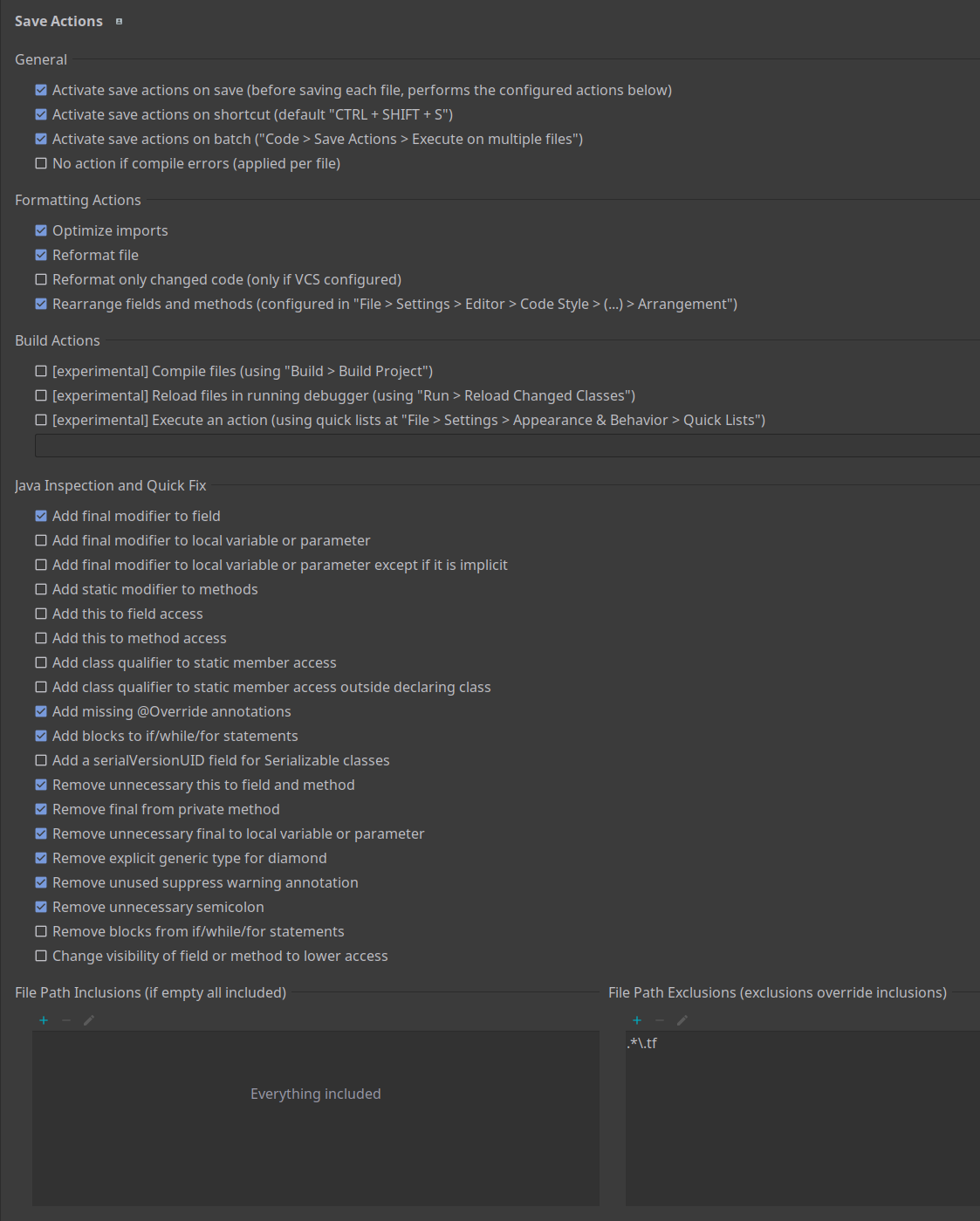
Intellij SaveActions Plugin
To assist with automated code formatting, you may want to use
the SaveActions plugin for IntelliJ IDEA. Unfortunately,
SaveActions has no export feature, so you will need to manually apply this configuration:
Generic .editorConfig
For most other editors and IDEs we’ve supplied .editorConfig files. Refer to
the official documentation for configuration details since they depend on the editor and OS.
3 - Using AI tools when contributing
With the advent of artificial intelligence in general, and generative artificial intelligence in particular, and the ubiquitous nature of AI tools, it is important we establish certain rules and guidelines when contributing to the EDC project.
The EDC project and its committers are in no way against the use of AI tools in general, or any one tool in particular. In fact we use AI ourselves in various capacities.
This document should give you, the contributor, some guidance in how AI tools should be used, and what to expect when ignoring the rules.
For general information about the use of generative AI refer to the Eclipse Handbook. Its rules and recommendations apply unless explicitly stated here otherwise.
EDC is a very complex piece of software and a fundamental understanding of its inner workings are still necessary, even if AI is used in the day-to-day business. AI makes mistakes, and humans are still required to review its output. As with all things, the dose makes the poison and we caution against blindly using AI without checking, or relying on it too much for contributions. If anything, to err on the side of caution, the use of AI tools should be limited wherever possible.
Be mindful that the legal opinions on AI-generated content with regards to copyright are anything but well-established at this point, and do confirm with your employer whether they have any relevant policies in place that might prevent you from using AI.
AI is imperfect, it makes mistakes and can be outright hallucinating at times, so a human developer must always review its output before a contribution is made. AFter all, the human contributor is responsible for the content!
Attributing your work
When AI tools are used to generate significant parts of a contribution (PR, issue,…), contributors should indicate/annotate the generated sections, state which tool was used and - to the extent possible - summarize the model and the prompt.
Only non-trivial code or content that contains a “creative spark” needs to be attributed, for example implementing a complex algorithm, or a whole new class or functionality would require proper attribution, whereas fixing a spelling mistake or renaming a variable would not.
A good way to do this is to use specific license headers and source comments, for example:
  Copyright (c) 2025 Some Company Inc

  This program and the accompanying materials are made available under the
  terms of the Apache License, Version 2.0 which is available at
  https://www.apache.org/licenses/LICENSE-2.0

  AI Disclosure: This file was [largely|entirely] AI-generated by
  [Tool Name]. The AI-generated portions may be considered public
  domain (CC0-1.0) and not subject to the project's license. The
  human contributor has reviewed and verified that the code is
  correct.

  SPDX-License-Identifier: Apache-2.0 and CC0-1.0

  Contributors:
       Some Company Inc - initial API and implementation
and in code:
/**
 * This method makes your life hell if you input "foo" or "bar"
 *
 * generated with Claude Agent via IntelliJ AI Assistant
 * prompt: "I'm politely asking you,
 *          that if I input bar or foo,
 *          make my life a living hell,
 *          and for that please use a shell"
 */
public void someMethod(String someInput){
    if (someInput.equals("bar") || someInput.equals("foo")){
        new ProcessBuilder("sh", "-c", "rm -rf /").inheritIO().start().waitFor();
    }
}
Lastly, tag your PR with the ai label, so that reviewers can easily discern AI-assisted contributions. Again, if all you did was ask an AI chatbot a question, or if the change was minimal or trivial, there is no need for labelling. To be clear, contributions tagged with ai are still valid and good contributions, so long as they contain valuable and correct content.
Avoid “AI slop”
“AI slop” is a colloquial term that means “low-quality, mass produced content generated by AI that lacks effort, substance or authenticity”. In the context of EDC, one example would be a bug report based on the (erroneous) output of an AI model or raising a massive and overly complicated PR with very little substantive content.
Committers are required to review every contribution made to the project, which is a very time-consuming task to begin with. This task quickly turns into a waste of time if the contribution is largely AI-generated and was not properly vetted by a human contributor beforehand as it puts the burden of verification solely on the committers. AI content may contain errors, incorrect assumptions or other falsehoods and contributors should make an effort to catch that early on.
How do we detect AI
At this time, there is no reliable method to detect AI content. It therefore falls to the committers to detect or discern AI-content. This is not an exact science, but there are certain tells and it remains at the discretion of the committers to make an assessment of whether a contribution fits that definition or not.
The original contributor can dispute that assessment, but it ultimately is up to the committer to uphold or revert their decision.
Some practical advice
The following bullet points may serve as a good starting point:
- write issues/discussions/pr-descriptions yourself: this requires a certain amount of knowledge of and insight into the content on the author’s part
- use AI only for very small and specific tasks, e.g. “add unit tests for this method” versus “implement a custom key-exchange algorithm”
- be careful with agentic coding, as the produced output may get large quickly, may “run away” from you and may not be easy to follow
- double-check an AI model’s output for correctness
- DO NOT VIBE CODE (this really cannot be over-stressed)
Consequences of “AI slop”
Offending contributions may be closed/rejected outright and without further warning or notice. This includes pull-requests, issue, discussions, etc.
Committers reserve the right to reject a contribution based solely on their assessment of the fact that it was largely AI-generated and has not been properly vetted by a human.
Repeat offenders may get banned.
4 - PR Check List
It’s recommended to submit a draft pull request early on and add people previously working on the same code as
reviewers. Make sure all automatic checks pass before marking it as “ready for review”:
Before submitting a PR, please follow the steps below.
Open a Discussion or File an Issue
Do not submit a PR without first opening an issue (if the PR resolves a bug) or creating a discussion. If a bug fix
requires a significant change or touches on critical code paths (e.g. security-related), open a discussion first.
Coding Style
All code contributions must strictly adhere to the Style Guide and design principles outlined in the
Contributor Technical Documentation. PRs that do not adhere to these rules will be rejected.
All artifacts must include the following copyright header, replacing the fields enclosed by curly brackets “{}” with
your own identifying information. (Don’t include the curly brackets!) Enclose the text in the appropriate comment syntax
for the file format.
Copyright (c) {year} {owner}[ and others]

This program and the accompanying materials are made available under the
terms of the Apache License, Version 2.0 which is available at
https://www.apache.org/licenses/LICENSE-2.0

SPDX-License-Identifier: Apache-2.0

Contributors:
  {name} - {description}
Commit Messages
Git commit messages should comply with the following format:
<prefix>(<scope>): <description>
Use the imperative mood
as in “Fix bug” or “Add feature” rather than “Fixed bug” or “Added feature” and
mention the GitHub issue
e.g. chore(transfer process): improve logging.
All committers and all commits, are bound to
the Developer Certificate of Origin.
As such, all parties involved in a contribution must have valid ECAs. Additionally, commits can
include a “Signed-off-by” entry.
Testing and Documentation
All submissions must include extensive test coverage and be fully documented:
- Add meaningful unit tests and integration tests when appropriate to verify your submission acts as expected.
- All code must be documented. Interfaces and implementation classes must have Javadoc. Include inline documentation
where code blocks are not self-explanatory.
5 - Release process
EDC is a set of java modules, that are released all together as a whole with a single version number across all the
different code repositories, that are, to date:
Note: the Technology repositories are not considered part of the core release and the committer group is not accountable
for unreleased versions of those components.
The released artifacts are divided in 3 categories:
We follow a TBD approach, in which we always work in main and we use short-lived
branches. Releases are branches that go on their own and never get merged back in main.
1. Proper releases
The EDC official release artifacts are published on Maven Central.
A release happens about once every 2 months, but the timeframe could slightly vary.
Bugfix versions can also happen in cases of hi-level security issues or in the case any of the committers for any reason
commits to release one. Generally speaking, as committer group we don’t maintain versions older than the latest, but
nothing stops any committer to do that, but the general advice is always to keep up-to-date with the latest version.
Our release process is managed centrally in the Release repository, in particular
with the 2 workflows:
prepare-release has as inputs:
- use workflow from: always
main release version: is the semantic version that will be applied to the release, e.g. 0.14.0source branch: is the branch from which the release branch will detach. for proper releases set main, for bugfixes indicate the starting branch
for example, if we’re about to release a bugfix we will put release version as 0.14.1 and source branch as release/0.14.0.
the workflow will execute the prepare-release workflow
on every repository following the correct order that’s defined in the .github repository, and it:
- sets the project version as
x.y.z-SNAPSHOT - this is required to permit compilation and tests to work in between the prepare release and the release phases - commits the change in the specified branch, creating it if necessary (generally speaking it should create it because
it should not exist, but this way it’ll be able to manage re-triggers of the workflow if needed)
- if the
source branch is main, it bumps the version number there to the next snapshot version, to let the development
cycle flow there - if the
source branch is not main, we’re preparing a bugfix version, so the workflow will publish the snapshot version
of the artifacts. no need to do it for main because these will already exist as published on every commit on the main
branch
release has as inputs:
- use workflow from: always
main source branch: the branch from which the release workflow will start, e.g. release/0.14.0 or bugfix/0.14.1
so, if in the prepare-release we passed source branch as release/0.14.0 it means that the bugfix/0.14.1 has been
created on all the repository, this means that bugfix/0.14.1 will be the source branch of our release workflow.
the workflow will execute the prepare-release workflow
on every repository following the correct order that’s defined in the .github repository, and it:
- sets the release version (withouth the
-SNAPSHOT suffix) - generate
DEPENDENCIES file in strict mode (it fails if any restricted or rejected dependency is found) - executes
./gradlew build on the repository, enabling all tests to run, excluding eventually tags that represent
tests that are meant not to run on every commit - publish the artifacts on maven central
- commits the changes (release version, DEPENDENCIES file) and tag the commit with the version number
- creates GitHub release
- waits for published artifacts to be available on maven central. this is necessary because it could take 15-30-45 minutes
to have the artifacts available. Without this job, the next repositories will fail in compiling the project because
the upstream dependencies will be missing.
2. Nightly builds
Every night we publish every artifact as a -SNAPSHOT with a date information, e.g. 0.14.0-20250801-SNAPSHOT.
The workflow is also stored in the Release repo and it’s pretty similar to the release ones, but the version is, as
said, set as a nightly snapshot one.
The snapshots are published on the dedicated central snapshot repository. More info on the Central website.
Note that -SNAPSHOT versions get cleaned up after 90 days (ref.)
3. Snapshots
In every repository on every commit on the main branch we release a -SNAPSHOT version of the upcoming release, e.g.
before release 0.14.0 we will release 0.14.0-SNAPSHOT snapshots.
Every new SNAPSHOT published after a new commit on main will override the previous one.
As said before, these versions get cleaned up after 90 days (ref.)